When it comes to pushing new software updates fast, Samsung doesn’t have a good track record. And if you own a Samsung device from a US network provider, you must be mentally prepared to wait for months before major OS updates are rolled out for your device. For the past few weeks AT&T variants of eligible Samsung Galaxy devices have been receiving the long awaited Lollipop update.
Some older devices like the AT&T Galaxy Note 3 and S4 have already received the Android Lollipop update and now the users of the AT&T Galaxy S5 has started getting the Android 5.0 OTA with build version G900AUCU3BOC4. Since it’s a major OS upgrade, the size of the OTA is as heavy as 1.4GB.
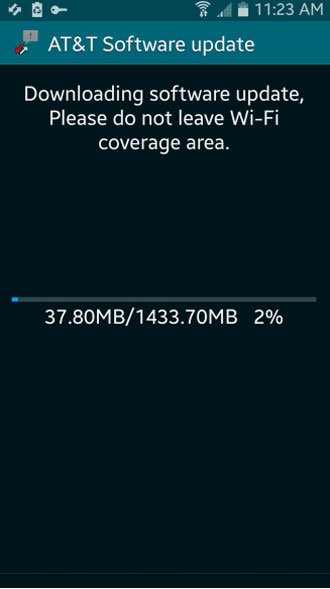
Many users have already downloaded and installed the Lollipop OTA but if you have not received the update notification from AT&T yet, you should try triggering the update manually by going to Settings> System> About device> Software update. If you still out of luck, or if you are out of the United States and want to update your AT&T Galaxy S5 SM-G900A, we’ve come up a manual method for you.
As you know, Android 5.0 Lollipop update is probably the best thing that has happened to the OS so far. The update brings a bunch of new features and improvements. Below is a short list of a few new things you’ll be able to enjoy after getting the update.
- All new Material design in the user interface.
- Smoother and more fluid performance and animations.
- Get notification cards on your lockscreen.
- Songs, photos, apps, etc. from one Android device can be immediately enjoyed across all of your Android devices.
- Priority notifications mode.
- Better battery performance and more battery saving features.
- Most frequently used Settings available with just two swipes down in the notification panel.
Install Lollipop OTA on AT&T Galaxy S5
Note: If you are unable to get Lollipop using the OTA method, you can install the stock Lollipop firmware manually. See this tutorial.
- Make sure your AT&T Galaxy S5 is 100% stock Android 4.4.4 KitKat firmware.
- Copy the OTA zip file to the external SD card of your phone.
- Enable USB Debugging on your phone as a precaution.
- Now turn off your device and reboot into the stock recovery. To do so, hold the Volume Up+Home+Power keys together while the device is switched off. As soon as you see the Samsung logo, release the Power key and keep the other two keys pressed until you see the recovery menu.
- Using the volume keys, scroll to apply update from external storage option and select it by pressing the Power key.

- Navigate to the OTA update Zip package and select it.
- Confirm installation when prompted.
- When the file is flashed, go back to the main menu and select “reboot system now” option.
Done! Now you need to wait patiently for about 5-10 minutes before your Galaxy S5 boots up and becomes usable.
Install Pre-Rooted Lollipop on AT&T Galaxy S5
If you want to enjoy root privilege on your AT&T Galaxy S5 running Android 5.0 Lollipop firmware, the following instructions would help you do that.
Warning!
You can use this method regardless of what firmware or build version your phone has. However, you must be rooted to be able to use the FireFlash app! Flashing the pre-rooted firmware provided below will not trip the KNOX Warranty Void flag. The procedure given below is considered risky. Follow it on your responsibility!
Preparations
- To gain root access on your AT&T Galaxy S5 running KitKat, you can try Towelroot.
- Enable USB Debugging on your Galaxy S5. This step has nothing to do with the method given below but it could be a lifesaver if anything goes wrong.
- Install Chainfire’s FireFlash app on your AT&T Galaxy S5. Since this new app is only available for beta-testers currently, go to the Google+ page and join the Android-FlashFire community. You must be signed into Google+ using the same Gmail ID that you use on the Google Play Store. Having joined the community, click the Play Store link to download FireFlash Beta app.
- Download any of the stock rooted Lollipop firmwares from below:
- Also download the Odin (v3.10.6) OA1 bootloader file: G900A_OA1_Bootloader.tar.md5
Instructions
- Copy the G900A_OF3_Stock_Rooted_ROM.zip to your device.
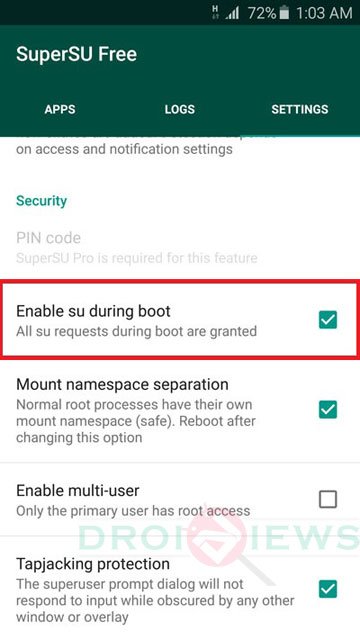
- Before you do anything, open SuperSU app on your phone, tap the Settings tab, scroll to Enable su during boot option and enable it.
- Open the FlashFire app and “Agree” to the Terms and Conditions prompted by the app.
- Press the rounded “+” button twice to bring up the Actions menu.
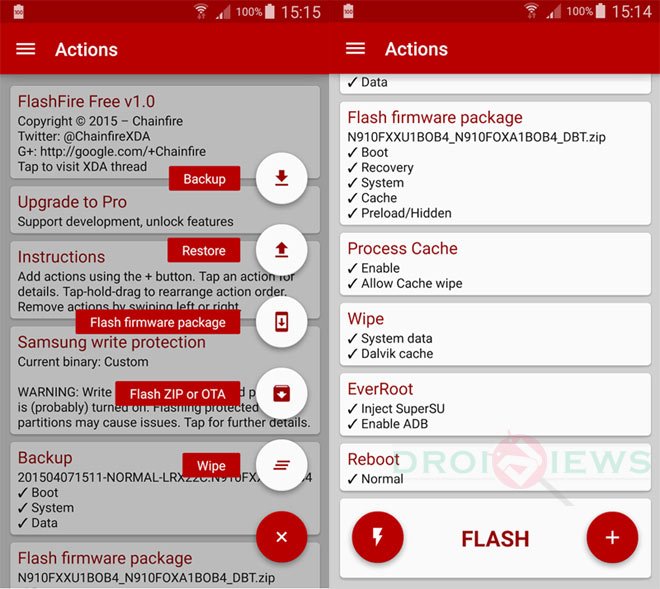
- Now tap Flash Zip or OTA option and select the G900A_OF3_Stock_Rooted_ROM.zip.
- Make sure that Auto-mount is unchecked under the Options menu and press the check-mark to continue.
- From the main menu uncheck all options under EverRoot.
- Set the Reboot settings to Download.
- When all’s done, tap the Lightning bolt icon followed by OK to begin the installation.
- When the installation is finished, your device will reboot automatically into the Download Mode.
- Now connect your phone to the PC via USB cable and launch Odin.
- Click the PDA/AP button in Odin and select the G900A_OA1_Bootloader.tar.md5 file.
- Then hit the Start button to begin installation.
Your AT&T Galaxy S5 will reboot automatically. Just wait patiently for a while. Done!
Fixing Bootloop or Soft-Brick after using the FireFlash Method
As you might be knowing already, there is no method that can guarantee 100% success rate, especially in such procedures as described above. Having followed the FireFlash method, some of you might end up with a bootloop or a soft-bricked phone. Here’s what you should do to fix such issues.
→ The first thing you should try in case you got into a bootloop or find some errors after installing Lollipop is to perform a data/factory reset via stock recovery. See the below guide for details:
How to Perform Data Factory Reset on Samsung Galaxy Devices
→ If wiping/resetting your Galaxy S5 doesn’t work for you, you should go flash the stock firmware to recover your phone and then root it again.
- Download NCE Firmware: G900A_Downgrade_to_NCE.rar
- Extract the .rar file to get the firmware file with .tar.md5 extension.
- Then use our detailed guide to install it using Odin.
- To gain root on your Galaxy S5, you can use Towelroot V3.
Enable WiFi Tethering on AT&T Galaxy S5 Running Lollipop (OC4)
- Install FireFlash app by Chainfire.
- Download the Mobile Hotspot mod file and copy the zip to your phone: G900A_OC4_TetherAddOn.zip
- Now launch FireFlash and tap the “+” icon twice to bring up the menu and then select Flash Zip or OTA option.
- Navigate to G900A_OC4_TetherAddOn.zip file and select it.
- Make sure that the Auto-mount option is not selected under Options.
- Leave the default settings under EverRoot and Reboot options untouched.
- Finally, tap the Lightning bolt icon and then tap OK.
Your phone’ screen will turn black for some time so do not panic. When it turns up, install the Tether add-on zip file and reboot your device. When your phone boots up, you’ll be able to enjoy free WiFi hotspot on your AT&T Galaxy S5 (S5 SM-G900A) running the new OC4 Lollipop firmware.
nvm i tested the second version… it WORKED THANKS SO MUCH
hey i did the first mode the otaone and i have android 4.4.2 and i did everything but i starts working then says error and loads back up can you pls help
Thanks for the tutorial and links. Worked well with a little ad-libbing on my own after. I feel it’s worth noting that in order to be able to get the Google Play store to work with this, I had to manually download the .apk for a newer version of the Play Store and install it on my phone and then connect and auto upgrade to the absolute latest Play Store.
Any chance of a native tethering add-on for OF3? The one in the links here is for 0C4 and I don’t want to try applying that to OF3 and end up brick in it and have to start all over.
Hi, glad to know it worked for you. As for the tethering issue on OF3, I would let you know if there’s a workaround for the same. 🙂
FYI… this tether add-on works with OF3 as well.
Thanks for the info!
Hi there, does it have any bug?
Plis root sm-g900a 5.1.1 plissss
Dude! Thank you very much! Worked like a charm. I can’t wait to see the Marshmallow release soon and another great guide by you.
Thanks for the appreciation, Dhin! We’ll be writing the keep-root tutorial for the Marshmallow update very soon.
Hi Rakesh
I have a SM-G900A with Android 5.1.1,
In order to activate WIFI I know all steps because I live in Cuba and I have to change the Country-configuration.
But I need to root this terminal or downgrade it to 4.4.2. because if I don’t have superuser privilegies I can’t update the terminal
Do you have a solution for this issue (root G900A with 5.1.1 or downgrade G900A from 5.1.1 to 4.4.2)
Thank you in advance
Boris
i tryed to install the update and my phone keeps on goin to recovery
Thank God I found this! Thank you very much people at DroidViews. For some reason, I believe my Samsung Galaxy S5 was glitched because it wouldn’t let me update to Android 5.0. I decided to look up an article and found this. I was worried that this would brick my phone but in the end, it looks like I turned out successful! Thank you again from the bottom of my heart! I hope to have no issues with this OS.
Glad to know the tutorial helped you! Thanks for visiting!
hello, maybe you can help me… I have a lollipop 0c4 and tried to unroot, but it came into a brick (can enter recovery or download mode). I’ve tried to update OTA using SD card, flash again with ODIN and nothing… could you give me another idea to do? thanks!
Attempting this “upgrade” from 4.4.2 (rooted with Towelroot for 1.5 years, latest version of SuperSU installed). OF3 flash reported success, as did OF1 bootlocker download. No problems until the final step, i.e., upon reboot the device sticks at the boot screen (Samsung Galaxy S5) and nothing appears to happen. Have let it sit for up to an hour, but still nothing. Pulled battery and repeated, still nothing. Any ideas?
I notice this article is near a year old, is there a more recent rom zip file thats available, that includes any OS updates since whenever the ROM in the article was cooked?
We keep the tutorial updated. OF3 is the latest available Lollipop build.
Ok thanks Chief! nice tut
Thank you very much. My device galaxy s5 at&t was on 4.4.2 rooted. I followed your tutorial and successfully upgraded to lolipop with flash fire method. thank you very much once again.
Glad to know!
Is this rom unlocked?
It’s a normal rooted ROM but it won’t affect permanent SIM unlock.
can anyone let me know if i can downgrade from G900AUCU4B0F2 back to KK 4.4.2?
Yes, you can, because the ROM does not upgrade the KitKat bootloader.
Is it guaranteed to work? has it been tested? I already have bricked a phone trying to downgrade but I wouldn’t want to risk it and buy another motherboard.
Well, nothing is guaranteed, but it works. You should read users’ comment who have tested it.
I have tried looking into discussions about it, but I haven’t had any luck with anyone downgrading from the firmware I currently have. As to how you said that the bootloader isn’t locked if that is correct then I would be able to downgrade or should I try kies?
The thing is, the Lollipop ROM provided above does not upgrade bootloader to Lollipop’s, and so you will be able to downgrade back to KK by installing the stock firmware.
http://samsung-updates.com/details/26624/Galaxy_S5_AT&T/SM-G900A/ATT/G900AUCU1ANCE.html
If you do not want root privilege, you can install the Lollipop firmware manually: https://www.droidviews.com/install-android-5-0-lollipop-firmware-on-att-galaxy-s5-sm-g900a-oc4/
I’ll give it a try and let’s hope I don’t brick it lol
Did you get it downgraded?
I have 4 files including the KK boot loader, AP, CP, and CSC but the BL gets an error
Which ROM have you been trying to install andar whats the build version of your firmware?
build number – LRXT21.G900AACU4BOF2
LRXT21.G900AUCU4BOF2
ANDROID VERSION – 5.0
BUILD NUMBER – LRXT21.G900AACU4BOF2
, and want to go back to KK
The Lollipop bootloader is undowngradable. Once installed Andoid 5, you can’t downgrade to Kitkat.
That’s what I wanted to know, but is there a possible way I can root the firmware version I have? I just want root access fro viper4android
Unfortunately, no working root method is available for the AT&T S5 running lollipop.
Darn it.. Alright thanks for everything though. Really appreciate it
You’re welcome!
thank you so much….worked like a charm 🙂
You are welcome!
When I click the download link for the stock lollipop for the unrooted g900a it says file does not exist. Can you please send me a new link? Thanks
i cant getthe flashfire to work,when i open the app just do nothig
Raquesh…Id like to thank you for successful root and update to lollipop,and tethering works,I think I did the wifi tethering with Xposed framework.
My only questions are:-
1.How to restore bluetooth???
2.How to enable the wifi working with data fix,that speeds up all downloads??
Here is something that may help you,or others.When you *#0011# or *#197328640# you get the servicemode screen but it seems you cant get into the machine,like before.What you do is hit MENU,then press BACK.then MENU again,then key input.Then type Q.then MENU again,then key input.TYPE 0000.Then wait 10 to 15 seconds,touch nothing.Bingo,menu changes to THE REAL FULL SERVICE MENU,from where you can unlock it,do almost anything…I never knew that.
got stuck on ODIN screen. downloaded samsung drivers 1.525 unsinstalled old drivers rebooted installed new drivers rebooted and all went ok. thanks for tutorial!
Can someone please help me. I have followed the procedures step by step from above and i have the base AT&T G900AUCU1ANCE 4.4.2 that was already loaded on the phone. I have a copy of the NCE software and all the other necessities but each time now after 3 attempts once i try the FireFlash with the lightening bolt, it just goes right to the Samsung Logo and sticks. Will not do anything else except boot into download mode, not even recovery mode. So it just leaves me at having to re-flash back to NCE. I have all the right packages etc and cord … But still no luck … Also, i cant get either TWRP or CMW to install correctly except for it saying “Custom” on the Samsung splash screen, i have no recovery to use … So basically all I have is 4.4.2 Rooted and thats all. I would like to have a good recovery and be at Lollipop !! Please help, Anyone ??
Hi I click the download button for the 5.0 android update for the att s5. But it says the file is missing. Could you a pass me the correct link please?
Try this: http://www.mediafire.com/download/ty1jwgb1xejg8xb/ATTS5Lollipop.zip
hello
my device is Galaxy S5 G900A AT&T , first i tried to root my device and after many times it failed but i got problem that it is now stuck on recovery mode (and USB Debugging seems deactivated ) and i tried to recover the lollipop for my devise using ODIN not succed , also KIES not recognizing my device so i couldn’t preform emergency firmware recovery , please advise me if somebody faced the same problem !
I have the exact same problem! Followed instructions above on a non-rooted Galaxy S5 G900A AT&T with previous Kitkat 4.4.4 and now its stuck in recovery mode (however my USb debugging is enabled). I went to Warsaw Samsung service center and they said they cannot fix because they do not have the AT&T software. Sammobile 4.4.4 Kitkat zip also does not install for roll back. Please help!
-ADB sideload seems to work
-Odin 3.10 and Kies 3 do not recognize phone with Samsung USB Drivers installed.
Any ideas?
Excelente, funcionò de maravilla! (It worked perfectly!) Thank you so much
Hi Rakesh.
I did manual update to prerooted 5.0 in first days when you published this method. And did wi-fi hot spot unlock.
There is some method to manual update from 5.0 to 5.1?
Not yet. I will let you know when a new method is available. 🙂
Thank you, Rakesh.
I have 4.4.2. Will the non-root method of updating to Lollipop still work?
No. You must have 4.4.4 KK firmware as base to install the OTA. You can still get Lollipop by flashing the stock firmware: https://drive.google.com/file/d/0B2QQ1ShKpLTtYjU0aDJCLVFFSFk/view
Thanks for the quick reply. The ‘stock firmware’ that you linked me, is it Lollipop or 4.4.4? Would I need to root the device or just follow the non-root method above for the stock firmware you sent me?
Finally, is the stock firmware you sent me made by AT&T?
Hi Denny, stock firmware in itself means official firmware. It’s Lollipop 5.0. Just download the zip and extract it find an exe file. Run the file and follow this guide : https://www.droidviews.com/install-stock-firmware-on-samsung-galaxy-devices-using-odin/
I might do that. But I’m wondering:
1) Does this work with SM-G900A?
2) Where did you get the stock firmware? Samsung? AT&T?
3) How would I update to 5.1?
Yes, it’s for SM-G900A. The firmware has been pulled out from a phone and then repackaged with 100% stock elements. Having updated to OC4, you can get the 5.1 OTA.
Just wondering does the exe file you sent me flash the bootloader as well? Can I downgrade to 4.4.2 if anything goes wrong?
Will it trip KNOX?
Can you upload again the stock firmware please?
I followed the procedure Carefully With the FlashFire metod, but when I reach the 9 step in the booting get stuck in the Samsung Galaxy S5 screen for 55 min… what should I do ?
What’s current status?
I removed the battery, reboot into download mode and followed the steps 11 12 and 13. everything went fine, I’m currently running lollipop. thank you very much for the support
Glad to know.
I’m having one hell of a time trying to get one of the OF3 stock ROMS and the Odin bootloader. Android File Host keeps giving me a 405 error code when trying to download.
Try again. It’s working now.
if i upgrade with root will everything work fine
What is the difference between Deodexed or Regular ?
In Odexed ROMs, the cache for each APK is contained separately in a .odex file, which loads into the virtual machine at the time of boot, thus speeding up boot times.
Whereas in Deodexed ROMs, the cache for each APK is contained within the APK itself as a classes.dex file, making the boot times slower as Dalvik VM is built up.
Deodexed ROMs are easier for modification than Odexed ROMs.
I successfully installed Lollipop in my Samsung Galaxy S5. Thanks you so much guys. I really appreciate the steps
Glad to know!
I am running G900A OC4 Build. I want to upgrade to OF3 Build safely. Will this method work??
Yes.
Where can I get OF3 update file?
I looked for it but did not find it. Sorry!
The image for the stock devices, is it no longer any good?
Don’t be alarmed when you your following the instructions and you get to where it says “Click the PDA/AP button in Odin” and you don’t have that button even though your using the v3 10.6 of Odin. Just select the AP button and you will be fine. I unchecked “F. Reset Time” as I read on several other posts to do that and it worked fine on my Samsung Galaxy S5.
do you have the stock updates that came after lollipop ? OF2 and the stagefright fix , I can’t get them to up date ota and im totally stock . Thanks
Here’s the OF2 OTA update zip: https://mega.co.nz/#!rJBiVRgJ!VsVQOkOyGDAX08f31ir46GYx_9rWu7ScAZNVRRwEGNw
Any recommendation for whether to install the regular or deodexed image? I’m coming from 4.4.2.
Btw, I purchased a Sim unlock that used a data cable and rooted in the process. I unrooted it to try the Ota update but it failed every time. That’s because I didn’t start off as 4.4.4 base right? If I never rooted in the first place would the update still fail? Seems weird that AT&T won’t let it update ota from 4.4.2. Thanks
Install the regular ROM.
hi rakesh,
any news for those like me that have 4.4.2 instead of 4.4.4 ?
thanks
You can try the Flash fire method.
Great tutorial, thanks.
One thing though, since Safestrap has been discontinued, are there any functioning custom recovery software for AT&T S5 phones?
Flashfire can also flash custom ROMs but I am 100% sure if it will work on devices with locked bootloaders.
Hi Rakesh,
I am trying to upgrade my GF S5 – AT&T Galaxy S5 SM-G900A
It came rooted with 4.4.2, but I unrooted it to force the OTA Lollipop update which the phone still can not find.
Been reading other forums and they state unless the phone is running 4.4.4 Stock Kitkat I can’t download and for an unrooted version of the OTA lollipop update to run. Is this correct?
Otherwise I do not mind Rooting the phone and downloading the Lollipop ROM for it?
I am using the below link as a guide – what do you recommend?
Preparations
You must have a rooted AT&T Galaxy S5.
Make sure you have installed Safestrap recovery on your device: Safestrap-I337-3.75-KitKat-A03.apk
Enable USB Debugging on your Galaxy S5.
Download Odin v3.09.
Download the rooted Lollipop backup file: G900A_OC4_Stock_Rooted_Backup.rar
Download Lollipop stock partitions: G900A_OC4_Stock_Partitions_wOA1_BL.tar.md5
The tutorial has been updated with new files and method, Please try again.
Hi, I’ve got a Galaxy S5 in USA that is unlocked from AT&T 4.4.2 with the base band that ends with ANG3. I tried to root it using Towelroot metod but the app says my phone is not compatible.
I plan to root it so I can update android to Lollipop 5.0. I have also another problem, i just cant create a “Wi fi hotspot” because it says my “SIM card is invalid or i dont have movil data”. How can i fix this?
Try this root app: https://www.droidviews.com/root-almost-all-android-devices-with-the-kingroot-tool/
I just tried with the PC version since the apk version doesnt work. I dont have idea what to do because is in some kind of asian language impossible to understand
Hi, I have a Galaxy S5 unlocked from Att with 4.4.2 and isnt rooted, can I update the phone with the first method? What I should do?
The firmware is official?
PD. I won’t root my phone.
Thanks.
You need to have Android 4.4.4 as base to be able to flash the Lollipop OTA. Since the official firmware is not available online, I can tell you a solution. I will look for a workaround and let you know.
Thanks, I’ll be waiting for it
has anyone produced the updates after this one? I have a unlocked att S5 and i cant grab the updates ota. I cant find any other updates for my phone online other than this one.
Hi i try the 2nd method but it wont work and now that i am going to try again and dont find the link so i tried to go back to stock 4.4.2 to try the first method because i see that you can do that outside the us but i cant go back i try to instal the ota firmware via odin but its imposible, so any help
Hi everyone. I updated from 4.4.2 to 5.0 successfully, however bluetooth and tethering is not working it says security policy restrics use internet sharing and bluetooh to handsfree features only. I have tried to install the tether addon but couldn’t make it work. Can somebody please help me?
Do you have root access on the device?
Yes I have root acces. I installed the tether add-on that is at the end of this post but it did nothing.
I found the solution to the problem. Don’t know why but when using an exchange activesync account you will have the problem described.
Hi, rooted image link is not working. Could you put a new mirror?
Hi, the ROM has been discontinued by the developer as it had some serious issues.
How can I upgrade my G900A from kitkat 4.4.2 to 5.0? Instructions said you need to have 4.4.4
T flash the provided Lollipop OTA, you device must have the base 4.4.4 firmware. So, you should look for the 4.4.4 firmware first.
i can’t find kitkat 4.4.4
@Rakesh hi can you plz help me in updating to lollipop…I have downloaded the zip and also tryed tryed to install from sd card but after that it is showing error
What error you getting?
Hi, i live in Venezuela and i have a AT&T S5 with 4.4.2 but the base band is G900AUCU1ANCE. By the OTA way is impossible update to 5.0, so i want to know how can i get the 5.0 lollipop version with that base band? It is possible?
i have the same question
@DroidViews:disqus still nothing for that person who installed the android lollipop 5.0 and didn’t get root before?.. when will be a solution for this? i’m with the g900a and i want to root it, thanks.
Unfortunately, there’s still no working root exploit available.
Hi, I just did the update with your tutorial, but now I don’t have mobile data, I have checked and standard data and LTE are On. What should I do?
Did you set your APN’s?
Try moving your SIM card to another phone and using it on the other phone for a little bit. Then put the SIM card back into your phone, so that your service provider will automatically set your correct APN’s for you. They will send you a configuration file that you can easily install.
Hello i have the S5 SM.G900A with android 4.42 and no rooted
how can i install android lollipop??
Easy just do the steps to root above then flash the 5.0 room also using the steps above. Don’t upgrade before you root your phone, because of you upgrade without routing first you will never be able to go back and root your phone.
I started with att 4.4.4 running with cricket. Now I have 5.0 with WiFi tethering working great. Thanks. I have a galaxy gear watch connected fine but I have it running the null rom and want to use bluetooth internet with it. Is there a way to add a bluetooth internet tethering option to the settings?
In the screen shot I attached there normally should be a bluetooth tethering option.
if i have the firmware 4.4.2 does it work?
According to the instructions if you are starting with 4.4.2 you need to first take the Ota update to get yourself on 4.4.4, To do this go to updates and press it. BTW you will need a att sim card to do this I believe. I don’t think it has to be a active att Sim though. Only update once also. If you keep updating ota until you are at lollipop 5.0 you are screwed and you can never go back to get your root. The Ota lollipop 5.0 updates your bootloader to one that is locked down so tight to this day no one can get root on a phone that has taken the ota lollipop 5.0 update. Anybody please correct me if I am wrong about any of the info I posted here.
rooted on S5 Tmobile lollipop with cf auto root.
is this ROM the official one?
It’s official but has been modded to retain root.
Which roms should i install to get russian?
If you got root, you should rather try this: https://www.droidviews.com/how-to-enable-language-packs-on-samsung-galaxy-devices/
I did the fire flash update and it worked but now i keep getting pop ups saying device provisioner and package access helper stopped working. This is prohibiting me from installing apps onto my phone from the playstore or online. What can I do?
I’m having a same problem.
Do a reset via recovery: https://www.droidviews.com/how-to-perform-data-factory-reset-and-wipe-cache-on-samsung-galaxy-devices/
Backup your apps and data first!
Rakesh thanks for response but I did the reset and still it’s a no go. Does the same thing I Odin twice already and started clean.
This didnt work. I have the same problem and did the wipe, but the problem still there.
I did that 3 times already and nothing.
Then flash the ROM again.
How do I do that? I don’t have fireflash anymoreally since it wiped my phone and it doesn’t let me install anything
But you should still have root. Reinstall FireFlash and try again.
I can’t install anything on my phone. My Device Provisioner and Package Access Helper have stopped
Then start from the scratch.
I have an unlocked Galaxy S5 G900a that I now have on metropcs which is using t-mobiles towers…it has a metropcs sim card though and when I go to check for update it says my software is up to date which isn’t the case because att put out their lollipop update in early april. Now I tried…loading the update onto it this way and pressing the power button to confirm install and whatnot and it says error and doesn’t install and just reboots right back onto this as kitkat 4.4.2. I really would like to put this update onto this phone and I know it’s definitely possible…it’s just i’my not on arts actual network…any help would be greatly appreciated..
Put the AT& SIM card in the device and it should be fixed.
If you got root, go with the FireFlash method.
after I do this, I can just place the metropcs sim card back in and everything will be fine, right?
Yes.
Since upgrading firmware does not affect SIM unlocked status, you should be able to use you SIM like you do now.
Right. One last question. AT&T sim doesn’t even actually have to be activated does it?
Yes.
did you ever get the update? Im in the same spot with a unlocked att phone on tmobile but with no way to update to lollipop. Seems like its either get someone to let me borrow their sim to download the update or root my phone.
I got the update. I went into my local bestbuy and they had a samsung experience shop, the guy at the counter said that unlocked phones normally don’t and can’t be updated but that he’d try anyway…he put it in his computer and within 30 seconds he told me it was updating and I waited around in that area no longer than 10 minutes and it was done and updated. NO problems at all with the update either. You could maybe try to do the same.
Have you come across any other zip files for updates since this one. I was able to update mine but havent found any more sine lilli.
i didn’t. i was thinking bout either rooting, borrowing a sim card or going to a bestbuy samsung experience shop and seeing if maybe they could update it.
Im having strange root permission issues. I.E. I downloaded Hold Back to Kill for the back button app killing and it says it kills but doesn’t. Then I have Clean Master running to restrict restarting apps and it permission errors when I try to ignore certain apps. Both apps are in the SuperSu list with always grant selected. I then have other apps like App Quarantine that have no permission issues. Is there any way to reinstall or reset SuperSu? It appears you can only disable it?
What does Root Checker say?
https://play.google.com/store/apps/details?id=com.jrummyapps.rootchecker
Attached. How about the “reinstall” under “cleanup” in the setting menu of SuperSu. Will that mess up root? How about trust system user?
SuperSU is just a root manager app, it’s not root itself. You can clean and reinstall it manually.
Apparently you can’t clean or uninstall SuperSU when it is installed in the system folder on a pre rooted ROM. Any idea if another root permission program can be installed and run if SuperSU is disabled?
Download the latest SuperSU package from here: http://download.chainfire.eu/supersu
Extract the zip. find superuser.apk file, copy it to your phone and install it.
hi, i tried to flash the wifi tethering thingy just like you mentioned above, after flashing it restarted and is stuck on at&t logo. any idea why?
and i have 4.4.2 installed
Where did the stock att galaxy s5 lollipop rom come from? Is there a download straight from att available?
No, it’s not. The ROM is based on the captured OTAs and has the KitKat bootloader.
It’s not what? Is there an official att download?
No.
Thx
Im having an issue with Google Play not down loading apps. I click install, then accept, then it just hangs with the blue bar left to right. If I then restart it will say the program is downloaded and installing. Heard of this issue?
Are you trying to download FireFlash?
Good question. No. I used FireFlash method to upgrade already. Trying to set everything up and Google Play will hang on the blue bar after “accept”ing an app download. Maybe unrelated to upgrade?
Try the following:
https://www.droidviews.com/how-to-fix-google-play-store-errors-on-android-devices/
if it doesn’t help, perform a wipe via recovery.
https://www.droidviews.com/how-to-perform-data-factory-reset-and-wipe-cache-on-samsung-galaxy-devices/
Hi! I have the same problem, I tried the wipe via recovery but doesnt work install apps in play store and a tried install whatsapp(example) from the web page apk but the same problem dont install the apk and I have a problem with fingerprint lock
Is there a solution for this?
How can I get xposed installer on my g900a s5 att on lollipop v5
Xposed for Lollipop is still in alpha state. Moreover, it’s not yet fully working on Samsung devices with Lollipop.
I won’t recommend you to try it now, but if you are too willing, here’s the tutorial: https://www.droidviews.com/xposed-lollipop-now-offical-heres-install/
Just found out the problem, this file: G900A_OC4_Stock_Rooted_Firmware.rar
Which is missing…
Can you help me to find it?
Here’s the link: https://www.androidfilehost.com/?fid=23991606952598711
Not this one, this one: G900A_OC4_Stock_Rooted_Firmware.rar, it says on xda fórum that this file is needed for the firmware button on fireflash.
That file has been removed by the uploader. It has now been replaced by the one provided on the tutorial.
I follow all the instructions, the phone shows that everything is doing fine, then I got stuck on the bootload, over and over again. I just don’t know what else I should do.
I already restore and installed rooted firmware, but 4.4.2, not 5.0. I tried many times, nothing seems to work, always get stuck when it tries to reboot.
I give up, I’m getting stuck over and over on the bootloop.
I checked everything and I’m doing it right.
I was following the update and it says “done”at the end and when it tries to reboot, get stuck.
Hello,
First of all, thanks for the tips 🙂
I’m in Senegal, and I have the G900A, as you can see the infos on the attached picture.
I tried to update, but it stops after seconds, saying there’s an error.
What should be the problem?
Thank you 🙂
For the OTA method, you require Android 4.4.4 base on the phone.
You can use the FireFlash method though.
I’m not rooted… When I try TR, it says “phone not supported” 🙁
How can I go from 4.4.2 to 4.4.4?
Install Towelroot v3 on phone: https://www.androidfilehost.com/?fid=23681161096070831
Install this file using Odin: https://www.androidfilehost.com/?fid=23622183712464356
Then root with Towelroot.
Then install the NG3 Kernel using Odin.
You’ll have root and then you can use FireFlash.
Note: Use Odin 3.09
Odin steps here: https://www.droidviews.com/install-stock-firmware-on-samsung-galaxy-devices-using-odin/
Thank you very much Rakesh.
I will keep you posted 🙂
When i flash the root lollipop can i downgrade back to nce with the odin file?
Yes, you can.
Firmware (NCE): https://www.androidfilehost.com/?fid=23622183712464416
Warning: Do not try to downgrade, however, you chose the OTA method.
Ok so i just flashed the lollipop rooted rom worked like a charm. You say i can downgrade back to stock nce through odin but you also say “Warning: Do not try to downgrade, however, you chose the OTA method”. Im kinda confused.
Actually, when you go with the OTA, your kernel, modem and bootloader get upgraded and then you can’t downgrade.
Going with the FF method keeps you on a safer side. Suppose you get bootloop, you can flash back the NCE because many people do not go with the proper sequence and described above. I mean they keep the flash method above and then select wipe. FF installs the ROM but then wipes it too without them knowing and their phone gets stuck on boot.
In such a case, the devices has actually no OS, no Lollipop, no nothing. And therefore you can downgrade to NCE.
I think you got what I mean to say.
Hi Rakesh, can i copy and translate this excelent tutorial and use it in a spanish Forum, and use yours images and links to help the people who dont speak english?
i live in Venezuela, i have a AT&T S5 with 4.4.2, i do your Pre-Rooted Lollipop on AT&T Galaxy S5 tutorial and i update my phone to 5.0… and works perfect! thanks!!!
Hi Rafael,
I am happy you liked the tutorial. As for your request, yes, you can translate the guide and share it on a different forum with credit to this page.
However, try not to copy the content. Translation will be a better idea. There are many site who copy our guides shamelessly without mentioning the source/via. You asked at least.
Regards!
Epale Rafael me puedes indicar cual fue el procedimiento que realizaste?
Tengo un AT&T S5 4.4.2 con banda base ANG3, quisiera saber si
podras escribirme a mi correo par auna informacion mas detallada,
raysanchz@hotmail.com, saludos y gracias de antemano.
Hola Rafael
Hola Rafael, necesito de tu ayuda. He intentado varios metodos para Rootear mi S5 4.4.2 de ATT&T G900A y ha sido imposible. Necesito hacerlo para poder utilizar el Wifi portatil que esta bloqueado. Podrias ayudarme con esto?
I did everything as explained, but then, after the FlashFire, it loaded a lot of files and then, it is in the logo screen for more than an hour
It says: Samsung S5
Custom
powered by Android
What should I do?
Did I brick the phone?
Did you use the latest Fireflash app?
Yes, I did.
Everything was happening fine. But then, in the last part it got stuck in the logo screen
Okay try this: https://www.droidviews.com/how-to-perform-data-factory-reset-and-wipe-cache-on-samsung-galaxy-devices/
and if does not help install the stock firmware.
It doesn’t get there. I press up + home + power => Nothing happens
And the other link you sent was for the Galaxy S5 Active
I am sure you made some mistake.
Anyway, then pull out the battery, boot into the download mode.
Download this file: https://www.androidfilehost.com/?fid=23622183712464416
Extract the .rar file to get .tar file and install it using Odin: https://www.droidviews.com/install-stock-firmware-on-samsung-galaxy-devices-using-odin/
I managed to put it on download mode, do I still need to extract the battery or can I keep going from here?
No need. just continue with Odin steps.
It worked. I’m back to 4.4.2
Thank you.
So, now, root it and try everything again?
Yes. Just play it carefully. Now you know what to do if things screw up.
Ok
Thank you
Hey, I think I just found out why your phone is getting into bootloop again and again.
I’m all ears…
So, why is that?
Another question: After flashing those two tar files, before using the Fireflash, should I see Firmware 4.4.4 on the phone?
I didn’t tried again yet.
Just wanted to ask you that.
Since none of them is firmware file, it won’t help you.
What do you mean?
Aren’t these firmware files?
G900A_ND3_Stock_Kernel.tar.md5, G900A_NG3_Stock_Kernel.tar.md5, G900A_OC4_Stock_Rooted_ROM_wOA1_BL, G900A_OA1_Stock_Kernel.tar.md5
No. This one (G900A_OC4_Stock_Rooted_ROM_wOA1_BL) is just a flashable ROM file and the other files with .tar.md5 extensions are just Kernel (firmware component) files. There’s no full firmware.
I thought this one was supposed to upgrade my phone to 5.0, but if it’s not firmware, how am I going to update it?
I’m kinda lost right now.
You’re not lost at all. The “G900A_OC4_Stock_Rooted_ROM_wOA1_BL.zip” is a firmware/ROM packed in a flashable file but it can’t be used with Odin. AT&T seldom publishes its firmware publicly. What we have on the net have been pulled out by different users.
Then, even though this is not a firmware, it is indeed the only file I shall use to upgrade the phone to lollipop, right?
So, now, what do I do to try it again?
The phone is still rooted, I have Supersu and FireFlash installed, and this flashable file. So, what are the next steps?
I was wondering if I can flash the firmware 4.4.4 to the phone and then apply the first method. The problem is that I can’t find a flashable 4.4.4 firmware. So, let me know how shroud I proceed. Thank you
I believe it would help me too, if you list the steps to update my S5 to Lollipop from 4.4.2
It’s already rooted, the root Checker say that it is rooted.
I have Fireflash, Odin3 v3.10, G900A_ND3_Stock_Kernel.tar.md5, G900A_NG3_Stock_Kernel.tar.md5, G900A_OC4_Stock_Rooted_ROM_wOA1_BL, G900A_OA1_Stock_Kernel.tar.md5, G900A_OC4_TetherAddOn, SuperSu and Towelroot
I used all (but TetherAddOne) in the order that was asked, and it didn’t work. Still in 4.4.2, but at least rooted. So, I’m counting on you…
I suspect you are making mistake on Step#8 under FireFlash method. Make sure to reorder “wipe” and “flash OTA or Zip” options in correct sequence.
This is a mistake I’m not making, I can garantee that.
Okay, but I don’t see any other reason why it’s not working for you.
This time, it seemed that it was working fine, but after using Fireflash, it loaded a lot of files and then reboot and it is still on 4.4.2 and it says that the SIMCard is not inserted, but it is.
And the Market is gone, can’t find anywhere, along with the Fireflash and many other apps
Reset the device via recovery.
ok
Before you said that, I restarted the phone, and everything was then working fine, the SIMCARD, the Wi-Fi, but still on 4.4.2
Sounds weird! Give it another try. I think there’s some problem with root privilege. Fireflash could not overwrite the existing system files.
Ok, I’ll try that tonight, because now I have to go to work.
Meanwhile, where should I start again from?
Rooting on your current NCE firmware.
Ok. Thank you
The only thing that I did that was different was the SuperSu, I couldn’t find it on the TowelRoot, so I downloaded it from the Market App, then I tried to open the FireFlash and kept asking for the SuperSu, so I opened the SuperSu it asked to update, I allowed and then the FireFlash started working, and I kept going from there
It worked
Now, I’m going to try everything again.
Paying attention to every detail
Root with Towelroot v3 and install the SuperSU app from the market.
Ok
Read the tutorial twice before starting.
I did, I’m pretty sure I followed all the steps, but, I already read it again, and I’ll be following carefully all the steps.
Installing the SuperSu, it asked Samsung Knox has been detected. This might limit root capabilities and causing annoying popups. Try to disable Know?
Options are: Cancel – Never – Ok
Which one should I click on?
Last time I hitted cancel
Select OK.
Also see this: https://www.droidviews.com/disable-knox-security-service-on-samsung-galaxy-devices/
So, this might be the mistake I made.
Anyway, download this firmware:
http://muqic.com/exit.php?id=m5w5b4a4v584k484t2b4x2b413
or
http://pan.baidu.com/wap/link?uk=2718696646&shareid=2574028894&third=0
and install it using Odin: https://www.droidviews.com/install-stock-firmware-on-samsung-galaxy-devices-using-odin/
Hey Rakesh, the update went very well for me. I ran into one problem and still cannot figure it out! I did not do the wifi tether option when flashing, but 5.0 flashed perfect from 4.2 using the 2nd method. After the update i am stuck on the startup setup options and is stuck at “Software update” checking for updates and i cant skip it or access my phone at all! its been like this for over 20 minutes. Any help would be greatly appreciated!!!!!!
What’s the current status?
Hi, I’m trying to update my AT&T Galaxy S5 using de method 2 (Flashfire), I’m having problems with the. When I try to open flashfire the app just crash.
I have a rooted galaxy s5 on 4.4.2 This is my Galaxy info:
Reboot the device and try reinstalling it. The app is in beta and such errors are common.
No luck buddy. I unnistall the app, rebooted, reinstalled it, reboot, open the app, and crash again….
I have G900AUCU2ANG3
Did you try the APK or the Pay store version?
Do you have root?
Yes I have root, I use the apk from the file, and I also tried to follow the link to the play store, but is gone..
Go here: https://plus.google.com/communities/116661625291346007584
Join the beta tester community and then go to the Play Store: https://play.google.com/store/apps/details?id=eu.chainfire.flash
Thank you very much buddy, finally the app is working. I’m going flash the S5 later because I’m going to work.
Glad to know! Do share your experience!
Is there a root available for the at&t galaxy s5 already running lollipop?
Nope.
I downloaded the file, but it appears only as 1.3GB, is that right?
I’m still waiting for your answer on the other question to know if I’ll be able to use it or not.
Thank you
My phone is still in 4.4.2, and I don’t want to root the phone, because I’m no expert on that, since I’m not in the US, how can I update my phone SM-G900A to lollipop?
As I understood this wifi tethering should be done only on rooted phones, right?
Thank you very much for spending time helping desperate users around the world.
Yes, you can install it but must have the required base firmware.
So, first I have to update it to 4.4.4, right?
Do you happen to know where can I find this firmware? I looked for it everywhere and I can’t find it.
Thank you
I looked too but did not find either the firmware or the OTA files. Go with the FireFlash method then.
But then I’ll have to root it, and I’m not comfortable with that.
There’s no other to work from 4.4.2 to 5.0?
I recently factory reset my Galaxy S5 Active which I doubt it changes anything. My phone is rooted. I used Odin to root from 4.4.2 to 4.4.4. Now my question is, after I downloaded flashfire, it won’t open, why?
It won’t do anything so I can’t get my process going. Do I have to downgrade to 4.4.2 or is it a bug?
Did you signed for the beta tester program and download FF from the Play Store?
Yes I did. And the app just started working for me. Can I just start following the instructions above with my phone?
Yes.
Thanks. Also, great tutorial. I’ll leave a comment if I find any more issues.
I have rooted S5, I did flasfire android L, enabled WiFi tether before through above procedure.
I doubt the installation went well on my phone. To clear it I’m thinking to repeat the Flashfire method
Now can I repeat to conform proper install??
1. Will it damage my phone
2. Should I have to enable WiFi tether again
*Thank you very much
What make you feel doubtful. Did you check the Settings> About on your device to make sure it shows Android 5.0 there?
Unable to switch ON/OFF mobile data properly….Little bit sluggish too
I found the procedure was changed. Will i be a problem
Nope.
Hi Rakesh, I have a problem, I follow all the instructions with the FlashFire method, but the screen freeze on the boot screen for more than 20 minutes, whats could I do?
Hi again Rakesh, I already can boot the phone, but only when I restore to 4.4.2, my question is, the zip file needs to be in the sd card? because the last time that I tried to update, I put the file on the internal memory. Thanks.
Hi Hector, I missed you last comment. Sorry! As for putting the zip file, you can keep that either on internal or external storage. It doesn’t make any difference. Give it another shot and this time copy the file on the external storage. Good luck.
whenever i try to install from external it tells me to load sd card at the bottom. the sd card is loaded with the ota zip on the root, why am i getting this problem ;(
Which method are you trying? You won’t be able to use any of the methods from above with unrooted 4.4.2.
You must have 4.4.4 unrooted for the OTA method. On the other hand, to go with the FireFlash way, your phone must have root access regardless of firmware version.
Hi Rakesh, this method worked great on my s5. Thank you!… I want to know if you know how to activate the download booster option?
See this: https://www.droidviews.com/enable-download-booster-on-galaxy-s5-att-sprint-verizon-t-mobile/
I believe there was a partition file that was part of the process a few days ago…. The method for FireFlash is now just the one stock ROM file? No partition?
You’re right. The tutorial has been updated with a new file that contains the partitions too. Just use the new steps. It’s a bit easier.
Thank you. Is there a way to recover if the FlashFire process does not work, or if it is unstable? Nandroid Backup? Odin to stock?
Well, there’s barely any chance that it’ll not work but no body can guarantee 100% success rate with such things. Sometimes even official OTAs result in bricked devices.
Since the Lollipop firmware for the AT&T S5 is not available for download you won’t be able to Odin back to stock. The good thing is, it does not void the warranty and so you’ll be able to claim a new phone in case of any mishap.
Is there a working link for the lollipop rooted rom file? The one that was posted got deleted. Thanks
Download here: https://www.androidfilehost.com/?fid=23991606952591472
Just wait for 15 minutes. I am going to update the steps.
Updated the steps. Please refresh the page.
@Rakish I have a ATT rooted 4.4.2 S5 that I’m currently using on H2O service and I was wondering what method can I use to keep my root and all my data intact?
Use the FireFlash method from above and you will have Lollipop+root. Installing the firmware won’t affect the SIM-unlock.
Thank you for the quick response but I was wondering if the FireFlash method would delete all my data ( text, pics and games)?
It’ll not but you should backup your apps and data using Titanium Backup app.
thank you so much!! my at-t non rooted phone would not update on kies or OTA. i tried this and it worked perfectly. thank you!
Thanks for sharing your experience!
Does OC4 firmware have more system languages than 4.4.2 (Need Russian)
A few more languages but I don’t think it has Russian.
Can you make screenshot of language tab?
I don’t have S5 any more.
I have android 4.4.2 root , how I can install on my att rom lollipop s5 if I have the G900AUCU1ANCE firmware? (I will not rooting android 5)
Try the Fireflash method.
If you go with the OTA method you’ll have to install the OTA package in the following sequence before you can have Lollipop:
First OTA:
Version: G900AUCU2AND3
Size: 163MB
Android version: 4.4.2
Build number: KOT49H.G900AUCU2AND3
Second OTA:
Version: G900AUCU2ANG3
Size: 142.85MB
Android version: 4.4.2
Build number: KOT49H G900AUCU2ANG3
Third OTA:
Version: G900AUCU2AOA1
Size: 487MB
Android version: 4.4.4
Build number: KTU84P.G900AUCU2AOA1
Fourth OTA:
Version: G900AUCU3BOC4/G900AUCUcBOC4
Size: 1.4GB
Android version: 5.0
Build number: LRX21T.G900AUCU3BOC4
So what if on April 8th I just took the regular OC4 ota?? Could I still use one of the methods and root? If so what method
No, you can’t root your S5 on Lollipop as of now.
Thanks anyways!
Installed on Galaxy S5 G900a AT&T works like a charm!!! I can not hotshpot with another sim card other than AT&T!!! Thanks @DroidViews:disqus
Were. You already on 5.0 before this?
Nope.. coming from 4.4
Glad to know, Jermaine. Keep visiting!
Many thanks!! I will
can i remove flashfire app after i flash all the files?
Yes, you can.
Ok great.. I just installed the wifi tether.. its been on black screen for about 20 minutes, is that normal?
Yes.
ok. thanks.. it still is black, hope it comes up soon.
Ok, well now it has been almost 50 minutes.. closing on an hr.. still shouldn’t be concerned?
50 minutes is unusual.
should i take the battery out and re-run that process?
Yes.
Works!!!
Everything seems to have worked correctly but I am having an issue with the play store. able to log in after side loading the .apk but nothing is downloading. says it is but is not DL anything?
By the way, thank you for the tutorial!
Glad to know it worked for you! Try the solution given here for the Play store problems: https://www.droidviews.com/how-to-fix-google-play-store-errors-on-android-devices/
Thanks for the quick reply! I cleared the cache and all started working. Thanks again!
I have a G900a running 4.4.2. Which method do I use? I’m not technologically inept but I am not well versed in this area so all this talk about rooting and so forth is new to me. Can someone guide me through please?
You can go with the Fireflash method but you’ll have to gain root using Towelroot first:
https://www.droidviews.com/root-att-and-verizon-galaxy-s5-without-voiding-knox-warranty/
It is saying my phone is currently not supported. This is an unlocked ATT phone that I am using outside of the USA.
see error msg below
i tried changing the moodstrings and the last one doesn’t do anything when i hit make it ra1n
Here’re Odin steps: https://www.droidviews.com/install-stock-firmware-on-samsung-galaxy-devices-using-odin/
Thanks! Got my work cutout for me will try this and get back to you when I get thru all of this. lol
Sure. Do it carefully.
Okay, your phone is on NG3 and you’ll need to downgrade to ND3 build to be able to root your S5.
1. Download and install Towelroot-v3
2. Place your phone into “Download Mode” (press and hold the Home, Volume Down, and Power keys until the phone powers on and displays warning screen, then press Volume Up key) and flash theG900A_ND3_Stock_Kernel using Odin’s PDA slot(AP in Odin v3.09+).
3. Open the Towelroot app from your app drawer and press “Make it Rain” to root your device.
4. Power off then boot into “Download Mode” again and flash the G900A_NG3_Stock_Kernel also using Odin’s PDA slot(AP in Odin v3.09+).
5. Install SuperSU to manage root access. Done!
Here are required links:
https://www.droidviews.com/root-att-and-verizon-galaxy-s5-without-voiding-knox-warranty/
https://www.androidfilehost.com/?fid=23622183712464356
https://www.androidfilehost.com/?fid=23622183712464323
https://play.google.com/store/apps/details?id=eu.chainfire.supersu
https://www.droidviews.com/download-odin-tool-for-samsung-galaxy-devices-all-versions/
Hello. I have G900A, 4.4.2, NG3 build, rooted. Do I have to go to 4.4.4, or can I just use FireFlash from the current setup?
You can proceed with the FireFlash method no matter what build your device has.
Is there a way to recover if the process fails? I.E. Can you Odin back to an earlier stock build or Kies recover?
Nope.
how can i install lollipop rom on my att s5 if i have the firmware G900AUCU1ANCE
If you got root, follow the FireFlash method from above.
Hi guys, any idea on a Xposed version that works on this rom?
Now, i have android 5.0,
Kernel Version 3.4.0-4432708
Compilation Number LRX21T.G900AUCU3BOC4
Version G900AUCU3B0C4
I want to root, because before i upgrade the android, i made a back up with titanium backup, and now, i re-install a game, and i want to restore a save game of that game, and i think the only way to do that is having root, to get the access to titanium, you have another suggestion of how i can do it? thanks.
Does the samsung write protection matter, for mine it says the current binary is official. Also do you have to wipe 3rd party apps?
You can root your device if you’re still on KitKat and go with the method given above without changing the binary status or KNOX to custom from official.
My phone is already rooted though
Also do I have to wipe the 3rd party apps?
No, but take a backup with Titanium Backup.
so just check the dalvik cache and system data?
Hi, thanks for the info on how to install manually without using the
Software Update in the settings menu. I tried downloading the update
onto my phone that way: it would download, but when I tried to follow through and
install it, it said I didn’t have enough free space. I tried twice.
Downloaded it twice as well lol.
But I was wondering, when you put the
update file onto the SD card and install the update from it and
everything is all good, and everything works, can I then take that file off the SD card to
free up space since the update is already installed? Thanks for your
time
Yes, you can delete the file after it is installed.
I DON’T UNDERSTAND, I INSTALL THE G900A_OC4_Stock_Rooted_Firmware.rar with the recovery mode, after that you wrote that i have to open FlashFire, but when i open it, it says that i’m not root, so i cant use it, what do you suggest to do?.. i try with towel root but it’s doesnt work.. thanks
Look, you can install the OTA without root but you must have the base 4.4.4 firmware installed on your S5 for that.
If you want Lollipop with root, you must use Fireflash app and for that you must have root access.
Tell me about the version and build number of your current firmware?
Now, i have android 5.0,
Kernel Version 3.4.0-4432708
Compilation Number LRX21T.G900AUCU3BOC4
Version G900AUCU3B0C4
I want to root, because before i upgrade the android, i made a back up with titanium backup, and now, i re-install a game, and i want to restore a save game of that game, and i think the only way to do that is having root, to get the access to titanium, you have another suggestion of how i can do it? thanks.
Nicolas,
perdona-me, necessito de lo fichero G900A_OC4_Stock_Rooted_Firmware.rar, puedes decirme donde encuentra-lo?
No se se lo dijo correctamente, entonces…
Nicolas,
sorry to bother you, but I need this file G900A_OC4_Stock_Rooted_Firmware.rar, and it seems that you have found it, so, can you please tell me where can I find it?
Can you provide it for me?
I can’t update my phone without it.
Thank you in advance
There’s one way for you to share the file G900A_OC4_Stock_Rooted_Firmware.rar with me, it’s the website wetransfer.com let me know if you will be able to send it, I can provide you my e-mail address.
Thank you in advance
Is there any custom recovery with this or no?
No.
ready only restart my phone and all is there thank
Great!
Thank you…Successfully updated with the method 1 but can’t find the google aplication service
How exactly do I extract the rar file ?? I’ve tried ESfile explorer but nothing happens ?
Use any zip extraxter program on your PC.
I don’t have a pc , is there any app I can do it with ?
Try these: https://play.google.com/store/apps/details?id=com.rbigsoft.easyunrar.lite&hl=en
https://play.google.com/store/apps/details?id=com.rarlab.rar&hl=en
the link G900A_OC4_Stock_Partitions_wOA1_BL.tar.md5 don’t work
Try the Fireflash method instead.
I have a custom rom dinamic Kit kat, but I want to upgrade to Lollipop , which method do you reccomend?
The FireFlash method.
Thank you…Successfully updated
but I tried enable tethering without inserting SIM, screen went blank a while ago..Its almost 20 mins still blank.
What I have to do now…
How long usually it will take
is there any way to remove (CUSTOM) logo on startup.?
No.
you can download an app from google play called “Triangle Away” It worked for me
1. can I copy the G900A_OC4_Stock_Rooted_Firmware.tar.md5 and G900A_OC4_Stock_Partitions_wOA1_BL.zip to device internal memory & continue Method-01 (root) ??
2. If I factory reset my phone after 5.0 update & enabling tethering, do I have to do update & tethering again??
No, resetting the device won’t affect root status or remove the tethering mod.
In the Method 1: Can copy Copy G900A_OC4_Stock_Rooted_Firmware.tar.md5 and G900A_OC4_Stock_Partitions_wOA1_BL.zip to internal memory and continue??
Yes.
i followed method one, and now im sitting at a black screen after i pressed flash
oh so it worked, now when its booting it says system process isnt responding
Perform a data factory reset.
Mine did this same thing, booted recovery mode and did a factory reset and all is working good, at the moment.
hi guys, this is at&t stock or google stock? I mean, does it comes with all the bullshit apps of at&t? thanks
AT&T stock, of course. It does have AT&T bloats but remember you can remove some of them manually.
thanks bro, it did work perfectly!! but i don’t understand what’s the last wifi Tethering update for. with the base lolipop OS i can share internet (hotspot) without any issue here in argentina (without an at&t sim ofcourse)
In that case you don’t need to install the tethering add-on.
nice, thanks!
Rakesh any luck finding those files for me ? so I can recover from my softbrick..
Hey, I couldn’t find them. Sorry!
So I guess I’ll have to wait……they should be up sooner or later right?
Yes. It won’t be available officially but if someone uploads it, we can have it.
I have marked your comment and will let you know if I get them.
G900A_OC4_Stock_Partitions_wOA1_BL.zip >> File not found..
Im using S5 G900A, 4.4.2, Unlocked, No root, in India
Will method 1 work for me??
& heard G900A has no root, Wll Towelroot V3 works??
Get it here: https://www.androidfilehost.com/?fid=95916177934555091
Yes, Twelroot will work for you. Having rooted the device, use Method 1.
Great work….Thank you very much
Will try & Let you know
I HAVE IT NOW!!!
Enable WiFi Tethering on AT&T Galaxy S5 Running Lollipop (OC4)
Rooted Android 5 & WiFi Tethering……
Thanks! It’s awesome!!!
ok new more important issue…in the process of trying to get a recovery I soft bricked my gs5 … tried to downgrade to stock nc3 that didn’t work. now I assume it is because im on 5.0 bootloader now …odin wont flash the original stock rooted tar …I have flashed 0c4 stock partitions ..but I need the rest of the stock firmware im assuming.(…please please help I think my fiancé is going to hurt me if I don’t get it working again
You shouldn’t have tried to flash a custom recovery on a device with locked bootloader. I don’t know what made you do that but you have really done a blunder, especially when the stock Lollipop firmware is not available anywhere on net.
Anyway, I’ll look for the require files to fix the problem. Give me some time.
Thanks man I hope you can find it so I don’t have an expensive paperweight….you are very much appreciated either way
dear i have compleat roote setups.but same condition.when i select ota file .it says instal card… then updating for few seconds, then restart and still on kitkat..so whats next
OTA zip will not work for you if your device is rooted. Read the instructions clearly.
Try Method 1, that is the FireFlash one.
ok
thnx rakesh.its all done,now i m using lollipop.great work.awasome.bro now i can all apps mean super su, flasfire?
Rakesh you are doing good job.many of us are in troble and you are giving them a way.its appericate able.good job
Rakesh ji thankyou very much. i have successfully updated my phone using method 1.Ur presentation is really good,spoon fed actually.thanks for the quick replies too.would post on facebook giving you the credit.
Thanks for the appreciation, Narendra!
“Enable WiFi Tethering on AT&T Galaxy S5 Running Lollipop (OC4)”
—> When it turns up, install the Tether add-on zip file and reboot your device.
Can you please explain step by step this installation?
(Ones again: there is some way to add Russian UI in it?)
With best regards, Vegas.
You can find the Russian language in a custom ROM but certainly not in the stock AT&T firmware. You can try the following tutorial: https://www.droidviews.com/how-to-enable-hidden-languages-on-samsung-htc-and-sony-android-devices/
However, I am not sure if it’ll work for you.
You’re right, it’s didn’t work.
The last one I left to do in this device is Russian (UI)
Thank you for your help.
dear brothers please help me. i am on 4.4.2 s5 g900a. i have used method
no 1.but when i go to recovery and select file from externel storage after 30 to 40 second it go
back.please help my device is not rooted.please help i want lollipop.
thnks in advance
Did you use Towelroot to gain root access?
No i dont.plz bro tell me detail i will alwayz thankful of u…..
See this: https://www.droidviews.com/root-att-and-verizon-galaxy-s5-without-voiding-knox-warranty/
Try Towelroot V1 or V3. You can then follow Method 1 from above.
Ok bro after this proces i will tell you result.thnks for support
dear i have compleat roote setups.but same condition.when i select ota
file .it says instal card… then updating for few seconds, then restart
and still on kitkat..so whats next…
sorry my device is 4.4.2 help please
dear brothers please help me. i am on 4.2.2 s5 g900a. i have used method
no 1.but when i go to recovery and select file from externel storage after 30 to 40 second it go
back.please help my device is not rooted.please help i want lollipop.
thnks in advance
Hi, the tutorial has been updated with a working way to enable WiFi Tethering on the AT&T S5 running Lollipop.
method 1 works great, my s5 upgraded to 5.0 excellent work
where I find the links to method 2
where I find the links to method 2
i used method 1 and i lost my recovery .. when i tried to reinstall safestrap 3.75 it says installed but never boots into recovery… is there a work around?
Safestrap does not support Lollipop yet. You’ll have to wait for some time before it is updates to support the new OS.
ok new more important issue…in the process of trying to get a recovery I soft bricked my gs5 … tried to downgrade to stock nc3 that didn’t work. now I assume it is because im on 5.0 bootloader now …odin wont flash the original stock rooted tar …I have flashed 0c4 stock partitions ..but I need the rest of the stock firmware im assuming.(…please please help I think my fiancé is going to hurt me if I don’t get it working again
Thank you very much i was very disappointed that there wasnt a root method for lollipop and that is a must. I used the first method and i had no problems. Now just to get that bootloader unlocked!
how can I unroot my G900A with lollipop?
What’s your current firmware version?
Lollipop 5.0
S5 G900A
You can do that by installing the stock firmware. However, since the Lollipop firmware is not available for download at the moment, you can try this: https://www.droidviews.com/how-to-unroot-android-devices-manually/
when I download the .rar file flashfire doesnt see it. I can see the file through the native file manager, but not in flashdrive…any ideas why? I downloaded to PC and transfered and I downloaded directly from device and same result..please help
nevermind..Im an idiot. Forgot to extract the tar from rar
Okay.
Thank you for this manual!
I installed rooted by second method.
There is some way to include other langueges in to this phone?
Did you check Language and input under Settings?
Sure!
But I need Russian UI (system)
I keep getting errors extracting the .tar
Just do what the instructions say. You don’t need to extract the. Tar. Md5 file.
The download links are missing for pre-rooted lollipop and partitions
Download the rooted Lollipop backup file: G900A_OC4_Stock_Rooted_Backup.rar
Download Lollipop stock partitions: G900A_OC4_Stock_Partitions_wOA1_BL.tar.md5 Its not found please
Use method one instead.
Does it matter if im currently using a custom rom before updating to lollipop 5.0?
You can use the FireFlash method. I’ll wipe the custom ROM and you will be left with the stock rooted Lollipop at the end of the procedure.
Excellent tutorial.! I used method 1 and it worked without any problems.
My previous version was 4.4.2 I and jumped to 5.0 with no problem.
Thanks for sharing your feedback!
Hi i am also on 4.4.2, never got update 4.4.4 beacuse out the country, method 1 definitely worked? im on the verge of doing it now, thanks
It’ll work for you. Just follow the steps carefully!
But could not download stock rooted backup file as in method 2
Try Method 1.
What does “install rooted Lollipop” mean? Are you saying install a custom ROM based on Lollipop?
No, they are not custom ROMs. The provided pre-rooted backup and the pre-rooted firmware are both stock Samsung Lollipop but the su binary and SuperSU app have been pre-inserted into them.
Very interesting! Thanks
My s5 is with rooted 4.4.2 (because I couldn’t find the way to root 4.4.4 on att s5). Will there be a problem if I install the rooted lollipop using method 1?
No, you can do that without problem. Go ahead.
Is there any way yet to root a GS5 already updated to Lollipop? I had my device replaced yesterday and couldn’t do anything to stop the OTA update- now I’m stuck without root.
There’s no way at the moment. You must downgrade to a version that can be rooted.
does safe strap work on 4.4.4?
im currently on rooted 4.4.4 and I cant get safestrap to install correctly. when i hit reboot into recovery it justs reboots the phone.
Yes, it does. I mistakenly linked the wrong version. Download this: https://www.androidfilehost.com/?fid=95832962473398954
Uninstall the previous version before installing the new app.
Thanks for the quick reply
And yes, just added a new method as Method 1. You can try that too.
Hello, i have an at&t s5 but on 4.4.2.I would like to update to lollipop but i am not in the USA. Can the the first as i do not have a rooted device? Your instructions say i need a rooted device, if i install the first one what would or could happen?
The OTA requires the base firmware, that is 4.4.4 (NJ4) to install successfully. If try it on a different version, you’ll get error and a bad flash might result into a bootloop.
okay, thank you. what can i do?
Use Towelroot to gain root: https://www.droidviews.com/root-att-and-verizon-galaxy-s5-without-voiding-knox-warranty/
Then follow Method 2.
i will try, i hope it work, thank you again
hey i downloaded the app installed it and clicked the button, however the gray make it ra!n but just turns amber. Do i have to wait for it to do something?
Did you try Towelroot V3?
Link: https://www.androidfilehost.com/?fid=23681161096070831
hey yes i did. It says my device is not supported.
What is the build number of the 4.4.2 firmware?
4KOT49H.G900AUCU2ANG3
Hmm. In that case, you would have to flash the ND3 kernel first and then user Towelroot to gain root privilege.
Use this guide to do that: http://forum.xda-developers.com/showpost.php?p=55133105&postcount=1
Skip step 1 as you are already on NG3.
okay will try
Hey, i got the root done. so i will now try the second option, however it this coorect?
“Make sure you have installed Safestrap recovery on your device: Safestrap-I337-3.75-KitKat-A03.apk” isnt that for the S4?
Thanks for pointing to that. A mistake.
Download this: https://www.androidfilehost.com/?fid=95832962473398954
I have updated the post too.
sure np i will try and let you know.
Between, I have just added a new method. Take a look and try if you find it easier.
safe trap doesnt give a back up option but it does gives an install recovery and an uninstall recovery option.
what happendif i have the 4.4.2 instead of the 4.4.4 and i do this?
Well, the Lollipop OTA requires the KitKat 4.4.4 base for successful installation so you can’t install that.
As for the other method that involves restoring the rooted Lollipop ROM backup using Safestrap, you can go with that.
there is any chance for me to get somewhere my whone the 4.4.4so i can install the lollipop update? i hace this at&t phone but i am not in the US so dont get the updates
Use method 2 then.
If you don’t want to root your phone, upgrade to 4.4.4 and then try method 1.