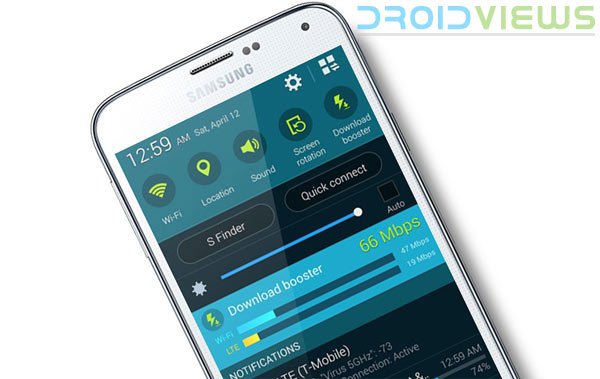
Samsung’s engineers might be incapable of bringing new design to their flagships for the last couple of years, but the company never misses to introduce some really good features. The Galaxy S5 might not appeal to you with its look but it really has some really awesome features. The Download Booster is one of the most interesting features of the Galaxy S5 but it has been disabled on some US variants of the device.
If you own a Sprint, AT&T, or Verizon Galaxy S5, you might not find the Download booster on your phone. It’s not that the feature is not found at all on these models, it’s just hidden just like the Developer options on Android device running Android 4.2 or above. The AT&T website proclaims that the carrier has been testing Download booster and so it appears that the feature might be made available to users in future. But what about other Verizon and Sprint?
Well, you need not live on the mercy of these carriers anymore as now there is a way to make this feature visible and enable it. Download booster employs a special technology that boosts the rate of download significantly by taking advantage of WiFi and LTE networks at the same time. Thus, to be able to use Download booster, you need to turn of WiFi and mobile data on your phone. The feature makes it easier and faster to download large files over 30 MB.
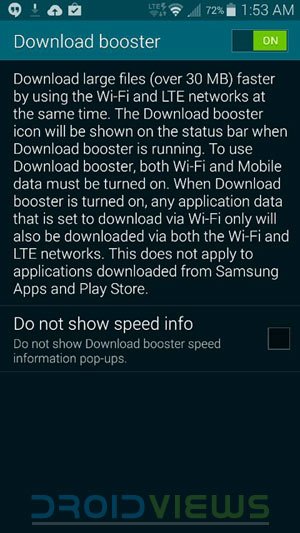
Having activated the Download Booster on Galaxy S5, you can easily access it via statusbar or notification toggles screen.
Enable Download Booster on Galaxy S5
As for users’ reviews about the feature, they are of mixed nature. Some find it working while other say it is simply ineffective. If you want to find it yourself, just follow the method to enable Download Booster on Galaxy S5.
- Download a third-party launcher app like Nova or Apex and set it as your default launcher.
- Tap and hold the home screen and select Shortcuts.
- Navigate to Activities>Settings>Download Booster and select it.
- Tap the new settings icon on the home screen and enable Download booster.
RevelationOmega, the man who discovered this method of enabling Download booster has now been testing a mod to make the feature work effectively on the AT&T/Sprint/Verizon Galaxy S5. We’ll keep an eye on the latest developments and share it here when it’s available. Meanwhile, if you have root and custom recovery on your S5, you can jump to his XDA thread and participate in his beta testing. Cheers!
Download Booster Alternative App
Just install and launch QuickShortcutMaker app. Search for “DownloadBooster” option under Settings and create a shortcut.
[googleplay url=”https://play.google.com/store/apps/details?id=com.sika524.android.quickshortcut”]Alternatively, you can download Super Download – Booster to get faster download on your Galaxy S5:
[googleplay url=”https://play.google.com/store/apps/details?id=it.opbyte.superdownload”]

Enabling a 3rd party launcher is not entirely needed. I just enabled this feature using an app called “QuickShortcutMaker”. Just had to search for the option “DownloadBooster” which was found in settings, then created the shortcut, turned on the option, and I now have DownloadBooster enabled within TouchWiz.
I do very much appreciate the information within this post however, thank you for providing detail on what was done by these major carriers. Well written!
i have sprint version s5
i will search for download booster
there is also not a shortcut of mobile data enabled
did u find this ?