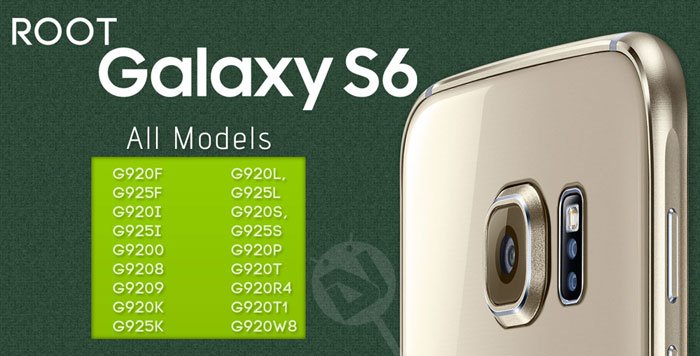
The Samsung Galaxy S6 and S6 Edge are probably the first Samsung flagships after the Galaxy S2 to release with a single processor type running on all its variants. Before the S6, the OEM used to ship its Galaxy and Note line devices with its in-house Exynos and Qualcomm Snapdragon chipsets.
Since Samsung has used the same chip on all S6 models, things are going to be more exciting this time. In future, we’ll see mods and custom ROMs that can be installed on different models of the Galaxy S6 alike. Just a few days ago, we did a few tutorials about rooting some of the S6 models using CF-Auto-Root. Our today’s guide, however, is not about a particular device but almost all models of the Samsung Galaxy S6.
If you own any of the variants of the phone listed below, you can root your device and install a custom recovery right away. All these models have unlocked bootloaders. Since CF-Root is not available for all S6 models, we’ll be gaining root privilege on the listed models by installing the TWRP recovery using Odin and then by flashing the SuperSU package.
Supported Galaxy S6 Models
- SM-G920F (International- European)
- SM-G920I (International/Asia- India, Singapore, Australia, US, Latin America, etc.)
- SM-G9200 (China Dual SIM)
- SM-G9208 (China)
- SM-G9209 (China)
- SM-G920K (Korea)
- SM-G920L (Korea)
- SM-G920S (Korea)
- SM-G920P (Sprint)
- SM-G920T (T-Mobile)
- SM-G920R4 (US Cellular)
- SM-G920T1
- SM-G920W8
- SM-G920W8 (Canadian)
Note: Do not try to flash the TWRP recovery file provided below on the Verizon or AT&T models of the Samsung Galaxy S6. Both the models come with locked bootloaders!
Warning!
The procedure described below is considered risky and might soft-brick your Samsung Galaxy S6. You’ll be able to restore your device only by flashing the stock firmware. To avoid any kind of mishap, follow the tutorial carefully and at your own responsibility! Also, before you make the decision to flash TWRP and root your Galaxy S6, please make sure that the stock firmware for your device model is available for download. Thus, if anything goes wrong, you can easily restore the original firmware back. Do not try the tutorial on your S6 Edge!
Getting Prepared
- Download Odin tool: Odin3_v3.10.6.zip
- Download the TWRP recovery file (with .tar extension) for your Galaxy S6:
- TWRP for all S6 models: twrp-2.8.7.1-zeroflte.img.tar
- TWRP for Sprint S6: twrp-2.8.7.0-zerofltespr.img.tar
- Also download the latest SuperSU flashable zip: UPDATE-SuperSU-v2.xx.zip
- Enable USB Debugging on your Galaxy S6: Go to Settings> About> Build number and tap it 7 times to unlock Developer options. Now return to Settings> Developer options and tick the USB Debugging.
- Install the latest Samsung USB drivers on your PC.
- Make sure your Galaxy S6 has more than 50% battery left before you jump into action.
Also see:
List of Galaxy S6 Bloat Apps and How to Remove them Without Root
Root Samsung Galaxy S6 and Install TWRP
Update: You can now root your Samsung Galaxy S6 without tripping the KNOX Warranty Void counter. Click here to know how you can do so.
- Copy the UPDATE-SuperSU-v2.xx.zip file to your phone.
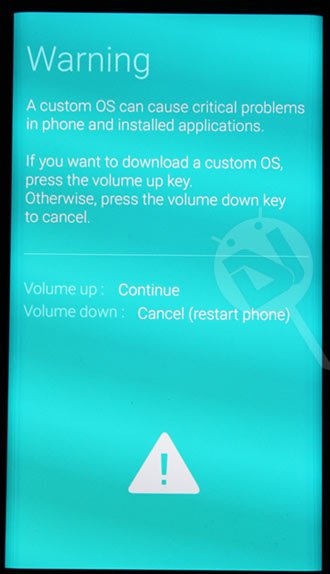
- Now turn off your Galaxy S6 and reboot it into the Download Mode by pressing the Volume Down+Home+Power keys simultaneously for 3-5 seconds. When you see the warning screen with an exclamation sign, press the Volume up key.
- Now unzip the Odin file you downloaded above and open the extracted folder.
- Double-click Odin3-v3.10.6.exe to launch the program.
- Connect your phone to the computer using the USB cable that came with it.
- ID:COM port of Odin will be highlighted to show that your device has been detected by the tool.
- Click the AP button and select twrp-2.8.6.0-zerofxxx.img.tar file.
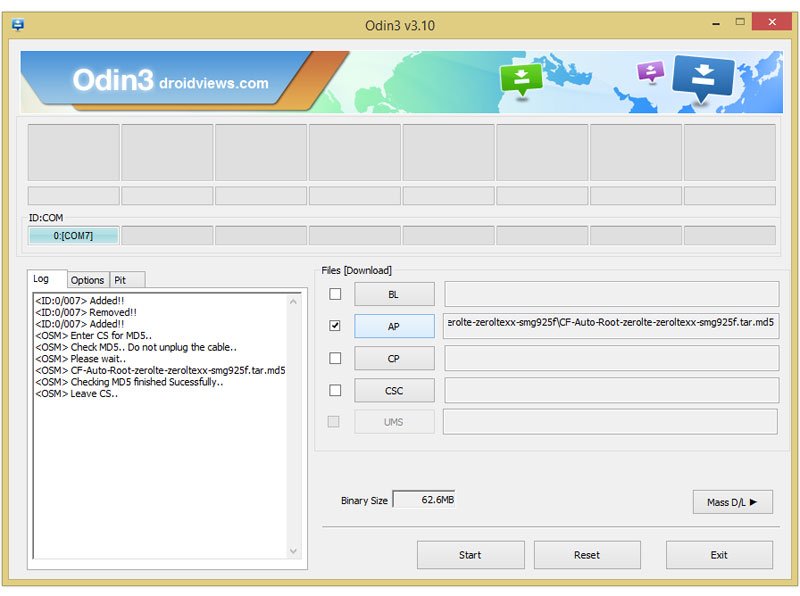
- Now click the Options tab in Odin and uncheck Auto Reboot option.
- Finally, click the Start button to trigger the installation.
- The installation will be finished within a few moments and you’ll get PASS! message on Odin.
- Now detach the USB cable from your Galaxy S6 and hold the Volume Down+Power buttons at the same time for about 7 seconds.
- As soon as the screen turns off/black, quickly press and hold the Volume Up+Home+Power buttons simultaneously. Remember, you have to do this before the boot screen with Samsung Galaxy S6 logo appears or your phone will reboot. Just as you see the Samsung Galaxy S6 logo, release the Power key but keep the Volume Up+Home buttons pressed until you are greeted a blue screen with while Android logo followed by TWRP menu.
- Tap the Install button in TWRP, navigate to UPDATE-SuperSU-v2.xx.zip and select it.
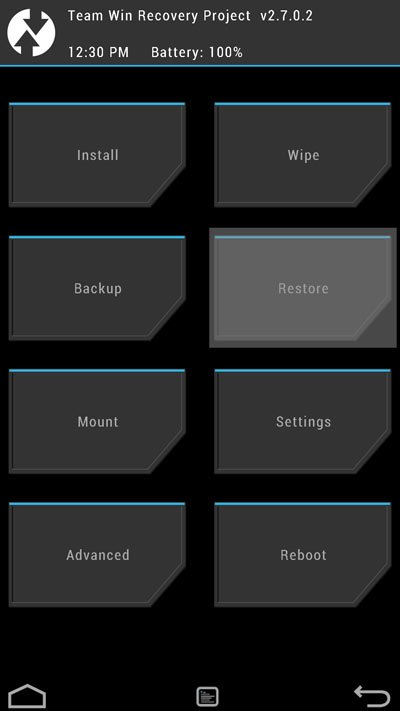
- Confirm the installation by swiping the slider button.
- When SuperSU is flashed, return to the main menu in TWRP and tap Reboot> System.
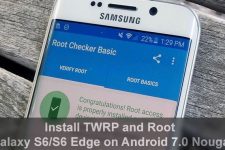
Done! Just wait until your Samsung Galaxy S6 boots up. Now you have a rooted S6 with TWRP recovery installed on it. You can verify root access on your phone using the Root Checker app from the Google Play Store.
[googleplay url=”https://play.google.com/store/apps/details?id=com.joeykrim.rootcheck”]
*TO ANYONE GETTING RECOVERY NO SENFORCED ERROR!*
Go to the TWRP website itself and download the latest for the S6 which, as of writing this, is “twrp 3.1.1-0 zerofilte”. Boot into download mode and repeat the same process you did while flashing the older TWRP provided in this article. Worked for me, now have TWRP just fine.
You’re a life saver bud
its not all models if you don’t count VERIZON…
Agree! I should have added ‘almost all’ instead.
yeah not at&t either
Hi. I tried the method, i can root my SM G920W8, but when I try flash TWRP odin show me PASSED. but when i press volume+home+power in the samsung logo say recovery is not seandroid enforcing. im in 6.0.1 PC8. i hope to you help. thanks!
maybe a little late but you should try to root it again and then access the recovery mode through the twrp app instead of turning off your phone and using the buttons, i had the same issue and it worked for me!
Will this method work on Marshmallow (6.0.1)?
!!!How to Root Samsung Galaxy S6 Edge SM-G925P on Android 6.0.1 Marshmallow!!!
I have an issue cause ive got a sm-g920w8 and I cant use it in Spanish. Morelocale and other apps didnt change it. My question is if i can flash a sm-920f stock flash into my w8.
Got a bootloop. I can access TWRP but what do I do next?
Son of a bitch! This got me stuck in the boot loader! I really wish I would’ve read AirJonn’s comment before this. Now I’m stressin’ over whether or not I can get this fixed before I have go to work! This phone is expensive!
PLEASE UPDATE THIS PAGE OR REMOVE IT!!! So other’s don’t make the same mistake!
Do not use this method to get root if you dont have it yet, you will get stuck in boot loop. Flash custom kernel like unikernal trough Odin first to get root. Then install twrp after, no need for supersu flash.
This will remove Samsung’s Android kernel mods that make Gear VR work correctly. It may still appear to work but color resolution is way wrong and green stripes tend to pop up.
This is the same problem I had. I rooted so I could use my PS3 controller with Sixaxis and the colors are all wrong. I went back to stock and everything’s great, but I gotta spend another 40 bucks on another controller. It’ll be worth it.
Yeah, I saw your description of the problem, on Reddit I think it was, and had to chuckle. I’ve gotten no further in my quest for rooting an S6 that leaves all the good stuff alone. There has got to be a way in Android to hook into a running system so as to confer root privilege but I can’t see where anybody has found and isolated it yet.
Big contribution there for someone with the skill.
HI I’m on android 5.1.1 and I have the samsung smg920v and I find out my boot loader is open so my question is can I downgrade 5.0.2 using twrp? I had the 5.0.2 when got my phone but I used Odin and I updated to 5.1.1 and now I can’t be root 🙁 any help?
metro s6 stuck on boot screen, this sucks. Don’t use this junk.
Not working! Keeps rebooting after installed the UPDATE file,what to do!?
rakesh anything about xposed framework for lollipop 5.1.1 s6 edge
anyone have a exposed framework for s6 edge
When I get to the part where is says to reboot when Iet go of the vol down and move to the vol up then release the power key is goes to the samsung screen and says in red up top ( Recovery is not seandroid enforcing) in red. I have a sprint g920p.
same problem 🙁
I’ve got the G920F with android 5.1.1 G920FXXU2BOFJ
Just added the latest version. Try again and let me know.
THANKS 🙂 I managed to install TWRP recovery on my phone ….. but now my system is stuck in a boot loop 🙁
I forgot to load the SuperSU file on to my phone so after booting into TWRP recovery I immediately tried to reboot ( using reboot->power off). Now the system is stuck in a boot loop (but I can still boot into TWRP ).
Any Ideas?
Try a wipe in TWRP. Don’t wipe system partition.
Tried that… didn’t work.
Ended up re-flashing the Official ROM and starting over.
Second time around the system booted up properly but went into a boot loop after I installed the Root SuperSU.
I tried a factory reset using TWRP…. no change.
Same issue with the latest version as well
The (Recovery is not seandroid enforcing) still appears for me up top… but I found that you have to continue holding on to the POWER + HOME + VOL-UP keys for around seven seconds before the TWRP splash screen appears.
Try the new files.
How come pin pong root does not have my data when it is supported with sprint
Hi there…
i have a Galaxy S6 SM-G920X model live demo Unit.. will this work with that and i hope it will not completely mess-up the phone.. please advice me so i would like to try.
Thank you
Yes, it should work.
ok… let me try… thank you
Did it work for you?
Hello, did it work? I have a galaxy S6 G920x with limitations: charging only at 70%.
Rakesh I have a SM-G920X LDU and it’s stuck on RECOVERY IS NOT SEANDROID ENFORCING. Please give me a step by step on how to fix that problem as if you’re giving instructions to a 3 years old. I am not proficient in with these things.
Will this help me unlock my Sprint s6edge? I am trying to take my phone to tmobile
Hi that root can support G920W8 Android version 5.0.2?
Yes, try this TWRP: http://dl.twrp.me/zeroflte/twrp-2.8.6.0-zeroflte.img.tar
If you want an easier method, go with this: https://www.droidviews.com/root-samsung-galaxy-s6-without-tripping-knox-with-pingpong-root/
hi, if i will root my samsung s6 it will solve the network unlocked code?
Root access is just a means, not the end. It ill help you SIM unlock your devices using online services.
Hi, i followed your steps until step13, then i could not tap the install button, not respond at all….my is SM-G9200, and the swipe to unlock also not able to swipe…pls help
There might be some error in the TWRP build you are using. Try a different version.
thanks for your fast respond, different version means try the Sprints S6 TWRP? will it effect for dual sim function or others? whats the different between these two?
TWRP for the Chinese Edge model has been tested on the Sprint Edge by Frank White ( see his comments below). I don’t see it’ do any harm or have any effect on the dual SIM compatibility. Just try Sprint S6’s TWRP. It would work.
hurray u the man its all good.
all i need is a working xposed i staller
Great! Can you provide me the root checker screenshots of your Edge?
ohoh i erased my storage files. i was enqripting my phone and it disconnected from charger.dammit.
is there a program i can recover files
There are many programs but I doubt they do what they claim.
https://www.droidviews.com/how-to-recover-deleted-files-on-android-phones-and-windows-computer/
I have the screen shot but how do i put it here
the chinese twrp has the swipe to install the dark,light and play themes do not
everthing works but the swipe cant install
theres no swipe
ok it worked THANK YOU.
one more thing.
can you get me xposed installer for sm-g925p.
i cant find it no where
I will look for it and let you know.
anything ok a xposed installer for sm-g925p
Not yet.
anything ok a xposed installer for sm-g925p
xposed installer framework
sm-g925p
PLEASE!!!!!!
It’s still not available for the S6/S6 Edge.
Just wait for some hours.
anything similar
mods or apps
Yes, there seems to be workaround to get Exposed on S6.
Check this out: https://www.droidviews.com/how-to-install-xposed-framework-on-samsung-tw-lollipop-roms/
thanks but that’s just way to much for me i guess I’ll wait
that’s complicated what else you got buddy
Try this: https://www.droidviews.com/unofficial-xposed-for-samsung-touchwiz-lollipop/
no go unsupported
ugh!!!!!!!!!
anything yet for s6 edge for xposed framework
Hi Frank, I had been out for more than 20 days and so I am not quite updated with the new developments. I will check now.
please do thanks
find anything
No. There’s no perfectly working version.
hey my friend is there a working exposed framework for s6 edge yet
Not yet. i’ve been waiting for it too.
anything about xposed framework for lollipop 5.1.1 s6 edge sm-g925p
Check this out: https://www.droidviews.com/xposed-framework-for-galaxy-s6-and-s6-edge-is-finally-here/
no good bootloop trid all what else you got. want this bad
i found a working xposed framework
hell yeah!!!!!
hi rakesh.my s6 edge is bricked. ok now i tried to odin flash stock firmware but it fails.it also fails to boot.cant even boot into recovery.is there anything i can flash in odin to unbrick it.download mode is the only thing i can do.please help
how do i install it
Here’s how to install: https://www.droidviews.com/install-material-design-themes-for-twrp-recovery/
thanks but its in japenese
It’s Chinese actually. Download a TWRP theme from here and install it: https://basketbuild.com/filedl/devs?dev=z31s1g&dl=z31s1g/1080/TWRP%20286X_v1/286X_v1_1080_play.zip
i downloaded and installed but no change to twrp
Does the theme change? It has been confirmed working.
Anyway, try a theme from here: https://basketbuild.com/devs/z31s1g/1440/
Boot in TWRP and note its version. Select a theme based on the TWRP version.
Here’s how to install: https://www.droidviews.com/install-material-design-themes-for-twrp-recovery/
i need recovery for sprint s6 edge sm-g925p
Hi Frank, just found the Unified Toolkit that officially supports SM-G925P/I/F etc. I am going to try it on my G925I.
Here’s the TWRP recovery for the Sprint S6 Edge: https://mega.co.nz/#!38pyUCqB!ZhURUjuNepOvcTz-ct3JzcuwQ7ox7jjj7ZCflfHtpuE
I have s6 edge sm-g925p ive in stalled twrp all kinda ways but when i go to boot in recovery my sceen blinks the gos completely blank. i mean off. period.
any help please
I have s6 edge sm-g925p ive in stalled twrp all kinda ways but when i go to boot in recovery my sceen blinks the gos completely blank. i mean off. period.
any help please
Hi Frank, the guide strictly mentions that the TWRP recovery provided above is only for the Galaxy S6 SM920X models. Since you have flashed it on your Edge sm-g925p, you made a big mistake.
Anyway, hold the Volume down+Home+Power keys together for few seconds and check if you can boot into the download mode.
i could and did
I have and Edge too and have been trying to port TWRP myself without any success so far. No custom recovery is available for any Edge model yet. I would let you know when it’s out.
ok thank you
i just reflashed autoroot now its fine. but is there no way to put some kind of recovery on it.
Great!
can u help with recovery.
i can’t find none for mine
s6 edge
Sprint sm-g925p ed
As I said, I have working for 2 days. Soft-bricked my phone 4 times. I hope it’ll be out very soon. Someone more capable and with more time than me would be trying too.
please let me know thanks..
i just upgraded from s4.
i have things apps i cant use because of no recovery. great phone but it be perfect with recovery. lolol
Agree.
anything on recovery for sm-g925p Sprint edge
There has been a working port for the T-Mobile version but not for the Sprint model.
Not yet.
Stop rooting your phone people… not worth it when you decide to hack your $800 phone! Here’s an idea: leave your phone at home, go out for some fresh air
LOL
After doing this, my phone is now unresponnsive in twrp. I am unable to do any button push or anything on my screen. My phone doesnt respond to my touches. any help?
Press and hold the Volume Down+Power keys for about 7 seconds to reboot the device. Then turn off the phone and try rebooting into TWRP again.
yea this doesn’t work
Well, it does. I am not sure why the Update-SuperSU zip file is not detected by TWRP in your case.
others are all saying it doesn’t work either
I got the Edge model, but tested it myself on a friend’s S6 2 days ago.
Make sure the SuperSU zip is not corrupt. Can you see the zip using File manager?
No. I downloaded it from your site. It’s not showing in the phone
Sounds like LOL! Download UPDATE-SuperSU-v2.xx.zip on the computer and then copy it to your phone.
Then reboot into TWRP recovery, tap Install button and install UPDATE-SuperSU-v2.xx.zip. That’s it.
when I do that, it doesn’t show up in the phone’s directory to install
if i root my S6. Will i still be able to install new android version ?
Yes, but you won’t get the OTAs. You will have to install them manually.
And where can i find these new android version ? I know there isn’t at the moment, but id like to know where to find them. Thanks for you fast response.
At Samsung-updates.com or at Sammobile.
and i will not lose my root if i update ?
Yes, but you can root again.
Even after showing pass! on odin, i only able to reboot to stock recovery. Anyone else experiencing same issue?
Just wait, SELinux is not letting the custom recovery to stay. I got a workaround. Just updating the tutorial. Please wait for 15 minutes.
Just wait, SELinux is not letting the custom recovery to stay. I got a workaround. Just updating the tutorial. Please wait for 15 minutes.
Hi again, the tutorial has been updated. Please install TWRP again but this time uncheck the Auto Reboot option. More details above…
Let me know of the results.
Hi again, the tutorial has been updated. Please install TWRP again but this time uncheck the Auto Reboot option. More details above…
Let me know of the results.
Step 12, there is no where to Install option in TWRP, navigate to UPDATE-SuperSU-v2.xx.zip and select it.
TWRP does have the Install option. See this: http://cdn.droidviews.com/wp-content/uploads/2014/02/nexus-5-twrp-menu.jpg
the install option is there but SuperSu isn’t there to be installed so I can’t get root access
Did you copy the ‘UPDATE-SuperSU-v2.xx.zip’ file to your phone as instructed in Step#1?
yes. did everything as followed. my s3 rooted easily. not sure why this is such a pain
The tutorial has been updated. Please go through it again.