The term “rooting” in Android means a lot more that it verbal implications. It is a pretty much like a genie that is capable of realizing any wish related to your Android device that you might think of. Not happy with your phone’s battery life, performance, look of the UI, volume loudness, audio quality, or the bloat apps? Rooting is there to help with solutions to all such issues. It might even let you enjoy some desirable features from other Android device! Keeping such things in view, root access on an Android device is just something you must have if you want to enjoy your device fully.
There was a time when rooting Android devices was pretty easier than it is nowadays. All major OEMs and carriers keep patching all holes (in the name of security) that let our developers in to gain root access, And so, there is always a hide-and-seek going on between manufacturers carriers and the developers. Thankfully, it is the great minds of Android community that win the game in most cases. As Android enthusiasts, we always welcome any root exploit that hits the scene, but sometimes good news comes in multitudes. Just a few months ago, we did a detailed review of a root tool called Framaroot that works on a large number of devices.
Today, we have come up with another rooting toolkit that is compatible with not less than 25 Sony Xperia devices across various versions of firmwares. The Xperia Root Toolkit has been developed by DooMLoRD and is capable of giving root access on the following Sony devices (tested on these):
- Xperia Z (C6602/3) {FW: 10.3.A.0.423} [v16 onwards]
- Xperia Z (C6602/3) {FW: 10.1.1.A.1.307} [v10 onwards]
- Xperia Z (C6616) {FW: 10.1.1.A.1.319} [Bell Canada] [v19a]
- Xperia Z (C6606) {FW: 10.1.1.B.0.1.166} [v17 onwards]
- Xperia ZL (C6503) {FW: 10.3.A.0.423} [v12 onwards]
- Xperia ZR (M35h) {FW: 10.1.1.A.1.317} [v17 onwards]
- Xperia ZR (C5502/C5503) {FW: 10.1.1.A.1.317} [v16 onwards]
- Xperia Tablet Z (SGP311/2) {FW: 10.1.C.0.370} [v13 onwards]
- Xperia Tablet Z (SGP321) {FW: 10.1.1.A.1.307} [v13 onwards]
- Xperia SP (C5302) {FW: 12.0.A.1.284} [v11 onwards]
- Xperia SP (C5302/3/6) {FW: 12.0.A.1.211/257} [v16 onwards]
- Xperia T (LT30p) {FW: 9.1.A.1.141} [v13 onwards]
- Xperia T (LT30p) {FW: 9.1.A.1.142} (added by the_laser) [v14 onwards]
- Xperia TX (LT29i) {FW: 9.1.B.1.67} (added by sj8023ld) [v14 onwards]
- Xperia TX (LT29i) {FW: 9.1.B.0.411} (added by fi01) [v14 onwards]
- Xperia V (LT25i) {FW: 9.1.A.1.140/142} (added by the_laser) [v14 onwards]
- Xperia V (LT25i) {FW: 9.1.A.1.145} [v16 onwards]
- Xperia Ion (LT28h) {FW: 6.2.B.0.211} [v16 onwards]
- Xperia S (LT26i) {FW: 6.2.B.0.211} [v10 onwards]
- Xperia S (LT26i) {FW: 6.2.B.0.200} [v16 onwards]
- Xperia SL (LT26ii) {FW: 6.2.B.0.200} [v17 onwards]
- Xperia SL (LT26ii) {FW: 6.2.B.0.211} (added by the_laser) [v14 onwards]
- Xperia Acro S (LT26w) {FW: 6.2.B.0.200} [v13 onwards]
- Xperia Acro S (LT26w) {FW: 6.2.B.0.211} [v16 onwards] [FIXED]
- Xperia P (LT22i) {FW: 6.2.A.1.100} (added by the_laser) [v14 onwards]
- Xperia Go (ST27i) {FW: 6.2.A.1.100} (added by the_laser) [v14 onwards]
- Xperia Go (ST27a) {FW: 6.2.A.1.100} (added by DooMLoRD, untested) [v14 onwards]
- Xperia J (ST26a/i) {FW: 11.2.A.0.21/31} (added by DooMLoRD, untested) [v17 onwards]
- Xperia L (C2104/5) {FW: 15.0.A.1.31/36} (added by DooMLoRD, untested) [v17 onwards]
- Xperia AX (SO-01E) {FW: 9.1.C.0.473} (added by fi01) [v14 onwards]
- Xperia Z (SO-02E) {FW: 10.1.D.0.343} (added by fi01) [v14 onwards]
- Tablet Z (SO-03E) {FW: 10.1.E.0.265/269}(added by fi01) [v14 onwards]
- Xperia GX (SO-04D) {FW: 7.0.D.1.137} (added by fi01) [v14 onwards]
- Xperia A (SO-04E) {FW: 10.1.1.D.0.179} (added by fi01) [v14 onwards]
- Xperia A (SO-04E) {FW: 10.1.1.D.2.26} [v16 onwards]
- Xperia SX (SO-05D) {FW: 7.0.D.1.137} (added by fi01) [v14 onwards]
- Xperia VL (SOL21) {FW: 9.1.D.0.395} (added by fi01) [v14 onwards]
- Xperia VL (SOL21) {FW: 9.0.F.0.226} [v16 onwards]
- Xperia VL (SOL21) {FW: 9.1.D.0.401} [v16 onwards]
- Xperia UL (SOL22) {FW: 10.2.F.3.43} (added by fi01) [v14 onwards]
DoomLord’s Easy Rooting Toolkit can do the rooting magic on the above listed Xperia devices and is compatible with cross-platform computers on Windows, Linux and Mac. To root these devices, the toolkit takes advantage of “pref_event exploit”, and therefore it works on all devices which have it.
Using Easy Rooting Toolkit:
Achieving root access on Xperia devices with Easy Root Toolkit is an easy fun. It’s a one-click tool and requires just a single hit on the Enter key. However,it doesn’t mean that you do not have to get prepared before operating the script.
- Download Easy Rooting Toolkit and extract the zip: DooMLoRD_Easy-Rooting-Toolkit_v17_perf-event-exploit
- Download and install latest Sony USB Drivers on your computer: Download
- Turn on USB Debugging on your device: Click here
- Also, turn on Unknown Sources option from device Settings> Security>
- Go to display settings and increase screen timeout to 15 minutes.
- Connect your phone to computer via USB cable.
- Now open the Easy Rooting Toolkit folder and double-click the “runme” batch file depending on the OS of your computer. For example, if you are a Windows user, click on “runme_win.bat” file.
- You will then see a cmd window, asking you to press any key.
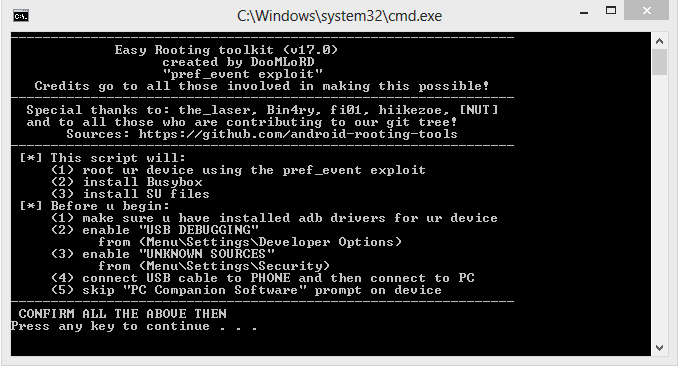
- Just obey it blindly and it will run the rooting script that will push SuperSU and Busybox into your device.
Your Xperia device should now be rooted. Enjoy! In case you have any query or problem let us know. Also, do not forget to share your experience with us. Cheers!


Thanks for your reply. Its listed two older FW for xperia T. Do you think any of those will work for me? Thanks
No, it’ll not.
Hi, i have xperia T 9.2.A.1.199 . It works that method for me to? thanks
Check above, If it’s listed, it’ll work.
i have sony xperia ul sol22 an update 4.2.2 has come and now sim locked i tryed old version 4.1.2 still locked
i tried on my xperia v but the command say there’s error:more than 1 device and emulator, can u help me?
not work for my xperia a so-04e android 4.2.2
Try this: https://www.droidviews.com/root-almost-android-devices-mashup-root-tool/
can this work on xperia zr C5002 version 4.3 jellybean
Do you need to unlock bootloader?
Yes.
It keeps saying root failed need root
it wont work on xperia v 4.3 update
does this work for the new 4.3 update for xperia z c6616
Not sure about this. Try KingoApp: https://www.droidviews.com/root-a-range-of-android-devices-in-just-one-click-with-this-universal-root-tool/
can u send me a way to root on sony xperia v
Did you try the above method?
Hi, it says it does NOT support C6616
My disappointment was that i was not able to transfer apps to SD, and this was the core reason as why i had rooted my phone in the first place.. as u can see in the piks uploaded.. i cant and i dont know how to fix this issue.. 🙁
My disappointment was that i was not able to transfer apps to SD, and this was the core reason as why i had rooted my phone in the first place.. as u can see in the piks uploaded.. i cant and i dont know how to fix this issue.. 🙁
Your phone’s SD must be showing as sdcard0 that is a vitual location. It is often creaed when you use an AOSP based ROM.
oki.. what can i do to fix that?..
Please advise as how I can resolve the issue…
Hey Thanks for the info provided.. i am using CynogenMod 11. and now i would like to fall back to the primary settings or the factory setting of my Xperia ZR C5502.. and i dont think i have a backup of the phone core files… 🙁 i have the .TFT for the sony Xperia zr and for flashing it… but i am not sure as how to proceed.. Plz Help..
Use Flash tool to flash the firmware. Here is a guide: https://www.droidviews.com/install-pre-rooted-firmware-version-10-1-1-a-1-253-on-xperia-z/
the link u sent is about Xperia Z.. i need for ZR…
Firmware file is different but the Flashtool method is the same.
loudgaminghd Try this tool but unlock the bootloader first.
Any root for Xperia z c6606 4.2.2 t mobile
XPERIA ZR not gettiong rooted, please check.
Well, it only works on specific firmwares. Try this: https://www.droidviews.com/root-a-range-of-android-devices-in-just-one-click-with-this-universal-root-tool/
mine is10.3.1.A.2.67, android 4.2.2
And that’s why it is not working. The exploit has been patched by Sony.
I have just purchased a Sony Xperia L smartphone but I’m having trouble with the apps. I have made several attempts in trying to solve this mystery problem; I am unable to open or download apps on my phone, it is running Amdroid 4.1.2 the latest version. Anyway, there is nothing at all to solve this problem, no solution, nothing on the internet whatsoever… The only thing I can do before sending it out to guarantee recover is to root the phone. I found this article very interesting and maybe even helpful? (considering I haven’t tried rooting my phone yet) … I have a question before following these procedures…. ; Step 09 – “Just obey it blindly and it will run the rooting script that will push SuperSU and Busybox into your device.” So after this my xperia device should be rooted… okay, what exactly do you mean by rooted? Are you saying that the Android 4.1.2 should be reinstalled by step 9? Or are you saying that my phone is just going to be blacked out by step 9 , open for any installation of any type… (which of course would lead to a whole new different procedure)
There is an easier tool for rooting here: https://www.droidviews.com/root-a-range-of-android-devices-in-just-one-click-with-this-universal-root-tool/
For more info on rooting, see this: https://www.droidviews.com/to-root-or-not-to-root-thats-the-question/
Here are some apps for rooted devices: https://www.droidviews.com/best-apps-for-rooted-android-devices/
My xperia z is from bell. model c6616 with 10.1.1.A.319 and version 4.1.2. I tried this and used root checker = no root access. What do I do now?
Download this tool- http://www.kingoapp.com/android-root/download.htm
Enable USB debugging, connect device and then click on root.
it does not working on my Xperia V (LT25i) {FW: 9.1.A.1.145}. after
script completed. my mobile just rebooted and nothing happends in
mobile. it show your device is not rooted yet
tRY kINGO rOOT TOOL: https://www.droidviews.com/how-to-root-att-samsung-galaxy-mega-sgh-i527-canadian-sgh-i527m-and-others/