
Nexus 5 is an awesome smartphone and owning it is a kind of privilege in itself. The device is very popular and has received positive reviews from reviewers and users alike. However, there are a few departments, namely camera picture quality and speaker volume loudness, where the Google’s flagship falls short. Just a few hours ago, we shared the Xperia Z apps and Xloud Beats mod pack for the device to enhance your Nexus 5 experience.
If you are disappointed with the performance of the camera of your phone, we have already a shared a camera mod that significantly improves the Nexus 5 picture quality. To solve the low speaker volume issue of your Nexus 5, we have now come with the Nexus 5 volume boost mod that amplifies the headphone and speaker volume drastically.
If you have a rooted Nexus 5 and want to enjoy louder speaker and headphone volume of your phone, Drummerjed from XDA has prepared a the Nexus 5 Volume Boost Mod for that does the magic quite impressively. His volume boost mod works on any Nexus 5 running the stock Android 4.4.2 ROM or custom ROMs like CM 11, Omni, AOSP, etc. Here has released his mod in three versions that target different volume boost solutions.
- Moves volume sweet spot to 50% vs. stock 80-90%
- Removes need for volume boosting apps that usually distort the audio
- Improved low end at optimal listening levels
All you need to do is to download your preferred mod and flash it via CWM or TWRP recovery. Needless to mention that your phone must have a custom recovery to be able to flash the audio mod on your device. If do not have a rooted Nexus 5, take some time and follow our rooting tutorial to gain root access and install TWRP recovery on it.
Installing Nexus 5 Volume Boost Mod
- Copy the downloaded volume boost mod file in ZIP to your Nexus 5.
- Boot your device into CWM/TWRP recovery mode.
- Backup your current ROM first.
- Select the Install option, navigate to the mod file and select it.
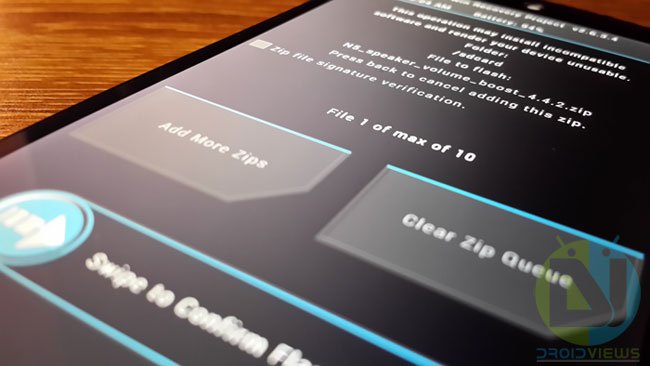
- When you are prompted to confirm installation, do it.
- It’ll take just a few moments to flash the volume mod.
- Go back to the main menu in recovery and select Reboot> System option.
- Done!
When your Nexus 5 boots up, you should notice a great difference between the audio level of the speakers and headphone of your Nexus 5. In case you do not like the effect of the mod and wish to revert back to the stock volume levels, copy the N5_stock_volume_levels_4.4.2.zip file using the same steps. We just hope that you enjoy the amplified volume. Do not forget to share your experience with us. Cheers!



May I know , current My NEXUS 5 had root to CM12 5.0.2 , may i flash this volume boost for my nexus 5 ?
Hi guys check out my free App made specifically for the nexus 5.
The Nexus 5 Real Volume Booster will create a custom mixer_paths.xml file for you, which will allow you to increase the
default maximums for headphone and speaker volume.
Note: (You need a custom recovery in order to install the file)
The free version currently has a 4.3 rating on Google Play with over 7000 installs
The free version has all the same features as the pro. The PRO has no ads and you help support my work.
Free version : https://play.google.com/store/apps/details?id=com.n5rvb.nexus5realvolumebooster
PRO (AdFree Version: https://play.google.com/store/apps/details?id=com.n5rvb.nexus5realvolumeboosterpro
XDA Thread: http://forum.xda-developers.com/google-nexus-5/themes-apps/app-nexus-5-real-volume-booster-t2688313
Let me know what you think.
Thanks
Thanks for sharing, I would test this app and try to get it reviewed if it works on my Nexus 5.
Please note that I had to change the name of the app to “Volume Boost For Nexus 5™” to comply with Google naming policies. The app can be found here: https://play.google.com/store/apps/details?id=com.n5rvb.nexus5realvolumebooster