
You might be following quite a lot of accounts on Instagram. However, you might not be interacting with all of them on a regular basis. Keeping this in mind, the popular image-sharing platform has added some useful features in this regard. Instagram is taking a slew of measures towards making your Following section clutter-free. Apart from that, it has also added some nifty functionalities to sort the accounts you are following. Let’s have a look at each of them in detail. Also, have a look at our guide to untag yourself from multiple Instagram posts at once.
Instagram brings new updates to the Following tab
Want to see which Instagram accounts show up in your feed the most and who you interact with the least? Now you can! Just tap “Following” and manage your list from there. pic.twitter.com/eKFOBCdutr
— Instagram (@instagram) February 6, 2020
You could now easily get information on the accounts you have interacted with the most. On the same lines, the app now also has a Least Interacted section. This as the name suggests, shows you the list of all accounts with whom you have hardly got in touch for the past 90 days. Interactions include liking to those account’s posts, commenting on their stories and others. Apart from that. there are also some other new additions to the Following section of Instagram.
Have you ever wanted to know who was the first account that you followed on Instagram? Well, look no further. The latest update to the Following tab of Instagram has added a new Sort section. It currently holds three options: Default, Date Followed: Latest and Date Followed: Earliest. Although the ability to sort it alphabetically is still missing, however, these two are still a welcome addition. Moreover, you could also hide Instagram stories from followers and non-followers. Refer to our guide to know more.
How to access this feature
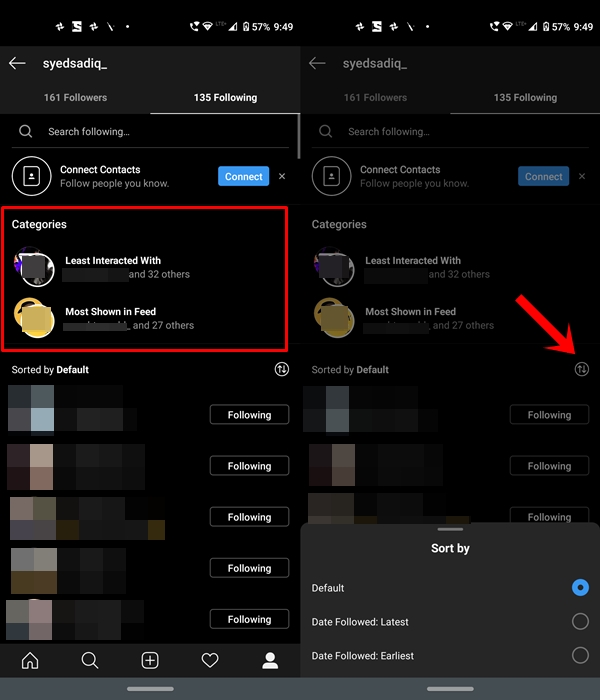
All these updates are now available in the latest Instagram update, which you could now directly download from Play Store. Once done head over to your profile and tap on the Following section of Instagram. Within that, you’ll now see a Category tab. As already mentioned, it holds the Categories and Sorts feature. The former lets you view the account you have most and least interacted with. The latter holds the ability to view your following accounts based on recency
So this was all about the new updates to the Following tab of Instagram. What do you think of this update and what further additions you wish to see in the near future? Do let us know in the comments section below.



Join The Discussion: