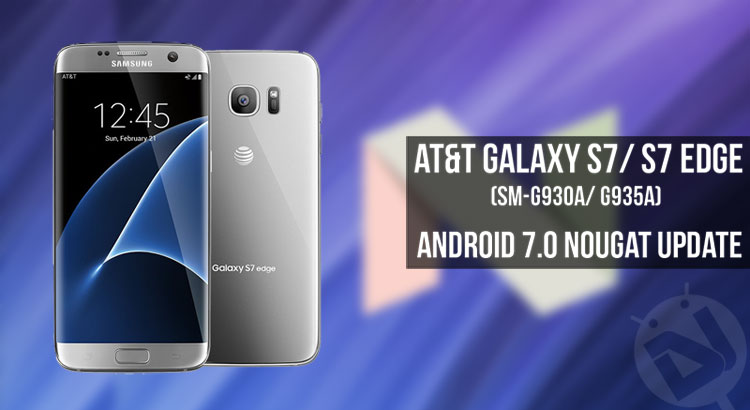
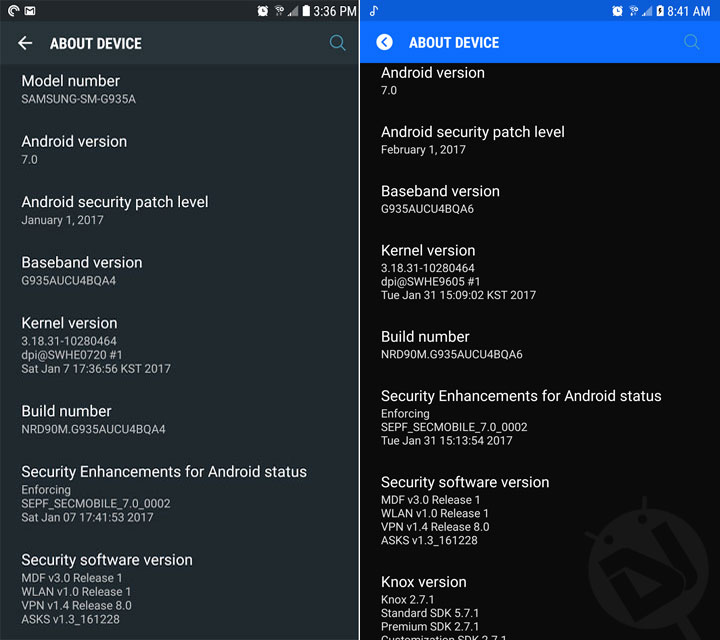
January 15 was the date when Samsung started releasing the Android 7.0 Nougat OTA in UK and since then things have been happening very fast. Usually, the carrier-branded models of Samsung devices get the latest software updates much later than international variants but this time, the scenario is a bit different. AT&T has not started rolling out the official Nougat update for the Samsung Galaxy S7/S7 Edge but the Nougat OTA zip with build version UCU4BQA4 has been spotted by some users. And if you want to get the latest update, here’s a detailed guide to help you get Android 7.0 Nougat on AT&T Galaxy S7 / S7 Edge (SM-G930A/ G935A).
As you know AT&T does not make full firmwares available, but as it happens, some users manage to capture the OTA zips and share them at forums. This time, XDA member Jimmyvb98 has shared the OTAs and by flashing them in consecutive order, you can finally enjoy the official Nougat on your AT&T Galaxy S7 or S7 Edge.
Disclaimer:
I have been very careful in laying out the steps described in the tutorial and you’re supposed to follow them carefully. It’s a good idea to clear any doubts that you might have regarding the guide before proceeding. Your phone must be fully stock to flash the OTA files. In case you have a rooted AT&T Galaxy S7 Edge, you can flash the G935AUCS4APK1 firmware provided below and then you can flash the G935AUCU4BQA4 OTA zip or can install the Nougat OTA from Settings> About device> and check for software update.
Related Posts:
- Download Official Android 7.0 Nougat Firmware for Galaxy S7/S7 Edge
- Install Android 7.0 Nougat on Verizon Galaxy S7 (SM-G930V)
UPDATE: AT&T S7/S7 Edge Android Oreo Update Available
Install Android 8.0 Oreo on AT&T Galaxy S7 & S7 Edge (SM-G930A/G935A)
Getting Prepared
Before you proceed, here’re a few preparations you need to make so that things go smoothly for you.
- Backup all your data and apps using Smart Switch as a precaution so that they are safe in case something goes wrong after flashing the OTA zips.
- Go to Settings> Personal> Lockscreen and security> Find my mobile and turn off Reactivation Lock.
- Go to Settings> Developer options and enable USB debugging (this is just as a precaution).
- If you have disabled some system apps, go to Settings> Applications and enable them or OTA installation may fail.
- Make sure that your Galaxy S7 is fully charged.
- You will also need an external micro SD card.
Update: March 15, 2017
No need to download the OTAs as the official Nougat firmware is available now. Click the link below:
Install Android Nougat Firmware on AT&T Galaxy S7/S7 Edge (SM-G930A/G935A)
Download OTA Zips for AT&T Galaxy S7 (SM-G930A)
Note: Please read this before you start downloading the OTA zip files linked below. Go to Settings> About device> Software info and check your phone current firmware version. Suppose your Galaxy S7’s firmware version is G930AUCU2APD1, you need to download all 6 files (from v2 to v7) listed below. However, if your phone is currently on G930AUCU2APG1, for example, start downloading from v5 onwards. You have to install the files in the same order as they appear in the list.
- v2 (G930AUCU2APD1) to v3 (G930AUCS2APE1) update zip
- v3 (G930AUCS2APE1) to v4 (G930AUCS2APF2) update zip
- v4 (G930AUCS2APF2) to v5 (G930AUCU2APG1) update zip
- v5 (G930AUCU2APG1) to v6 (G930AUCS2APH1) update zip
- v6 (G930AUCS2APH1) to v7 (G930AUCS4API2) update zip
- v6 (G930AUCS2API2) to v7 (G930AUCS4APJ4) update zip
- From PJ4, you need to update to PK1 before flashing the Nougat OTA provided below. Having flashed the PJ4 update Zip, so to Settings> About device and check fo system update to go to PK1 and then install the following file.
- v7 (G930AUCS4APK1) to (G930AUCU4BQA4) update zip
Here’s the order in which you have to install the update zip files: PD1> PE1> PF2> PG1> PH1> PI2> PJ4> PK1> QA4.
Must Read: Now you don’t need to download and install all OTA zips from PD1> PE1> PF2> PG1> PH1> PI2> PJ4> PK1. Just download the G930AUCS4APK1 full firmware files and install them using Odin (see this guide). After that, just flash the v7 (G930AUCS4APK1) to (G930AUCU4BQA4) OTA update zip file from above.
Having downloaded the following firmware files, extract all 4 .RAR files to get the following files.
AP_G930AUCS4APK1_CL9439621_REV02_user_low_ship_MULTI_CERT.tar
BL_G930AUCS4APK1_CL9439621_REV02_user_low_ship_MULTI_CERT.tar
CP_G930AUCS4APK1_CL9439621_REV02_user_low_ship_MULTI_CERT.tar
CSC_ATT_G930AATT4APK1_CL9439621_REV02_user_low_ship_MULTI_CERT.tar
Thus you can go to PK1 directly from any firmware version and then get to Android 7.0 Nougat.
Download OTA Zips for AT&T Galaxy S7 Edge (SM-G935A)
Note:
Please read this before you start downloading the OTA zip files linked below. Go to Settings> About device> Software info and check your phone current firmware version. Suppose your Galaxy S7 Edge’s firmware version is G935AUCU2APD1, you need to download all 8 files (from v2 to v9) listed below. However, if your phone is currently on G935AUCS2APH1, for example, start downloading from v6 onwards. You have to install the files in ascending order using the steps in the tutorial below.
- v2 (G935AUCU2APD1) to v3 (G935AUCS2APE1) update zip
- v3 (G935AUCS2APE1) to v4 (G935AUCS2APF2) update zip
- v4 (G935AUCS2APF2) to v5 (G935AUCU2APG1) update zip
- v5 (G935AUCU2APG1) to v6 (G935AUCS2APH1) update zip
- v6 (G935AUCS2APH1) to v7 (G935AUCS4API2) update zip
- v7 (G935AUCS4API2) to v8 (G935AUCU4APJ4) update zip
- v8 (G935AUCS4APJ4) to (G935AUCU4BQA4) zip (Nougat)
- v9 (G935AUCS4APK1) to (G935AUCU4BQA4) update zip (Nougat)
If your S7 Edge is running the PJ4 or PK1 firmware, you can skip the QA4 file from above and directly install the newer QA6 build with February security patch based on your current version:
Here’s the order in which you have to install the update zip files: PD1> PE1> PF2> PG1> PH1> PI2> PJ4> QA4 or QA6/PK1> QA4 or QA6
Must read: If you own the AT&T Galaxy S7 Edge, you don’t need to download and install all files from above. You can simply install the G935AUCS4APK1 firmware using Odin and then flash the G935AUCU4BQA6 update zip from above via stock recovery (see instructions below). Please note that installing the firmware will wipe your phone apps and data.
- Download Odin3_v3.12.3.zip and extract it.
- Also download the firmware file: G935AUCS4APK1.zip | Mirror
- After downloading the firmware, extract the zip. You will find the following 4 files inside: AP_G935AUCS4APK1_REV02_user_low_ship_MULTI_CERT.tar.md5
BL_G935AUCS4APK1_REV02_user_low_ship_MULTI_CERT.tar.md5
CP_G935AUCS4APK1_REV02_user_low_ship_MULTI_CERT.tar.md5
CSC_ATT_G935AATT4APK1_REV02_user_low_ship_MULTI_CERT.tar.md5 - Enable USB debugging on your phone.
- Install the firmware using the steps here.
- Then download SS-G935AUCS4APK1-to-U4BQA6.zip and install it using the steps below. Alternatively, you can go to Settings> About device> Software info, tap the software update option and download and install the Nougat update from there.
Installing the OTA Zips on AT&T Galaxy S7/ S7 Edge via Recovery
- Having downloaded the required OTA Zip files, rename the first file to update.zip. Suppose you downloaded v9SS-G935AUCS4APK1-to-U4BQA4-UP.zip, rename it to update.zip.
- After that, create a new folder in the root directory of your external SD card and rename it to fota.
- Copy the update.zip file to the fota folder you created earlier.
- Finally, power off your device.
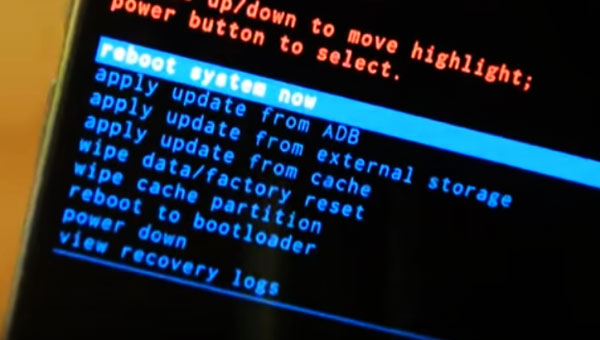
- Now reboot your S7/S7 Edge into the recovery mode by pressing and holding the Volume Up + Home + Power buttons at the same time until you get into the stock recovery.
- Having entered the recovery mode, select apply update from external storage option (use the Volume rockers to navigate and the Power button to select).
- Then, navigate to the fota folder on your external SD card and select the update.zip file.
- Finally, click Yes to apply.
- When the file it’s installed, reboot your phone using reboot system now option.
- When your phone boots up, rename the next file to update.zip and copy it to the fota folder.
- Install the file using the same steps you flashed the first file.
- Keep repeating the same steps until you have flashed the QA4 (Nougat update) file.
Having flashed the last OTA Zip file (QA4), your AT&T Galaxy S7 or S7 Edge will have the all-new Android 7.0 Nougat installed on it. Enjoy!
OREO Updatefor AT&T S7:
https://www.droidviews.com/oreo-on-att-galaxy-s7-s7-edge-sm-g930a-g935a/
FROM VERSION G930AUCU4APJ4 CAN I INSTALL DIRECTLY NOUGAT?
Good afternoon, I have the model SM-G935A and is currently unlocked for any company. I am from Mexico, and I would like to update my cell phone, can I do it with all these steps? I would like to update it using the recovery, it is safe to do it even when the phone is unlocked, and being in Mexico? I hope and you can help me, thank you very much.
Hi Sa Sa, installing the full firmware manually will not affect the unlocked status of your AT&T S7 Edge. 🙂
Try this guide: https://www.droidviews.com/nougat-firmware-on-att-galaxy-s7s7-edge-sm-g930a-g935a/
i have same problem, sa sa, you cant?
bueno creo que debes hablar espanol, oye si pudiste hacerlo, tengo el mismo problema pero no eh podido
Hi! I’m already running on G935AUCS4APK1 do i still need to download the firmware or can i just skip that step and flash the G935AUCU4BQA6 update zip? Thank you!
Hi, just download the latest Nougat firmware from here and install it: https://www.droidviews.com/nougat-firmware-on-att-galaxy-s7s7-edge-sm-g930a-g935a/#comment-3464299547
Thank you so much! Been trying to get the correct firmware for months because android 6.01 had a bug that kept the phone in a high power consumption mode which drained the battery in about 2 hours (even on idle). The update solved that issue with its integrated power management software!. Thanks again!
Glad to know!
It already warned about a possible data wipe and that;s why, we suggested to take a backup of everything.
https://uploads.disquscdn.com/images/6b321ea30d6b700a740363f4b386cb3d6decffdb3a9e4096ce134576aec60b71.png
I followed the steps and is the same help please
Which method did you follow?
Guide me to update to nougat https://uploads.disquscdn.com/images/c43261597cc405cc3261bb3465c90e9c9a622027dbe4b15c6d29967450da8768.png
r u there dear /?m talking with Rakesh
hi m kamran .. m using S7 G930A at&t .. plz help me out to update my cell to nougat .. recently its firm ware is PG1 and security patch is jully 1, 2016.. wht i hae to do?
Hi, download and install the Nougat firmware: https://www.droidviews.com/nougat-firmware-on-att-galaxy-s7s7-edge-sm-g930a-g935a/
which firmware there is lots of
Read this tutorial and follow it carefully: https://www.droidviews.com/nougat-firmware-on-att-galaxy-s7s7-edge-sm-g930a-g935a/
Dear something goes wrong i forget to on usb debugging? Wht hapnd now’?
Good afternoon dear … I have to ask is it possible to change firmware G930A t0 G930F ??
No.
dear good morning … is it possible to update samsung note4 N910H to nogat?? hope u ll be fine
Good afternoon rakesh.. is there any update availble for s6 edge+ 928c samsung to nogat??plz reply
Yes, it’s available. Where are you from?
Download this firmware: http://updato.com/firmware-archive-select-model?record=00DAB530114411E7963AFA163EE8F90B
Sorry its G9280 ….
From pakistan …
Download and install this: http://updato.com/firmware-archive-select-model?record=00DAB530114411E7963AFA163EE8F90B
http://updato.com/firmware-archive-select-model?record=97A36E057DAA11E7963AFA163EE8F90B
Its shows g928c…
I have g9280….
Procedure is same as i did for S7 using odin tool.?
Good evening ..dear is it possible to upgrade note4 n910h to oreo…its now mm6.0.1..m from pakistan
I have s7 edge 935FD baseband XXU1BQA1..is nougat update available?
Plz reply ….
good afternoon dear…..hope u l be fine..can I update note4 sm n910h MM to nougat?help me out
Hi, the Nougat firmware for this model is not available yet. 🙁
Is there any chance? ?
Dear is there any other possible way to update note 4 g910h to nougat??i hv seen some videos on youtube to update bt i didnt understand to follow..pls reply
Note 4 N910H . .
Good evening…..Is nougat firmware available for G9280 s6 edge plus? Plz reply
Hi,
I already replied to your query on the other page.
Good evening dear… is there nogat update available for note5 SM920CD.. m from pakistan
Mention the correct model number.
Good afternoon dear … i have s7 edge g935f duos … is there nougat update available??
Its now mm 6.0.1 ..january 1 2017 security patch… its base band G935FXXU1BQA1
Here it is: https://www.droidviews.com/android-7-nougat-firmware-on-galaxy-s7-s7-edge-sm-g930fd-935fd/
Which firmware??
Where are you from?
pakistan
Download this firmware and install it: http://updato.com/firmware-archive-select-model?record=41A8431989E211E7963AFA163EE8F90B
I have updated with Indian firmware … it’s working fine
Thanks dear….
Is it possible to over write it??
Yes.
Good evening dear .. how can i improve wifi range on s7 edge .? Its range is very limited ..m using G935FD model and recently update to nougat 7.0…plz help me out
Good evening dear … is it possible to increase range of wifi on s7 edge … my s7 edge has very limited range ..whts wrong with ths?? Plz help me out
Dear good morning … is it possible to change my firmware to pakistan version …i updated to indian firmeware . ??plz reply
m from pakistan
should i install indian firmware …
plz reply
Sorry to bother u
How do I downgrade back to 5.0 so I can keep doing OTA updates?
I have G930AUCU2APC2 as my baseband version and its nowhere in your list above. Should I still go ahead with the steps?
Leave it. Follow this guide: https://www.droidviews.com/nougat-firmware-on-att-galaxy-s7s7-edge-sm-g930a-g935a/
Can I presume that the baseband version does not matter when following the guide you referenced above?
Yes. You can install the full Nougat firmware over any version.
Thanks, Worked
Glad to know! 🙂
The official Nougat firmware for the AT&T Galaxy S7 Edge is available now. Download it and install: https://www.droidviews.com/nougat-firmware-on-att-galaxy-s7s7-edge-sm-g930a-g935a/
I am also getting the 2 error messages when trying to install from sd card the first, E:footer is wrong and E: signature verification failed it tries again with the same result and then aborts installation
Please extract the downloaded zip and show me the screenshot of the extracted folder.
I’ll show you what it extracts when I download it again but I just got the Ota 7.0 moments so
unfortunqtely i cant install it using the SD. it shows me 2 errors : error footer is wrong and signature failing. can you please help
Did you rename the file?
Extract the downloaded zip and let me what files you find inside the extracted folder.
yes i did rename it to update. there is only one file : SS-G935AUCS4APK1-to-U4BQA4-UP
Please extract SS-G935AUCS4APK1-to-U4BQA4-UP.zip file and tell me what files you ind inside.
Hi good afternoon. I have the firmware QA4.
I can update it to qa6?
You’ll have to downgrade to PK1 firmware and then install the PK1 to QA6 OTA zip.
Thanks very much. you are awesome!
Sorry i dont see the PK1 firmware. :/
Anybody has the BQA6 update file for the930A? Ive been looking everywhere but had no luck
Yes, it’s not available for download yet. I’ll let you know as soon as someone captures and shares the OTA ZIP.
Thanks!! you’re awesome
That will not factory reset the phone, rigth? Is just a update..
Yest, it won’t reset your device.
Thanks a lot, i will update my s7 edge, later in the day. I will tell you how is going
My phone is at&t galaxy s7edge. I update to nougat. But after update no ringtones and mobile data showing 4g lte but no internet. Wifi is working. Could u help me .please
Try a data factory reset via recovery mode: https://www.droidviews.com/how-to-perform-data-factory-reset-and-wipe-cache-on-samsung-galaxy-devices/
I had this issue too and it was fixed after I reset the phone.
thank u so much rakesh. my phone is good
Glad to know, Nasiruddin!
i am sorry to say my mobile data again gone. please let me know what i have to now
Try a data factory reset: https://www.droidviews.com/how-to-perform-data-factory-reset-and-wipe-cache-on-samsung-galaxy-devices/
i did but still same. i call celluer comp. they try apn reset. reboot few other step.but not work. . told me phone problem. itry this sim another device its works. but i find an app dicecovery. than working. but its not right way. u have any other option or i can do this installation over again?
Android nougat 7.0 or 7.1.1??
Thanks
It’s 7.0. The S8 will be the first Samsung phone to have 7.1.1.
I need updating in zip format MMB29M.G930AUCU2APD1. Thank you very much
For SM-G930A or G935A?
For SM-G930A. Thank you very much!!
https://uploads.disquscdn.com/images/54bac8d6de22772351db940b80c534de68d5c3d838ad883ad12f7fd1f8f1e8b3.png
Hey, here’s an easier way.
Download the PK1 firmware: https://drive.google.com/drive/folders/0B4MKaAZpQvBcNTlKRXZDeXh5RE0
Install it using this guide: https://www.droidviews.com/download-official-android-7-0-nougat-firmware-galaxy-s7-s7-edge/
Then download the Nougat OTA zip (G935AUCU4BQA4) zip and install it.
Rakesh, thank you very much. Perform all the steps and I was able to update without inconveniences. My S7 already has Nougat. Greetings
Glad to know, Santiago! Happy to help! 🙂
My phone is on PK1. When I try to flash the v9 zip, I get an error that says, “footer is wrong,” then “signature verification failed.” Any ideas?
Okay. I am glad you made it!
Try another SD card, did same thing with me.
Thanks for sharing the info, Charles!
how did you fix it? im getting the same error
Hi Joshua, extract the downloaded zip file and let me know what you find inside.
What was the fix? I’ve created a fota folder in my sd card, I’ve moved the downloaded zip file to the fota folder that’s on my sd card, and when I try to flash the zip, I get the exact same error. I’m also using the s7 edge on pk1. I can’t seem to find anything on my phone that says “reactivation lock” but I have the find my mobile features turned off. I have the exact same error. Will you please tell me what I can do to fix it? It’s probably some tiny detail that I am not seeing. Will you please tell me what worked for you to get this flashed via the external sd card? Thank you.
What about QA6 that is out Now???? How can I get this file???
Having updated to QA4, you can get the QA6 OTA. Check for update from Settings> About device> Software update
Do I need to Enable all the closed apps first or anything else before I check for update to BQA6 on my G930A S7
Actually, some system/bloat apps are necessary for software upgrade. Since I don’t know exactly which apps you have disabled, I would recommend enabling them temporarily.
Thanks will give it a try and see if it Updates and let you know back. THANKS FOR REPLY
You’re welcome, Charles! Between, when did you update to QA4?
About a week ago. It did not work, says it is up to Date.
Hi, if you want to update to the latest QA6, Odin back to the PK1 firmware and install the U4BQA6 zip file.
https://www.androidfilehost.com/?fid=457095661767134163
My s7 edge has a baseband version of G935AUCU1APB5, can i upgrade this to the new firmware?
Yes, just install the firmware file from here: https://www.droidviews.com/nougat-firmware-on-att-galaxy-s7s7-edge-sm-g930a-g935a/