The Android 7.0 Nougat OTA for the Samsung Galaxy S7 and S7 Edge rollout started for EE in UK and it was followed by the release of the official Nougat firmware for the UK users. Since the available Nougat firmware is carrier-unbranded, it can be installed on any Galaxy S7/S7 Edge with model number SM-G930F or SM-G935F. The good thing is the firmware for these models can also be installed on the dual-SIM variants of the S7/S7 Edge.
If you have already updated your Samsung Galaxy S7 or S7 Edge, you must have lost your root and custom recovery already. In case you want to continue enjoying root privilege and TWRP on the new Android Nougat firmware, here’s how you can do that.
Note and Disclaimer
Please note that the official TWRP for Nougat on Galaxy S7/S7 Edge is not available yet but the Marshmallow version is reported working on Nougat too. By installing a custom recovery on your S7 and rooting it, you’ll void its warranty. I have tested the procedure on my Galaxy S7 Edge (SM-G935FD) successfully but still, you are warned to proceed unless you understand what you’re going to do. The procedure might soft-brick your device but you can easily recover it by installing the stock firmware back. Please note that Samsung Pay won’t work once your Galaxy S7 is rooted.
Confirmed working on:
- Samsung Galaxy S7/S7 Edge (SM-G930F/G935F)
- Dual-SIM Galaxy S7/S7 Edge (SM-G930FD/G935FD)
In case you own a US variant of the Galaxy S7/S7 Edge, head to the following tutorial:
Get Prepared
If you have made up your mind to get your Galaxy S7 or S7 Edge rooted and install TWRP recovery on it, here’re a few things you need to do beforehand.
- Download Odin3_v3.11.1.zip.
- If you own the Galaxy S7 (SM-G930F/FD), download this TWRP image:
twrp-3.1.0-0-herolte.img.tar - Samsung Galaxy S7 Edge (SM-G935F/FD) users should download this file:
twrp-3.1.0-0-hero2lte.img.tar - Download the latest TWRP flashable SuperSU zip: SR3-SuperSU-v2.82-SR3-20170813133244.zip
- Also download: no-verity-opt-encrypt-5.0.zip
- Make sure you have Samsung USB Drivers installed on your computer.
- Go to Settings> About device> Software info and tap Build number 7 times to enable Developer options. Now enable OEM unlocking and USB debugging in Developer options.
- Do not forget to backup your phone’s data and charge it to at least 60% battery level.
Install TWRP & Root Galaxy S7 and S7 Edge on Nougat
After downloading the required files and doing things instructed above, let’s head to the steps to install TWRP recovery and root your Samsung Galaxy S7/S7 Edge.
- Extract the downloaded Odin zip file to your desktop and copy the twrp-3.0.2-4-herolte.img.tar file to the extracted folder.
- Now turn off your Galaxy S7 and press and hold the Volume Down + Home + Power keys at the same time for 2-3 seconds to boot your phone into the Download mode. Release the keys as soon as you see a blue screen with exclamation sign and press the Volume Up key.
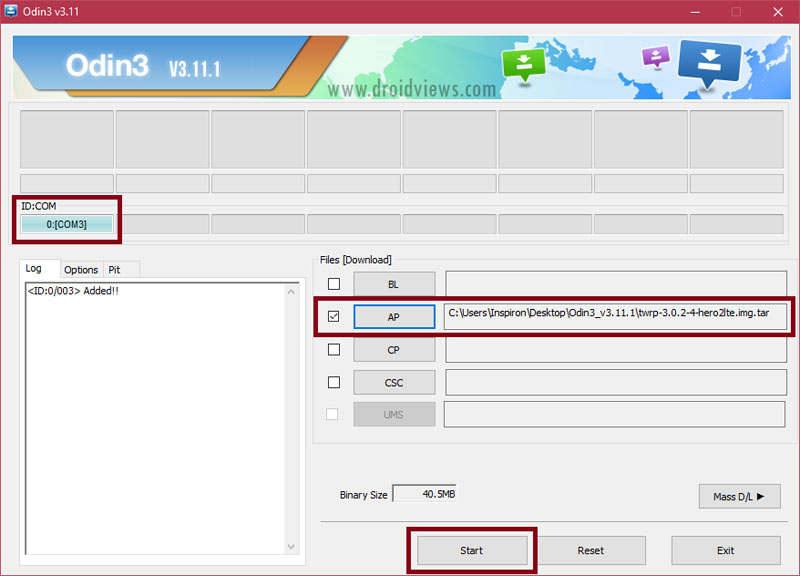
- When your phone gets into the Download/Odin mode, open the Odin folder and launch the Odin v3.11.1.exe as administrator.
- Now connect your Galaxy S7 to your computer using a USB cable.
- The ID:COM port on Odin will be highlighted in blue as soon as your device is detected.
- Click the AP button in Odin and add the twrp-3.1.0-0-hero2lte.img.tar file to it.
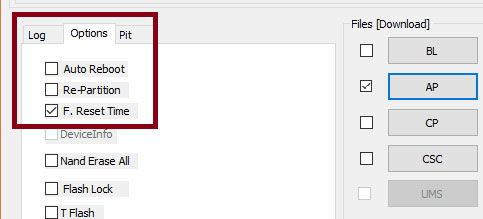
- Then Click the Options tab in Odin and uncheck Auto-Reboot.
- Now click the Start button to trigger TWRP installation.
- When TWRP is installed and you get PASS! message in Odin. Disconnect the USB cable if you wish to. However, if you want to copy the SuperSU and no-very-opt-encrypt zip files over MTP, stay connected to PC.
- Now press and hold the Volume Down + Home + Power buttons at the same time and immediately swap to Volume Up as soon as the screen goes blank/black while still pressing the Home and Power keys. Keep the 3 keys pressed until you get into TWRP Recovery.
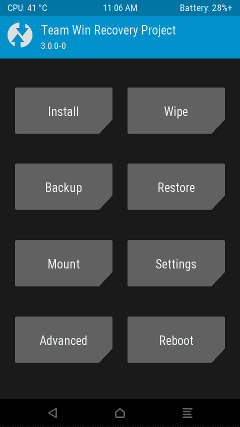
- At this point, you will reach the screen asking if you want to allow system modifications. Just ignore the warning.
- Now tap Reboot> Recovery.
- Your S7 will get into TWRP mode again.
- Now connect your phone (while booted in TWRP mode) to your PC and transfer no-verity-opt-encrypt-5.0.zip and SR3-SuperSU-v2.82-SR3-20170813133244.zip files using MTP mode (via USB cable).
- Tap the Install button in TWRP, navigate to no-verity-opt-encrypt-5.0.zip and select it. Swipe the confirmation slider when prompted. (Note: In case you see the red text error in TWRP saying unable to mount storage, go to the main menu in TWRP and select Wipe> Format Data. After that, reboot the recovery and then install no-verity-opt-encrypt-5.0.zip.)
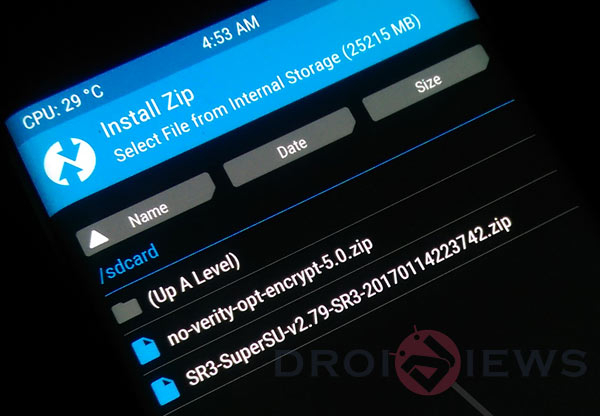
- When it’s flashed, go back and tap Reboot> Recovery.
- When your phone reboots into TWRP recovery, tap Install again and install SR3-SuperSU-v2.79-SR3-20170114223742.zip this time.
- The SuperSU is flashed, go back to TWRP main menu and tap Reboot System.
Done! The first boot might take awhile so don’t panic and wait patiently. To very root access on your Galaxy S7/S7 Edge, download the Root Check app from the Play Store and run it. Enjoy!
[googleplay url=”https://play.google.com/store/apps/details?id=com.jrummyapps.rootchecker”/]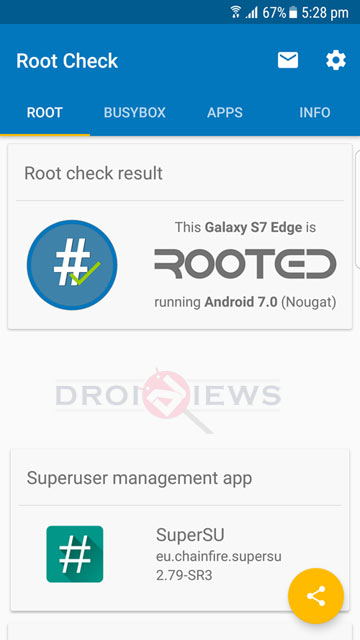
Hi I need help…. my phone just keeps blinking “SAMSUNG Galaxy S7 powered by andriod…” continuously how can i solve this…
Thanks! It works!
I install both no verify and super su at the same time and then rebooted without going back to the main menu and now I am stuck in the samsung display. How to fix this? Can I try the process again?
Install the stock firmware.
Ok, I tried again and was successful. Unfortunately, I had to wipe my internal storage 🙁
Glad to know you made it yourself! 🙂
You have been very helpful and accommodating. 5 stars to you. I also had my data backed up so I’m reinstalling everything
I did the root check and it said my galaxy s7 is not rooted. Running android 7.0 (nougat)
Flash the latest SuperSU: http://download.chainfire.eu/1122/SuperSU/SR3-SuperSU-v2.82-SR3-20170813133244.zip?retrieve_file=1
Do I have to do the process over again or can I hold volume up, power and home and flash it from there?
You’ll have to flash no-verity-opt-encrypt-5.0.zip and SR3-SuperSU-v2.82-SR3.zip again.
I tried to this in my phone, but before reading this guide.
I just downloaded TWRP and flashed it, then ignored the red messages about mounting /data (mistake)
Just sideloaded supersu just as I do for every phone I root.
After reooting to OS, am stuck in the password request, it is not accpeting my password.
At this point I would like to:
Undo the process, recover the ability to get into the phone so I can Backup the needed stuff.
any way to do this?
Later I can procedd and format data and do the rest.
HI RAKESH, after following each step the phone appeared to bootloop. i twrp recovery again and tried to wipe data etc but getting some mount error etc. whats the solution.did i flashed older version of recovery( twrp-3.1.0-0-hero2lte.img.tar) i see there is also a latest version on the twrp page. was i supposed to flash that? if yes how do i reflash the latest version.
Glad to know! 🙂
CAREFUL!!!!!!!!!!!THE NOTE IN STEP 15 SHOULD ACTUALLY BE STEP 14 OTHERWISE YOU WILL GET A BOOTLOOP!!!!!!!!!!!!!!!!!!!!!!!!!!11
I tried cf-auto-root, and now my phone stuck on the Samsung animation
logo, though the odin shows “pass”.
Can I follow this tutorial to get my phone back?
Thanks.
I can enter download mode by pressing home + power + volume
down
I also can enter recovery mode by pressing home + power + column up
In recovery mode, my phone shows
samsung/hero21texx/hero2lte
7.0/NRD90M/G935FXXU1DQD3
You need to restore your phone to the stock Nougat and then try this tutorial to root your S7.
if I wipe data, is there any risque to lose my data
thanks. after wasting times on many other blogs and videos, finally this works.
It also worked for Android 6.0.1.
Thanks for the tutorial!
it worked, thanks 🙂 keep in mind that if you do a wipe/format, it will erase all of your apps and settings.
Thanks you very much.
i did everythind step by step as in the information above and it worked as charmed …
but when i install linux on my sm-g935f, i lose my root access for some reason !!
can you please help me with this !
Try flashing the C-Auto-Root file from here: https://www.droidviews.com/root-samsung-galaxy-devices-android-nougat-cf-auto-root/
When I try to flash TWRP, Odin tells me “Failed!” and on the phone there is an error message:
Custom Binary(RECOVERY) Blocked By FRP Lock.
So don’t try to root
Not working at all , followed step by step, piece by piece, and gone into boot loop with SAMSUNG blinking (boot-loop)…..
Try this: https://www.droidviews.com/root-samsung-galaxy-devices-android-nougat-cf-auto-root/
Do you have any guide on how to bypass the restriction for some apps to run on rooted devices?
My phone blinking at start up. even successfully followed above steps.
Please help.
Do you meant it is stuck on the Samsung logo animation?
YES!!!!! IT STUCK!
Did you try formatting data in TWRP?
Did you manage to fix this issue? I have same issue.
Did you manage to fix this issue?
So im stuck on step 14. When it boots back up and i try to copy the files, it’s showing the phone on my pc but there arent any folders inside and it doesnt allow me to copy anything to the phone storage. Please help
Had to wipe data.. all cool 😀
Great! 🙂
I got to step 10 and everything went smoothly. However, the phone would not enter recovery. Instead it tried to start and got as far as the “Samsung” logo screen and there it sits for the past two hours. I tried reflashing twrp, but it still won’t enter twrp and starts to the Samsung logo. I have an SM-G935FD. I also used Odin3 v3.12.5 and twrp 3.1.0.1. I can’t even shut the phone off. So, how do I fix this?
After how many hours i still wait my phone to boot completly, it almost 1 hour i’m waiting
Hi! After the root process, the phone starts, but the problem is that I can not configure the brightness, the camera and the flashlight do not work.
How many hours you have been waiting to boot
Flash TWRP again.
thanks bro i did my self….. thankss thankss thanks a lot
Glad to know!
PLEASE HELP!
Red data appears but I dont want to perform a ‘format data’ and my screen is stuck on ‘samsung’ logo. Please tell what should I do ?
you need to format for root
i followed each and every instructions provided by you in this tutorial and i have successfully rooted my samsung galaxy s7 edge but the problem i am facing is that i am not able to use MyKnox app and Samsung Pay app… and i use these apps for my daily basis…please help me to get those app work again… i also flashed stock rom via odin but still i am not able to run those apps…
please help me!!
Thank You!!!
You won’t be able to use them anymore. By rooting it, you triggered the Knox Warranty Bit to 0x1 and that prevents you to use both Samsung Pay and of course Knox. Since it cannot be triggered again to 0x0, if you need to use them you’ll need to buy another phone…
Great tutorial BUT there’s a crucial typo, step 15 says “Tap the Install button in Odin” it should read “Tap the Install button in TWRP I’m sure a few people might get confused?
I am sorry for making that mistake. Just corrected it! Thanks for bringing it to our attention, Dave! 🙂
When you connect your phone to PC even in TWRP mode, you’ll be able to access your phone’s storage. Copy those 2 files to your device then. You can also use a micro SD card and copy the files to it.
Thanks for answering! It turns out that I didn’t read ahead and after I wiped format data I was able to move the files. My s7’s rooted now.
Glad to know!
Im also stuck here, my storage isnt showing up on pc.. and when i try to copy-paste, it says that it cant copy :/
Just did it on my galaxy s7 (Nougat) with odin3.12.5, twrp3.1.0.0 and SuperSU-v2.79-SR3-20170114223742 and it works fine. Root checked with root checker apps.
Thanks for everyone who worked on dat tutorial
You’re welcome!
Thanx dude it worked but if I start lucky patcher or freedom it freeze and reboot device 🙁 is there a way to fix that?
I am not sure about Freedom but LuckyPatcher does not support some Nougat builds.
please help the samsung logo keeps coming up what do i do
After which step?
Thnx so much i searched on Google about stock firmware and got it back maybe im gonna root another time
after 4 hour failed and frustrated, finally i found this site,,,,,this is the best instruction that makes me SUCCESS for rooted my S7….
Thank you so much !
how do i remove this no-verity-opt-encrypt-5.0.zip after i install? i unrooted my phone, knox and sam pay aint working pls help..
Samsung Pay doesn’t work on rooted devices. You can make Samsung Health app work though: https://www.droidviews.com/use-s-health-app-on-rooted-samsung-devices-with-tripped-knox/
Running s7 edge SM-G935F. Installed twrp, my phone will not boot up. When the galaxy sign comes on it doen’t go to Samsung. It continues to loopback on the Galaxy screen.
– Reboot recovery
– Install non-verity
– Reboot recovery
– Install supersu
– Reboot phone
Did all the steps on my SM-930F, installed Root Check and it recognized the root, device working perfectly fine. Then installed Root App Delete to get rid of bloatware, and for some reason, I can’t delete system apps. SuperSU grants full access to the application, but when trying to uninstall anything, the app prompts me that I don’t have root access. Tried with another app, and same problem. Does anyone have any ideas why this is happening?
Did all the steps on my SM-930F, installed Root Check and it recognized the root, device working perfectly fine. Then installed Root App Delete to get rid of bloatware, and for some reason, I can’t delete system apps. SuperSU grants full access to the application, but when trying to uninstall anything, the app prompts me that I don’t have root access.
Did all the steps on my Nougat SM-930F, installed Root Check and it confirmed the root. All worked Well, apparently. Altough
if so how can i fix it
i did not disable auto reboot, is that bad?
Yes. you’ll have to install TWRP again.
stuck at samsung logo, odin said i passed so twirp works
what to do with the twrp file its an disc image
like should i burn the file or what please help
You have to download the .tar file, not the .img one.
If you have the red errors (cant mount) just perform a format data and then:
– Reboot recovery
– Install non-verity
– Reboot recovery
– Install supersu
– Reboot phone
work perfectly on S7 G935F 7.0. Thank you so much for this clear instructions =)
Glad to know! 🙂
We have more stuff for you: https://www.droidviews.com/tag/samsung-galaxy-s7-edge/
Please help i got stuck on samsung logo
when i try to wipe cache and dalvik, twrp shows me:
unable to mount storage
failed to mount /data (invalid argument)
i cant wipe data also any solutions?
Tap mount button in TWRP and select the partition to mount. Then go back and tap Reboot> Recovery. It should fix the issue. Let me know.
It doesnt let me mount data for any reason
If you have the red errors (cant mount) just perform a format data and then:
– Reboot recovery
– Install non-verity
– Reboot recovery
– Install supersu
– Reboot phone
Internal Storage is 0 bytes.
Can’t mount Data.
Phone has bootloop in boot screen.
Odin give me FAIL (Device Info).
I thought it dead.
Only solution worked is Emergency Software Recovery by Smart Switch.
Your Instructions bricked my Device.
I tried to install the file, but my s7 edge shows samsung logo only, how long will I wait for this?
while start up asking for the start up code but showing error on my usual code what to do
please help me asap
now its keep on restarting my device please help me
i have the same issue!!!! does anyone know what the actual password is?
It says invalid argument with RED.
however at the top says Install Successful. is that normal? I’m using GS7 SM-G930F
Also it stuck on SAMSUNG and when I tried to wipe cash… (not system) it failed
What should I do ?
The only way was to format the internal storage lucky I had a Backup
my phone is rooted now
thanks
Glad to know you made it, mate!
Well it **Failed** on SafetyNet test any idea on how to pass it?
Plus Apps like Lucky Patcher Freezes and force my device to reboot after giving root GRANT, is the problem with Super SU it self or I should Install another Superuser like Magisk Su …?
LuckyPatcher is not supported on Samsung Nougat firmware. I tried it myself and it failed.
Yeah Freedom worked after few attempts. Would you mind telling me how to bypass the Safety net test ?
it’s been one hour and my phone still booting… what should i do ?
Press and hold Volume up+Home+Power keys to get into the recovery mode. Wipe dalvik cache and flash the SuperSU again.
i had the same problem and i did what u said and still nothing i cant boot my phone
Then install the stock firmware: https://www.droidviews.com/download-official-android-7-0-nougat-firmware-galaxy-s7-s7-edge/
ok man u helped me i did it, i root my s7 in the end and thank u for the tuttorial, but i have a little problem now can u help me?? when it opened and i finish all theese i had to do i go and i “checked OFF” the “OEM” in programmer settings and then i did a reboot but now it cant open, it is writting above the samsung galaxy s7 edge logo “custom binary blocked by FAP lock” and it shuts down, i cant even get access in twrp menu, can u help me plz?
Disable FRP (factory reset protection) to fix the issue: https://www.droidviews.com/bypass-factory-reset-protection-galaxy-s7s7-edge/
Stupid advice to wipe your system for no reason! Step 17 wipes your data, totally unnecessary and a waste of time to set up everything again.
Once you get TWRP working, ditch the piece of crap Odin and install manually in TWRP. Skip steps 12 and beyond. You would basically be installing no-verity & SuperSU twice for no reason.
Never use Odin unless you have to. You just need it to get TWRP going. From here onwards, always use TWRP to install and flash.
Does it work with S7 G930AUCU4BQA6 (nougat)?
Try this tutorial instead: https://www.droidviews.com/root-galaxy-s7-s7edge-snapdragon-variant-on-android-nougat/
Hello man… thanks for this awesome tutorial. Very well explained. Just to be sure, can u tell me if will this method work on S7 G930FXXU1DQB1 (nougat Brazil)???
Yes.
After installing TWRP, my galaxy does not leave the Odin screen. Does anyone know how to solve it?
I got a s7 sm-g930T1 Nougat, it’s work in this version?
Build No. G930T1UVS4BQC1
Try this instead: https://www.droidviews.com/root-galaxy-s7-s7edge-snapdragon-variant-on-android-nougat/
thanks
It’s work thank you so much for ur help, now i got my s7 flat with root access………
I am glad it did! Thanks for the appreciation!
Will Build No. G930FXXU1DQC2 works with this method?
Yes.
successfully rooted.i had to try few times 🙂
Glad to know, Aung! 🙂
my phone keeps restarting.
After step 20 is it normal??
Is it still in a bootloop?
work in G935FXXUDQA3?
Yes.
Why need to wipe data?
You can try it without wiping. On my phone it broke WiFi but when I performed the wipe it was fixed.
Ok got it thanks
why we do format. all of my app is gone. good work
Hello I know I’m late but I am on the T-Mobile Galaxy S7 Edge model : SM-G935T. I’m on Nougat 7.0 I’m on G935TUVU4BQB1. I’m very desperate for root please someone let me know will this work for me. Thanks
Did you try it yet?
It works on all Exynos models. Since the TMO S7 has a Snapdragon pricessor, you should try this instead: https://www.droidviews.com/root-galaxy-s7-s7edge-snapdragon-variant-on-android-nougat/
I was wondering if i could root my SM-G935F which is on firmware: G935FXXU1DQB. Would it make any difference because it’s not G935FXXU1DPLT?
after it says pass on twrp my phone still remains on downloading mode and the bar is not fully finished…
after pass in odin the phone stayed in download mode and now its just stuck on samsung logo.
what to do?
Successfuly rooted
s7 edge (Android 7 Nougat) SM-G935FD
Speacial thanks to Rakesh
Glad to know, Hamid! Thanks for the appreciation!
Please can you see if I may be able to root. My cooment is posted above Thank You and so happy for this….I hope!
i have a question. i have a galaxy S7 and i want to upgrade to nougat and root it. At the moment it is at android 6.0.1. if i use this guide will it also upgrade to nougat and get rooted?
Hi, this guide is only about rooting the S7 on Nougat. To install the Nougat firmware, follow the steps given here: https://www.droidviews.com/download-official-android-7-0-nougat-firmware-galaxy-s7-s7-edge/
After I installed the TWRP under the AP tap as instructed my device fails to boot and when I tried to install stock firmware it gives me the error “SECURE CHECK FAIL (bootloader)”.
Please help…
Try flashing the firmware again!
hi rakesh, i decided to unroot but i am stuck again, i reflashed stock rom G935FXXU1DPLT thru odin but when the phone rebooted it showed error com.sec.epdg stopped working, etc then screen became non responsive , was there some step which i missed . is it related to bootloader i mean , was i supposed to uncheck /check unlock bootlaoder option again or if i reflash without using BL the problem will resolve
Turn off the phone and re-flash the firmware.
resolved, ty, however i observed that my LED is not working actually when i bought the device it was working then, afterwards when i flashed UK firmware i dont remember it stopped working then or after rooting. anyworkaround, itried *#o*# test, its not blinking , any clu
Glad to know! I have tested the method on PLT firmware and everything including the notification LED worked just fine. I would only suggest you trying it again. Do it and let me know.
resolved by downloading older version of twrp
So, everything is fine now?
Perfectly. Even managed to get the s s health app working on tripped knox. Only issue seems cannot download latest OTA updates am getting unauthorised error.
Great! You can’t get OTA with root and TWRP present on your phone.
no luck rakesh again same thing, i disconnected from odin once PASS. then volume Down + Home + Power , then Volume Up, but its not booting recovery!! its on smaung flashing logo. what seems to be going on,
The tutorial will work on QB3 too.
i recieved an OTA update right now G935FXXU1DQB3 , so above still valid?
Yes.
I have rooted my Edge 4 times using this method without bootloop. Try it.
Yes.
Once your KNOX is tripped, you will no longer be able to use the Health S app! Writer failed to mention this!
I really missed. Actually I didn’t try S Health after rooting. I’ll add the warning in the tutorial. Thanks!
Hey, now you can use S Health app with root and TWRP: https://www.droidviews.com/use-s-health-app-on-rooted-samsung-devices-with-tripped-knox/
Rooted. BUT, if you reset the device (restore factory setting) root will be gone! There is no warning on the KNOX count/trip in the article. Beware!
is a requirement to wipe data?
Yes. If you flash the recovery without flashing, you phone’s WiFi might not work. You must format the data.
i tried without wipe data and works perfectly!
Excellent. Thanks.
please i need your help
my s7 stuck boot screen samsung how can i
After which step did it happen?
(Sorry for the late reply! I was out of town.)