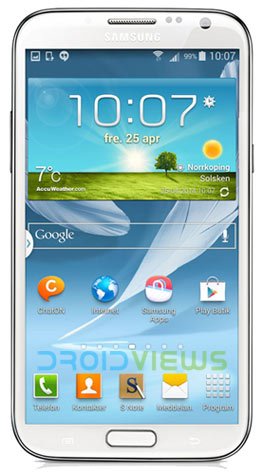
It is a common practice among smartphone manufacturers to make the users of their older devices wait for latest software updates. OEMs like Samsung have their main focus on dumping the smartphone market with new models and in doing so, they ignore the interests of the current loyal users. It has been about 5 months since the release of KitKat and it only occupies about 8.5 percent share of all devices running Android OS. Coming back to Samsung, there are just a few device that are privileged to get Android 4.4.2.
Expanding the KitKat update trail, Samsung now seems have recovered from its oblivion as it has started the Android 4.4.2 KitKat official firmware update for the international Samsung Galaxy Note 2 GT-N7100. Actually, the KitKat update started rolling out for the users of Galaxy Note 2 in France and it hit the Indian users just a day ago.
If you own the Samsung Note 2 and have not received the OTA update yet, it’s time to get a fresh feel by installing it manually. Just download the attached firmware file from below and update your Galaxy Note 2 GT-N7100 with the official Android 4.4.2 KitKat. Since both the available firmwares are for carrier unbranded devices, it can be installed on any Galaxy Note 2 GT-N7100 that is not locked to a carrier.
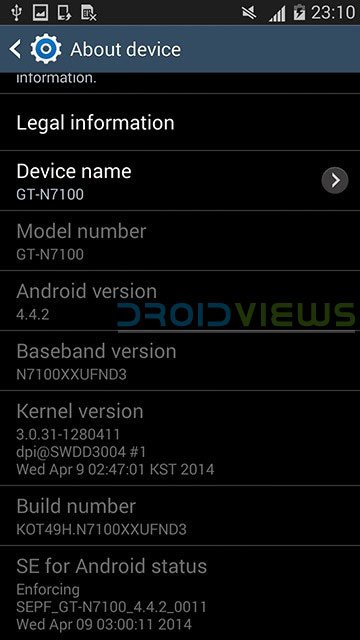
Though the Android 4.4.2 KitKat is really a big shot but after getting it on your Note 2, many of you won’t feel any great changes to make you say “wow”. Still, here are some of the new things we noticed and have listed below:
- The statusbar is now transparent and the its icons are now white.
- New camera shortcut on the lockscreen.
- The performance is now faster.
- The multitasking menu now looks terrible and some animations are removed.
- The screen now turns off with fading effect.
- New “Default applications” option in device Settings.
- GPS toggle has been replaced with a “Location” toggle.
- Samsung clock app has a new “Desk Clock” tab.
- Calculator UI change now has square/rectangular buttons.
- Settings and some other app icons have been updated.
- FM Radio UI has changed.
- Samsung KNOX security and un-downgradable bootloader.
- Many others.
How to Install
To update Galaxy Note 2 GT-N7100 with Android 4.4.2, just download the Android 4.4.2 firmware file from above, extract the zip, put the device in Download Mode, launch Odin and select the file with .tar.md5 extension in PDA/AP section on Odin. For detailed installation guide, see our firmware installation tutorial.
After upgrading to Android 4.4.2 on your Galaxy Note 2 GT-N7100, do not forget to share your thoughts about its performance, features and bugs, etc. Cheers!
Root Note 2 on KitKat and Install CWM Recovery
Root Galaxy Note 2 GT-N7100 on Android 4.4.2 KitKat & Install PhilZ Recovery



Hi Rakesh,
Claire here, This is about my Samsung Note 2 GT-n7100. I just found out that the phone I have is a cloned phone, it is actually an MT65XX Android phone. I guess that is the reason why my phone is not working in a way note 2 should during data factory reset.
Would you know how to reset an MT65XX instead? I have it factory reset already and still I could not upload my previous applications i.e.: facebook and youtube app – it is showing “not enough space on device”.
Hoping for your kind response. Thank you in advance.
Claire
Hello,
I have an old samsung Note 2 4.1.1 GT-N7100
Baseband Version N7100XXALIE
Build# JR003C.N7100ZSALIA
Problem is when I reset to factory settings to remove all unnecessary application and upload the app I need, when I start uploading apps it says “device does not have enough space” (something like that). What would I do? Thank you in advance.
Perform a data factory reset via the recovery mode. I am currently doing a detailed guide on the topic.
What I did was factory reset but I do not know how/what is factory reset via recovery mode. thanks
Hello,
‘morning 🙂
This is what happens when I press volume up+power+home together. after i choose recovery it shows the second picture. Hope you can assist me with this.
Thank you so much.
Claire
See this: https://www.droidviews.com/how-to-perform-data-factory-reset-and-wipe-cache-on-samsung-galaxy-devices/
Muchas Gracias, me sirvio muchisimo
Dear..
I have a Samsung note 2 GT-N7100
4.3 OS
Baseband version : N7100XXUEMK1
When I am updating by my phone its say you have latest version
how can i update 4.4.2 in my phone by officially..
please reply
thanks in advance
Yes, flashing a different modem file might fix the wifi issue.
Good Noon Hakesh, Thx for response!
I was very very tired yesterday, no sleeping for 20h! but now i’m ok!
just a questions:
1. do you have a link to root my sgh-i317 again by odin?
2. the file modem downloaded can i install directily from odin exactily like a upgrade?
Thx my friend! and so sorry to send you a lot of questions!
were you from?
awaiting your response to start root and install modem,
warm regards
Emerson Cassio
Try this: http://download.chainfire.eu/280/CF-Root/CF-Auto-Root/CF-Auto-Root-t0lteatt-t0lteatt-samsungsghi317.zip
Extract the zip and flash the .tar.md5 file using Odin 1.85: https://dl.dropboxusercontent.com/u/84115590/Odin_v1.85.zip
Having installed it, open SuperSU app and if you get KNOX warning, follow the instructions given here: https://www.droidviews.com/disable-knox-security-service-on-samsung-galaxy-devices/
Then download latest Odin flashable TWRP (.tar) from here: http://teamw.in/project/twrp2/124
and flash it using Odin 3.09. You can then install the modem using TWRP.
yES! i found the TWRP 2.02, i was using a old version, and i installed, the knox message appeared and i tick no. now my sgh-i317 ATT is rooted, i’ll sending the printscreens to you. thx a lot to help me.
but can you tell me how can i install the modem by TWRP please?
Glad to know it worked! I was kinda afraid. LOL
Download the modem file (it must be a flashable zip) and copy it to device.
Root into recovery mode using Volume Up+Home+Power buttons or this app for doing that conveniently: https://play.google.com/store/apps/details?id=com.jc.rebootmanager
Backup your ROM first using Backup option.
To install the modem, use Steps 4-7 from this guide: https://www.droidviews.com/how-to-install-custom-rom-on-nexus-5/
Provide the screenshots (not photos) of the rooting and modem flashing screens. Let me know.
Ok! lol! the link above is in Chinese linguage, and i don’t know speak or write one word in chinese LOL!
but can i make this by ES File explorer rooted? I installed my SuperSu by ES or in TWRP 2.02 have option “add Zip” and “Flash Now”
You mean my site link? No way!
If you are talking about the app, try this: https://play.google.com/store/apps/details?id=com.jmz.soft.twrpmanager
And yes, I am from India. 🙂
YeS! I saw your profile, you are a teacher! I think the India a very nice place.
About the App is exactilly i have installed in my note.
can i install by him? or by ES file?
i just need install this modem and pray to work fine! LoL
Of course, you have to flash the modem using TWRP recovery.
TWRP Manager?
Choose reboot to recovery> Install> add zip> confirm installation> reboot system
Oh my god, i saw in my watch 02:24am in your country. i so sorry, tomorrow i return talk with you. have a good dreams! see you 🙂
Hi Rakesh, i’m very very glad with update to 4.4.2, working fine and fast, the battery is excelent.
but… can you help me to fix my wi-fi? please 🙂
awaiting good news!
Warm regards from Brazil
E.Cassio
Try flashing different modems.
Hi Rakesh, Good Noon!
I’ve a Galaxy Note 2 AT&T SGH-i317 LTE
ANDROID 4.1.2
BB: i317UCAMH3
Kernel: 3.0.31 – 1363381
Can I make the 4.4.2 upgrade in may device with the
ROM: ZTO-N7100UBUFND2-20140520151336.zip?
i’ve odin and the device is rooted.
I bought my galaxy note 2 in U.S but i’m living in Brazil, and i can´t make the UP by OTA or KIES in my country.
Thx if you can help me, i will very glade!
warm regads,
From Brazil
Emerson Cassio.
Hi, you should not even think of installing a firmware that is not meant for your phone model. Here is the 4.4.2 firmware for the AT&T Note 2: http://d-h.st/8HG
Download it and install using Odin. You can follow the firmware installations steps here: https://www.droidviews.com/android-4-3-leaked-firmware-on-galaxy-note-2/
Don’t forget to make the preparations described on the guide.
Hi Rakesh, thanks a lot for quick response!
i’ve SU and Titanium insttaled in my galaxy note 2.
Just one more questions please,
1.the new firmware have portuguese linguage option and work fine with all funcions and services?
2. i need make full backup and clean all data before install the 4.4.2?
Thank you one more time for your support, i’m very glad!
awaiting to begin the upgrade…
regards,
Emerson Cassio.
Hi Emerson, if your phone has Portuguese with 4.1.2 AT&T firmware, it must be there in 4.4.2 too as it has the same csc and carrier.
You need not necessarily clean all data but you must always make backups of imp. data before flashing a new ROM.
Btw. cleaning data means a clean install which will make the firmware perform better!
Follow the instructions carefully.
Ok. my note 2 will be AT&T forever, right? 🙁
if you need anything for here, just contact me ok.
i’m very pleasure to help you.
after my upgrade i’ll posting here.
see you…Thx
Emerson Cassio
Oh yes.
I have asked one our contributors to cover the topic as the firmware is not available easily.
Please give us the Odin screenshot when you get PASS message and also the home, lock and About device screenshots. Thanks a lot!
ok! i’m downloading the files. when i finish post the screenshots!
Okay, good luck!
Good Morning Rakesh!
The Upgrade was a sucess. working fine! but my Wi-Fi no working. when i press turn on wi-fi button back to turn off automatically. how can i fix it? please!
The 4G 3G edge, from network operator is fine.
S pen – OK
app’s – Ok like before.
here are the printscreens i promised, Please help me fix my wi-fi network!
you are the Guy! THX!
awating fix…
Emerson Cassio
Hey sorry for the late reply! Time zone problem you know!
Anyway, glad to everything is working fine for you. As for the WiFi issue, try a data factory reset via system recovery.
Thanks for the screenshots. ☺
Hi Rakesh, Good Morning!
lol, don’t worry. really the time zone is diferent!
the time here in Brazil: 02:27h
developer options is enabled. how can i root for 4.2.2 by odin? link please.
and, if i use data factory reset via system recovery i’ll loose my personal data?
Hi Rakesh, why do you deleting my last questions?
I did something wrong?
I’m sorry if I made any mistakes
I didn’t delete any. All comments with external links are submitted for moderation. Since I am away for a while, I could not approve it. Sorry.
Good Noon Rakesh,
i found this video can you tell me what you think about? do you know this system? Ezkat. follow the link on youtube video: http://www.youtube.com/watch?v=H8LnMaFLqug
PS. I’m downloading yet, my connection is 10Mb but the link is slow.
Checked. Seems fine. You need not refer to a video though. Just use the Odin steps an preparations given here: https://www.droidviews.com/update-sprint-galaxy-note-3-to-android-4-4-4-kitkat-and-root-it/
Only difference: choose the firmware you are downloading now in AP.
Yes. Sure! i’ll folling your steps.
i need enable USB Debugging before connect the device on desktop?
Yes, it would wipe all data on the internal storage. Backup your apps before attempting data factory reset.
You won’t be able to receive OTA in Brazil and I don’t think you would go to US for that. You’ll have to flash new firmwares manually.
As for rooting, I am not quite sure but Towelroot should work for you: https://www.droidviews.com/root-att-and-verizon-galaxy-s5-without-voiding-knox-warranty/
Hi
I accidentaly have reset my note 2 and now my IMEI number is different and phone do not accept the sim card.
Help me plz
You mean the factory reset wiped the IMEI?
I dont know probbably. I just reset my phone on RESET icon it has in Settings than it happened
Where are you from?
Im from Kosovo
Can you help me with my problem please.
Try installing the same version of firmware as your phone is currently running. It should be fixed. Since you do not have the backup of your IMEI/EFS, there is no other way than flashing firmware and using Octopus box tool.
hI dear may i have password for this zipped file please?
which zip file?
Hi i am zeeshan i am having problem while installing the update via odin i receive this message and sign of fail appears ”Can’t open the serial(COM) port”, please help. thanx
Resinstall the drivers, disable enable USB debugging, restart computer and try a different USB cable.
for some reason, my wifi keeps on being disconnected after kitkat update. Didn’t happened before when it was 4.3. It wasn’t my router for the other devices connected to it were never disconnected automatically.
It’s a known issue. However, you can try a data factory reset as a possible solution.
Rakesh can you help me??
I still can’t get the samsung official 4.4.2 update for my note 2 GT-N7100,even i can’t recieve the update 4.3.1 still…
Why don’t you install 4.4.2 manually?
How can I install it?
The ROM is above and the guide here: https://www.droidviews.com/android-4-3-leaked-firmware-on-galaxy-note-2/
Does it have Persian (Farsi / فارسی) language? I know the french version doesn’t but how about the Indian one?
Get this UAE firmware: http://samsung-updates.com/details/28361/Galaxy_Note_2_International/GT-N7100/XSG/N7100XXUFND4.html
It should have Farsi.
Can you generate a torrent Link for AFG (Afghanistan) region for 4.4.2
thank you
THanks a lot bro….torrent link was osam..!!
thanks for sharing
What About Verizon Note 2 ??
any help plz
The KitKat OTA for your phone has already been rolling out for a couple of days now. Just wait and you’ll get software update notification.
Thanks again Rakesh for this good article. With your days of use, what do you think is the best rom, France or India?
Both are almost the same in performance. I tried both since the France version came a week earlier.