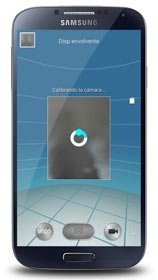
The Photosphere camera from Android 4.2 is one of the most sought about things among non-Nexus Android users. And why not, the feature so unique in its own right as it lets users capture a 360° panoramic pictures that look amazing. Before the launch of Galaxy S4, there were strong rumours that Samsung would release its own version of Google’s photosphere branding it as Samsung Orb. Well, the Galaxy S4 came and offered a lot of new camera features but Orb was not there.
It was not until the arrival of the Galaxy Note 3 that the Korean manufacturer introduced something similar to the Photosphere. Among the various camera modes of the Note 3, there is one called the Surround Shot feature that allows capturing 360° panoramic pictures by stitching together multiple photos into a single spherical image. With the Android 4.3 update rolling out to the Galaxy S4, we all expected to see the new camera feature on this device, but it did not come to S4.
Are you a Galaxy S4 users? If yes, how would you feel if you are privileged to enjoy the Note 3’s exclusive Surround Shot camera feature on your phone? Yes, it is only the world of Android where such things can happen! If you have a rooted Galaxy S4 with a custom recovery installed on it, XDA member LastStandingDroid has good surprise for you! He has backported the Note 3 camera with all its modes that also includes Surround Shot.
The Note 3 camera app for the Galaxy S4 is available as a flashable zip and can be installed using a custom recovery like ClockworkMod or TWRP. The app has been tested working fine on Samsung Galaxy S4 GT-I9500 and GT-I9505. Because it works on the LTE variant of the device with Qualcomm Snapdragon chip, it should also work on the US (Verizon, AT&T, T-Mobile, Sprint, etc.) and Canadian versions of the device.
Requirements:
- A rooted Galaxy S4
- CWM or TWRP Recovery
- Your device must have either Android 4.3 based TouchWiz ROM (not tested on Android 4.2.2)
- A root file browser app
Also Read:
Update Your Galaxy S4 with Android 4.3 Official Firmware
How to Install:
- Download the Note 3 camera app in zip from above and copy it to your S4.
- Boot your device into recovery mode by pressing Volume Up+Home+Power buttons together for 4-5 seconds. Release the keys when you see the CWM or TWRP screen. Alternatively, you can use one of these apps to enter the recovery mode.
- The first thing that you must do after arriving the recovery mode is to backup your current ROM using “backup and restore” or “Backup” option. If you change your mind, you can later restore the backed up ROM.
- Now go to “install zip from sdcard” or “Install” option and select the zip file.
- Confirm the installation when prompted.
- Finally, reboot your Galaxy S4.
When you phone boots up, check out the new camera app> Enjoy!
Fixing Bugs:
Having installed the Note 3 camera on your Galaxy S4, if you find that the Surround Shot feature is not working properly, download the following file, and copy it to system/ framework folder using a root file manager app. When the file is copied fix the permission to rw-r–r (644). You can find a detailed guide on fixing file permission on Android here.

Sorry . . meant to add “Rooted S3”
Will it work on a Samsung S3 android 4.3 ??
No.
will this work on note 2???
No.
🙂 okkk thanks for the info
arvind_kewat No, it’s only for the S4.
Hello rakesh, I m having omega rom with android v4.3 on my galaxy s3(gt-i9300).can I flash this camera zip??? Will this work on my galaxy s3???
Thank you! I will try it a little bit later today. ^_^
k_saetern26 Either download on PC and then copy to device, or download directly to the device. It doesn’t matter. Just make sure to remember the zip file’s location.
Hi Rakesh, I have a galaxay S4. I want to download this app, however, how do I download the zip? Do I download it to my computer and then open it up? How do I copy it to my S4? Sorry, this is my first time trying this.
Thanks!
Hi,
I upgraded my camera, but it does not work. Is there any way to restore the old one without restoring the whole device?
please rakesh i need help.. i have galaxy note 2 sgh i317m.. and i need input arabic language.. haw can i do it.. i try and try and nothing works .. please please help me ….
Did you try this: https://www.droidviews.com/how-to-enable-hidden-languages-on-samsung-htc-and-sony-android-devices/
yes i did put maybe because my phone from Canada its not supported Arabic language .. its there any other way and thank you for your respond .. please please help me
Then root your phone first and try language enabler.
i rooted my phone and tryed language enapler put tha arabic language don’t show up.. did you have International room supported my phone galaxy note 2 sgh i317m ، 4.1.2
What do want full system language or Arabic on keyboard?
full system.. i have arabic keyboard..
See this if it helps: http://www.mydigitallife.info/how-to-install-and-add-hebrew-arabic-and-unsupported-language-fonts-to-android-phone/
thank you for your help .. my phone is reading and writing Arabic font but the main screen is anguish and I don’t have Arabic language in my system that’s what I want Arabic language in all system .. I’m sorry if I bothering you you and thank you very much ..^_^..
Try this once: https://www.droidviews.com/how-to-enable-hidden-csc-features-on-samsung-galaxy-devices-with-root-access/
these for adding keyboard language not for system language.. im sorry man its ok if u don’t now another way .. u trying so hard and thank u soo soo match for that
I’ll keep an eye on things and will let you know if I discover anything.
i can’t think u enough man you are a great guy and I hope you all the best in your life .. I am waiting for your response ..
hi rakesh haw r u.. did u find any thing u can help my with.. im still witting for u..
Hi tried to find out a solution but no result. I think you should look for a custom ROM that has Arabic support. 🙁
Will this work on Note 2 N7100 running 4.3 custom rom?
Not tested myself but it should work. You can give it a shot after backing up your ROM.
@Rakesh do you have an idea if this will also work on custom rom like cm 10.2 AOSP for the 19500?
Well, it’s a TW based camera and so it require TW framework to work. Let’s hope someone mods it to work with AOSP too.
okay thnx for your respond
Thanks again Rakesh..it working.
Nice, can you confirm your Android version and S4 model?
Will it work on s3??
No, it’s only for Galaxy S4. 🙁