As it turns out, Google wasn’t really trolling anyone when it allowed the Pixel 3 XL to become the most leaked smartphone in history. Perhaps they were allowing everyone the time to rant up and then calm down about the ugly notch by the time they announced the phone. Because the notch is there on the Pixel 3 XL and it’s huge, and it also has a bottom chin. Google unveiled the Pixel 3 and the Pixel 3 XL at the made by Google event in New York Yesterday. The phones are out however you may feel about one of them. Hardly a day later, the Pixel 3’s Google Camera is available to download for older Pixel devices.
Even before the devices were announced, we’ve seen numerous leaks. We even had all the live wallpapers from the device. Then the Pixel 3 live wallpapers were also ported to other devices. Therefore, it shouldn’t surprise many that the Google Camera APK from the Pixel 3 is already available. We can expect more Pixel 3 goodies to come out soon as the devices make their way into the hands of consumers and developers.
Google Camera from Pixel 3
Just to make it clear though, this Google Camera APK is simply the updated Google Camera app extracted from the Pixel 3 firmware. It is not a port and will not (or at least should not, theoretically) work on other Android devices except for the older Pixel/XL and Pixel 2/XL. Although the new and updated APK does bring in some changes, it doesn’t bring all the Pixel 3 camera features, obviously. Things like Live Lens, H265, live focus tracking, and Top Shot, etc. aren’t here, yet. Google will probably want to keep some of them Pixel 3 exclusives for a while.
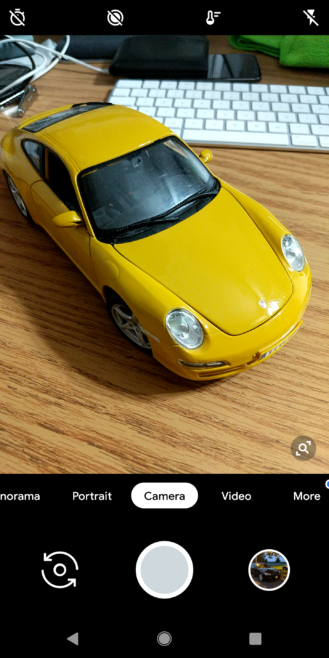
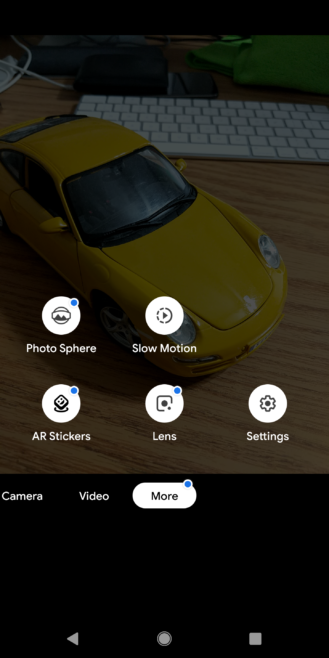
The camera interface has been updated to a more iOS-esque style thus removing the slide-out side menu on the left. Instead, you can switch between different camera modes by swiping from left to right, as listed across the bottom. Many Android OEMs have been taking an inspiration from Apple’s camera interface implementation over the years. Google has finally joined in and it’s not exactly a bad thing. There are some things Apple does better and if we can get some of that without all the cons of iOS, it can’t be bad.
Moreover, you’ll notice the smaller video recording button beside the capture button is gone. Video recording mode instead can also be accessed by swiping left. Similarly, you can also access the Panorama and Portrait modes. A “More” section has been added which contains Photosphere, Slowmotion, AR Stickers, Lens and Settings. Lens mode can also be activated by long pressing the viewfinder and that’s really intuitive. There are some other minor changes here and there such as a white ring around your latest camera picture and a new zoom UI.
New features
While most of the changes are about the interface, the new Google Camera from the Pixel 3 does bring a couple of new features. First and most important, if you’re someone who takes photos very seriously, is RAW support. It has been mysteriously absent from previous Google Camera versions but it is finally here and you can find it under the Advanced section in the Settings. When you enable RAW support, a toggle at the top of the camera interface allows you to switch between JPEG only and RAW+JPEG. The Burst settings are gone now which isn’t devastating considering Photos already did that.
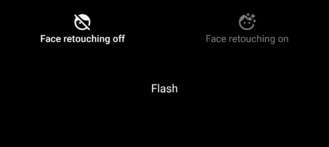
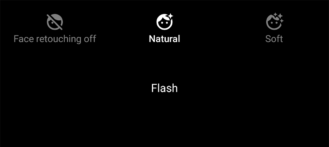
The Panorama mode has also seen an update where you don’t have to line up the dots anymore. The new mode is simpler, and Google says, has better stitching quality. It is optimized for VR as well, and can now also record sound. Furthermore, Portrait mode now lets you enable/disable soft or natural face touching options. You can also completely disable face retouching.
Download Google Camera from Pixel 3
The Google Camera APK from the Pixel 3 is available on APKMirror, courtesy of AndroidPolice. The APK is meant to be installed on Google Pixel devices running Android 9.0 Pie.
source: androidpolice
Join The Discussion: