We’ve just been aware of the launch of the powerful and stunning Nexus 5 coming with the latest and new version of Android; KitKat 4.4. Our worthy Administrator/Writer already took the liberty to briefly explain the features of this new Android version (Read the complete article here).
But we’ll are also aware of the fact that this new version is going to take a bit of more time to land on other devices. Everyone here is enthusiastic, to use the new UI as well as the Apps, so here we’re making it a little simple for you to enjoy the latest Android KitKat goodies on your Android device running Jelly Bean (4.1/4.2/4.3). We’re simply gonna share the extracted APKs of the latest Apps, which can be installed directly on the latter.
For those who own the Nexus 4 and Nexus 7, can read out this article to Install the KitKat 4.4 based AOSP ROMs on their devices.
Below is a list of Android KitKat 4.4 apps that are available for Jelly Bean devices.
Google Play Store
version: 4.4.22
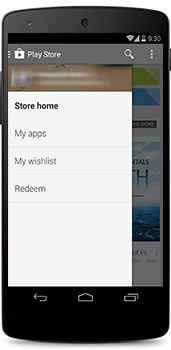
The latest Play Store came along with a major overhaul to bring in a slide-out menu, which definitely makes it look more sleek and organized. Apart from that, a few more colors have been added, also App changelog shows the addition of some more translations.
Hangouts
version: 2.0.012
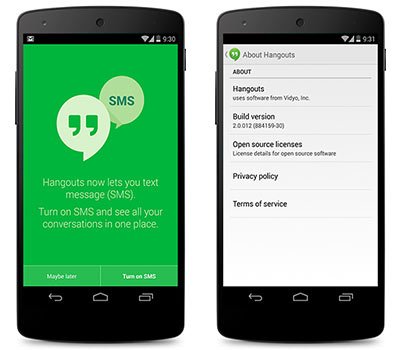
We’ve been rumored since a long back about the combined all-in-one Hangouts, to finally combine both; the IM chats and text messages. And so here it is, the v2 of the Hangouts App brings it in. Other additions include: Set Status/Moods, Location Sharing & GIF animations.
Camera
version: 2.0.001
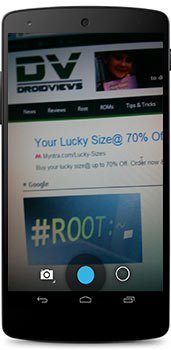
With the release of JellyBean, both the Camera & Gallery Apps were merged altogether into one and now with the release of KitKat 4.4, both have been separated again. Whereas the camera App has now also been allotted a new icon and internal enhancements for better exposure and light levels, resulting in better picture.
QuickOffice
version: 6.1.181
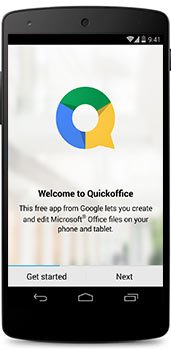
Google has deliberately released a new App which has got initiated its delivery with the upcoming Android 4.4 KitKat. What it does? The name says it all, it is an App to open, create, edit Microsoft Office documents. You can also open and view PDF files. Which can be later saved onto your Google Drive storage with a huge capacity of 15 GB.
Clock
version: 3.0.0
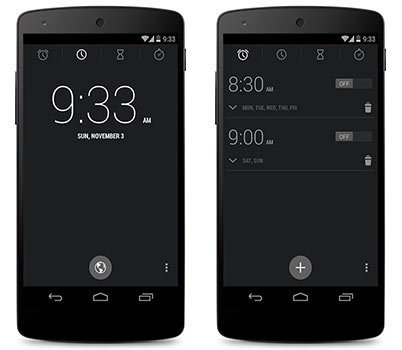
The new clock App comes with a revamped UI bringing the Alarms to the upper tabs, it also takes back the bold colors from the clock that showed up in JellyBean.
version: Unknown
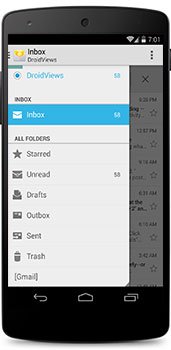
Finally! The stock Email App gets updated with completely revamped UI, which is very much similar to the Gmail App. The most noticeable addition is the slide-out menu. Apart from this, no other changes are yet visible or mentioned.
Google Experience Launcher
version: 0.9.6.886092
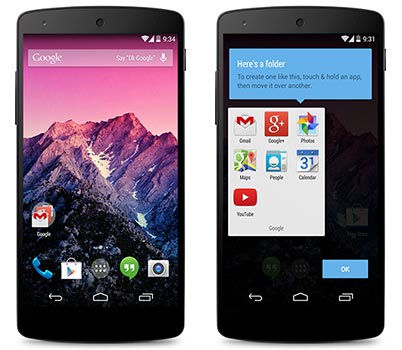
The new launcher App incorporates a lot of new designs and features, which includes new wallpapers, new folder outlooks, much more integrated Google Now actions and a lot more to look into. The pack below comprises of 3 Major APKs, which are held responsible for the proper functioning of this launcher. These are:
- PreBuiltGmsCore.apk (Google Play Services 4.0)
- Velvet.apk (Google Search)
- GoogleHome.apk (Launcher)
The launcher apk alone can work too, but for a pure Google experience, you are highly recommended to Install all the three. In case you get FC issues with Google Search, long-press on the homescreen empty space, tap on Settings and then on Voice. Now, tap on Language, select and other random language and then reselect your desired language and voila! Everything will work smooth.
Some More KitKat 4.4 Apps:
Google Calendar- Download
Gmail- Download
Google Keep- Download
Play Books- Download
Play Games- Download
Gallery- Download
How To Install?
Its very simple, just download the desired App. Connect your device to the PC and transfer the APKs. Now, using a suitable file manager browse to the APK location and Install it as a normal application. If you’ve not yet installed any application from outside the Play Store, you will need to enable Unknown Sources under Settings > Security.
Now just browse to your app drawer and launch the latest and updated apps that come with KitKat 4.4 on your JellyBean device. Kindly share your views about these newly updated apps.

messed up my s3 mini.
Hello,
im using an Alcatel Onetouch idol ultra running JB 4.1.1 but after i install all of the three apks (
PreBuiltGmsCore.apk (Google Play Services 4.0)
Velvet.apk (Google Search)
GoogleHome.apk (Launcher)
) i cant enter to the launcher, it says “Unfortunatelly, google search has stopped” do would you know how to fix it? plz help me it looks awesome. or doesnt it work on 4.1.1?
Hi, tested it on a Galaxy device with 4.1.1 and it works. I am not sure what makes it not working on your phone.
I got the error message too but after rebooting the phone a couple of times, it was fixed. Do you have root and CWM on your phone?
Why I can’t install the New Google play store? It says “Google Play Store Won’t Install. Free Up Some Space” but I have 2gb space storage in my phone. Help ASAP
My phone is looking good with this launcher, I will share this website with other people.
It has nothing to do with the free user memory. Free system memory by uninstalling apps/games.
Do you mean I will uninstall all my apps and games?
No, just a few of them to free some space.
i have this issue befor ebut what i did is wipe cache and dalvik cahe and rebooted my phone and its fixed
This apps are available only in nexus 4 and 7? I want to install this apk in my s3mini
These can be Installed on any JellyBean running device, even your S3mini
Thank you for knowing me 🙂 everyday i visit your website if there’s new post 🙂
We surely won’t let your hopes down! Keep viewing 🙂
Hi, did you have lattest Google wallet apk? it is updated on stock 4.4?
There is no significant difference. If you still want to have it, download the full dump: https://www.droidviews.com/download-nexus-5-official-stock-wallpapers/
please rakesh i need help.. i have galaxy note 2 sgh i317m.. and i need input arabic language.. haw can i do it.. i try and try and nothing works .. please please help me..
See this: https://www.droidviews.com/how-to-enable-hidden-languages-on-samsung-htc-and-sony-android-devices/