Galaxy S6 & S6 Edge users are in for another treat with the new Volume mod that will significantly increase the volume levels of your device’s speaker, headphone, and Bluetooth. Just a while back, we’ve posted a workaround for enjoying Viper4Android on your Galaxy S6/S6 Edge smartphone which will give you the ultimate music experience with balanced audio performance. If you haven’t checked it yet, do follow the below link:
With Viper4Android you’ll get a great music experience but you could still notice low volumes just because Samsung chose to seal the volume levels at a certain point. Usually, smartphone manufacturers restrict the hardware capacities to an optimal level to ensure the life of the device. However, tweaking these levels to a certain level wouldn’t harm your device noticeably (probably it will marginally) but you’ll certainly feel the improvement in performance. So if you’re in, today we will see how to increase the speaker volume on Galaxy S6 and S6 Edge using the Volume mod developed by raw2000j of XDA developers.
The Volume mod V3 will increase the volume levels of the speakers, headset, Bluetooth to 7 levels higher and the ringtones to 3 levels higher. The mod is available both in the flashable zip format and the modified mixer_paths.XML file, so you can choose either of them. If you choose the simpler recovery method, follow our TWRP installation guide for Galaxy S6.
Downloads
Install Volume Mod on Galaxy S6/S6 Edge
Method 1: Using TWRP Recovery
- Download the flashable version of the Volume mod and transfer it to the root of your device’s storage.
- Reboot into recovery mode:
- Power off your device and wait until it’s completely turned off.
- Press and hold Power + Home + Volume Up buttons together and release them as soon as you see the Galaxy S6 logo on the screen.
- First of all, backup your current ROM and setup using the Backup option in TWRP.
- In recovery, click on Install and choose the Volume mod zip file and confirm flashing.
- Reboot the device once the flashing is complete.
Method 2: Using Root Explorer
- Download and install any root explorer of your choice. You can use the app below:
[googleplay url=”https://play.google.com/store/apps/details?id=com.speedsoftware.explorer”] - Download and transfer the modified mixer_paths.XML file and transfer it to your device’s storage.
- Open the explorer app, rename the original mixer_paths.XML file to mixer_paths.xml.bak just to have a backup of the original file.
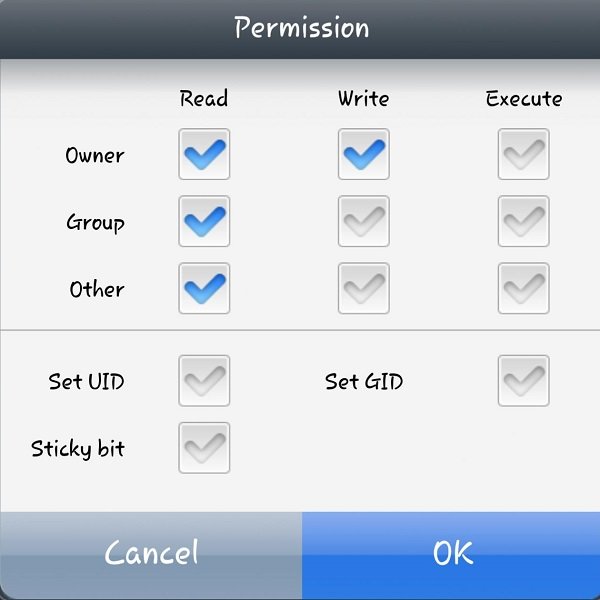
- Now copy the modified file and change the permissions to 644 (rw-r-r) and double check the permissions once again.
- Reboot the device.
After installing this mod, you’ll notice a significant increase in the volume levels of your device. If you feel like reverting back, replace the modified file with the stock mixer paths file. That’s it.



why when this fashion Volume Mod V3 Flashable when calling crackling dynamics