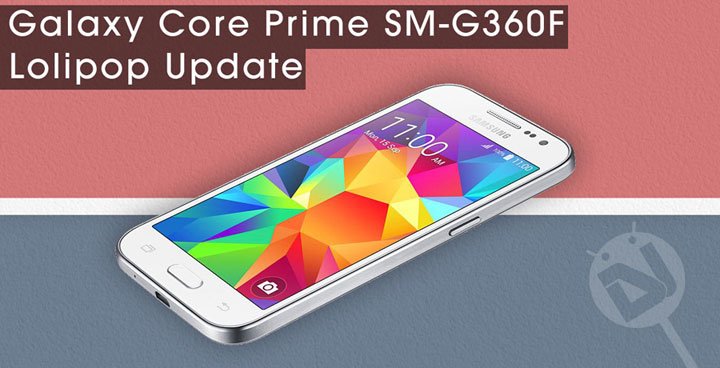
Samsung has been pretty busy with sending the latest software update to many of its eligible devices for quite a few months now. The reason that makes the update so special this time is the Lollipop upgrade. Android Lollipop is definitely the best interaction the OS has witnessed so far. It brings heavy tweaks in terms of the look and feel of the user interface, as well as new features. Having updated to Lollipop, you will also experience better and faster performance, smooth animation and better battery backup.
One noticeable thing about Samsung’s Lollipop rollout has mainly been for the new and older flagships. However, when we see a low-end phone like the Samsung Galaxy Core Prime getting major OS updates along with the high-end devices, it feels cool. The Galaxy Core Prime is rather a new phone launched in the November 2014 with Android 4.4.4 KitKat out of the box and now it has been receiving the latest and greatest version of Android. Yes, I mean the Android 5.0.2 Lollipop.
The European LTE model of the Galaxy Core Prime (SM-G360F) has been getting the new update for a day now. The Lollipop update has started rolling out in Poland, followed by Bosnia and Herzegovina. You live in these countries, you might have already got the OTA notification. In case you did not receive the OTA yet, you can trigger it manually by tapping the Update Now option under Settings> About> Software update.
If you have rooted your Galaxy Core Prime SM-G360F or have installed a custom recovery, you might not get the official OTA. However, it does not mean that you won’t be able to enjoy Lollipop at all. Since the firmwares files are available for download, you can install them manually using Odin. If you do not belong to Poland or Bosnia and Herzegovina, you can still download the Android 5.0.2 firmware from below and flash it right away.
Both the available firmware are unbranded and it means that they can be installed on any Galaxy Core Prime with model number SM-G360F regardless of country and region. The only thing you must take care before installing the firmware is to make sure that your phone is not locked to a network provider.
Download Lollipop Firmware for Core Prime SM-G360F
Poland: G360FXXU1BOD9_G360FOXA1BOD9_XEO.zip
Bosnia and Herzegovina: G360FXXU1BOD9_G360FOXX1BOE2_ERO.zip
How to Install:
To install the Android 5.0.2 Lollipop firmware on your Samsung Galaxy Core Prime, please refer to our detailed tutorial on flashing Samsung firmwares on Galaxy devices.
can i install this rom on samsung galaxy core prime sm-g360H variant?
How i can retrieve the old software for Samsung Galaxy Core Prime? I have problem with my unit, after I update my software last May 2015. My phone gets lagging. And it appears TouchWiz not responding. please help me. Thank you.
what would happen if i flash it on my g360h?
I don’t recommend absolutly do this, your phone will be critically slow and probably you will be repentant
is this 4.4.4 ???
yup it is kitkat 4.0.4 🙂
have any idea when they release lollipop rom for this model
hello,
Pls someone has already tested this firmware on SM-G360H ?
thks.
I did and the phone is sluggish, it takes upto 20 seconds and more for apps to open. Even doing basic operations like messaging is slow. I do not recommend lollipop till the fix the bugs
Since updating to Lollipop my core prime is sluggish, battery drains quicker and certain apps take too long to open
I Upgraded as well and I am having the same issues im downgrading to 4.4 kitkat
did you have any trouble going back to kitkat, I also read somewhere that if you do a factory reset and reinstall your apps the phone should be grand
The only issue i had was when you flashed it and it rebooted. It got stuck in a boot loop so i just pulled out the battery, went into recovery and did a factory reset.Then i rebooted the phone gave it 5-10 mins to boot then it was back to normal, just what it was like at the start.
I done a data factory reset and the phone is working perfectly using lollipop
Do a reset: https://www.droidviews.com/how-to-perform-data-factory-reset-and-wipe-cache-on-samsung-galaxy-devices/
sir my phone is smg360h how to install 5.0.2 lollipop version upgrade i m indian
It’s not available officially yet.
i have a problem my core prime after installing android 5.0.2 is heating up more than 4.4 how can i downgrade?
Heating a common issue with new firmware upgrades. Try a data factory reset to fix it: https://www.droidviews.com/how-to-perform-data-factory-reset-and-wipe-cache-on-samsung-galaxy-devices/
Flashed, now my brightness control does not work. Please help
Nevermind,.. I had to do a factory reset.
Rooted, now my brightness control does not work. please help
will the polish firmware work in the united kingdom?
Yes, it’ll.
sir can i update this firmware to my samsung galaxy core prime 360h???
no
how can i downgrade from 5.0.2 to 4.4.4 have tried using odin but it just hangs when trying to reboot and gets stuck on the samsung logo
no worries sorted it
my phone is galaxy core prime 360H, will it be possible to upgrade to lolipop version here in bangladesh?
No because its not available yet.
Will the poland or second firmware work in Pakistan?
Yes.
Thanks.
what if i have the phone but a different build -mine is (G360FXXU1AOB1)- would it work?
Yes, it’ll still work for you. Install the Poland firmware.
thanks man i really appreciate your help
how can i update my tab 2 10.1 gt_p5100
See here: https://www.droidviews.com/galaxy-tab-2-10-1-gt-p5100-gets-android-4-2-2-jelly-bean-update/