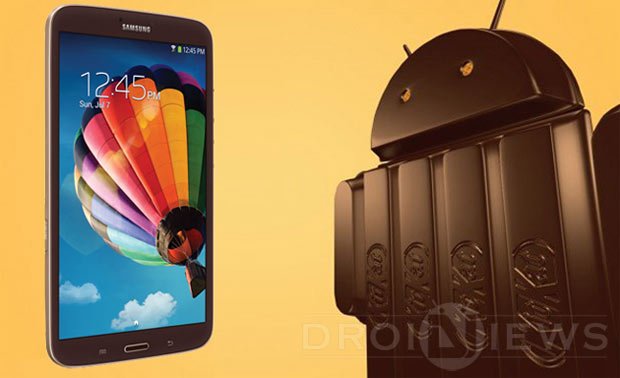
The Samsung Galaxy Tab 3 8.0 SM-T310 has been present in the market for about one year now. It belongs to the third-generation of Samsung’s Tab series and was launched with Android 4.2.2 out of the box. Quite surprisingly, the device did not see any major OS update from its manufacturer since its release.
If you own the Galaxy Tab 3 8.0 with model number SM-T310, a good news has finally arrived as Samsung has started rolling Android 4.4.2 KitKat firmware update as OTA for this tablet device. If you have not received the KitKat OTA update notification yet, you should manually check for it from Settings> About> Software update.
In case you do not see any update notification, you’ll have to wait till the OTA reaches your country your region. However, if you do not have patience enough to wait, there is another way to install the Android 4.4.2 KitKat firmware on Galaxy Tab 3 8.0 SM-T310. The KitKat firmware for the device with build version T310XXUBNE9 is now available for download. Actually, the firmware is meant for the users of Tab 3 8.0 SM-T310 in France. Since the firmware is for carrier-unbranded devices, it can be installed on any Tab 3 with the aforementioned model number.
Warning!
Please note that the Android 4.4.2 KitKat firmware provided below is official and meant for Galaxy Tab 3 8.0 SM-T310 only. Installing firmware manually on your phone might prove risky, so follow the installation steps at your own responsibility.
Preparations
If you have decided to get the latest version of Android on your Galaxy Tab 3 8.0, here are a few things that you need to do beforehand:
- Download the firmware file for your device: T310XXUBNE9_T310OXABNE9_XEF.zip
- Till the file gets downloaded, download the install Samsung USB Drivers on your computer. Skip this step if you already have it installed.
- Also download Odin 3.09: Odin3 v3.09.zip
- Enable USB Debugging on your Galaxy Tab 3. Follow these instructions if you do not know how to do so.
- Backup the apps and data present on your device.
Install KitKat Firmware on Galaxy Tab 3 8.0
Having taken care of the things mentioned above, you can now install the stock KitKat firmware on your device. Just follow the steps given below:
- Extract the firmware zip file. Inside the extracted folder, you’ll find the actual firmware with .tar.md5 extension.
- Also unzip the Odin_v3.09.zip and open the extracted folder.
- Now boot your Galaxy Tab 3 8.0 into the Download mode: turn it off and then press and hold the Volume Down + Home + Power buttons together for about 2-3 seconds. You’ll see a warning screen, just press the Volume Up key to enter Download mode.
- Launch Odin and connect your device using the original USB cable provided with your device.
- The ID:COM port on Odin will turn blue when it your devices gets detected.
- Now click the PDA button on Odin and select the firmware file with .tar.md5 extension.
- Make sure that only Auto Reboot and F. Reset Time options are checked on Odin.
- Take a calm breath and click the Start button on Odin.
- Wait till the installation is done. It might take about a 2-4 minutes.
- Finally your Galaxy Tab 3 8.0 SM-T310 will reboot automatically.
When your Tab 3 boots up, it will be running the newly installed Android 4.4.2 KitKat firmware. Enjoy! In case you encounter any issue during installation, or have any question, just drop us a comment below!

help me . I try it and it fail . how can I back to the old version ?
I guess you are from Philippines. Downoad and install this firmware: http://updato.com/firmware-archive-select-model?record=277019CFED1C11E69215FA163EE8F90B
does it work on SM-T113NU ..
Where are you from?
does it work on SM-113NU
Will this firmware overwrite the old o/s, ? reason i ask is my device has a virus,i have tried doing a factory reset,but virus seems to have tethered itself to my tablet,and keeps coming back every time i boot up,and thought the only way to eradicate virus was to do a fresh install of o/s,hope someone can give me an answer,as i am totaly lost as what else to do with my samsung galaxy tab,thanks.
Had this same problem. I have downloaded firmware from sammobile, pack for UK, after flashing ROM using ODIN I’m not able even to connect to my wifi, and I get popups about that google.play stopped working etc. Any help?
Try this first: https://www.droidviews.com/how-to-perform-data-factory-reset-and-wipe-cache-on-samsung-galaxy-devices/
Yes it will. You can also try this if you don’t want to install the firmware: https://www.droidviews.com/how-to-perform-data-factory-reset-and-wipe-cache-on-samsung-galaxy-devices/
i want firmware for tab 3 T217A AT&T kindly help
you guys really need to upload the file to a better link. its pain in the ass to download that big of file from sites like gives you only 50kb/s download speed just because you re not premium.
Download from here then: http://www.sammobile.com/firmwares/
Se Pude Aser Con Root ?
Does it work on T310 TAB as it’s “NORDIC” editon or something
Does it work with SMT210
No, installing it will brick your device.
What firmware must be on tab3 8.0 to install?
Any.
Can u please provide a better link for the update tera file doesnt work and rapidgator is too much confusing
It works with tab 3 7.0 ?
No.
Hello guys. I had just one question to ask you guys. I have a non rooted android 4.2.2 tab 3 8.0. Do i need to root my tablet in order to flash this kitkat update? Thanks in advance. Waiting for a reply.
It’s official Samsung firmware, so you do not need to root your device.
I have beeen waiting too long for this. Should i update it manually or wait for the official ota update. One last thing, are you aware of any problems after this update? Thanks.
To the best of my knowledge, the update works fine on your device. As for updating it manually, it’s your call!
WHEN DOES THE TAB 3 SM – T211 GET AN FIRMWARE UPDATE
It has already received KK update. Download this firmware: http://samsung-updates.com/details/30408/Galaxy_Tab_3_7.0_WiFiplus3G/SM-T211/ITV/T211XXBNF5.html
Please note that it for Italy but would work on your device without any problem. You can install the firmware using the tutorial above.
Will the firmware work on samsung galaxy tab 3 Sm-T311?
See here: https://www.droidviews.com/update-galaxy-tab-3-7-0-sm-t211-with-android-4-4-2-kitkat-firmware/