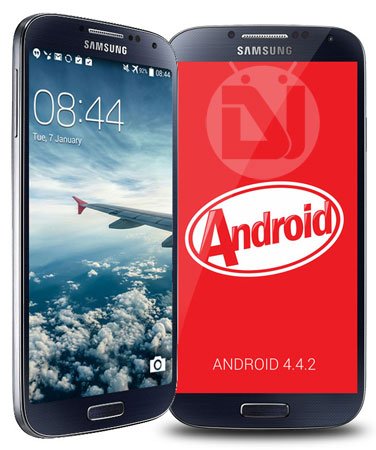
The long-awaited Android 4.4.2 KitKat official firmware update for the Samsung Galaxy S4 GT-I9500 has finally started rolling out. This time, the users of the phone in Russia have reported getting the new update via OTA. Since the KitKat firmware for GT-I9500 is unbranded, it can be installed on any Galaxy S4 (Exynos Octa variant) that is is not carrier branded.
If you happen to own this S4 variant and are from some other part of the globe than Russia, you can download the firmware file from our link below and install it manually using Odin. For the sake of your convenience, we have added some download mirror links too.
Android 4.4.2 KitKat firmware with build version I9500SERFNB3 for the Galaxy S4 GT-I9500 brings several new features and above all better performance. Just for your information, it does not bring ART (Android RunTime) to your device that Google introduced while releasing KitKat.
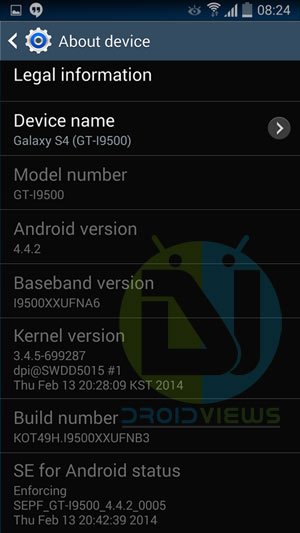
Firmware Details:
Device Model: Samsung Galaxy S4 GT-I9500
Firmware Version: Android 4.4.2 KitKat
Build date: 13 February, 2014
Product Code: SER (Russia)
PDA: I9500XXUFNB3
CSC: I9500SERFNB3
MODEM: I9500XXUFNA6
New Features in Galaxy S4 Android 4.4.2 Update
- The camera button on the lock screen
- Improvement in Camera performance
- White icons on the status bar
- You can choose default app for Home Launcher and Messaging in Settings> More> Default Applications
- Better performance resulting in better scores on benchmarks
- Many others
How to Install:
Please note that updating your phone with the new firmware will upgrade its bootloader, and so you will not be able to downgrade your device to Android 4.3. To install this official firmware manually on your Samsung Galaxy S4, follow the installation steps given in our guide.

Hello I Have A Question. I Live in Saudi Arabia aka KSA but i dont want the frimware to be in Arabic so can i downloda the KSA one and change it to english; I mean that by changing language.
Yes, you can change the system language to English.
when i click the link it opens but downloading doesnt start … ended with an error that site does not allow two time downloading something regarding session
do you have any other link apart from sammobile bcoz that to not working some kind of torrent ??
Hi rakesh plz help me that why my mobile samsung galaxy GTi9500 cannot download and install an application?? 🙁 🙁
i m from Pakistan
What error do you see when you try to to that?
Hello Rakesh, My Mobile is Galaxy s4 GT19500,Sim Card Range Cant Available What Happend.So Please Help Me…..
Since when are you having this issue?
Hello Rakesh. My mobile is Galaxy s4 GT19500, I cant change the system font style. So please help me to change the font
Root your device and install a custom recovery: https://www.droidviews.com/root-and-install-cwm-recovery-on-samsung-galaxy-s4-gt-i9500/
And then, you’ll be able to flash custom fonts of your choice on your S4: https://www.droidviews.com/install-fonts-on-android-via-aroma-with-fontfly/
Hello Rakesh ji last night my mobile saying unfortunately rservicesHome has stopped plz how can I fix? My mobile is galaxy s4 GT19500
hello rakesh i rooted my gt i9500 and installed stock rom . Is this a stock rom and can i install this rom .by clearing cahce and everything like the way i installed the custom rom.
Well, this is Samsung stock firmware and you need to use Odin for installing it.
is firmware and rom the same i am confused with these two terms
Firmware and stock ROM are the same things, but custom ROMs are different as they are modified stock ROMs and are installed through a custom recovery.
hello rakesh it says now stop responding everytime what to do
hi rakesh.. bro could u please help me…. i don’t know that from which country my phone exactly is from.. so because of that i can’t download a stock rom for it… on the battery it says “CELL MADE IN KOREA. ASSEMBLED IN VIETNAM “…. i’m worried because if i’ll flash some other countries stock rom.. i might potentially BRICK my phone…??? :”( please help me
The best way to know that is connecting the device via Kies and note down the CSC code. You can then find it out: https://www.droidviews.com/how-to-change-csc-in-samsung-galaxy-phones/
Where are you from and where did your buy your phone from? Also, you can install any unbranded firmware if your phone is not locked to a carrier.
hey Rakesh, my IMEI number gone, can i get it back by flash-ing stock rom? currently I used indonesian version.
Not pretty sure. If you had backed up the EFS partition, it would have been easier to fix the IMEI.
Rakesh, can u help me? i rooted my s4 i9500 and device status changed from official to custom ,can i bring status back?
Try Triangle Away app from Google play.
Hello Rakesh ji I got last two days my mobile saying unfortunately rservicesHome has stopped plz how can I fix? My mobile is galaxy s4 GT19500
rakesh i need your help my phone lose Imei and i need flash to stock rom did you have stock room samsung s4 gt19500 code indonesia please respone 🙂
Here’s the firmware for Indonesia: http://samsung-updates.com/details/25143/Galaxy_S_4_Exynos_Octa/GT-I9500/XSE/I9500XXUFNB7.html
rakeesh still waiting on ur response
Reinstall the drivers and reboot phone and pc.
I put the phone in download mode but odin is not responding to it when i connected it with usb….instead it says driver was not successfully installed……
Remove old driver and Install this driver: http://d-h.st/zjq
Reboot phone and PC and try again.
I tried it again, I installed the drivers above but, odin is not responding to the device when I plug it….pls help.
rakeesh pls help..odin is still not responding to my device when i plug it in in download mode..
can i remove the russian lungauges?
After installing the firmware, yu can choose you preferred lang. from the list.
i live in philipines, what firmware should i download?
If you want English, you can install any firmware. Choose a country near you.
can i install the russia one? because i want it to be a torrent file
Yes, you can.
rakesh.. i am from ghana, if download the firmware for russia , on my gt19500, will it work??? its not carrier branded.
Yes, it’ll work.
i downloaded the one from domimica will it work or its only that from russia????
Any unbranded firmware would work fine.
Can I download a different firmware to my S4 that has a Chinese firmware?
It’ll not work.
GOD BLESS YOU!!!!!!! Couldnt find a torrent link and the other downloads were soooo slooowwww(15 hours!!) with the torrent i downloaded the thing in 25 minutes 😉 THANK YOU!
I recently took the update on my Galaxy S4. While a few of the new features are nice, I lost almost half my app icons and now it often takes several seconds for the screen to wake up. Anyone else having this issue? Is there a fix for this coming? I’d like to revert back to 4.3 if possible, but I’m seeing postings saying that reverting to previous versions is no longer possible.
I loved the phone before the update. Now I’m getting frustrated with it.
Performing a data factory reset via recovery might help. Try the steps 10-14 given here: https://www.droidviews.com/how-to-downgrade-firmware-on-samsung-galaxy-devices/
UPDATE: I restarted the phone not long after I posted the original comment above and the performance issues have cleared up. I thought the phone had restarted right after the update, so I guess I didn’t think to do it manually. I’ve still had to re-install several apps, but I can live with that.
Sorry I forgot to tell you to make a backup. 🙁