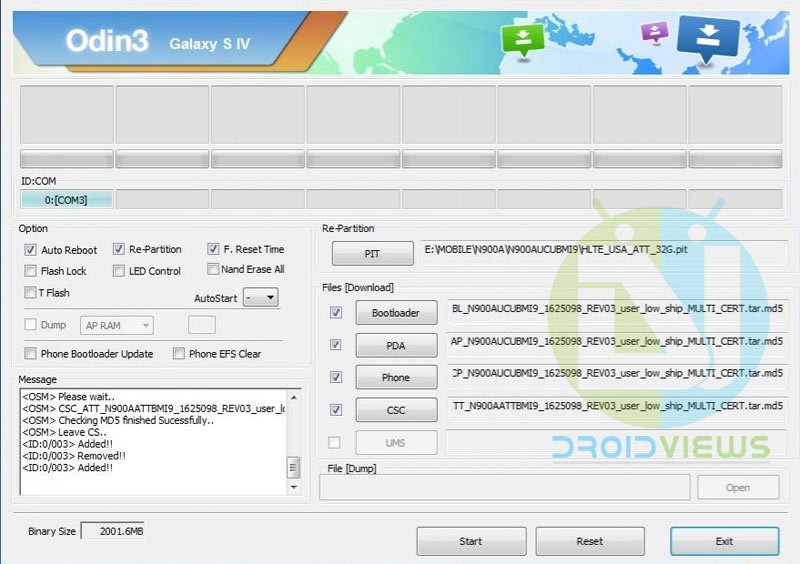
It’s said that it is only through rooting an Android device that we can make the most out of it. There are hundreds of good root apps that can help you customize your device and improve its performance. The wish to get the best of the device we own often prompts us to involve us in activities like rooting the device and installing a custom recovery on it.
Indeed, having a rooted smartphone has its own advantages but it also involves the risk of various natures. While in most cases, the procedure of gaining root access goes successful, there are still chances that you might find your device caught in a bootloop. Sometimes, trying to install a custom recovery on a device with secured bootloader bricks the device and it refuses to turn on.
In many cases, the device keeps showing the boot/splash screen but the users are able to boot the device in Download Mode. If you can access Download Mode on your Samsung Galaxy device, it simply means that it is soft-bricked and there are still chances that you can revive it.
Today, we shall see how to unbrick AT&T Galaxy Note 3 SM-N900A from a soft-bricked state. Please note that to be able to use the method described below, you must be able to boot your Note 3 into the Download Mode. If you want to downgrade your AT&T Note 3, you can do it too but in that case, you will have to leave the Bootloader box (shown as BL in Odin) blank. Since the AT&T Note 3 comes with a secure bootloader, it does not let flashing a lesser version that your device has.
Getting Prepared
Before we proceed to install the stock firmware on the AT&T Galaxy Note 3, here are a few preparatory steps that you need to make:
- Download Odin 3.09 and extract the zip: Odin3 v3.09.zip
- Download the firmware file for Note 3 SM-N900A and unzip it. Open Settings> About device, see your firmware build version and download either equal or greater version):
- N900AUCECMLG.zip (Android KitKat)
- (this is single firmware file (Android 4.4.2), you can download different components below)
- N900AUCUDNL1_N900AATTDNL1_N900AUCUDNL1_HOME.tar.md5 (this is single firmware file (Android 4.4.4), you can download different components of this firmware below)
- N900AUCUEOC1_N900AATTEOC1_N900AUCUEOC1_HOME.tar.md5 (this is single firmware file (Android 5.0), you can download different components of this firmware below)
- Download and install Kies or Samsung USB Drivers on your computer.
- Enable USB Debugging so that your device.
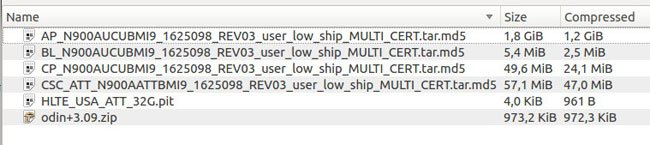
Please note that after extracting the firmware zip file from above, you’ll find many files. Normally, Samsung firmware comes in singles with .tar.md5 extension. The firmwares provided on this page are multi-file because different components of the firmware have been separated. Inside each of the zip files, you will find the following components:
- AP = Android Platform
- BL = Bootloader
- CP = Modem (radio)
- CSC = Region & Network operator
- PIT = Partition table
Unbrick AT&T Galaxy Note 3
If you have downloaded the firmware file for your AT&T Galaxy Note 3 and have already installed the Samsung USB Drivers on your computer, let’s now do the real action, but carefully!
- Boot your Note 3 into Download Mode. You can do so by turning off the device and then pressing the Volume Down + Home + Power buttons together for 2-3 seconds. When you see the warning screen, press Volume Up to enter Download Mode.
- Connect your phone to computer via USB cable.
- Go to Odin folder and launch the program. Wait till your device is detected by Odin and the ID:COM port turns blue and you see “Added!! message on it.
- Now click on BL/Bootloader button and select the file in the firmware that begins with BL. Leave this field blank if the firmware build version you are going to install is lesser than the one present of your AT&T Note 3.
- Click AP/PDA button and select the file with AP in its name.
- Then click the CP/Phone button and select the file beginning with CP.
- Click CSC and select the file with CSC in its name.
- Then click PIT and select the file with .pit extension.
- Auto Reboot and F.Reset Time options are checked by default in Odin. Make sure that they are selected.
- Since we are using the PIT file here, you’ll have to select Re-Partition option too.
- Finally, click the Start button and wait till the firmware is installed on your device.
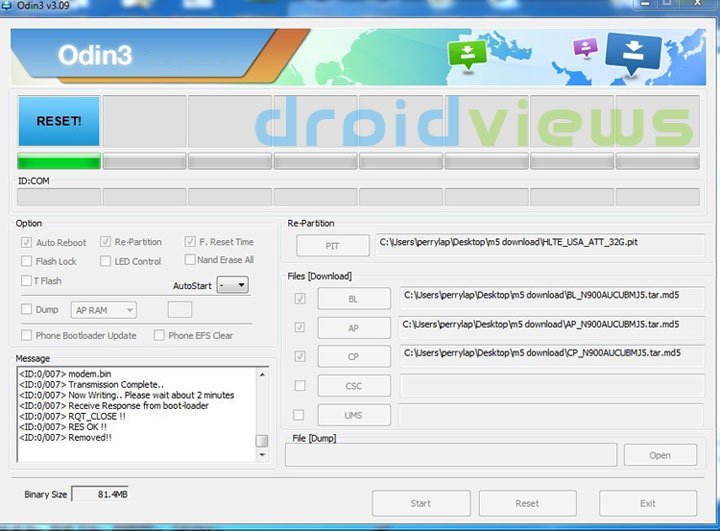
- You will see RESET/PASS! message and your phone will reboot automatically.
Wait till your Note 3 boots up. Done!
Getting a Bootloop?
In case your AT&T Note 3 refuses to boot normally and it hangs on the Samsung logo bootanimation, here’s how you can fix the bootloop:
- Remove your phone’s battery, wait for 30 seconds and reinsert it back to its place.
- Now boot the device in Recovery Mode. Press and hold the Volume Up + Home + Power buttons together till the screen turns up and the Samsung logo blinks for two times. Release the Power button but keep the other two keys pressed till you see the recovery screen.
- Having entered the Recovery mode, scroll down to wipe data/factory reset option and select yes to confirm your choice.
- Then wipe cache partition.
- Finally, select reboot system now.
With the hope that this tutorial would have proved helpful to you in recovering in soft-bricked AT&T Note 3 SM-N900A, we put our guide to en end here. Please do not forget to your feedback or doubts via comments below. Cheers!

Downgrading N900A went fine. This fixed my hard buttons but did not fix screen rotation. Had to add the .PIT file separate as it was not inside the bundle. Big thank you!
i had rooted nc2 dynamic cat for a while but it gave me shit battery life, it was giving me errors, play services errors, the launcher wasnt working right with google now. so i tried flashing the rooted oc1 rom in safestrap but that bricked my phone? not sure why. so i ended up downloading odin and flashing the 4 oc1 files and it fixed my phone works great now back to stock with lollipop, battery life has never been better even with all the bloatware. just follow the steps people idk how people are having problems.
People often get into trouble by following steps carelessly or making mistakes,
im getting com.android.system has stopped everytime i hold the home button for recent apps,i dont know if this will fix it. will it?
Yes, it will fix it. You can also try a data factory reset using the stock recovery: https://www.droidviews.com/how-to-perform-data-factory-reset-and-wipe-cache-on-samsung-galaxy-devices/
im so really happy right now bcaz i just download all the needed components files and flashed my samsung galaxy note 3 N900A. the first two try it failed then i restart my laptop and tried again and it work flawless.thank you guys so much at droidviews. millions of thumbs up
Glad to know, Dane! Keep visiting and please us too for interesting tips and tutorials. 🙂
http://fabteam.info/Downloads/CSC_ATT_N900AATTCNC2_722276_REV03_user_low_ship_MULTI_CERT.tar.md5 is down, do you have another link? I would like to try the individual files so that I can repartition as well.
If phone is 100% bricked, would the only fix be a new logic board? thx
Download here: http://www.mediafire.com/file/50i8n0jcpw1n3dc/CSC_ATT_N900AATTCNC2_722276_REV03_user_low_ship_MULTI_CERT.tar.md5
Well, if you device can boot into the download mode, it can be fixed. However, if it does respond even when you long-press the power key, you should take the device to service center.
https://uploads.disquscdn.com/images/34eb4b35f8c8bafc5a46678ecc5cfeec8e436d3e42dea41fde28bea07603b235.png KINDLY SOLVE MY PROBLEM I HAVE SAMSUNG NOTE 3 AT&T AND I IT REQUIRED ODIN START AND IT DO NOT RESTORE AND NOT WORKING.
KINDLY ADVICE ME SIR WHT IS THE PERFECT ODIN SOFTWARE FOR THIS MODEL. PLEASE SIR PLEASE
MODEL SM-N900A
FCC ID – A3LSMN900A
S/N – R38F30KWDHJ
Try Odin 3.10.7. Please note that you won’t be able to install a lesser version of firmware that one already installed on your AT&T Note 3. Either try the same or a higher version of firmware.
Try installing the Lollipop firmware.
anything on fixing efs folder to get imei and baseband back
Do you have a backup of the EFS partition?
Same problem, I am not have EFS backup 🙁
Worked great! Thank you SO much!
Hello i have a Note 3 n900a rooted with 4.4.2 and i am out of the USA so am using another carrier sim card i want to upgrade to Lolipop but wanted to know if this might get myu phone locked to ATnT
Thank you! Your instructions were perfect! Everything works now!
Thanks for the appreciation! A good tutorial requires a good follower to be perfect!
Thank you for all your help via articles. So I have a Note3; rooted with Towelroot, installed Safestrap, superuser, and upgraded from 4.4.2 to 4.4.4 then 5.0 and all seems to be good.
Just did a Safestrap backup and when rebooting it goes to Android Recovery. It’s done that before while I was stumbling thru all of the steps above.
Why is this happening and what is best way to resolve.
Thanks in advance. Oh I will do your recommendation for fixing Bootloop.
So i tried to root my lollipop 5.0 SM-N900A note 3 with a N900AUCUBMI9_N900AATTBMI9 root thing. and it failed. im not sure what i need to download firmware wise to restore my phone
thanks for the wonderful article. I had got issue with my 900a due to safstrap which cause the phone in soft brick but now it 100% ok. thanks again
Thanks for sharing your experience!
Is there a mistake in the Odin screenshot with the files placed? I followed the tutorial and had a CSC file, the screenshot you have appears not to have any files in that slot.
Thanks for the great tutorial.
Hi Derrick, you can there’re several firmwares linked in the tutorial. The Odin screenshot was created on an older firmware.
Hello. Will flashing stock trip the Knox flags?
It’ll not trip KNOX.
Thanks for the info
Estimado amigo, usted me acaba de salvar la vida de mi Note 3, mi mas profundo agradecimiento, recomiendo esta pagina a toda persona conocida. sinceramente gracias del alma.
Dear friend, you just saved me the life of my Note 3 my deepest thanks, I recommend this product to any known person. sincerely thank the soul.
Thanks for the appreciation!
New time I show my appreciation for the work done, you can tell me which way you can release the bands blocked by ATT, and if a custom Rom can do? Thanks in advance.
Ivan como lo hiciste? a mi se me brickio la note porque estaba en lollipop y flashie nc2 en Odin, que puedo hacer ahora? bajo todo lo de nc2 o lo de oc1?
Con safestrap instale lollipop en una particion, pero el telefono no pasa del logo de samsung y no puedo acceder safestrap para intentar cambiar a la rom stock. ¿Haciendo esto se solucionaria el problema?
With lollipop safestrap installed in a partition , but the phone does not pass the samsung logo and can not access safestrap to try to change the stock rom . Doing this problem would be solved ?
Yes, it’ll fix your phone. Do things carefully.
¿Si instalo solo el firmware funcionaría o tengo que agregar todos los componentes hasta el de particion? Muchas gracias por su respuesta
If I install only the firmware work or have to add all components to the partition ? Thank you very much for your reply
Try the NL1 single file and use this guide: https://www.droidviews.com/install-stock-firmware-on-samsung-galaxy-devices-using-odin/
ya lo he restaurado 😀 supongo se han eliminado las particiones de safestrap, pero aun puedo probar para instalar lollipop, sin tanto riesgo de volverlo a brickear o en caso de que se vuelva a brickear resutararía de la misma forma que aquí explica?
I have already restored : D I guess were deleted partitions safestrap , but I still try to install lollipop, without much risk of re- bricking or if re- bricking resutararía the same way as here explained?
To install Lollipop, root and install Safestrap on your phone, follow this guide: https://www.droidviews.com/update-att-note-3-with-lollipop-ota-and-root-it/
omg i hate when this happens!!! u gave the file and instructions and when i try to do it the files u gave is nothing like the ones in the pic… could u assist me please? or give an email which i can contact u
Hi, sorry for the super late reply. I some how missed your comment.
Do you still need help?
I had note 4 evolution rim and it’s awesome with KK 4.4.4 but battery life is horrible can I go back to stock NC2 with out BL flashing please reply soon
Yes, but you might get a bootloop.
I flashed a “note 4” ROM to my n900a Note 3. Buggy as hell with all the many random reboots. I am unable to flash the stock ROM now to get back to square one. (Odin gives errors) Will this method work for me? I’d love to get back to pure stock, to end the random reboots!
Did you create a nandroid backup before installing the Note 4 ROM?
I’m not sure if it’s literally “Nandroid”, but it was a full backup done from Safestrap. But now after flashing the Note 4 ROM, Safestrap doesn’t work. (cannot boot into it) So I can’t restore my backup.
I tried reinstalling Safestrap, but that doesn’t help. That all said, do you think the steps in this article are worth trying?
Thanks so much, this saved me!!!!
Because of my ROM issues, I did a factory reset and that really screwed me up. No “3g/4g data”, no Play Services, no Play Store. Lots of other issues. Way worse than before. I was unable to restore to stock using Odin and stock firmware from sammobile.com. Got errors every time. Could’t get into Safestrap to restore from a good backup.
So as a last resort, I crossed my fingers, held my breath, and tried your tutorial. Wow. You totally fixed it, thanks so much!! 🙂
Glad to know it worked for you! 🙂
blessings
very many grasias this works great
I finish and pass those step. But I still cannot install ROM from recovery.
What do you mean by “cannot install ROM from recovery”? What issues are you having?
never mind. Do u know how to root AT&T NOTE 3 MJ5?
I use Kingo to root this phone. But when I boot recovery and try to install the ROM, it cannot be done.
I have an AT&T sm-n900a. I tried to root it, but the process doesn’t finish and the phone don’t up any more. I’ve follow the steps and my phone it’s alive again. I’m very happy for this. Thank you a lot. You are the best.
Glad to know! 🙂 Thanks for sharing your feedback!
will this blow away my region lock? thank u
No.
I need help I have an sm-n900a and it was on 4.4.2 kitkat and I tried flashing rom and now wont boot I van get into recovery mode and download mode what would be the best way to fix my phone
I did the steps, and used the one ending in mi9, after getting about 95% it failed, and when I rebooted, I get “firmware upgrade encountered an issue. Please select recovery mode in kies & try again? any help?
The only one that did pass was the MJ5 but it just put my phone in an endless bootloop 🙁 any help would be lovely. I was on 4.4.2 KK
You cannot go back to MJ5 when on KK
hey same thing had happened to me. are you just using the single tar file? i downloaded all the component files and restart computer then in odin i selected dem one by one and click start. i worked for me. but first u have to put the phone back into download mode by pressing home/power/volume down button.
Up until 3 days ago everything worked great, now all of a sudden my phone will not connect to wifi. Any idea what happened or how I can fix it? I’m not getting an error, or just says trying to connect.
Is this happening a software update? Try doing a data factory reset from Android system recovery. You can access it by pressing and holding Volume up + Home + Power keys together for a few seconds.
stuck on boot loop…when i do vol up + home + power it brings up the note 3 logo and recover booting in blue at the top left corner, but it resets into the boot logo but in a loop. it doesn’t take me to recovery mode
What was the firmware version of your device?
4.4.2 KK
Then find and equal or greater version of firmware to install it successfully.
Did you fix your phone yet bud? I found a solution after looking for days, I finally fixed my note 3 sm-n900a and im back to perfect. rooted,and everything.
What’s the solution?
Ok, only works for galaxy note 3 sm-n900a and the firmware has to be n900aucunc2… kitkat… just follow the directions on this page… its free and it works perfect, fast download and everything 🙂 let me know how you make out. it saved my phone.. http://forum.xda-developers.com/showthread.php?t=2703006
i haven’t found out how to fix it. how did u do it Monster?
ok this only works on galaxy note 3 sm-n900a and the firmware has to be n900aucucnc2… just go to this website and follow these directions. it worked perfect. share with your friends… http://forum.xda-developers.com/showthread.php?t=2703006 let me know how you made out 🙂
hell to the mo’fo yeah! it’s up and running. thnx i got it. i wasn’t able to root because the website to download that towelroot needs payment. i’m not making a payment.
i also got a message that says, ” unathorized actions have been detected. restart your phone to undo any unathorized actions.”
You don’t need to pay, it’s just an option my friend. Just go to the website from your phone, and click the red icon in the middle of the screen and it downloads directly to your phone. It’s so easy. Glad I could help.
I just realized that this version of kitkat is probably the bootlegged one from the past. I already had the official release on my phone before bricking. Could I just use the previous version and then re-upgrade after everything is normal again?
Seems like it was recognized with no issues. However, when I download the kitkat version of the above firmwares (N900AUCECMLG) and extract the file, none of the above mentioned files that should be inside are there (AP, BL, CP…) and when I open odin and then open the N900 file within odin, none of the files show up because they have none of the correct file extensions. Thanks for your help.
Right, N900AUCECMLG is the leaked KitKat firmware. The official KK is not available for download yet. as for file extension, it should be .tar.md5.
if the phone is bricked, how do you expect someone to turn on USB debugging from the settings? The phone doesn’t boot bast the carrier logo. can i do it without it?
We always suggest people to keep USB debugging enabled to avoid connectivity issues in situations like this. You can try it and if the device gets recognized in Odin, you can be successful in recovering your device too.
Thanks. I’ll try that in a bit.
Even when I hold the volume down, power and home key it will still keep repeating the same message on the phone “recovery booting… set warranty bit : recovery”
Great now my bootloader is broke, thanks
To those who can’t get it to work.. try using the OFFICIAL USB cable.
This works! Thanks!
Yes hello, is this the way to return to complete stock, cause i want to since i rooted and removed stock apps, and i cant update the phone, so would this bring me back to full stock and be as if i just bought it?
Yes, you can do that!
Even though my phone isn’t bricked or anything?
Yes. Just make sure not to install lesser version of firmware or you’ll mess with the bootloader.
Well I’m on android 4.3, so it’s fine if i install the 4.3 mj5 that you have here?
What does the firmware version show in Settings> About?
Android 4.3 with n900aucubmj5, and does this method work properly, cause people in these comments have posted about getting lots of errors?
Try this KitKat firmware: http://www.androidfilehost.com/?fid=23321874045862491
Will it work like that, by flashing a 4.4 firmware on my note that has 4.3?
I don’t know about anyone else but this doesn’t work in any configuration. Tried everything…all I get is a big fat FAIL. So what’s up with that Rakesh? How did you get this to work?
Is there a way to install the leaked version of MLG 4.4.2 over the OTA update of NC2 4.4.2 on At&t Samsung note 3. Trying to get back to MJ5 4.3. I don’t think that I can downgrade the new OTA NC2 4.4.2 to MJ5 4.3 because of the bootloader. that’s why I was thinking if this can be done with the leaked Kitkat then I can go back to MJ5 that way with odin 3.
Sorry, I missed the KitKat thing. The method described above works on 4.3. Why do want to downgrade, by the way?
Back to rooting. Then I can disable apps the use great amouts of data that I don’t use, useless bloatware. Plus 4.3 runs better the way I use the phone. Thanks
Hey rakesh, can i use this method to conpletely restore me phone to stock, even though its not bricked, i just want full stock to be able to update to 4.4 kit kat?
Do I flash the bl and there’s no csc in the included package.Anyone have a link to the 4.4.2 odin one click? All the dls time out before it finishes and I’m fairly sure it could fix this.i have no google play services and I just want to return to 100% stock/official firmware
I’m on mj5 system status is custom but I’m not rooted and want a clean install so I can ota to 4.4.2 any help????
Will this work if I did the the leaked 4.4.2 update? I wanna go back to 4.3
Do not flash the bootloader and you should be able to do it. Proceed at your own risk.
Why doesn’t the N900AUCUBMJ5.Zip have no CSC file in the download link?
Leave that field while flashing the firmware.
I got a boot loop. Didn’t work. Now what?
Follow steps 10-14 from here: https://www.droidviews.com/how-to-downgrade-firmware-on-samsung-galaxy-devices/
It wont let me go to the recovery mode
Crap! I was afraid of that. The bootloader is broken. Anyway, install the same leaked 4.4.2 firmware and wait till the official firmware file is available for download.
i did the one click 4.4.2 again and it works now. I just have to deal with reboots and force closing apps once in a while. I hope the Official 4.4.2 comes very soon. Thanx for all your help! 🙂
I keep getting “fail”. I’m not sure what I’m doing wrong. I’ve tried the Kies initialization, the emergency recovery mode, and now this. I followed the directions exactly, and then unchecked the bootloader file after I saw it here in the comments, but it gets all the way to the end and then says fail. Am I doing something wrong?
still stuck on samsung note 3 boot logo even when it all went thru smoothly …got the odin pass and all …..im so frustrated
Do not flash the boot loader file.
Awesome read!
Why the hell aren’t there any comments?
Thanks for the info.
Yeah, it surprises me too but people mostly comment when they get into problem and want help. Thanks for your comment though. 🙂 A great start!
Hi Rakesh,
I bought a sealed AT&T SM-N900A Note 3. It has baseband version MJ5 and i need to use it in India. It is sim lock for sure and since it is after july 2013 – i suspect it to be region locked as well.
I have rooted the phone successfully however chainfire’s app did not work. Could you tell me what’s the best solution I have for unlocking the phone completely?
Please advise.