At a time when Nexus 5 users have been enjoying the new exclusive flavor of KitKat and other Nexus users are counting down the very hour when Android KitKat would reach their device, there is still a larger community of Android users who can only keep their fingers crossed in a hope that KitKat might come to them some day. Most of non-Nexus users have not received even the lower versions of the OS like Android 4.2 and 4.3. Yesterday, we published a news that Samsung has pulled back the already out Android 4.3 update for the Galaxy S3 and postponed the OTA for Note 2 to fix some serious issues.
The users of both the Galaxy devices have been forced to remain with Android 4.1.2 and keeping in view Samsung’s software update policy for its older devices, it appears that it would take forever for Android 4.4 KitKat to come to these models. Thanks to the open source nature of Android that does not let some die of eating and others die of hunger. Yes, this is pretty true for those who have a rooted device with a custom recovery installed on it. I see it as an irony that we have lazy and careless OEMs whose only goal is to dump the market with new models, and then we have hard-working developers who keep trying to give us the latest and best of Android.
Anyway, if you own a Samsung Galaxy Note 2 and are frustrated with the jumbo delays in firmware update from Samsung and your carrier, it’s time to kick them to side and move on. You need not be jealous of Nexus users as the Android 4.4 KitKat based custom ROMs are now available for almost all the variants of Galaxy Note 2.
In the present article we’ll see some new ROMs that will let you enjoy the latest version of Android on your phablet device. Before proceeding, make sure you have one of the following variants of Note 2:
- Samsung Galaxy Note 2 GT-N7100
- Samsung Galaxy Note 2 LTE GT-N7105
- AT&T Galaxy Note 2 SGH-I317
- T-Mobile Galaxy Note 2 SGH-T889
- Sprint Galaxy Note 2 SPH-L900
- Verizon Galaxy Note 2 SCH-I605
You can check your phone’s model by going to Settings> About.
Disclaimer:
Please note that the procedure described below and considered risky and despite that fact that is has been tested successfully, you can get into trouble if you do not follow the steps to the word. We or the developers of the included ROMs shall not, in any case, be responsible for any mishap. Do not proceed unless you understand what you are going to do. Remember, you’ve been warned!
Requirements:
- A rooted Galaxy Note 2
- Latest version of CWM (v6.0.4.3 or above) or TWRP (vv2.6.3.0 or above) Recovery installed on the device. If you do not have the latest version of these recoveries, you’ll receive “Failed!” message while installing the ROM. The older versions do not have support for Android 4.4 KitKat. To update your recovery software, you can use the ROM Manager app (for CWM) or Goo Manager (for TWRP).
About the ROMs:
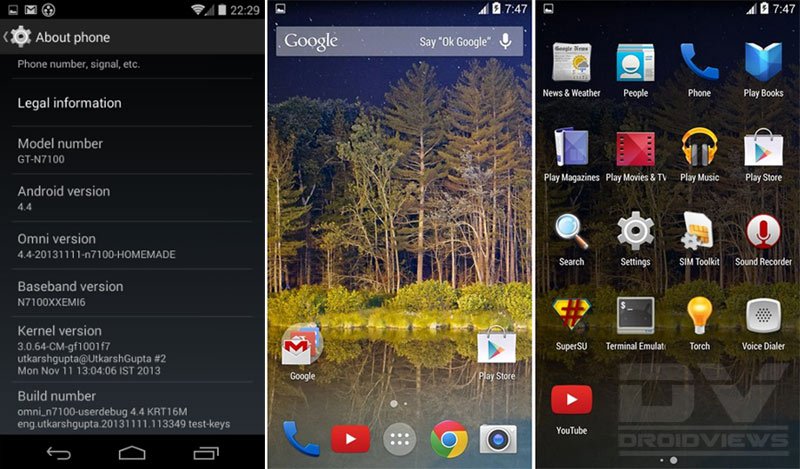
Please note that all the ROMs that are listed below are still in experimental stage. Therefore, do not expect bugless performance from them. I have tested the Omni ROM and the only issue I discovered was the camera FC bug. We hope that with new versions of the ROMs, all such bugs will be fixed.
Downloads
Android 4.4 KitKat ROM on Galaxy Note 2:
- Galaxy Note 2 International GT-N7100:
- ParanoidAndroid: pa_n7100-4.0-20131111.zip
- CM 11 ROM: cm-10.2-20140209-NIGHTLY-n7100.zip
- Galaxy Note 2 LTE GT-N7105: cm-11-20140209-NIGHTLY-t0lte.zip
- AT&T Galaxy Note 2: cm-10.2-20140209-NIGHTLY-t0lteatt.zip
- T-Mobile Galaxy Note 2: cm-10.2-20140209-NIGHTLY-t0ltetmo.zip
- Sprint Galaxy Note 2 SPH-L900: cm-11-20140209-NIGHTLY-l900.zip
- Verizon Note 2 SCH-I605 (CM 11): cm-11-20140209-NIGHTLY-i605.zip
Download the Latest SuperSU:
UPDATE-SuperSU-v1.69.zip
Download Camera App:
After installing the Android 4.4 based ROM in case you discover that your app is not working, please download any of the photosphere camera apps from below and install it manually.
How to Install a Custom ROM on Note 2:
- Do not forget to backup your phone’s EFS data or IMEI before involving in any such activity. Read this article for detailed tutorial.
- Make sure you device is charged up to 70%.
- Copy the downloaded Android 4.4 ROM file in zip (do not extract) to your Note 2.
- Then copy the Gapps file to the device.
- Now copy the “UPDATE-SuperSU-v1.69.zip” file to the device too.
- Boot your Galaxy Note 2 into CWM/TWRP Recovery mode. To do this, hold down the Volume Up+Home+Power buttons together for 4-6 seconds till the screen turns up and you see the recovery screen. If you are not able to get into recovery using the key combo, use any of these apps.
- If you are using CWM, use the volume keys to scroll up/down and the power button to select files and options. TWRP users can simply touch the corresponding buttons to get a job done.
- Important: Before doing anything, do not forget to backup your current ROM using “backup and restore” option (in CWM) oe “Backup” option (in TWRP) and check all items to backup.
- CWM Users: Go back to main menu in recovery and select “wipe data / factory reset> yes”. Then go to “mounts and storage” and wipe data and system.
- TWRP Users: Just tap on “Wipe” button and select Data, System and Cache.
- Now go back again and choose “install zip from sdcard> choose zip from sd card” option, select the ROM file in zip and choose “yes” when asked. If you have TWRP, use “Install” button, select the ROM and swipe the slider to confirm installation.
- When the ROM is installed, install the Gapps zip package just like you flashed the ROM in Step 11.
- Then install the “UPDATE-SuperSU-v1.69.zip” file the same way.
- Finally, select the reboot system option.
- Done!
The first boot will take a few minutes, so do not panic. Set up your data connection, Gmail, Google Wallet, etc. and enjoy the newly installed Android 4.4 based custom ROM. Enjoy and allow me to go on a KitKat Break too! Cheers!



Hello, will it work on Samsung Galaxy Note 2 GT-N7105T?
hello friends,
i have a question,
i recently bought a note II from USA
i want to upgrade my android to 4.4.2
i’ve checked my software version in ‘About Phone”, i can see its GT-N7100
when im entering in download mode, i am seeing another model SGH-317,something like that..i’ve downloaded the N7100 firmware, will it work on the phone??
the phone is an unlocked one
What do you see on the boot screen when you reboot the phone?
Hello, i install it, but everything seem to ne small, i dont fond where coule i change it to have the same size that i had on 4.2 ?
Rakesh, i installed Omni 4.4.2 Rom,but Network issue occured, i am not getting Network Signals, can you please give me a Bug Fixed Galaxy Note 2 n7100 Omni Rom?
Check you IMEI first by dialling *#06#
samsungs updates policy is just criminal … im sure ill not buy anything from samsung anymore … not even a damned memory card … never again
Why are ar so disappointed? Those who have updated tp KK are now looking to go back to JB.
Hi , i keep get an error says , This package is for “t03g,n7100,GT-N7100
‘ devices ; this is a “t0ltetmo”
Error status 7 !
what does that mean !! my device is GT-N7100 !
error in sdcard omni 4.4
status installation aborted ????????
Status 7 error occurs when the ROM demand a newer version of recovery. Please update CMW/TWRP that you have on your device and try again.
Excuse me, in mexico we have the same model number as the canadians (sgh-317m)
Do you think this rom will work on my mexican note?
Yes, it’ll work.
Can you send me the right link to get the right cwm for my phone.
I’d really appreciate that man (:
Download ROM Manager and it’ll automatically install the latest version of CWM to your device. In case you want TWRP, install the latest Canadian version using a custom recovery: http://techerrata.com/file/twrp2/t0ltecan/openrecovery-twrp-2.6.3.1-t0ltecan.zip
Works great but no real WOW factor that will impress your friends. Just super smooth and slick. Worth giving up TouchWiz, multi-screen and Sammy stylus support for but not for the faint of heart. Install always comes with a few heart attack scares.
Hello, I have a problem getting Data Working on my T-Mobile. I installed “T-Mobile Galaxy Note 2: omni-4.4-20131117-t0ltetmo-HOMEMADE.zip” file and g-apps 4.4 and upon reboot I tried setting up my APN Data connection and the APN settings would not save. Everything is currently blank right now and I have no signal connection. Was there something i did wrong or just a fluke?
Hi, can you see your device’s IMEI?
If yes, also try the latest version dated 23rd November: https://drive.google.com/folderview?id=0B9H3V_TDVt5vampLNVVrQzd6bEk&usp=sharing#list
I cannot it says unknown 🙁
That’s why you are not able to access network. I hope you backed up the IMEI as instructed above. Please say “yes”.
I was kinda in a hurry this morning before I went to work so I skipped that part :-/ I was switching between builds. CM Mods worked fine. I was on stock 4.1.2 from t-mobile firmware. I succesfully installed 4.2.2 and 4.3 no IMEI issues. The problem happened when I updated to 4.4
Hmm, nice to know that. I got this ROM tested by a friend on his T-Mobile variant and he reported no such issues except broken camera. I’ll try to update the post soon with more stable versions. 🙂
Can you help me as far as the IMEI problem? Since Im not able to restore. Maybe someone to write the IMEI back in? Thanks for all your help!
You said you did not notice IMEI issue!
That was before I installed 4.4 ROM. What I was saying earlier that when I installed the 4.2.2 and 4.3 variants I did not have an IMEI issue, It was not missing, but when I just did the 4.4 ROM my IMEI disappeared and now says unknown
Well, you are in a serious problem then. It’s because of this fear that I always recommend backing up EFS/IMEI before doing anything like that. Since you did not backup it earlier, I don’t think I or anybody can distantly solve the issue.
However, you can contact a person who has Jatg or Jig box to fix the corrupted IMEI. Just try to find a person in a repair shop and you;ll find someone hopefully.
Meanwhile, I am trying to find a fix for you. 🙁
I was so fixated on trying to do all these test runs before coming to work….. Im crying at my work seat right now :'( (internally) lol. Trying to keep composure at work. Thanks a lot for your help!. Please let me know if you find anything
I’ll do that for sure, Caleb!
FYI The camera works fine. Have them install separate .apk file for kit kat 4.4 camera if he still having issues
Restore the EFS.
I was previously running the 4.3 ROM before I updated to 4.4 and the data worked fine and IMEI was visible and had 4G but since 4.4 update my IMEI dissapeared
Hi, I got a problem, couse when I try to install this message appears: “This package is for t03g, N7100, GT-N7100′ device this is a ‘t0lteatt”
Well… what does it means, couse this installation tuto is for GT-N7100 right? And this is the model of my phone! Is there a problem with the rom uploaded here?
Thnx!
Try the latest ROM from here: http://d-h.st/users/tilaksidduram/?fld_id=12928#files
It is for GT-N7100 as you told.
Hello, I was using the wrong TWRP version lol! So I used the right and it worked, but the rom could not identify my external sd. Do you know how I could fix it?
Thank you again!
How did you come to that conclusion?
I mean what makes you think that your ext sd card is not showing?
Couse I can’t access it neither by usb conection or on the phone. And in the Storage settings it appears as “conect a sd card”, I tap that optiton, but nothing happens.
Then it might be a bug in the ROM. What is your device model.
It`s the GT-N7100. I got back to the 4.3 rom that I had =/
For the time being, it’s a wise decision. The roms are in experimental stage currently and it might take some time before all bugs are fixed.
Hello mate! The GAPPS link is broken, it says the file doesn’t exist. Can you post a new one? 😉
Get it here: http://www.androidfilehost.com/?a=show&w=files&flid=7988
Hello mate! The GPPS link is broken.. The file doesn’t exist anymore. Can you get another one?
More specifically its not detecting my sim card?
Can you confirm if you can see your phone’s IMEI?
Imei reads unknown
Hmm. You have lost your phone’s IMEI. First of all, restore the Samsung ROM that you backed up before installing it. Did you backup the EFS as instructed in the guide above?
Yes I did. It is restored and working fine.
You know if you hadn’t backed EFS, you would been in a serious problem. Whenever you have a new version of firmware, try to backup EFS every time.
Now you can give it a try again. 🙂
I flashed the ROM again with the same outcome. There is a T-Mobile zip ending in md5sum. What is the difference between that and the one titled homemade?
The MD5SUM file is meant for signature verification so that you can rest assured that the file you downloaded was not broken. See more info here: https://www.droidviews.com/check-md5sum-of-a-file-on-windows-mac-and-linux/
Also, try another ROM called SlimKat:
http://slimroms.net/index.php/downloads/dlsearch/viewcategory/772-t0ltetmo
Install this gapps:
http://slimroms.net/index.php/downloads/dlsearch/viewcategory/978-addons4-4/downloads/dlsearch
Let me know how it works.
I’ll do that. Thanks for all you help!
I have the same problem. Both with CM and Omni. Both android 4.4
I just read that its bacause we used TWRP to flash it. Then this happens.
We have to use the newest CWM for this rom. To bad I have no idea how to flash that to my Note2:(
Download ROM Manager and install it: http://download.clockworkmod.com/recoveries/RomManager.apk
Open app and choose install clickworkmod recovery. It will flash the latest CWM on your device.
Will it replace twrp or interfere with it at all?
It will replace TWRP. You cannot have 3 recoveries at the same time.
I flashed the slim ROM with the same outcome. No data and no imei. I redownloadedsu and flashed again. Still nothing. Is there something I can do to troubleshoot?
Okay, then wait for some time till a stable version of the ROM is out.
Incorrect md5sum might be a reason why you are losing the IMEI again and again. Check the md5 and if it mismatches, redownload the ROM file.
I installed this on my t889 and everything looks great! The issue i need help with is my mobile data isn’t coming on. Do you have a solution for this?
I am trying to install KitKat 4.4 on my SCH-i605 and I select the correct ROM listed in this post and I keep getting the following rom (cm_l900-ota-sbrissen_11-11.zip)instead of the SCH-i605 version. Do you know where I can get the correct version for my Note II? I am trying to find Cm_SCH-I605-Ota-Sbrissen_11-11.Zip.
Hey Larry, sorry for the wrong link and thanks for bringing it to my notice. I have updated the link. Download this please: http://www.androidfilehost.com/?fid=23212708291676692
Hey I just installed this rom. everything works fine except for the camera. Whenever I try to open it a black screen appears and stays like that. I tried rebooting the device and even tried force stopping and clearing the app in the app manager.plz help!!!
The camera issue is is know bug in all KitKat ROMs currently. Try a different camera app. I have given some links to camera apps above.
I tried that too.but no use:(
Then wait till the update or restore the previous ROM.
The paranoid android rom has 2 bugs that i came across so far. the wifi is not switching on and the calculator is not working. Other tweaks like halo notification, hybrid properties and toolbars do not exist in this kitkat update……just wanted to let you know.
Yes, the download page makes it clear too: http://d-h.st/bJu
Iam having some problem flashing it on to my SGH-T889V, it says that this rom is not built for this device
Did you try the canadian version?
Also try this: https://drive.google.com/folderview?id=0B9H3V_TDVt5vU1Rqa0tfNFpzSkk&usp=sharing#list
Thats the one i downloaded, it reports that it dose not support this device
Hey Alex, sorry I did not notice your device model. Please install the ROM meant for T-Mobile: https://drive.google.com/folderview?id=0B9H3V_TDVt5vampLNVVrQzd6bEk&usp=sharing#list
I have the T889V with Wind Mobile. Rom starts, infinite string of errors – com.gooogle.process.location and the setup wizard crashes. I’ve wiped the caches and the system.