The Galaxy S4 came to Verizon later that other network providers in the US but the development activity around this device so active that now we have a great number of mods and custom ROMs available for it. Rooting a Galaxy device from Verizon is always a little complicated that one from other carriers as they come with tighter security and locked bootloaders.
A few days weeks back we came up with a very detailed tutorial on rooting the Verizon Galaxy S4 SCH-I545 but as we said, it was a little tougher for an average user. So if you already have a shiny new Galaxy S4 from the biggest carrier in the US and want to root your device and install a custom recovery on it, we now have another easier method that not only saves your time but also makes the rooting drill a thing of few mouse clicks.
Thanks to XDA member bhp090808 for taking the inconvenience of the Verizon S4 users seriously and compiling all resources required to root Verizon Galaxy S4 into a simple All-in-One Root Toolkit that does it so neatly! The easy root toolkit works with a Windows computer and demands little effort to achieve root access on your Galaxy S4.
Besides rooting the phone, the All-in-One Root Toolkit for the Verizon Galaxy S4 SCH-I545 is also capable of installing your favorite custom recovery like ClockworkMod Recovery or TWRP. So, if you are willing to hack your device, it’s high time to do it.
Update: Root Vzw S4 on I545VRUAME7 or MK2 firmware
If your Verizon Galaxy S4 is running the I545VRUAME7 or MK2 firmware , use this tutorial to root it.
Using Root ToolKit:
- Download the All-in-One Root Toolkit and extract the zip on your Windows desktop: I545_ALL_IN_ONE_TOOL_7_8
- Download and install either latest Samsung Kies or USB Drivers on your computer: Download
- Turn on USB Debugging on your phone. To do this, enable Developer Options on your Verizon SCH-I545 first. Open Settings> More> About and tap the “Build Number” for 7 times. Then go back and you’ll see “Developer Options” under Settings> More. Tap on it and select USB Debugging.
- Now hook up your device to computer using USB cable.
- Open the Toolkit folder and double click the RUN_ME.bat file.
- Doing this will launch a command window as shown below.
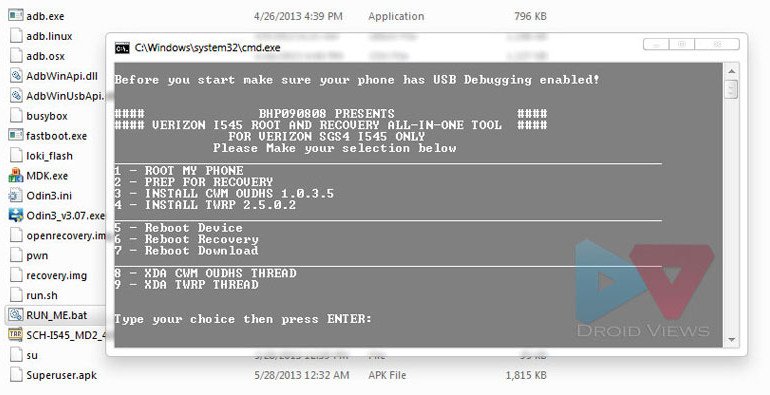
- As you can see, there is numbering before each option in the cmd window. Wahat you have to do it to enter the corresponding number and hit the Enter key. For example, if you have to root your phone, enter “1”.
- When the phone is rooted, enter “2” to prepare the device for installing a recovery. You can then enter “3” or “4” to install CWM or TWRP” recovery on the device.
- In case, your SCH-I545 is already rooted an yo wish to install a custom recovery only, enter “2” first and then continue with “3” or “4”.
Wasn’t it easy! At the end of the procedure, your Verizon Galaxy S4 should be rooted and have your favorite custom reocvery installed on it. Congrats! If you get into any problem while doing the steps above, or have a question, feel free to drop a comment below.
Got a Rooted Galaxy S4? See This!
Best Custom ROMs for Verizon Galaxy S3 SCH-I545
Things to Do Before and After Installing a ROM



can it root android 6.0.1
You VZW S4 has stock Marshmallow? Really?
To root using this method will I lose any data or apps in the process?
My phone is Galaxy s4 Device: SCH-I545
Android 4.4.2
Kernel 3.4.0 dpiswdd5015#1 Fri Mar 2813 13:38:41 KST2014
Build # KOT49H.I545VRUFNC5
Baseband Verizon i545vrufnc5
Hi, this guide is very old and won’t work. Try this instead: https://www.droidviews.com/root-att-and-verizon-galaxy-s5-without-voiding-knox-warranty/
tried using this method. got the red fail message. what next?
What’s the firmware version? Try this too:https://www.droidviews.com/root-att-and-verizon-galaxy-s5-without-voiding-knox-warranty/
How do I root my galaxy s4, (its a verizon, just got kitkat 4.4.2 I545URUFNc5 upgrade). Just wanna root. Dont wanna lose any info or anything. Just wanna know what to do to root my phone please!!
Sadly, no working root exploit is available for any Verizon Galaxy device with KitKat. You’ll have to wait till something comes up.
Hi Brother ,
A friend of mine get stuck with Galaxy S4 dual sim GSM+CDMA that he bought from china , he want to root it to add international languages , Model SCH-I959 , Android 4.2.2 , Baseband version I959KEUCMF1 , Kernel version 3.4.5-482199 , Build number JDQ39.I959KEUCMG2 , China Telecom is the carrier , can you help me to help him please .
hey bro does this work on the s4 build vruemj7 because I tried and nothing happened. also tried other ways but I cant seem to find one that actually works
Try this instead: https://www.droidviews.com/root-verizon-galaxy-s4-sch-i545-on-i545vruame7-firmware/
Hi Brother again , sory that I have a bad news , I missed up my galaxy s4 , using Titanium backup I uninstall some of bloated apps , I remember the last 3 apps I uninstall ( MobilePrintSvc_CUPS.apk ) , ( ToucWiz easy home 1.0 ) and ( TouchEiz home 4.2.-I545VRUAME7 ) , now after I swipe to unlock the screen it goes black except the toolbar on the top and from there I can drop down the window and go to settings from there , I did the factory reset it dosn’t work , also I did’t backup because it was hard for me to do it , I know I make a big mistake , is there anything I can do to save the lose. thank you again
It’s because you deleted the TW launcher that you are not able to see home and app drawer screen. Temporarily, you can download a launcher app from Google Play. Open Google Play on computer, and install this launcher: https://play.google.com/store/apps/details?id=com.anddoes.launcher
When it is installed, reboot the phone.
To get the TW launcher back, you can do the following things:
1. Restore the ROM if you backed it up earlier
2. Install a TouchWiz based custom ROM- https://www.droidviews.com/best-custom-roms-for-verizon-galaxy-s4-sch-i545/
3. Reinstall a new official firmware using Odin.
Hi brother , you told me to download Apex launcher from google play and install it to my computer , what is next , I mean how to transfer the launcher from pc to device and make the installation, in what way and should I unzip the file or not .
Just copy the Apk file to PC by connecting via USB. Open My Files and install the apk.
The best way will be to restore official ROM:
https://www.droidviews.com/how-to-install-latest-official-firmware-on-samsung-galaxy-s4-all-models/
Brother , you are the best , even I try to do it several time before and it dosn’t work but this time when I follow your steps it work I root it and I am very happy , I just have 2 notes about 2 little windows pop-up in my desktop while I am I downloading the drivers says :
1- Samsung kies ask me if I want to upgrade the firmware from PDA:ME7 to PDA:M11 shall I say yes or no
2- Verizon says : a software is available that will help your galaxy s4 communicate with your pc install now ?
are those better to accept them before or after rooting .
3- what is the best procedure to back-up the system software of the device
thank very much for the big help
Congrats!
Do not update firmware via Kies or OTA or you will lose the root. Say NO to all prompts from Kies or Verizon.
You can do various things with a rooted device. See these:
https://www.droidviews.com/how-to-backup-and-restore-efs-data-imei-on-samsung-galaxy-devices-did-you-do-it/
https://www.droidviews.com/things-to-do-before-and-after-installing-a-rom-troubleshooter/
https://www.droidviews.com/best-apps-for-rooted-android-devices/
Ok brother, my galaxy S4 verison SCH-i545 VRUAME7 , kernel version 3.4.0-690088 , Odin3 v3.07 ,I follow the instructions step by step ,in Odin it show 0:(COM3) in blue , above that it says Fail in red , I hit start again it says same word Fail , I want to root it so I can add extra language and get red of those tons of bloated apps , can you help , please
To root VRUAME7 use this guide instead: https://www.droidviews.com/root-verizon-galaxy-s4-sch-i545-on-i545vruame7-firmware/
Hi. Rakesh,
The link you mentioned her ./pwn command doesn’t show me message Obtained root 🙂 .
Please help
Try this: https://www.droidviews.com/root-verizon-galaxy-s4-sch-i545-on-i545vruame7-firmware/
Thanks a lot for your reply and that worked for me and now my phone is also rooted. I also see normal recovery I got from supersu. Can you please advice me how to install cyanogenmod using custom recovery? Thanks a lot.
For that, you need to unlock your phone’s bootloader and install CWM/TWRP first.
Can you please guide me how I can unlock my phone’s bootloader? And if possible also provide me link to install CWM/TWRP. Thanks!
Unfortunately, there is no working method to unlock the bootloader and therefore a custom recovery can’t be installed at the moment.
ok the baseband verision is vruamdk my kernel version is 3.4.0-562219 model i545 verizon would this tutorial be for me ? i just wana confirm it is cuz im rarely new at this and do not have the money for a new phone any help would be welly appreciated
Yes, it should work on that firmware version. Follow steps carefully.
i cant get it to work on mine either. i am stuck on the screen witht he green guy and it says downloading do not turn off target i dont know what to do with my phne now please help!!!
Did you click the PDA button, select .tar file and then hit the Start button on Odin.
If you have already done this, disconnect the device and pull out the battery and place it back.
thank you I got it back to normal working mode but once i get to the step to add the pda and select the tar file it keeps failing so i am assuming this has the new ota it is
a new phone i just got it maybe amonth ago. any suggestions?
What error do you notice on Odin when it says failed.
in the odin box It says fail! then in the box below it says 0:[com12] on the phone in tiny red writing it says secure magiccode check fail : boot and then under the green guy it says downloading do not turn off target does that help?
“secure magiccode check fail” points to some new exploit blockage used by Verizon to prevent rooting.
In that case, you should try to downgrade the firmware and then try rooting again.
Thanks for all the help i think i am going to be stuck with it unrooted since i am new to all of this and not 100% sure what or how to downgrade firmware
It’s you call, mate! If you need any help with that, read these:
https://www.droidviews.com/how-to-downgrade-firmware-on-samsung-galaxy-devices/
https://www.droidviews.com/how-to-install-latest-official-firmware-on-samsung-galaxy-s4-all-models/
i went through the whole process and when i went to odin and attached the .tar file to the pda and started it. it told me it failed…why would it have done this ? ive rooted the galaxy s3 with no problems with odin but im having problems with this
I think the reason is the newest OTA update that is not letting this work.
Is there anything youve came across that does work? It tells me it failed to root after the first set goes through
Rakesh, I’m soft-bricked my phone. I was able to recover it using one of your guides. The screen that shows the bootloader is unlocked no longer shows up. How do I check and see if it’s unlocked? Secondly, if it’s not unlocked you had a guide on unlocking the bootloader but I can’t seem to find it. Thanks I’m getting an error message trying to follow this procedure so first thing I want to do is make sure I’m unlocked.
Hi Kane, nice to know I could help you.
As long as I remember, Vzw S4’s bootloader has not been unlocked yet perfectly. Most method for rooting available now bypass the bootloader. Actually, bootloader has nothing to do with rooting. Is you phone currently on ME7 firmware version?
The Root toolkit has now been updated: http://goo.gl/bsO4k
Try it again but if your phone has ME7, it’ll not work due to the root exploit patch from Verizon.
If it does not work still, install the MDK rootable kernel first and then try this tool: http://droidviews.com/2013/how-to-install-latest-official-firmware-on-samsung-galaxy-s4-all-models/
Hope it helps. 🙂
Fyi, this toolkit wont work with the new OTA update that Verizon pushed out July 16th. They patched the exploit. Right now there no released workaround to gain root access or unlock the bootloader on SCH-i545 which is the Verizon version of Galaxy S4.
rooting worked great for my verizon s4 (4 hrs old). When I selected step 2 it just hung there. I gave it 20 minutes but it never finished. Its probably an issue on my end. I want to install TWRP next. Also I wish to disable any OTA updates. I have 3 Moto Photon 4g’s that became locked up supertight. Thank you for all of your work, tools & guides
Hi Allen,
”
As you say you are already rooted, try rebooting the PC and phone both start again with Step 2. In case that does not help, you can simply download the Goo Manager app from Play store and install twrp via this app very easily. We have another detailed guide here:
http://droidviews.com/2013/how-to-root-verizon-galaxy-s4-sch-i545-and-install-cwm-recovery-on-it/
For OTA freezing, you can try to disable automatic updates from Settings> More> About> Software Update. There is another way of doing this by editing a similar line like this:
“ro.build.fingerprint=verizon_wwe/inc/inc/inc:2.3.4/GRJ22/222219:user/release-keys”
in the “build.prop” file.
The best way of getting rid of unwanted OTA, however, is to install a good custom ROM like Synergy.
http://droidviews.com/2013/best-custom-roms-for-verizon-galaxy-s4-sch-i545/
Hope it helps.