Instagram’s latest attempt to grab people away from Snapchat is coming to life via the Threads from Instagram app. Many early adopters of the application have found it to be incredibly smooth and stable all the while offering a Snapchat-like experience sans the filters. In this article, I’ll show you how you can add your remove people to your Threads close friends list.
Threads, as you might have heard already, allows users to connect with the people who’re in their Close Friends list. If you’ve downloaded the application and haven’t yet set up your own Close Friends list or want to remove a few individuals from the list, then there’s no reason to freat.
Add or Remove People from Threads Close Friends List
Adding and removing individuals from your Threads close friends list is fairly easy on Threads. Simply follow the steps below to set up the Close Friends list in Threads within no time at all.
- Launch Threads on your device.
- Swipe down or tap on the home icon to go to the messages section of the app.
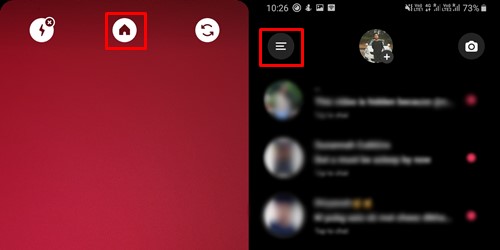
- Tap on the menu icon located at the top left of the screen.
- Now select Close friends.
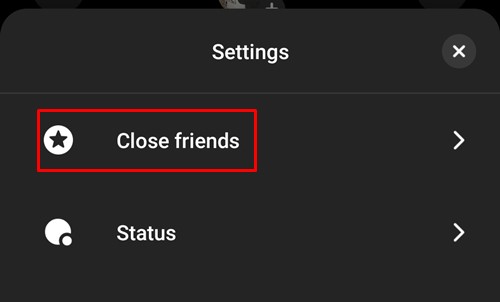
- This would bring up the list of people you follow on Instagram. The ones which are selected (ticked) are the ones how are currently in your Close Friends list. To remove an individual from the list, simply tap on their name.

- To add individuals to the list all you would need to do is tap on their name and make sure they are selected.
- Once you’re satisfied with the people in your Close Friends list, tap on Done.
So that’s how you add or remove people in the Close Freinds list on Threads. The application also has a few other features and options which you could check out here. Make sure to only add those whom you’re comfortable sharing posts or information with to the list.
It’s also worth noting that you could edit the Close Friends list from within the Instagram application itself as you used to before the launch of Threads. This means you don’t necessarily need to use the Threads application to add or remove individuals from the Close Friends if you know how to do this on Instagram.
Read next: Merge Multiple Google Photos Accounts into a Single Account



Join The Discussion: