It has now been a couple of weeks since Verizon rolled out the long-awaited Android 4.4 Jelly Bean firmware to the Samsung Galaxy S3. Though it appears awkward that at a time when the air so filled with the aroma of KitKat, the owners of S3 have just been compensated with a lesser version of the OS. Saferoot can root Verizon Galaxy S3 on Android 4. stock firmware.
As we all know, rooting a Samsung Galaxy device is easier than devices from other OEMs, but when it comes to rooting a Galaxy phone from one a US carrier, especially Verizon and AT&t, things become a little complicated. However, the good thing is that Android has a very elite and striving community that keeps trying to overcome all obstacles put by manufacturers to discourage custom development.
The Verizon Galaxy S3 has recently received the Android 4.3 firmware update with build version I535VRUCML1. Many people shrink from taking new OTAs just because of losing root and the fear that they might be able to root their device again! As expected, the new firmware comes with a locked bootloader that is accompanied with Samsung KNOX too. It simply means that devising a new way to root and unlock the bootloader on this old phone will pose a new challenge to our devs.
Well, if you have already accepted the latest OTA from Verizon on your Galaxy S3 and are now looking for a method to root it, we have discovered an old one-click root tool that was originally developed to root the US variants of the Galaxy S4. The exploit has been made by XDA member k1mu and it is found to be working well on Verizon Galaxy S3 with the latest VRUCML1 firmware.
Warning!
Because our developers have not yet discovered a way to unlock the bootloader of the Verizon Galaxy S3, you will not be able to flash a custom recovery like CWM or TWRP on it. Trying to do so on the secure boot bootloader will brick your phone.
Disclaimer:
The rooting method described below is considered risky so not proceed unless you are ready for any consequences. The procedure has been tested successfully but we cannot claim that it will yield the same results to you too. In many cases, failure occurs due to some mistake. Just be careful while you do the steps.
Preparations:
- Download the latest Saferoot exploit.
- Make sure you have either Samsung USB drivers or Kies installed on your computer.
- Do not forget to enable USB Debugging on your Galaxy S3.
Root Verizon Galaxy S3:
- Extract the saferoot.zip file and open the folder. You will find 2 files and a folder inside it.
- Now connect your Verizon S3 to your computer and wait for a few seconds till it is recognized by the computer.
- Then double-click the “install.bat” file if you use a Windows PC, or run “install.sh” in case you are a Mac user.
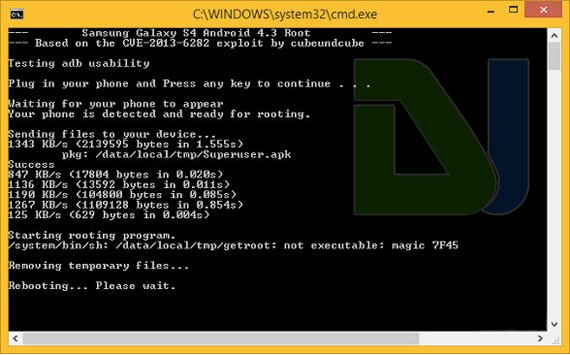
- Doing this will trigger the root script which will install SuperUser on your device.
You Verizon Galaxy S3 with Android 4.3 VRUCML1 Firmware will be rooted in a matter of seconds. After the device has rebooted, open the app drawer and look for the presence of SuperSU app there. To verify the root, you can download the following app from the Play Store and run it.
[googleplay url=”https://play.google.com/store/apps/details?id=com.joeykrim.rootcheck”]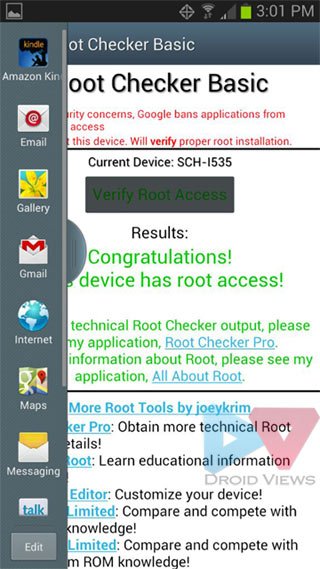
Do Not Miss!
After successful root verification, you will be able to enjoy root apps on your phone. Do not forget to read our list of the best apps for rooted Android devices:
Best Apps for Rooted Android Devices



Does this tutorial work in my Samsung Galaxy S3 Verizon in KitKat 4.4.2? Build number is I535VRUDNE1..
No.
I have a Samsung Galaxy s3 SCH-s968c through Straighttalk. I cannot find anything that works so far. Please Help
Try Towelroot: https://www.droidviews.com/root-att-and-verizon-galaxy-s5-without-voiding-knox-warranty/
and
the Saferoot method from here: https://www.droidviews.com/root-verizon-galaxy-s4-sch-i545-on-android-4-3-vruemk2/
Let me know!
Is there a root method for the SCH-I535 on 4.4.2?
Try this: https://www.droidviews.com/root-att-and-verizon-galaxy-s5-without-voiding-knox-warranty/
I have a galaxy s3 i535 running 4.3 and I cannot get saferoot to work. Does anyone know another way to root my phone? Thanks
Try this: https://www.droidviews.com/root-att-and-verizon-galaxy-s5-without-voiding-knox-warranty/
Im pretty sure it worked! According to RootChecker it did! Thanks a ton!
Glad to know!
same for me, somebody has some help?
i tried to root my us cellular phone but once i unplugged from usb my phone shut off and will not come back on. what do i do?
Panic….
I used this method before and made the mistake of unlocking the bootloader after this type of root. It bricked my phone, so I sent it to Samsung. they put a new mothebroard in the phone for me and it works again. Whenever i run the “install.sh” on my macbook pro, the window pops up and shows all the information from the previous root. How can i get the files without all the information from the previous root?
I downloaded Kies 3 and when I try to connect my Verizon SCH-I535 4.3 it just continues to say connecting and doesn’t actually connect. Can I still safely root my device?
Can someone please help as soon as possible?
Hmm…make sure to update to latest version (there should be a popup when running kies for the firs ttime). or try enabling usb debugging if you haven’t. If all fails, try downloading the samsung usb drivers instead, an uninstalling Kies.
Has a workaround for the write protected boot chain been found yet? It would be nice to have an unlocked bootloader so we can stop this wait for 4.4.2 (or to downgrade to 4.1.2 like I want to). I didn’t even get an s3 on purpose. It was my only option after filing a claim on my RAZR HD Maxx. Verizon is not nice for this.
Wifi stopped working. I can’t turn it on after rooting the device. Any help please?!
I tried this method to root my phone and now my wifi will not turn on…any ideas?
Go to SuperSU app> Settings> Full unroot.
Reboot device and check if it is fixed. To the best of my knowledge, rooting does not affect WiFi. At the same time, you are the second person to report the issue after using Saferoot.
Already tried that and it did nothing. I also tried finding a fix while rooted, but had no success with that either.
I ran the safe root and I’m rooted, bootloader is still locked, I really need to change from the 4.3 OTA, my screen has been going black since the update, thats the reason why I decided to root hoping I could go with a custom rom possibly running 4.4. is there a fix for this yet.. I have the SCH-I535 running I535VRUCML1
I opened install.sh on my mac but it just opens into TextEdit, please help soon! Thanks
See this: http://stackoverflow.com/questions/733824/how-to-run-a-sh-script-in-an-unix-console-mac-terminal
For Mac I had to re write the script in text edit run the .sh and everything went smooth :$ did it on a RAZR m to so yeah.
I have never used Mac in my life so I have no idea about that. Can you share what changes did you make in the script so that I can update the tutorial. 🙂
I just replaced all the adb with ./adb in the script since I put my fastboot and adb from the android sdk folder into the same folder as the bat and install.sh files. To run it as a adb application not using the adb.exe since mac can’t read exe files. After putting those two into the folder and got the script edited I did a cd to where the install.sh and .bat are. Then ran the command sh after running the sh command I ran sh install.sh It sent the file and rebooted the phone super user was on. If I’m right this is the same thing on the moto RAZR M right? I can send you the folder in a email if you would like.
Thanks Preston. Yes, it’s the same Saferoot exploit. I will really appreciate if you send that folder. Here is our email id: droidviews@gmail.com
Thanks again 🙂
I am trying to root my Sch-i535 Galaxy S3 for Verizon. I have installed the drivers and enabled debugging for my phone. However, when I use Install.bat on my windows 7 64-bit the command prompt reads
[*] fixing folder structure
[*] Testing adb usability
and closes out when i try to continue.
Is there an easy fix to this?
Can you access a 32 bit PC? You can also try restarting the PC and the phone.
I only have access to a 64 bit, but i restarted both and still receive the same problem. Would it have to do with my device being unauthorized when I command adb devices? How would I fix that.
You are getting unauthorization message? If yes, there seems some problem with the USB drivers. Also, do you see see any authorization pop up on your phone’s screen when you connect it to PC when Saferoot cmd window opens.
I’ll reinstall them and try again
ready to move ahead with root on Verizon Galaxy S3 i535 Android4.3→ does the above guide do everything for root and unlock bootloader?(still learning-1st time to root….nervous but cant wait! )
It’ll only root your Vzw S3 without tripping the KNOX warranty counter. Also, it is one of the easiest and safest root exploits.
y, did you make any progress? I am getting the same [*] issue when double clicking on the .bat file. Tried downloading again and same thing.
I know you talk about boot-loaders in this article, but just to clarify, does this method fully unlock the boot-loader or is it just give it root access?
Hi John, Saferoot just pushes SuperSU in the system and bypasses the bootloader which still remains locked.
Okay thank you for telling me that. One of my friend’s has updated their phone and they don’t like the new update. Should I trying downgrading it to Touchwiz 4.1.2 through Odin (I have a .tar file for the Touchwiz 4.1.2 stock, non-rooted ROM for the Verizon version)? I know people on the international version did this without any problems, but people on the At&t version ended up bricking their phones, so I was wondering if you knew what would happen on the Verizon version. Also, if you don’t think that would work, if I rooted, could I freeze Knox through Titanium Backup, and then unlock the boot-loader the way you would for 4.1.2, or is Knox on partitions that I can’t access?
Since AT&T and Verizon rolled out VRUM3 build (Android 4.1.2), downgrading has been disabled as the new bootchain is write protected. I would not recommend either flashing a custom recovery or downgrading currently. Please wait till we have some workaround.
Okay thank you for your help.
You’re always welcome.
Is it ever a problem that the bootlader remains locked?
There is no problem in a locked bootloader. You will be able to use all root apps. The only difference it makes is, you cannot install a custom ROM.
Verizon Galaxy SIII i535→ Root Verified! Thanks so much for the help/guide 🙂
Glad to know that. Enjoy root access. 🙂
i tried to install a custom rom after rooted my phone, but before i could do it, just going into recovery mode has now messed up my phone, i get a unauthorized software detected, you must goto a verizon store for help
We have already warned above not to try to flash custom ROMs. By the way, there is no custom recovery available for the Vzw S3 running 4.3. How did you install the custom ROM?
i ran safe root and placed cyagenmod on my sd card, i then booted into recovery mode, i decided to wait, when i tried to restart without going further i got the verizon error message. at that point i had to use odin to resinstal a stock verizon 4.3
i didn’t see all the warning until it was too late, now seeing the, i was hoping that someone found a way around it…i have seen a copy of saferoot+know unlock that i was tempted to try but looking for someone with experiance
Are you able to access download mode by pressing Volume Down+Home+Power keys?
i was able to, at that point i used odin and now i’m back running verizons 4.3. so to recap i’m back to where i started with verizons stock 4.3 software and i’d like to get cyagen on there but only if i know its not a huge waste of time
what are the pros/cons to doing it without and unlocked bootlader?
Safestrap creates a partition where ROM files are saved and executed from. Generally, it’s considered safe to use. And if anything goes wrong, the maximum punishment is what you just undergone through. 🙂
i meant more in the sense, is there a limited feature set or other restrictions?
Nothing of the sort.
thanks for all the quick responces
so they only have a version for s4? any other ideas?
Okay, I tried that on S4 and thought it might be available for S3 too. Anyway, just wait for some time. As soon as a workaround is available for Vzw S3, I’ll let you know. 🙂
any chance of downgrading to 4.1.2 and going that route?
based on your above comments won’t that brick my phone? perhaps i misunderstand some terms her, this process is all new to me
You are right as I had doubts too but I say an user commenting at droid forum that he flashed that firmware to downgrade. If you have doubts, do not proceed.
did you do it ? … if so, did it work ?
thanks in advanced
i haven’t , i’m worried if i downgrade (as this forum and others has warned against) it will brick my phone. I will say starting over with a clean copy of 4.3 has cleaned up my phone considerably, after the OTA 4.3 upgrade it ran slow. If anyone else wants to chance it. That being said, if it just took me back to the verizon warning screen, it was pretty easy and quick to use odin to reload the software and i have left the phone rooted wth saferoot to run a few apps i couldn’t before.
do i loose any features? or limited in other ways?
What files did you use in odin? My phone is somewhat f’d up and I can’t do a factory reset, but can get in to download mode. I would like to have a fresh 4.3 version running if possible.
Thanks Rakesh! So this puts on andriod 4.3 firmware? Is there any reason I can’t flash to a previous version like 4.2 so that the bootloader isn’t locked and I can install a custom rom?