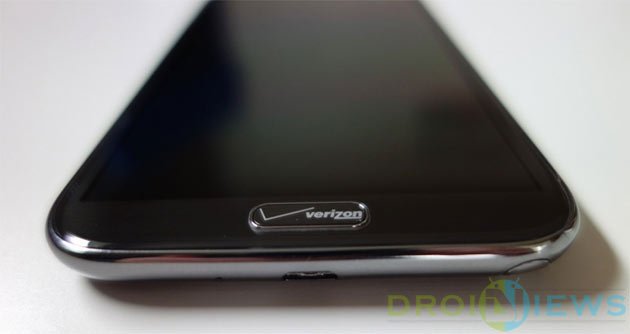
The Galaxy Note 2 belongs to the second generation of Samsung’s Galaxy Note line of phablets and was launched back in September 2012. At a time when the air is filled with the news of the all new Galaxy Note 4, the-2-year-old Galaxy Note 2 has already received the Android 4.4.2 KitKat update which the currently latest version of the OS on Samsung devices.
The Verizon variant of the Samsung Galaxy Note 2 SCH-I605 recently received the Android 4.4.2 KitKat firmware update with build version I605VRUFND7. If you have not received the new update because of root access and custom recovery, you can download the KitKat firmware file for the Verizon Galaxy Note 2 from here and install it manually using Odin.
In case you have already received the KitKat OTA update, you must have lost the root access on your Note 2 SCH-I605. Today, we have come with an easy root toolkit for gaining root privilege on Verizon Note 2. XDA member 25yvdgpo06 has released a multipurpose tool that can not only root Verizon Galaxy Note 2 on the latest ND7 firmware but can also do things like removing KNOX, delete boat apps, disable OTA updates, etc. 25yvdgpo06’s tool is known as GhettoRoot and it is based on Geohot’s famous Towelroot exploit.
Warning!
The procedure described below is considered risky. By rooting your Verizon Galaxy Note 2, you’ll void its warranty Follow the guide at your own risk!
Preparations Before Rooting
- Download GhettoRoot tool: ghettoroot-v0.3.2.zip
- Download and install Samsung USB drivers on your computer.
- Go to Settings> About device and tap Build version 7 time to unlock Developer options. Then go back to Settings> Developer options and enable USB debugging.
- Now open Settings> Security and enable Unknown sources option.
- Make sure to charge your Galaxy Note 2 to have at least 60% battery.
Root Verizon Galaxy Note 2 SCH-I605
Okay, we are now all set to do some real action to root the Verizon Galaxy Note 2 on Android 4.4.2 KitKat firmware. Here’re the steps:
- Unzip GhettoRoot zip file and open the extracted folder.
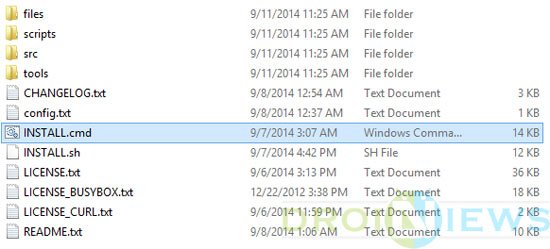
- Connect your Galaxy Note 2 to your computer using a USB cable.
- Now double-click the INSTALL.cmd file to launch the tool.
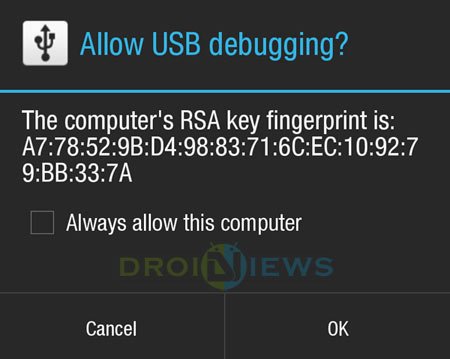
- Keep an eye on your phone’s homescreen and allow USB debugging when you see the following popup window.
- If the tool asks you to install BusyBox script, type Y and press the Enter key. Please note that you’ll require having a working internet connection to get BusyBox script downloaded.
- Now follow the on-screen to gain root access on your device.
At the completion of the procedure, your Verizon Galaxy Note 2 SCH-I605 should have root access. Wasn’t it easy? To verify root access on your phone, download the Root Check app and run it.
[googleplay url=”https://play.google.com/store/apps/details?id=com.jrummyapps.rootchecker”]

Added!!
Odin v.3 engine (ID:4)..
File analysis..
SetupConnection..
Initialzation..
Get PIT for mapping..
Firmware update start..
sboot.bin
NAND Write Start!!
tz.img
boot.img
recovery.img
system.img
cache.img
hidden.img
modem.bin
FAIL!
All threads completed. (succeed 0 / failed 1)
help please id tried many always like that
So i have root but i dont see anywhere in this tutorial that says it has removed knox
i have done all things you told but i dont get superuser in my phone 🙁
Hi, guys can you help please??i was going to upgrade my verizon note 2 but i didn’t know there are kind of these steps, i had just downloaded the kitkat and i did it. Now it is just flashing that’s all, is there any solution please???
I would like to help in root in my note 2 verizon 4.4.2 SCH-I605
Try this: https://www.droidviews.com/root-almost-all-android-devices-with-the-kingroot-tool/
Followed Jerry Hallet’s method and it worked. only problem is cannot update SuperSu Binaries. besides rootchecker confirmed the “root” and “busy box” installed smoothly as well.
Only issue left “failed to install Su binaries”
Download the latest SuperSU from here: http://download.chainfire.eu/supersu
Extract the zip, find the suspersu apk and install it manually. Reboot the device and check if it helps.
Help help I am trying to recover an factory reset.
Just follow Jerry Hallett’s direction and it will work. I tried other methods but this was the only one that worked for me. As for the pop up’s, just use titanium backup to freeze them. Did this and I no longer get any errors.
ok well i tried everything written on this page. multiple times. I’ve rooted several phones before. I’m no expert, but i’m no noob. the ghettoroot tool has installed supersu on my phone, but there is no root access. message from supersu – “there is no su binary installed, and supersu cannot install it. this is a problem!”. click ok, then supersu just closes. I factory reset my phone hoping to just get rid of supersu, but i cant. now i can’t get rid of it, and i have no root. please help.
I actually had to start the adb daemon (with ‘adb devices’) from the 3.2toolswin folder, THEN I could successfully run INSTALL.cmd from the 0.2.2 folder. Kinda strange, but I’m happy about it. Thanks a lot for the tool!
Thanks for sharing your experience.
This worked perfectly, thanks!
So I decided to do some more testing. I Odin’d back to factory ND7 and then tried to root again. I found out what was wrong. Steps to root:
– Download 2.2 and 3.2
– Place both folders in the root of C:
– Open a CMD window with ‘run as admin’
– Type cd C:ghettoroot-v0.3.2toolswinadb and run ‘adb devices’
– Type cd ……
– Type install.cmd and let it run (you should be running 3.2)
– Let the phone reboot and leave install mode
– Run the cleanup and try again until it works
– Navigate to C:ghettoroot-v0.3.2toolswinadb and run ‘adb devices’
– Type cd C:ghettoroot-v0.2.2ghettoroot
– Type install.cmd
– Let the phone reboot
– Run cleanup again when phone leaves install and you’re done with root
– Update SuperSU in the play store and reboot
I LOVE YOU!
You are welcome!
oi posso dizer Como a raiz não fez nenhuma taxa Seu 2, não estou conseguindo fazer
Followed the steps above and now i have SuperSU! Yay! I still do get the errors two errors on boot up. Is that ok?
So now I am wondering if I can install LiquidSmooth ROM v3.2? What do you think? I’m on verizon. That was what I really want to do. I am new to this and this is the first time I have rooted. Not worried about my note 2 though as I am eligible for an upgrade.
No because of the locked bootloader
What errors are you getting?
Dude, I think I love you but what am I so afraid of…
It worked!
Awesome!
Uh…except I am getting the SysScope and KNOX errors at startup. Thoughts?
I used Titanium Backup to freeze both the apk files (along with a lot of the bloat that came with the phone)
After trying other methods, this worked like a charm! Thanks so much.
You are welcome!
I still can’t get Rooted. I do get the SysScope and KNOX errors, but no SuperSu. And, root checker says No Root. I’m very frustrated. Do you know why it won’t let me Root?
Can you post a list of steps you’re taking and the output?
The 3.2 says it’s rooted, but SuperSu doesn’t get put on my phone.
The 2.2 method says it doesn’t connect USB.
I’ve tried different drivers, Samsung, Kies. And I’ve went through all the trouble shooting steps form the 2.2.
That’s part of the problem, did you get into the 3.2 folder and run adb devices first?
Yes, I went into the folder and Ran As Admin the “ADB.EXE”. It just opened a CMD type box for just a second then closed up. I’m going to try to go thru all the steps again right now. And, I’ll Post all the steps and all the outputs of them. Also, I really appreciate your help here.
Ok. I put both the 3.2 and the 2.2 Extracted Files in my C folder. Then I went to Start, Run, then typed in CMD. Then in the Command Window I typed in “cd C:ghettoroot-v0.3.2toolswinadb”, hit ENTER, then another line appeared in the Window with the stuff I just typed. Then I went into the 3.2 folder, Tools, Win, ADB and Ran As Admin the “ADB.EXE” file. It then opened up what looked like a CMD type box, a bunch of texts scrolled up for just a second, then it closed up. So, now back to the CMD Window. I typed in “cd……”, hit ENTER, then another line appeared(C:ghettoroot-v0.3.2>). Then I typed in install.cmd. Then all the texts start running thru the CMD Window. So, it seems to be running. The permission to connect to my phone came up, I hit OK. Also, it says the phone will switch out of Installer Mod automatically in 30sec. in a line on the CMD Window. The first few times I tried it I did nothing, just waited a minute and hit Y to continue. These last few times I tried I swapped my phone from Media Devise(MTP) to Camera(PTP) manually. I still get the same results. SuperSU isn’t on my phone and Root Check says No Root. Then went back and ran adb.exe and typed in all the stuff the run the 2.2. But, it cannot see my devise. I follow all the trouble shooting steps it has in the CMD Window, but nothing works. I’m very close to getting rid of my Note 2, it’s like 3 years old, and getting a 3 or 4, that’s root able.
The first step in 3.2 you need Type
cd C:ghettoroot-v0.3.2toolswinadb and run adb devices
not adb
Even if you root the note 2, you’ll have limited options.
Let me know if adb devices helps
Man, at first it looked like it was going to work. The CMD went thru all the correct looking flying texts stuff. Still No Root and No SuperSu. I’m not getting any sort of error message or anything. I think I’ll buy a Note 2 with 4.3. Any of yall looking for a cheap, un rooted Note 2??? Thanks for all the help Jerry. Let me know if you think of anything else.
How much 🙂
You’re welcome
I’m jumping in here a little late, but I’m having the same problems as Logan. The only difference I can see is that there is no “adb devices” in my folder for either version. I have adb.exe, two .dll files, and the license and readme files. Am I missing something somewhere? I’ve rooted a couple other phones and had no issues following directions. This one’s causing me to lose hair!
I don’t know how to get the adb devices to run – I have a file labeled adb and two .dll files in the win folder. after the long prompt, I literally type in run adb devices and nothing happens. *help*
Hi Everybody,
Disclamer: This was my first time rooting a phone….got stuck like several other people have reported getting stuck, but I was able to get through it and complete the root.
I have a note 2, SCH 1605, running 4.4.2 (possibly not ND7…never saw “ND7” anywhere).
To root, follow the preparation instructions from Rakesh above (they are great). I recommend uninstalling any adb or phone-related drivers EXCEPT for the recent Samsung drivers.
Then I followed the instructions from Jerry Hallett, above, except I hit “no” when prompted by the program to clean up, and then, and THIS IS THE MAIN TRICK – do not “navigate to C:ghettoroot-v0.3.2toolswinadb and run ‘adb devices” as Jerry suggests. Rather, use the command prompt to run ‘adb devices’. To do that, open a CMD window with ‘run as admin’, then type cd C:ghettoroot-v0.3.2toolswinadb and then run ‘adb devices’.
Then after that slight deviation from Jerry’s instructions, carry on as normal (picking up a the step that says “- Type cd C:ghettoroot-v0.2.2ghettoroot”
I believe that running “ADB.EXE” in place of “adb devices” is the main problem for many of you. I also could not find “adb devices” via navigation in explorer, but for some reason I could still “run” it via cmd prompt.
Hope this helps!!! As far as I can tell it’s what did the trick for me. My phone is now rooted, per a root checker app. Now it’s time to play!
Thanks for sharing! I’ll try adding the method used by you in my tutorial.
7/2015, Jerry Hallet’s steps above worked for me. Typing “adb devices” worked. I downloaded both versions including 2.2 from:
http://forum.xda-developers.com/note-2-verizon/general/root-adb-ghettoroot-v0-1-towelroot-port-t2864125
Thanks a million!! I tried 5 different methods of rooting but they all failed.
I was on kitkat 4.4.2 Verizon’s SCH-i605 samsung note 2.
Decided to skip to these instructions. I did download the ADBuniversal drivers as well as the Android SDK, which required the Java JDK… 0.3.2 appeared to fail(tons of errors in the install.cmd), but I didn’t even check for root…. I just kept going. but then 0.2.2 everything looked great. quick and fast! thanks.
Ran Version 2.2 on wifes SCH-i605 with 4.4.2 ND7 and worked like a charm Super User installed and stuck after reboot, root check verified as well. Thank you.
Thanks for the feedback!
I followed the instructions in detail all the way through with my Verizon Note 2 which has the 4.4.2 on it and even did the alternate variables like remove kies when it still wouldn’t root. Seems this flawed and not working for the note 2 like stated.at least with the 4.4.2 kit kat. Gettoroot shows unable to load and partitions all fail. It does show that it completes the process. Just fails to gain access to the partitions to actually re-write and allow the rootto ssucceed. To bad. Was really looking forward to modding my phone :-/
Try version 0.2.2 instead: http://forum.xda-developers.com/attachment.php?attachmentid=2924899&d=1409874318
Let me know.
Exact same issues for me. Neither version works
I am getting this as well. SysScope and one of the KNOX proccess keep force closing on boot
This worked for me. Thanks!!!
Neither worked for me. The debug log shows that the files never get pushed to the phone, though the log shows it tried. None of the files are found when it tries to run them on the phone.
****************
{Debug output}
push: C:ghettoroot-v0.3.2scripts\..files/UPDATE-SuperSU/arm/su -> /data/local/tmp/ghetto/UPDATE-SuperSU/arm/su
[…]
/data/local/tmp/ghetto/META-INF/com/google/android/update-binary-2[64]: unzip: not found
[…]
Unable to chmod /tmp/supersu/arm/chattr: No such file or directory
[…]
mkdir failed for /system/bin/.ext, File exists
cp: /tmp/supersu/arm/su: No such file or directory
SuperSu never gets installed.
I also wind up with SysScope and KnoxSetupWizard errors.
I get same crap. Were you ever able to figure out how to root it?
Don’t even bother with this root, it NOT working at all and bricked my note2, my phone keep rebooting
Download this firmware and install it: http://samsung-updates.com/details/29538/Galaxy_Note_2_Verizon/SCH-I605/VZW/I605VRUFND7.html
Your device will be fixed.
What next after I download the file?
Thank
Which file are you talking about?
Links are long dead
Just google and you would find it.
Don’t even bother this root now working at all and brick my note2
Thanks alot for this info.
I am currently running non-rooted 4.4.2. I’m travelling to Spain soon and would like to be able to change my APN settings. After researching I was told this is only possible by rooting and then using APN manager pro converted to a system app.
I have a question. Will this rooting method also unlock the bootloader? And if not, will I need to unock the bootloader in order to alter the APN settings with APN manager?
Any help is greatly appreciated.
Thanks!
Hi Dan, the method described above will not unlock the bootloader. It will just give you root access. Please note that your phones software build version should end with ND7 to get rooted with GhettoRoot.
If it does not work for your Try this: https://www.droidviews.com/root-att-and-verizon-galaxy-s5-without-voiding-knox-warranty/
Thanks Rakesh.
Do you think I’ll be able to edit the APN after a successful root without an unlocked bootloader? I don’t know alot about rooting because I’ve never had a reason to do it until now.
I’m just wondering, if one roots and makes changes as superuser but doesn’t unlock the bootloader, does this mean they can never reboot their device if they want to keep root?
Thanks again.
And yes, i’m on nd7.
Yes, you will be able to do that. APN has nothing to do with bootloader.
Ok so I attempted the root several times without success. I followed every step exactly. After rebooting rootcheck says not rooted.
Also I keep getting pop-up messages saying:
“unfortunately Knox has stopped running.”
I can’t recommend attempting this root on a Note 2 running 4.4.2 nd7.
Well, the method works but KNOX sometimes play the devil. Reinstall SuperSU app from the play store and try the solution given here: https://www.droidviews.com/disable-knox-security-service-on-samsung-galaxy-devices/
I can’t install SuperSU because the Root was not successful – I already explained this. When I run INSTALL.cmd it initiates but there are many lines where it says “failed..”
After reboot I get the popup regarding KNOX as well as a popup saying “Unfortunately, SysScope has stopped.”
This is frustrating as I followed everything exactly. I even installed Samsung KIES and made sure all drivers are a go.
Just for the sake of trying I attempted the towelroot but it failed saying that my phone is not supported.
Running 4.4.2 nd7.
You mean SuperSU app is not present in the app drawer?
That’s correct. The script runs and doesn’t end up installing anything. It looks like many of the actions in the script fail and it says dir not found. Then it reboots and has the error popups with no root accomplished.
I’ve tried multiple times, checking and rechecking everything. Debugging is enabled and unknown apps is checked.
Try one more thing, Dan. Remove Kies and install the USB Drivers: https://www.droidviews.com/android-usb-drivers-samsung-motorola-sony-lg-zte-htc-asus-huawei-acer/
Sometimes Kies interferes with such things.
I am having the exact same issue. Giving up for now.
Are you using 0.3.2? Try 0.2… I had the exact same issue, but then tried 0.2, and it worked like a charm
Did that. .2 wouldnt even recognize the device.
Confirming this. Any fixes Dan?