
Exceeding the cellular data limit, if you are not using a monthly plan with unlimited data, is heart-breaking. Surfing the internet becomes quite expensive in such situation.
Via our “New To Android” series, we try to answer the basic android problems that a new android user faces. That’s why we write these tutorials in extreme detail. You can check other instalments of this series here:
Part 1 | Part 2 | Part 3 | Part 4
The process to activate data limit may slightly vary depending on your device as different manufacturer’s put different skins or themes on top of stock Android. In this tutorial, I am using stock android so the steps to set data limit will be same if you are using any Nexus or Motorola device.
In order to set a data limit on Android lollipop, you first need to turn on the cellular data or mobile data. To turn on cellular data go to phone settings, tap on “sim cards”, then tap the grey switch which is right next to “mobile data” option. This will change the switch color to teal and cellular data will be activated.
Once cellular data is active head back to phone’s settings and tap on “data usage”. Here you will see a new button which isn’t available when cellular data is off, tap on that button to set data limit. Now you will receive a warning that your cellular data will be turned off automatically once it reaches the limit set by you. Tap on OK to proceed.
Now you will see one orange and one grey line. Orange line is used to limit the data and grey line is used to set a warning. For example, I get 7 GB of data a month. I can’t exceed that limit. Now as the orange line is used to set the limit I’ll set it to 7 GB. And just for the sake of knowing my data usage I’ll set the grey line to 5 GB. Once my usage reaches 5 GB I’ll get a warning and I’ll know that now I can use only 2 GB.
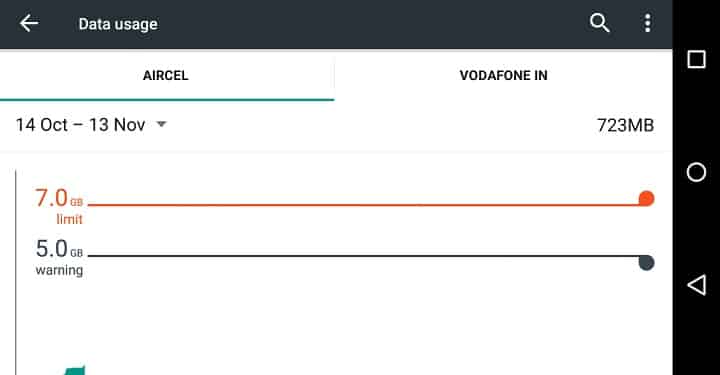
This is how you can set the cellular data limit on an Android running lollipop. Doing so will surely help you in keeping track of your data usage and you will also be assured that you will never cross the data limit.



Join The Discussion: