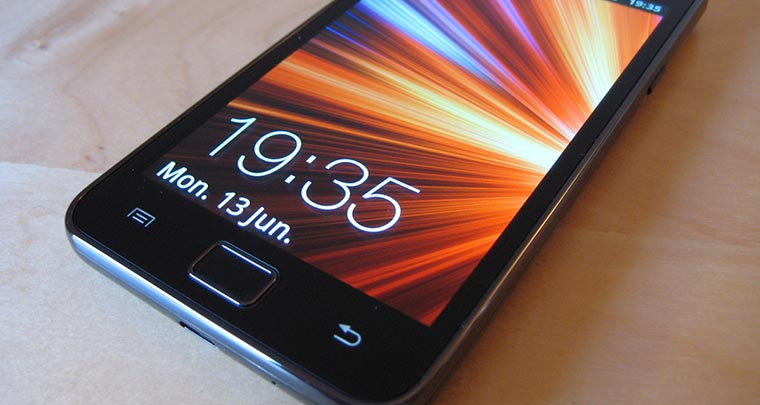
If you are looking for a custom ROM for your Samsung Galaxy S2 that gives your Galaxy S3 like experience, here is a good choice for you. Just a few weeks ago I wrote a review and installation guide for another Galaxy S3 styled ROM for the SGS2 called “Pure Look S3 [v3.1.1 Final]“. I had been using that ROM on my device for weeks until I stumbled upon the SalmanRom V4.
I used it for two whole days (and still using) and found it even more beautiful because of the option to have the choice of installing transparent contacts and phone apps. Again, this ROM has the original lockscreen from the SGS3. The SalmanRom V4 SGS3 Themed ROM has much to offer is you are an SGS3 fan but do not want to spend a handsome amount of money on a new device.
Features of the SalmanRom V4:
- Updated Google Play Jelly Bean
- New dialer, more like sgs3
- Lock screen with center date, time and weather
- SGS3 popup notifications (still needs work)
- SGS3 like notification area
- SGS3 music player
- New wallpaper selector
- New bootanimation
- Fully Themed
- Fully Deodexed
- BloaTware removed
- CF-ROOT Kernel
- Fully rooted
- Jkay framework included
- TouchwizUX-1.5.1-4×5
- SGS3 sounds
- SGS3 wallpapers
- SGS3 icons
- SGS3 widgets
- Full RTL support (ARABIC)
- Stock SGS3 shutdown animation (.qmg)
- My Files themed (blue)
- Browser themed (toolbar looks just like SGS3)
- Added SGS3 battery percentage
- Themed mms.apk
- No More FC
- More stable
- Faster, stable, better battery life
- Faster GPRS/Gps/Wifi
- Many others……
The huge list given above amply speaks about why you must try this ROM. Another reason to choose this ROM over Pure Look S3 ROM is that it is still being updated regularly, while the latter is the final version.
Requirements:
To install this awesome ROM, you need to have a rooted Samsung Galaxy S2 with ClockworkWorkMod Recovery installed on it. If you have yet rooted your device, refer to our easy tutorial on the topic.
Make your Galaxy S2 like Galaxy S3:
Install Android 4.1.2 Official Jelly Bean Firmware on Your Galaxy S2
How to Install SalmanROM v4.2 on Galaxy S2:
Now here are the steps to install the SalmanROM v4.2 on the Galaxy S2:
- Download the SalmanRom v4.2 XWLPG.zip
- Do not extract the zip and copy it to the SD Card of your device by connecting it to your computer via USB cable.
- Charge your device’s battery to at least 70% level.
- Backup all your contacts, messages, and other important data.
- Enable USB Debugging Mode on your device. Go to Settings> Developer Options>> USB Debugging> Turn On.
- Now boot it into CWM Recovery Mode. You can do this in three ways. If you can see a utility called CWM Manager on your device, open it and select “Reboot into ClockWorkMod Recovery”. Another way is to download the ROM Manager app from the Google Play Store and use “Reboot into Recovery” option. You can also boot your device in the Recovery mode by this way: switch off the device, and keep pressed the Volume Up+Home+Power keys simultaneously till the startup screen with Samsung Galaxy S2 logo blinks for two times.
- The first thing to be done after entering the CWM Recovery is to backup your current ROM so that you might come back to it if anything goes wrong of if you do not like this ROM.
- In the Recovery Mode, select “wipe data/factory reset” and “wipe cache partition” and confirm your choice by selecting “Yes”.
- Then go to the “advanced” option and choose “wipe dalvik cache” and confirm the choice.
- Now go back to “mounts and storage” option from the main menu and format the following things: format cache, format system, and format data. Then go back to the main menu again.
- Now select “install zip from sdcard>> choose zip from sdcard”. Browse to the “XWLPG.SalmanRom_v4.zip” file and select it.
- CWM Recovery will start flashing the ROM on to your Galaxy S2 and will take a few minutes to finish.
- When it is complete, go back to the main menu and select “reboot system now”.
- It will take a few minutes for your device to reboot. Do not panic if it takes a longer time and wait patiently.
- To install the transparent phone and contacts apps, download SalmanRom fully transparent dialer and phone.apk_LPG.zip. Copy it to the SD Card of your device. Enter CWM Recovery, select Install Zip from SDCard, select file and install as described in Step 10.



please can you help me with the fully transpareny dialer and phone apk LPG.
it says no file when i go to the site
SalmanRom fully transpareny dialer and phone.apk_LPG.zip was remove from media fire ? can u give me a new link? 🙁
Sorry, I do not have the file now.
i want to know if your rom have flash playing feature,because i have another rom with 4.1.2 JB without flash player. and i searched on market and i found it but it is not compatible.Please answer…..
Hi, this is a very old ROM. Try newer ones: http://droidviews.com/tag/best-custom-roms-for-samsung-galaxy-s2/
You will get the latest flash player here: http://droidviews.com/2013/download-install-adobe-flash-player-on-android-phone-with-ics-and-jelly-bean/
should i download the main link or the ‘mirror link’? what is the difference?
Both are the same files. Downloads any of them.
Oh okay! Thanks. And I also wanted to know if I could upgrade directy from Gingerbread to this. And if id have to change my kernel to fit ICS. I’m a total novice at this.
I can give you these details though,
1. My phone’s already rooted.
2. Running gb 2.3.6
Yes, you can but do not forget to do three wipes as directed in the instructions above. Also do not forget to backup your current Rom.
Ahh! okay then! Thanks a lot!
Hello again Rakesh,
I just installed the Salman ROM on my S2. Everything works fine except a few things. The lockscreen does not show up. I lock my phone and then press the home button or any button for that matter and it just opens into the homescreen. And also.. the home button doesnt seem to work.. When i press it, it doesnt seem to jump back to the homescreen. And i cant access the multitasking (is there multi tasking available on this ROM). Also, can you suggest some other ROMS i can try out? .. But I really like this one. I hope you can help me with these issues.
Thanks.
hi its kinda late i guess that i tries this rom, but im stucked in the step 13, i rebooted my phone then waited for minutes, then minutes then turned hours (7hrs) with the s2 logo on the screen only, now im panicking., i cant do anything on my phone pleeeaaase please help.. thanks for ur response….
If you have wiped data/factory reset, cache partition and dalvic cache, there should be no problem. I believe you have made a mistake somewhere in the procedure. Anyways, I will recommend you to repeat the steps more carefully. Do not forget to backup your previous ROM each time you flash a custom ROM.
Hello Rakesh, Thanks for the post on “How to Install the Pure Look S3 ROM on Galaxy S2” However, I need to know how to resolve the error reading; “Unfortunately, the process android.process.acore has stopped.”
Hope to get you reply,
Thanks,
Alex.
make sure that the usb debugging is turned on and also that the downloaded rom’s zip is complete and not broken. If the problem persists, please install (update) a different version of CWM recovery. Still not helps, feel free to teel me.
Regards and best of luck.
Hello Rakesh, Thanks for your post.I have run into a problem installing salmanrom.
When I go to install zipfrom SD Card I get the following message “E can’t open /emmc/xwlpg.salmanrom_v4.droidviews.com.zip. (bad) installation aborted. What can I do to fix this please. It looks like the zip file did not copy correctly to the phone.
Would really appreciate any assitance to fix please.
Many Thanks
Brian
Hi Brian, I have just extracted the ROM file on my PC and every things seems to be fine. I was successful in flashing the ROM to my SGS2.
As I can figure out, check if USB Debugging Mode is on your device. Try to extract the ROM file, if it is extracted without error, the file is not corrupted. The actual size of the ROM is 300,676 KB
Let me know of further developments. It is a very good ROM. Must try it.
Hi thanks for your reply. The USB debugging was box was ticked. I followed the instructions but the problem seems to be that the /xwlpg.salmanrom_v4.droidviews.com.zip did not copy over to the phone properly. Can i reverse what has been done or can I reflash through ODIN etc. The phone is stuck in limbo at present. Can supply more detail if required.
Thanks again for your help. Much appreciated.
You did not tell me if you extracted the zip or not to ensure that it is not corrupt. If it is so, download it again. Rename the file name to “XWLPG.SalmanRom_v4.zip”. If you device has external SD, turn it off, pull out the memory card and copy the ROM file via PC (using memory card reader/other device). Then repeat the installation steps. Hope it helps you.
Thanks again. Current position is as follows:
I have tried to reflash a KERNEL with ODIN. My phone would not boot so I too out the battery, reinstalled the USB drivers and flashed. The phone is still not booting up properly. I get to the Samsung Galaxy S2 screen then it goes to the ICS logo page, then it stops.
I can’t download anything at present because I can’t get into the phone.
I don’t have an external SD card. The “xwlpg” file was on the internal SD card and it is from this that I tried to install the file originally.
I am not too good at this! Hope I haven’t screwed up my phone!
Thanks
Brian
First of all do not panic till you can see anything on you device. My only question is this: can you enter the CWM Revovery mode. If you device was already rooted, you shouldn’t have flashed another kernel. Anyway, if you can boot into CWM, manage an external memory card, copy the ROM to it via PC, insert the card into device and flash again. Make sure that the ROM file is properly downloaded and not corrupt. If you have any other tried Custom ROM saved to your PC, you can flash that instead of this.
Hi. The Kernel I flashed was CF-Root-SGS2_XW_NEE_LPT-v5.6-CWM5CF-Root-SGS2_XW_NEE_LPT-v5.6-CWM5.tar. This was the KERNEL the phone was running anyway. I just flashed this to the phone last week.
I am back in the CWM Recovery mode screen with
-Reboot system now
-Install ZIP from SD card
etc.
As I am pretty awful at this sort of thing I hope you won’t mind me asking the following:
1. I have just installed a 4GB external SD card. -Does this need to be formatted?If so how might you do it?
2. When you say copy the ROM. I thought i had copied the ROM the first time to the internal SD Card but this did not work . How do you Copy the ROM to the card (internal or external)?.
3. I presume the external card will be placed in the device anyway when copying the ROM from the PC to the SD Card.
4. When you say ROM are you talking about the XWLPG.SalmanRom_v4.zip?
5. When you flash the ROM from the external SD card to the device can you do this through the CWM menu?
6. Can you use ODIN to do any of the above as using ODIN seems easier?
Finally. I am sorry to be such a nuisance. I realise this must be a pain, I owe you one if this can be fixed.
Thanks again
Brian
Here are the answers in respective sequence:
1. If it is a new card, you need not format it. New cards come preformatted.
2 &3. If the device is turned on, you can do this via a USB cable connected to your computer. In your case the device can not boot, so do use a memory card reader. If a card reader is not available, insert it in some other phone and copy the ROM file to it then install it to your device.
4. Yes, ROM is used for the SalmanRom_v4.zip in this case.
5. In CWM, you can select from internal or external sd card.
6. No, you cannot flash a ROM file in zip via Odin. Odin only recognizes .tar files.So it is mostly used for flashing stock firmware on Samsung devices only.
There is nothing to feel sorry. I will be happy if I could help you out anyway.
Before copying the ROM file to device, do not forget to ensure that the XWLPG.SalmanRom_v4.zip file is complete and not corrupt. By extracting it using WinRar or any other zip archiver, you can do it.
Best of luck!
Success. Brilliant. I am so happy and you have made my day.
I really thought I had bricked my phone. I think if I had an external SD Card at the start there would not have been a problem.
Thanks so much for all your time. I am so pleased and now looking forward to experiencing SG3 on my SG2.
Cheers & thanks again
Brian
Glad to hear! Please, join my site on Facebook/Twitter. Help me grow Droidviews.com if you think I have helped you.
Greetings!
Very glad to help you grow. Thanks again so much. Good luck with your future work.
will this work on sprints galaxy s 2 ? El 29 710 or just international
This is for Unbranded GT i9100, so should not work on yours!