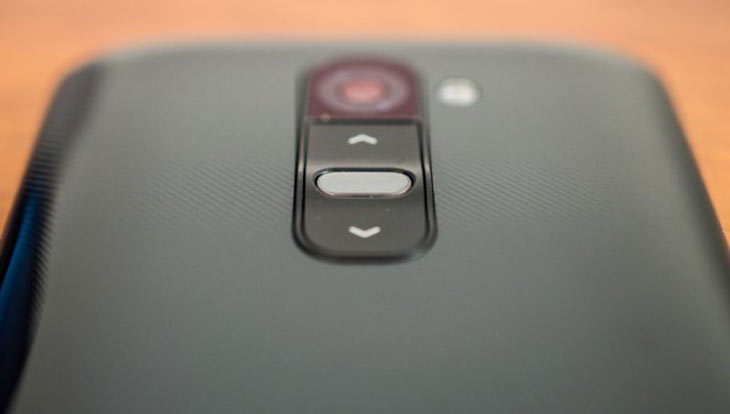
Network-locked or carrier contract based smartphones come with attractive price tags but. based on your plan, you have to pay the full value of the device in installments. It’s easy to buy a SIM-locked device but if you are not happy with the services of your operator, there is no way to put another SIM and enjoy a different network service unless you pay a big money or break your contract by getting your phone unlocked. Follow our tutorial to SIM Unlock Sprint LG G2 and the LG G Flex devices.
What I hate about a network-locked device is the feeling of bondage and snatched away the liberty to use some other SIM card. Indeed there are various SIM unlock code providers out there, but it’s not a good idea to give them our hard-earned money if we can do the magic ourselves!
Android is an awesome world of adventure where people keep coming with mods to solve issues that we face in our mobile life. Getting rid of SIM lock and enabling WiFi tethering is one of the most desirable things by the owners of network locked devices. Today, we shall see how we can achieve permanent SIM unlock Sprint LG G2 LS980. XDA member ysabxe has come with a working solution to unlock your Sprint LG G2 for free so that you might enjoy the services of the network services of your choice. The SIM unlock method also works on Sprint LG G Flex LS995.
Requirements:
- Sprint LG G2 LS980 with stock firmware or a stock-based ROM. To install stock firmware of your G2, refer to our guide.
- Download and install LG United USB Drivers on your computer.
- Your Sprint LG G2 must be rooted.
- Enable USB Debugging on your G2.
- Download the SIM unlock tool for the Sprint LG G2: ls980SIMunlockFinal
- Install a root file manager and BusyBox app on your device. We recommend Root Browser: [googleplay url=”https://play.google.com/store/apps/details?id=com.jrummy.root.browserfree”] and [googleplay url=”https://play.google.com/store/apps/details?id=stericson.busybox”]
SIM Unlock Sprint LG G2 LS980:
Note: Total Commander does not work on KitKat. Please use a root file manager app to replace system files with the modified files provided above.
Update!
Download the file from the following link, extract it and use the “carrier” folder while going through the procedure described below: lg-g-flex-carrier.rar
Having taken care of the prerequisites, you can now proceed with the steps to enjoy permanent SIM unlock on your LG G2 LS980.
- Connect your LG G2 to the computer using a USB cable.
- Unzip/extract ls980SIMunlockFinal.rar file, open the Total Commander folder and run Totalcmd.exe as administrator. If you are a Windows 8.0/8.1 user, you find encounter issues launching Total Commander. See below to find a fix for the issue.

- When the program is launched, click Network> ABD> Your Device.
- Now copy the folder named property to the directory called /carrier/ on your device by dragging the folder to your device in Total Commander window.
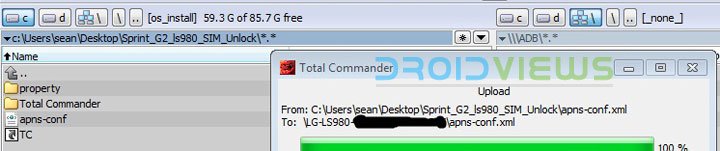
- To make APNs stick to your device automatically, also copy the apns-conf.xml file to /etc/ on your device.
- Now install the Root Browser app on your device. [googleplay url=”https://play.google.com/store/apps/details?id=com.jrummy.root.browserfree”]
- Open the app and navigate to /carrier/ property folder and fix file permissions to rw-r–r– (0644) and save changes.
- Delete telephony.db file found in /data/data/com.android.providers.telephony/databases on your device.
- Exit Root Browser and reboot your phone.
When your device boots up, you should be able to use a non-Sprint SIM card on your device. Cheers!
Update: After unlocking your Sprint LG G2 or Sprint LG G Flex, you might not be able to use SIM cards from some US operators.
Fix for Windows 8 Users:
- Right, click the Totalcmd.exe.
- Select Properties.
- You will see a new popup window, click the Compatibility tab.
- Then select Windows XP (Service Pack 2).
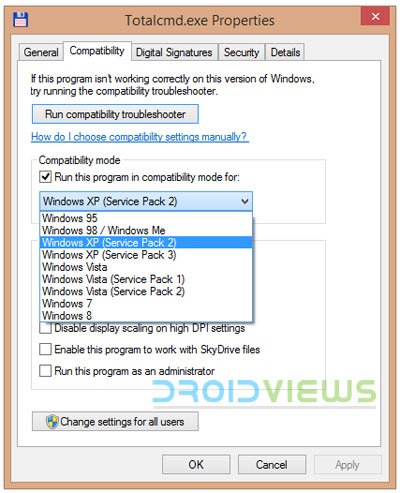
- Then check Run this program as an administrator.
- Click the OK button.
- Now launch the Totalcmd.exe again and select Run the program without getting help.
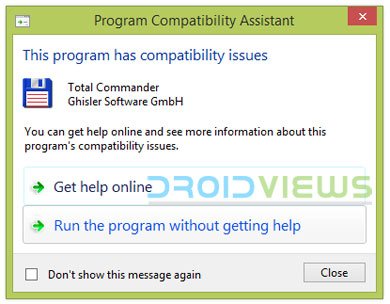
- Total Commander should now be working for you.
Halo sir. i a stuck on 3g/hsdpa, cannot 4g LTE …
Does total commander supports lollipop? And can you find me some good root file manager (free) for ls980zve stock because i tried root browser but it didn’t work… i am currently on lg g2 ls980zva jelly bean .. but i wanna upgrade .. and official update didn’t work and now it is showing your software is up to date… pls help.. 🙁
I am not sure about Total Commander’s compatibility with Lollipop. Give it a try yourself and try the Android version too: https://play.google.com/store/apps/details?id=com.ghisler.android.TotalCommander
For Root Browser to work, you need to install BustyBox too. Here’re some more root browsers:
https://play.google.com/store/search?q=root%20file%20browser&c=apps
Try Root Explorer, Xplore, etc.
Thank you! I’ll try and I’ll let you know.. hoping it would turn out to be successful cause i really want that lollipop update with sim unlock.. 🙁
I have LG ls665. will this procedure work too?
No, it will not.
LOve You ….it really worked …how can i donate You to say thanks 🙂 ?
Glad to know it worked for you, Tosif! We do not accept donations. If you want to say thanks, follow us on FB, Twitter and G+.
i have lg g2 ls980 zvg 5.0.2 everything is working fine but i m not able to use net plz suggest me???
Hi Rakesh,
First of all thanks for that it relly did unlock my sim, but there are three issues annoying me,
1. A Sprint animation is shown on every boot & shut down
2. Sprint Update notification
3. some stock apps are gone like Flashlight.
Hi Rakesh,
I’m watching this 2 years old thread, and seems still no solution for combination of Kitkat and removing telephony.db, and changing property dir, and apns-conf.xml file? I have G Flex LS995 with ZV9 stock rom. Tried all root browsers, nothing works, after all reboots the setup is the same, like I’m editing read-only files.
hi after rooting i just lost my system file like system updates nd mobile data of lg g2 …any way of get them back?? pliss help its ls980 lg g2
Cphoneunlocker. com! got my phone unlocked for free. Glad I didn’t have to pay moneyfor it. The unlocking process was easy and the step by step guide emailed to me!
I hope i helped you!
To make data to work:
My phone details:
Software version: LS980ZVG
Android Version: 5.0.2
I reverted from cm12 to stock rom(flashed tot file and completed all system updates until version 5.0.2 and then rooted) and then unlocked sim lock using above method, Calls and Text (Network:Airtel India) are working but Data was not working( copied apn-confs.xml file but no use)
In Lollipop version, carrier locked phones have no option to set apn manually(i.e you cant find APN settings in settings>wireless networks> mobile networks)
I contacted customercare to send me configuration settings, but they are not received by my phone(they say that “they are sent and please save them”).
After a few hours of googling i found this to set manually any apn’s required using adb commands
1.Download minimal adb fastboot
2.Enable usb debugging in dev options in your phone.
3.type this without quotes
“adb shell
su
am start -n com.android.settings/.Settings$ApnSettingsActivity”
then APN settings menu opens>then you can add any APN you wish (google your network’s apn info)>save them> reboot.
Internet works.
Total commander works on lollipop? Please help.
DEar Rakesh I have LSLS980ZVD.. there is no OTA update option & as well as SOftware update option ? what should i do ? Please help me
android version: 4.4.2
Kernel Version: 3.4.0
Is your phone carrier branded?
Hi rakesh ji
I have received a LG G2 LS980 with software ls980 zvd I am using tata cdma sim on mobile but unable to run internet can you help where as when I put airtel sim internet is running on it please guide me
Sprint LS980. After firmware flash, root and sim unlock, It always goes back to original firmware upon reboot.
I launched total cmd but cannot find network or abd or your device plz help
network is icon with 3 monitor click on it
OMG FINALLY! LG G2 ls980ZVG !!!!!!
It worked?
You bet your little ass it did!
Thanks!
Great!
how do I unzip rar files??Im running windows 8.1 and cant unzip the ls980SIMunlockFinal.rar
Download this program: http://filehippo.com/download_winrar/
I am not getting an option to Import Sim contacts please help me with this
hi gys m a new user lg g2 LS980 4.4.2 please any one tell me that how i import may contacts from to this phone ,, there no option of import ccontacts from sim ,,, please any one of u help with this I am not getting an option to Import Sim contacts
From which device did you switch to the LG G2?
https://www.droidviews.com/root-and-install-twrp-recovery-on-lg-g2-verizon-att-sprintt-mobile-bell-rogers/
Hi Rakesh, I can’t get rid of the telephony.db
I tried renaming it, and a new telephony.db showed up together with the renamed one.
The phone says No SIM card – LG
I tried deleteing it by r–r–r permission method, I can delete it and it shows up instantly again
Could you offer a solution please
same problem here.. plz help
I’m not sure if you know this site but I unlocked my phone for free there, it’s Cphoneunlocker. Com! The unlocking process was easy and the step by step guide emailed to me worked perfectly!
I hope I helped you :)?
Flashed Open LG G2 D802, a vodafone logo came up and now nothing is working right, I touch different part of screen, it detects in different area.
Hello Rakesh,
I am attempting to unlock my LG G Flex LS995ZV7 but am having trouble on T.C. when i try to copy property folder it does nothing and if i try the apns.xml it says error and copies nothing this is my second attempt the first time i completed every step but it was still sim locked so i flashed back to stock and tried again and this problem arose. Any help would be greatly appreciated.
hello my name is adam i had a sprint lg g2 ls980zvc phone now i sorta know what im doing i build computers for a living but this is the first ive gotten to work on andriod ive rooted the phone got it to stop booting up sprint just lg got it read the at&t activacted sim card and worked i have followed all the steps repeadly. i can send and recieve texts i recieve phone calls but everytime i make a call it says the process com.andriod.phone has stopped working and my phone keeps saying roaming indicator off instead of at&t. now if i go into radio switch and switch it back to gsm it will say at&t again and work just fine until i restart it or make a call with…….i have put alot of time into this and have faith it will work completely please help me….email admw6@aol.coms
You might have made some mistake. Read the comment by JtG101 below for more info. Try it again.
well i got the roaming issue fixed i had a problem with the apn. i am still having the issue of making outgoing calls everytime i try i get com.andriod.phone has stopped this seems to be my only problem right now i can recieve calls and talk on it perfectly just cant make them.
Hi Rakesh, I’m trying to follow the tutorial above, but whenever I try to copy over the property files. I’m using an LS980 (obviously), running 4.4.2 on software version ZVC.
Any help would be greatly appreciated, thanks!
Thanks for sharing.
hi
Rakesh I was just about to upgrade my lg g2 d800 with firmware D80010o when I noticed that you changed the intructions and now you asked the firmware based to be D80010d.
I have the original files saved, is there an issue for the D80010o?
Thanks
I tried, and it works for me. Thank you very much. I wonder if I can reinstall twrp after that ? If yes, how?
hi, I have the Indian version of D802 on my device. It is also not rooted. I was thinking of rooting the device and go for installing the ROM you have provided. Is it safe to do? or shall I wait for the official firmware to roll out OTA
If you device does not have Android 4.4.2, you can easily root it using this guide:
https://www.droidviews.com/root-and-install-twrp-recovery-on-lg-g2-verizon-att-sprintt-mobile-bell-rogers/
Yes, it’s safe as long as you are careful., but no guarantee from this side.
4.2.2 had no lte compatibility at first, it required an update from lg apps which i did not receive with a hong kong firmware. I’ve had to install european firmware. Is it now embedded ?
4.2.2 had no lte compatibility at first, it required an update from lg apps which i did not receive with a hong kong firmware. I’ve had to install european firmware. Is it now embedded ?
The ROM provided here is based on the German build, so it must have LTE.
Is it based on the german vodaphone rom i have seen on xda forums ?
Hi,
Looks really easy and well explained, but before I go forward I just wanna make sure that this firmware support the 32GB D802?
Yes, it does. 🙂
Sure did 🙂 Thanks a alot!
Good to know! 🙂