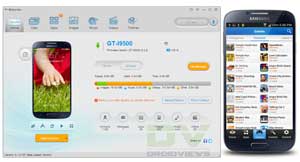
If you are with us for quite some time, you must not have forgotten our review of an all-in-one PC utility, named Moborobo, for Android and iOS devices. Moborobo is definitely a very good tool for Android users, considering the very fact that this most popular platform for mobile devices does not have a native PC Suite. Since Moborobo lets you perform various handy tasks on your phone or tablet and manage it using a Windows PC, it nicely compensates for the lack of a PC utility from our device manufacturers.
As a one-stop utility for Android users, Moborobo is loaded with all rings and bells to tempt users. Besides, an easy-t0-use desktop client, it also pushes various handy apps to your phone or tablet to enrich your mobile experience. Among the main features of Moborobo include:
- Display detailed device information.
- Automatically installation of USB Drivers.
- Managing contacts, messages, apps, audio, images and video files.
- Backup and restore your phone’s data.
- Capture screenshot from computer.
- Install APK files directly from desktop.
- Manage the files of device.
In our last article we discussed the ways in which Moborobo might help users simplify things using their computer. However, there still was another important aspect of the tool that we could not illuminate at length, and that is, Moborobo’s web resources that let you download apps available at the Google Play Store, wallpapers, music and video files absolutely free. I say “absolutely free” because you do even need to care about your mobile internet data charges, as Moborobo does it all using either a WiFi connection or the internet connection of your computer via USB cable. It must be pointed out here that Moborobo displays only free apps and games on download center.
Moborobo features a built-in dedicated web resource download center that allows you to download your favorite applications, games, wallpapers, ringtones and video files on your Android phone or tablet device taking advantage of your computer’s network. Some of the most striking features of this convenient aspect of Moborobo have been listed below:
- Download free apps and games.
- Download beautiful wallpapers for free.
- Download your favorite ringtones and videos.
- Since all files are downloaded to your computer first and then pushed to your device, you have a backup of all files on your PC too.
- Whenever a new version of an app or game is available, you get instant notification.
- What is more, Moborobo also comes with a handset client app called Mobo Market that can be used as an alternative for the Google Play Store app. There are various countries where Google services are not available, so it can be very useful tool for Android users in these countries.
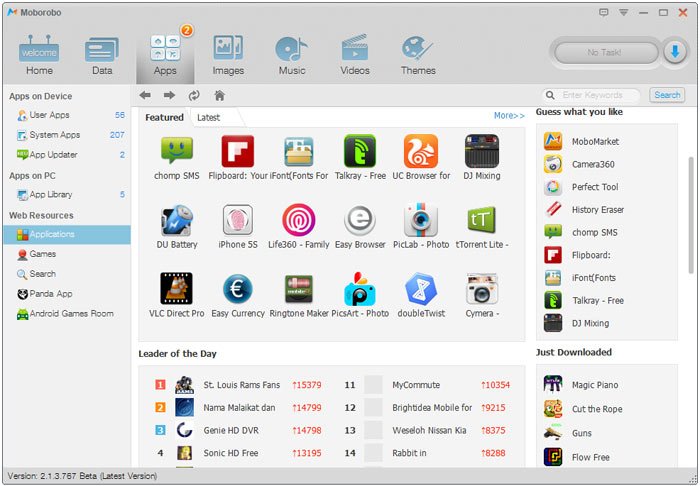
All web resources and downloadable stuff offered by Moborobo are easily accessible through its desktop client’s interface. At the top of the program, you can see icons for Apps, Image, Music and Videos. All the items on menu work in many ways. For example, clicking on the Apps tab shows you the apps installed on your device, but when you click on Applications option under Web Resources head on the left bar, you can see Android apps there. The same thing applies on other resources too.

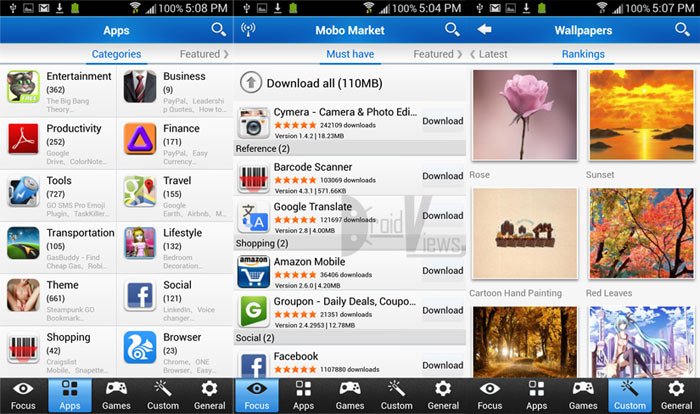
As we mentioned above, Moborobo’s handset’s client app Mobo Market makes it easy to download applications and games from the Play Store in a more customized way. The app classifies all apps and games under convenient to browse categories like Must Have, Hot, Latest, Featured, etc. Besides, you can also see apps and games based on their nature. This useful feature was available in the older Play Store but now it has been revoked. Fortunately, Moborobo still lets you browse apps by categories like Entertainment, Business, Productivity, Finance, Tools, Travel, Lifestyle, Social, Weather and so on.
Having described the features and advantages of Moborobo, it’s time now to wind up this little review of the web resources offered by this useful tool for Android devices. If you do not wish to spend a lot of money on your mobile data plans, it is just the ideal thing to have and make use of. If you already have it installed on your PC and Android device, start saving data now, and if you have just come across Moborobo for the first time, you can download the latest version of the application from the official site.
[Note: This is a sponsored post.]



Join The Discussion: