Being the current flagship, the Galaxy S7 was entitled to be the first Samsung phone to receive the latest Nougat roll out from the OEM and the thing has been happening since 13th January when the international and Dual-SIM variants of the device got the Android 7 update. As it usually happens, the US variants by Samsung receive latest software updates much later that the international models, the Verizon, AT&T and T-Mobile models of the phone are now getting the update. Today, we’ll see how we can install the Android 7.0 Nougat firmware on Verizon Galaxy S7 /S7 Edge (SM-G930V/G935V) manually using Odin.
In case, your Verizon S7 is on the PI3 version of Marshmallow firmware, you can request the Nougat OTA by going to Settings> About device> Software update.
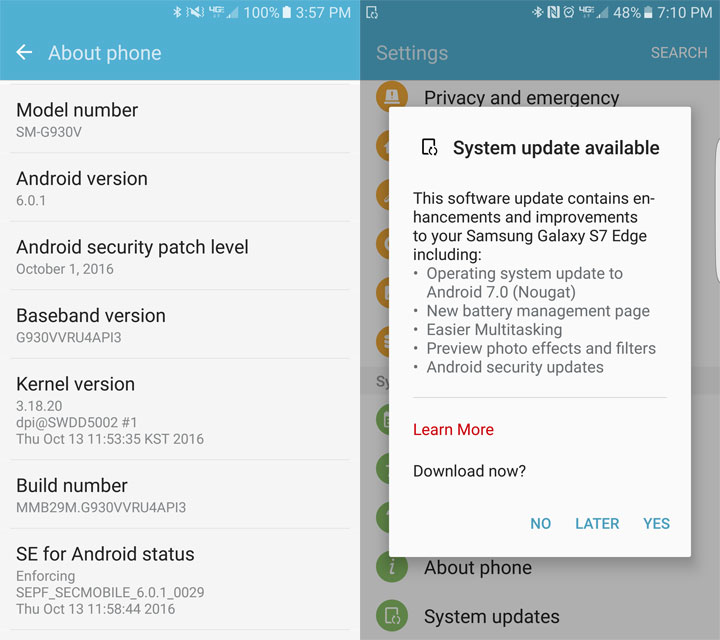
Note: The Verizon Galaxy S7 (flat) users on PI3 firmware can simply download the Nougat OTA file, rename it to “update.zip” and install it via stock recovery using these instructions.
However, if your phone is rooted or you are unable to receive the Nougat OTA for some other reason, you can update your Verizon Galaxy S7 (SM-G930V) or S7 Edge (SM-G935V) right now by installing the full Nougat firmware provided below.
New Features in Android 7.0 Nougat Update for Verizon Galaxy S7
Android 7.0 Nougat is definitely a big update that brings a host of new features, improvements, fresher and simpler UI and new ways to customize your S7/S7 Edge.
- Better battery management: Maximize your battery’s potential wit the new battery management feature. Customizable presets for Medium power and Maximum power saving modes are now available. The App Power Monitor detects inactive apps still using the battery, and puts them to sleep, extending your battery charge.
- Multitasking becomes easier: You can now enjoy multitasking by viewing 2 apps with the new split screen feature on Android Nougat now supports split screen, side by side viewing of any 2 apps. You can enjoy split screen by tapping the Recents button and then by tapping the split screen view icon for the desired apps.
- New effects preview screen: Now, you can preview all available effects and filters while taking a picture. To view the effects, just swiping left to right after launching the camera app. Moreover, you can also download new effects by tapping the download link on top.
- Customize Always On Display: You can now set any image saved in your Gallery on your Always On Display directly from the Gallery app.
- Safe browsing experience with Samsung Pass: The feature is available in Samsung Internet app and it allows you to take advantage of the Samsung Pass and the fingerprint scanner for website logins. Also, you need not remember multiple login details for various sites or apps as Samsung Pass securely stores your login credentials.
- Performance Mode: You can now improve your phone’s performance whenever you want using the Performance Mode that allows you to choose from Optimized, Game, Entertainment, and High-performance modes to optimize battery consumption and improve device performance.
- New keyboard with better language predictions: The new keyboard is configured updates language data automatically and provide better predictions.
- Configure automatic access to Wi-Fi: You can now enable or disable automatic reconnection to secure wireless routers or hotspots.
Download Android 7.0 Nougat Firmware for Verizon Galaxy S7/S7 Edge
Verizon S7 (SM-G930V):
G930VVRU4BQA2_G930VVZW4BQA2_VZW.zip | Mirror 1 | Mirror 2
Download G930VVRU4BQC5 firmware | Mirror
Download G930VVRS4BQC9 firmware | Mirror
Download G930VVRU4BQK2 firmware
Download G930VVRU4BQK4 firmware (latest)
Verizon S7 Edge (SM-G935V):
G935VVRU4BQA2_G935VVZW4BQA2_VZW.zip | Mirror 1 | Mirror 2
Download G935VVRU4BQC5 firmware | Mirror
Download G935VVRS4BQC9 firmware | Mirror
Download G935VVRU4BQF2 firmware | Mirror
Download G935VVRU4BQK4 firmware (latest)
Install Android 7.0 Nougat Firmware on Verizon Galaxy S7 /S7 Edge
Already downloaded the firmware file for your Verizon Galaxy S7? Great! Just follow the easy steps described below to install it.
- Download Odin3_v3.12.3.zip and extract it on your desktop.
- Go to Settings> Developer options and enable USB debugging.
- Backup your apps and data before proceeding.
- Unzip the downloaded firmware zip on your desktop. You will get 5 files (with .tar.md5 extension) inside the extracted folder. AP_G935VVZW4BQA2_CL10273029_REV00_user_low_ship.tar.md5
BL_G935VVZW4BQA2_CL10273029_REV00_user_low_ship.tar.md5
CP_G935VVZW4BQA2_CL10273029_REV00_user_low_ship.tar.md5
CSC_OXA_G935VVZW4BQA2_CL10273029_REV00_user_ship.tar.md5
HOME_CSC_OXA_G935VVZW4BQA2_REV00_user_low_ship.tar.md5 - Now turn off your Galaxy S7 and press and hold the Volume Down + Home + Power keys at simultaneously for 2-3 seconds to boot your phone into the Download mode. Release the keys as soon as you see a blue screen with exclamation sign and press the Volume Up key.
- When your phone gets into the Download mode, open the Odin folder and launch the .exe file to launch it.
- Now connect your Galaxy S7 to your computer using a USB cable.
- The ID:COM port on Odin will be highlighted as soon as your device is detected.
- Now click the BL button in Odin, navigate to the firmware folder and add the file that starts with BL in its name.
- Then click the AP button and add the corresponding file to it. Since the AP file is huge in size, it might take some time for it to be added in Odin.
- Now click the CP add the CP file to it.
- Finally click the CSC button and add the CSC file to it. Please note that if you select the HOME_CSC file, the apps and data on your phone will not be wiped. However, of you wish to wipe your phone, select the file that starts with CSC in its name.
- Make sure your Odin screen looks like my screenshot.
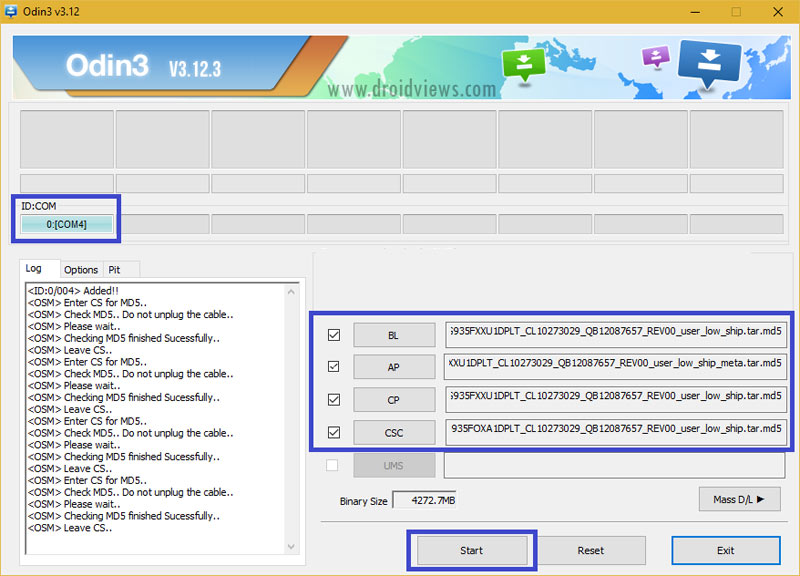
- Finally, click the Start button to initiate the installation and wait until the installation completes.
- When the firmware is installed, you will get PASS! message in Odin and your phone will reboot automatically.
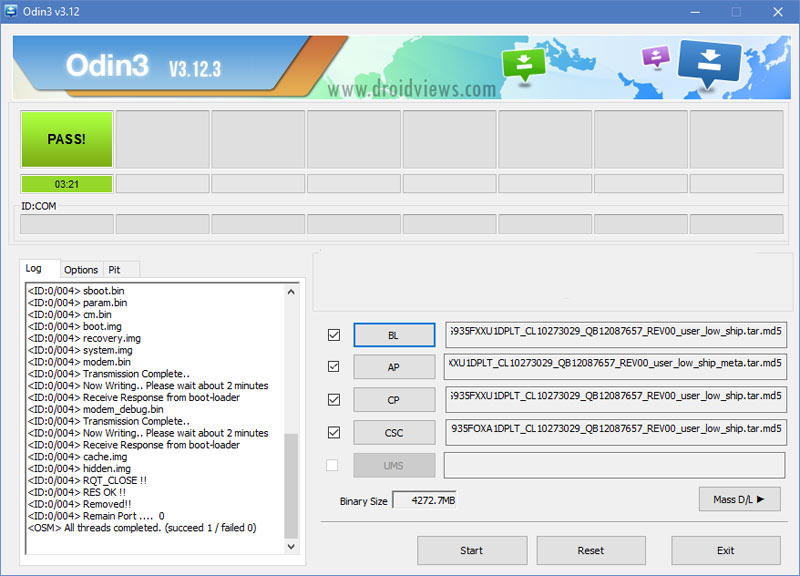
- Now, disconnect the USB cable and wait patiently until your phone boots up. The first boot might take about 5-7 minutes so don’t panic.
Make sure you have Samsung USB Drivers installed on your computer.
You will then be greeted by the welcome setup screen. You already know what to do now! Enjoy all new Android Nougat on your Verizon Galaxy S7 /S7 Edge.
Install the QC9 firmware.
I need Help!
I want to flash my galaxy s7 with the latest firware but i have a problem. Model number shown in About/Setting is 930T but in Bootloader Screen(Download Screen) it shows 930V.
please help me which model number i should flash 930T or 930V?
Which SIM card are you using?
I’m in Pakistan and using Ufone. It is factory unlocked, worked with any SIM card…
The model number of an Android device can be easily changed as you can see in my tutorial: https://www.droidviews.com/change-android-device-model-name-on-marshmallow-and-nougat/
The bootloader screen won’t lie, so you should try installing the SM-G900V firmware.
ok i’m going to flash with G930V firmware right now and let you know after that it works or not….
It worked thank you.
I successfully updated to 7.0
Glad to know!
This may help you…
https://uploads.disquscdn.com/images/7c1aa20dc396f4aa8c9cc43e07d6208c4446a7c8a6ecfb310f735fe32de22ea3.png
Thank you very much.
Hi Rob, looks like you were able to flash the firmware successfully! 🙂
I do not know what to do?
Hi Rob,
Which file did you try? Can you show me the Odin screenshot?
Began to flash the firmware stopped, got a brick.
Add my thanks to the list. Worked like a charm.
Do make a new article when Oreo update comes out. 🙂
Thanks for nice words, Waqar! We would one of the first to come with a detailed Oreo installation tutorial. 🙂
Hello..,, this rom support multilanguage?
I’m from indonesia, i need indonesian language from offical rom not root ect.. help. Thankz
Out of a SEA of terribly-written “guides”, with useless, out-dated, or out-right misinformation, THIS site’s guide worked without error. It was concise, precise, and effective.
THANK YOU RAKESH. A+
Thanks for the appreciation, Tommy! Follow us for more updates in future! 🙂
Works like a charm
Hello….. For SM-G930V…G930VVRU4API3.. which version should I install admin…tq.
Install the QC9 version.
I`ve already downloaded the bqc9 version, I`ve realized that I can manage the battery consume, but, do you know roms that keep a good performance without sacrifice the battery? I`m not gonna lie I`m a little dissapointed with this phone just for that.
Will this firmware enable a SM-G930V to be used with AT&T?
No.
Just download this: https://www.sammobile.com/firmwares/galaxy-s7/SM-G930V/VZW/download/G930VVRS4BQC9/167791/
and follow the instructions.
Thank You Bro. It works.
Rakesh, I was trying to recover a file off my phone and the program install a custom rom on my phone. I tried using your methoid to get my sm930v back to stock and only screen that will boot is the downloading screen. the rom will not install in odin? any assistance would be helpful information shows as followed
product: sm-g930v
Current binary: Samsung official
system state: custom
fap lock: off
Hi, can you show me the Odin screen log?
I was able to resolve it. Apparently the cable I was using was not the right type and caused the error it was a sun cable but o had to use a Samsung one. May want to notify any users if they start having same issue. Also the rom version must be of the same type that was installed on the phone ie marshmallow (6.0) or nogute (7.0) unless you flash the pit file. Just tid bits i learned.
Anyhow after I was able to place an is back bbq on the phone I then ran the Verizon repair assistant and was back to normal. Thanks for the reply though. I was really starting to worrie.
OMG!! thank you Ive just done it, and it worked!!!! yes
Glad to know, Roberto!
Hi, what file should I download, if my model is G930V running G930VVRU2APG5? Im out of the USA
Download the latest QC9 firmware.
cual es la diferencia entre QC5 y QC9 tengo el SM-g935V me funciona bastante bien, que mejoras tendré al brincar a la qc9? gracias de antemano…
English please!
Sorry.. Whats the diference betwen qc5 and qc9 i own a smg935v and it has qc5 and works just fine what will be the improvement switching to qc9?
Do you recomend it?
Tank you in advance!!
Hi, QC9 is just an incremental update with the latest security patch. It brings some performance related improvements and bug fixes. If you are happy with QC5, you can ignore QC9.
SM G-935V Model Conform is it for it plzzz Conform me Thanks.
Go ahead, you can install Nougat. Follow the tutorial carefully!
hi rakesh, can i install G930VVRS4BQC9 for my device, i am currently on A2
my phone is unlocked and i am irritated with verizon apps. please sugesst me what i shoud do.
the thing is i was happy with marshmallow bcoz it saved batttery a lot! should i update ro c9?
Hi, you can install the QC9 firmware. Since it’s a stock firmware, you’ll have all Verizon bloatware on QC9 too.
bro it has been a while can you please tell me about the latest firmware how is it hanging. i am curious about battery backup and stability of the phone. do tell me if you have tried it . my man you have been awesome since i baught the zeus. 😀
doesnt the g930V have a locked bootloader ?? i dont unerstand what any of these terms mean btw
Yes, it has but you can still install stock OTA package and firmware.
Dude .. you save lives .. I coudn’t find any link to the firmware with unlimited internet speed .. And this is all I need for my phone ..
Glad to know it helped, Luke!
will it work on the ph1 firmware i have the g930v but am out of usa and dont have a fine kinda connection to internet
Yes, try it.
how long should it take after i push start in odin? thank you
About 5-7 minutes.
my odin is stock on the Setup Connection
it’s work… thank you 🙂
Thanks for reporting!
Thank you!
Glad to know!
gracias soy de Perú, me sirvió para solucionar mi problema con el WIFI no me guardaba las contraseñas era cuestión de firmware, pase de 6.0 a nougat 7.0.
Me alegro de saber que te ayudó a mejorar a Nougat!
will this work if my firmware now is G930VVRU2APG5 android 6.0.1? please help me
Yes, it will.