Samsung started rolling out the Android 6.0.1 Marshmallow update for Galaxy S5 shortly after the release of its current flagship the Galaxy S7 and S7 Edge. The firmware update began to hit the international unlocked variant of the device as early as March 2016. However, as it usually happens, the carrier-branded devices, especially the ones from US operators, receive the latest software updates after many weeks and, in some cases, after months.
Since carrier operators like AT&T and Verizon are very strict about stopping their users from rooting their devices, many users ignore new software updates because they don’t want to lose root. If you remember, we posted a detailed tutorial on updating the Verizon Galaxy S5 to Lollipop and retaining root.
If you own the Galaxy S5 SM-G900V running Android Lollipop and have been enjoying root privilege on it, you must be ignoring the Marshmallow. If that is the case, here’s is a great news. Your wait is finally over because XDA member muniz_ri has come out a way to get your Verizon Galaxy S5 updated to Android 6.0.1 Marshmallow and retain root access after doing so.
The talented developer has repackaged the stock firmware as a deodexed and debloated ROM that can easily be flashed using Chainfire’s celebrated app FlashFire. You must have understood now that the method described below requires a rooted Galaxy S5 SM-G900V.
What’s New in Marshmallow for Verizon Galaxy S5
Anyway, if you unaware of the changes and improvements Marshmallow has brought over Lollipop, below is a small list of some major ones:
- The firmware version bumps to PF4 Android 6.0.1 Marshmallow
- Wifi calling
- Good lock support
- Battery improvements with Doze
- Now on tap
- New app icons
- 1 more bloat app
- Those who have taken Marshmallow OTA can easily downgrade to Lollipop (firmware version PB1).
Also Read:
How to Restore Verizon Galaxy S5 (SM-G900V) to Stock
Root Verizon Galaxy S5 (SM-G900V) on OE1/OG5/OK3/PB1 Firmware
About the ROM: Must Read
Now a few things about the ROMs provided below:
- You can flash the ROMs provided below over any firmware version or build. However, you must have root access.
- If you follow the procedure described below, the Modem, Non-hlos, System, Kernel, Recovery, and Bootloader of your Galaxy S5 will be updated.
- After installing the ROM, you’ll be able to use the WiFi tethering feature on your Verizon S5.
- You don’t need to wipe anything before flashing the ROM because the process will automatically wipe all user data on your phone. It’ll be a good thing to back up your apps and data beforehand as a precaution.
- If you choose to install the debloated version of the ROM, keep in mind that it doesn’t have any Google, most Verizon, and all Knox apps. In case you want them, you will have to install them later manually.
- If you do not already have root access, you can root your Verizon Galaxy S5 on OE1, OG5, OK3, PB1 firmware by following the instruction given here.
I have double-checked the steps in the tutorial, I still can’t guarantee that it’s risk-proof. In most cases, it’s some mistake on the part of the users that later end up with sad faces. follow the guide at your own responsibility. Good luck!
Preparations and Downloads
- Make sure your Vzw S5 has root privilege.
- If your Verizon Galaxy S5’s bootloader is locked, unlock it first by following the instruction given on this thread.
- Download and install FlashFire app from the Google Play Store.[googleplay url=”https://play.google.com/store/apps/details?id=eu.chainfire.flash”/]
- Download one of the following ROMs according to your preference:
- G900V_PF4_Stock_Rooted_ROM.zip (for the locked bootloader)
- G900V_PF4_Stock_Deodexed_Debloated_Rooted_ROM.zip (for the locked bootloader)
- G900V_PF4_Stock_Rooted_ROM.zip (for the unlocked bootloader)
- G900V_PF4_Stock_Deodexed_Debloated_Rooted_ROM.zip (for the unlocked bootloader)
- Download PF4 bootloader file: G900V_PF4_Bootloader.tar.md5
- Download the latest Odin from here.
- Make sure to enable USB Debugging on your Galaxy S5.
- You have Samsung USB Drivers or Samsung Kies installed on your computer.
Installation Instructions for VZW S5 with Unlocked Bootloaders
- Copy the G900V_PF4_Stock_Rooted_ROM.zip (or the deodexed and debloated version of the ROM) to your device’s internal storage on the external SD card.
- Open the FlashFire app and “Agree” to the Terms and Conditions prompted by the app.
- Press the rounded “+” button twice to bring up the Actions menu.
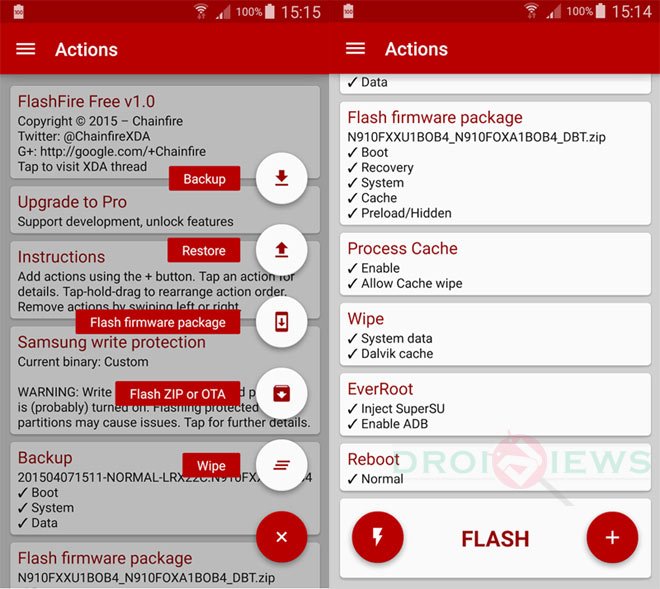
- Now tap Flash Zip or OTA option and select the G900V_PF4_Stock_Rooted_ROM.zip.
- Make sure that Auto-mount is unchecked under the Options menu and press the checkmark to continue.
- From the main menu uncheck all options under EverRoot.
- Set the Reboot settings to Download.
- When all’s done, tap the Lightning bolt icon followed by OK to begin the installation.
- When the installation is finished, your device will reboot automatically into the Download Mode.
- Now connect your phone to the PC via USB cable and launch Odin.
- Click the PDA/AP button in Odin and select the G900V_PF4_Bootloader.tar.md5 file.
- Then hit the Start button to begin the installation.
- Your Verizon Galaxy S5 will reboot automatically.
Note
Please note that while going through the FlashFire steps, the screen of your phone might turn black for a while flashing the system partition. Don’t panic and be patient for some time. After flashing the bootloader file in Odin, your device will halt at the Verizon splash screen for a couple of minutes. The halt duration might extend to 10 to 15 minutes if you have flashed the deodexed and debloated version of the ROM.
Once your Galaxy S5 gets past the splash screen, you’ll be able to use your phone and enjoy Marshmallow with root privilege. Should you have any issues after going through the steps given in the tutorial, or you need any help, feel free to drop us a comment below.
Note that my phone is a Root access Galaxy s5 900v was running lollipop 5.0 now happily runs marshmallow 6.0.1
Failed trying to flash through flashfire,I don’t know why but it worked through TWRP-Im new to this so I thought a positive outcome is worth sharing especially if anyone else is struggling like I was
Followed safestrap unlock bootloader process,used twrp recovery to install this ROM upgrade.
NOTE!!!TWRP would not read my sd card so I mounted to my PC and installed this rom onto internal storage, then flashed it..working great!!
Stuffed up first go becasue I flashed the wrong boatloader_unlock_AIO.Zip, just wanted to share this so ppl knew this actually works…cheers
I got Start Up Failed , and Secure fail : Kernel on top with red color
Help plz
Restore you S5 to stock: https://www.droidviews.com/install-stock-android-6-0-1-marshmallow-on-verizon-galaxy-s5-sm-g900v/
yes i know how to recover but what did i do wrong to get that message? any idea what caused it ?
Are you on PF4?
Hi Derek, you can try the ROMs for locked bootloaders, but keep in mind that involving in such things always has certain level of risk.
To fix that, you should perform a factory reset via stock recovery: https://www.droidviews.com/how-to-perform-data-factory-reset-and-wipe-cache-on-samsung-galaxy-devices/
If you want to install Marshmallow without root privilege, install the PF4 or PG1 firmware from here: https://www.droidviews.com/install-stock-android-6-0-1-marshmallow-on-verizon-galaxy-s5-sm-g900v/
Great thanks! The FDR cleared up the “stopped” messages. I have work to do to restore the phone screens, but that’s no problem.
Is there no way to root Marshmellow???
Root access is indeed a great thing to help improve the device experience, but there’s no working root method for Marshmallow available so far. 🙁
Sigh… with the OK3 version rooted, I tried the above again and… same result. SECURE FAIL: KERNEL
Have I overlooked something? I tried this with the deodexed version this time. Last time it was the stock, rooted version.
Which file you downloaded? I just updated the file links. Please make sure to download the ROM according to your bootloader status. And yes, try Safestrap in place of FlashFire.
Hi Richard,
Here’s a solution shared by a forum user. If it helps, let me know. I’ll update the tutorial accordingly.
Had to flash the PB1 full tar on ODIN
Then i had to root the PB1 as mentioned here. http://forum.xda-developers.com/veri…5-ok3-t3290370
After root i had to unlock bootloader. http://forum.xda-developers.com/veri…oader-t3337909
I used Method 2: Unlocker via Safestrap Samsung_Bootloader_Unlocker.zip in safestrap or flashfire
After this i verified i was on PB1 rooted and unlocked.
From there i went to Flashfire and flashed G900V_PF4_Stock_Rooted_ROM.zip (For “Unlocked” Bootloaders Only!) as posted on the OP
This placed me on PF4 ROM and firmware, but with a PB1 unlocked bootloader. (This is where the back button, recents and wifi dont work)
I then flashed TWRP 3.0.0 via ODIN
From there i followed the “If You Already Have Bootloader Unlocked And On A Samsung TW Rom” found here http://forum.xda-developers.com/veri…oader-t3337909
In case instructions changed, like it has on the past, they are:
In TWRP Flash TWRP_Prepare.zip
Reboot to Download Mode
In Odin Under AP slot load PB1_Firmware_Only_NK2_Kernel.tar.md5
Now in Odin Under PIT load S5_KLTE_USA_VZW.pit If you have a 32gb phone instead of 16gb phone skip this step
Click Start
When finished on reboot watch for Safestrap Splash Screen and enter Safestrap
Now goto Power Menu/Reboot Menu and reboot to Download Mode
Make sure in download mode the current binary is Official. If it is not reflash In Odin Under AP slot load PB1_Firmware_Only_NK2_Kernel.tar.md5
Now in Odin Under PIT load S5_KLTE_USA_VZW.pit
Click Start on reboot enter Safestrap reboot back to download mode and make sure binary status is Official
If Binary Status is Official Pull battery restart and enter SafeStrap
Flash: SafeStrap_PF4_Bootloader_Unlock_AIO.zip
Phone will Power Off.
Pull Battery enter download. Flash via ODIN TWRP 3.0.0 as the previous flash will install 3.2 which doesnt see the SD card.
There u go, thats it, this will have you on a rooted/unlocked PF4.
I’ll try that. Great thanks for your patience – I really, really appreciate it!
OK I keep running into the same problem: I can flash PB1, boot up, skip over everything, and set the developer options. When I flash NK2_kernel, the phone hits the boot screen and freezes. This is a known possibility. The recommended fix is clearing the cache and rebooting. At this point the phone should re-appear in File Explorer. All I get is the boot screen, the “CD Drive” device, never the actual phone. I can get to recovery and bootloader, but that’s it. I re-installed the PC USB drivers, but hasn’t didn’t change anything. Bottom line: I can get to an unrooted PB1 using this procedure, and that’s it.
It appears that the use of NK2_kernel is the problem. In fact, I don’t understand how these procedures work It appears that NK2_kernel is an OTA for (or to??) 4.4.4 while PB1/OK3 are 5.0. The mystery, then, is why any of this stuff works. Period.
Sigh… in fact, everything has been working correctly for installing all of the patched files for either OK3 or PB1 or, later, PF4. What got me in deep trouble is the instructions aren’t clear about what the results should look like. If anything, it’s probably best to assume that if Odin can install a firmware file, everything else will work. If the first step fails, then it’s time to panic.
BTW, if the phone can be booted into 5.0, then it’s rooted. No point in messing with Kingroot. Install SuperSu me 6.7 (in most “get to a rooted 5.0” packages) and run it. A) If it runs, you’re rooted. If you’re rooted,you don’t need Kingroot anymore. There are suggestions that it may or may not be entirely trustworthy.
I found a video that shows the process completely laid out. Unfortunately I can’t find my way back to it. As soon as I find it, I’ll post a link or title to search for.
NTL at the end of following the 6.0.1 process, I’m still being shot down by the SECURE FAIL: KERNEL message.
Here’s the video I mentioned. Search YouTube for:
Rooting Verizon Galaxy S5 on Lollipop OE1/OG5/OK3
The opening procedure is the one I followed to get to OK3. I’ll follow it to get PB1.
I’m losing track of where I am in this project. Right now I have unrooted OK3 in the phone. I skipped everything (email address, etc.) after it booted up. Now where do I resume? BTW, what time zone are you in? EST (GMT-5) here.
I now have a near-bricked phone with no way to Flash Fire – Start Up Failed and, in the upper left in red SECURE FAIL: KERNEL. Now what????
Flash the PB1 firmware from here: https://www.droidviews.com/install-stock-android-6-0-1-marshmallow-on-verizon-galaxy-s5-sm-g900v/
im stuck on the samsung screen? i have done everything properly? whats the problem how do i get back to lolipop now? must reply..
@DroidViews:disqus Tried with Galaxy S5 SM-G900V android 4.4.2. rooted, and boot unlocked.
I
seem to have had the exact same problem as @disqus_KtOulfML8i:disqus and @disqus_SIqzIQlNcg:disqus .
followed steps. was supposed to go to DOWNLOAD mode. but booted to
Samsung then hung on Verizon Logo Screen. I patiently waited for over 35
Minutes. Tried manual download mode (Home, volume down, power). boots
too “Kernel is not SEANDROID ENFORCING” “Set Warranty Bit: kernel”
I followed the steps on Flashfire when installation is completed, it was supposed to go to DOWNLOAD mode. But for some reason, it got stuck on the Red Verizon logo screen. So i turned it off, did the manual download mode (Home, volume down, power) but for some reason it wont connect to my computer via usb so i could do the next step. Did i do something wrong?
Plus, when i reboot, there was a message saying “System software not authorize by Verizon has been found on your phone. Please turn off your phone and go to the nearest Verizon store for help”
Appreciate any input. Thanks.
@Rakesh, please help.
@Rakesh Tried with Galaxy S5 SM-G900V android 4.4.2. rooted, and boot unlocked.
I seem to have had the exact same problem as @Gilbert and @Christine. followed steps. was supposed to go to DOWNLOAD mode. but booted to Samsung then hung on Verizon Logo Screen. I patiently waited for over 35 Minutes. Tried manual download mode (Home, volume down, power). boots too “Kernel is not SEANDROID ENFORCING” “Set Warranty Bit: kernel”
Do this:
1. Reboot into the recovery mode.
2. Perform a wipe.
3. Enable USB debugging
4. Install the PB1 firmware.
Enable debugging again.
5. Download this file: https://www.androidfilehost.co…
6.Extract the file.
7. Open the extracted folder and click the .bat file #1, Install APKs, plug in your phone and follow directions.
8. If the root process hangs Close the bat, unplug phone pull battery and reboot phone to recovery (VolUp+Pwr+Home). In recovery wipe cache only and reboot. If phone reboots back to recovery instead, pull battery and manually reboot. Now plug phone back in and Launch Bat #3.
9. IF you get into android and cannot get root, Open bat file #2 and start from there again. If your phone wont reboot, use Bat #4 and try and enter download mode manually(VolDown+Pwr+Home).
10. Open KingRoot.apk Click The Up Arrows a couple of time until you get to Try It and click Try It and that’s it don click nothing else just close Kingroot. You should now have root. If It says Root not available and the bat said your were rooted Reboot Phone and open KingRoot You should now be rooted(otherwise reboot phone and check again)
11. Copy the linked file (G900V_Fix Safestrap.zip) (It may come in handy later on) to your SD Card and Internal Storage Copy Safestrap_Flashable_Kernels and Safestrap_Flashable_Firmware and anything else you want to install like the below rom: https://www.androidfilehost.co…
12. Now open Busybox Installer Allow KingRoot permission click on install.
13. Click on Safstrap Allow KingRoot permission then click Install Safestrap after it installs reopen Safestrap and click on install again
14. Reboot phone open Safestrap app and Click Reboot To Recovery. If during this process you every get stuck on samsung screen.
Pull battery reboot phone to bootloader (VolDwn+Pwr+Home) Plug phone into computer open Odin In the AP Slot Flash “VZW_BPB1_KERNEL_ONLY.tar.md5” (located in the LOLLIROOT Folder)
Try and let me know. It’ll work for sure. Good luck!
Did you get it fixed? I appear to be stuck in a similar situation
@Dan No not yet.
i did it, installed stock 5.1 og5 stock firmware downloaded from official samsung site..
download that zip file,
unzip it, go to recovery clear cache and factory reset, and go to bootloader , and flash 5.1 stock file (it must be MD5 File type) use odin to flash it…
thank me later….
@Admin Droidopedia Thanks for your help. I will try this tomorrow. I will let u know what happened. Thanks again.
im sorry for late response , did you remove delvik ? and what was your stock baseband version if it was lolipop it must be og5?
Hi, thanks for your response. How do you remove Dalvik? Right now, my phone can only go to ODIN mode. If i press the START button, it goes to the START UP FAILED with yellow triangle screen. My phone when i bought this 2 years ago was 4.4.4 Then i try to upgrade to 6.0.4 Marshmallow, that’s when my problem began. Appreciate your help.
oh its still fine dont worry you can boot it up..
delvik can be cleaned with twrp..
http://samsung-updates.com/device/?id=SM-G900V
go here and download 4.4.4 version unzip it, on device go to bootloader and connect it to computer, on computer open odin 3.09 wait till device show up and select img file (extracted from download folder) and start to boot it..
tell me what happens next..
Hello Admin, sorry for a late response. For two days now, tried downloading the link you sent me, but Rapidgator link would not finished downloading. It worked fine with other file sharing files except Rapidgator. Was wondering if you have any other link other than Rapidgator. By the way, not sure if i mentioned – my phone is rooted! Thanks and hope you can still help me. I will still try to download link u gave me until i hear from you.
Hi Admin Droidopedia. Ok, here’s what i did today. gone to WIPE CACHE PARTITION, click YES, then to WIPE DATA/FACTORY RESET, click YES, then REBOOT TO BOOTLOADER click YES. Then went to ODIN 3.09, click AP to add the G900VVRU1AN12.md5 (my original stock model), click START, few minutes later it says FAILED! in red on upper left corner. What did i do wrong? Appreciate your help.
On rooted KitKat and upgrading to the deodexed MM rom listed here. Went through steps but never got a chance to Odin the bootloader. Went straight to verizon splash screen where it’s hung up. Anyone know how to reboot the phone so I can install a backup?
Did you ever get this resolved? I appear to be stuck in the same spot
I have a rooted (lollipop)PB1-g900v, with bootloader unlocked.. Now i just want too upgrade from (lollipop)PB1 > PF4(marshmellow); after completing the above method, phone rebooted with “kernal not seandroid”.. i used ( PF4_bootloader/Deodexed;Debloated_Rom).. can someone point me to a successfull solution ?
Thanks!
Read this: http://forum.xda-developers.com/showpost.php?p=67751030&postcount=1130
Then downgrade to KitKat, root it and try flashing this: https://www.androidfilehost.com/?fid=24591023225177384
Since you seem to be so willing to help (and I do appreciate it) do you mind if I ask why I need to downgrade and root again if I’m already rooted on 5.0? Mainly curious but I’ve also learned to follow the instructions at least at first even if they don’t make sense sometimes.
I’m rooted running stock 5.0 on a Verizon S5 g900v. I’ve tried this method more than once and keep getting stuck on the samsung boot screen. I’ve wiped and factory reset. I’m sure I’ve flashed the md5 file with oden every time. Has anyone gotten this to work and if so did you do something different. Is there another file that needs to be flashed with recovery or using odin before the md5? Thanks!
Or could someone tell me a simple way to unlock the hotspot on 5.0? I’ve tried a few methods for doing that and get stuck on the Verizon Screen every time. Oh and I’ve only been trying the stock, not the debloated.
Hi,
You should try flashing the hotspot unlock file given here via FlashFire: https://www.droidviews.com/install-lollipop-on-verizon-galaxy-s5-sm-g900v-keep-root-and-enable-wifi-tethering/
Thanks, but I’ve tried that one several times already. I get stuck on the samsung screen when trying to boot after installing the zip you mention. Perhaps it would help those trying to help me if I mentioned that I’m on: G900VVRU2BPB1 Firmware.
Can I and should I downgrade to: G900VVRU1BOC4?
Sad thing to me is that I have a backup of the last rom I had with the hotspot working of Optimal 4.4.4 but I’m unable to restore it for some reason it just keeps hanging as well and simply won’t boot.
I’m so behind on all this stuff. I kinda need my hotspot back, it’s been almost a week and I actually rely on it in this area for work so it’s becoming a problem I need to fix. Thanks!
Yes, the hotspot unlock is meant for OC4 only.
You need to downgrade to 4.4.4 NCG firmware using Odin 3.09- https://www.androidfilehost.com/?fid=95916177934534091
Root it using Towelroot.
Now you should have root, SO install SU, Busybox, and Safestrap.
Then proceed with this guide: https://www.droidviews.com/install-lollipop-on-verizon-galaxy-s5-sm-g900v-keep-root-and-enable-wifi-tethering/
I need to get some sleep but will give it a shot in the morning. Really appreciate the assistance and I think I’m starting to understand. So the OC4 unlock will work on the G900VVRU2BOE1 firmware (is that because it starts with an O?). I’m going to try a PD1 hotspot unlock zip that I found first just to try it (since I have root on 5.0 PB1) but have my doubts it will work.
I just need to get off the PB1 and downgrade to the oldest firmware (NGC) first using Odin 3.09. Root. Then install pre-rooted OE1. Then install hotspot unlock OC4?
Just so I don’t screw anything up do you have instructions for installing Towelroot on 4.4.4 NGC?
Thanks You!!
Here are the instructions: https://www.droidviews.com/root-att-and-verizon-galaxy-s5-without-voiding-knox-warranty/
Hi again! Here’s a stock pre-rooted Marshmallow ROM with tehering enabled: https://www.androidfilehost.com/?fid=24591023225177384
If you phone has locked bootloader, install it using Safestrap and if it’s unlocked bootloader, install.
For unlocked bootloaders, just make sure your on PD1 or PF4 bootloader. If using on locked bootloader, make sure you are on PD1 or PF4 bootloader and make sure to flash the ROM, wipe data and then flash MM kernel.
See this for reference: https://www.droidviews.com/flash-custom-marshmallow-roms-verizon-galaxy-s5/
Yet again I tried your new method and it didn’t work . When I flashed the G900V_PF4_Bootloader.tar.md5 the phone had a soft brick and it asked for the kies app to restore the phone . Yet again a non working method
Delete this page, your just getting everyone bricked and I’m getting PMs about it daily
He’s right.
after going through all the steps i didnt obtain root can u assist me
If you read my comment, its impossible to root MM with a locked bootloader
Hi everyone, its me, GeTex. Just wanted to tell you the author has no idea what they are talking about. You CANNOT Get rooted MM without an Unlock Bootloader, because you HAVE to flash an unsigned kernel that if you flash on a stock bootloader WILL GIVE YOU A BOOT LOOP. Sorry…
I have the bootloader unlocked and still i stuck at the boot loop.i think the problem is with the zip files and not with the phones.i have flashet the zips with flashfire and with TWRP recovery same problem at the end
How did you unlock your S5 bootloader? Also his zips may be bad, XDA has waaaaay better support
Did anyone find a solution to this? I am at the same problem. Stuck on the Samsung start screen. Having doubts this works…
Hi, the tutorial will be update with new method. The one describe above does’t seem to work for all. You can restore your device with the stock MM firmware: http://updato.com/firmware-archive-select-model?record=92684CD23F3611E6815B0CC47A44B7B2
Followed guide up to Flashfire, got the zip (stock) loaded and installed but it never went to download mode. 1 hour wait, rebooted to bootloader. Used Odin to flash the tar, then phone reset and has been at the Samsung logo for over an hour. Reloaded into recovery, it shows the 6.1 installed, so rebooted phone. Hour later still on Samsung screen…
I same happened to me , I did the same procedure and pilling I was in the Samsung logo
Glad to see I’m on the same boat with someone. Have you found a solution or anything yet William?
To fix the issue, downgrade to the last rootable stock firmware and then try again.
Thanks for getting back to us Rakesh. I dont think I can downgrade to KitKat from Marshmallow but I already downloaded the 4.4.2 firmware, so I’ll be downgrading to Lollipop then to KitKat and then rooting. When I’m rooted on KitKat, should I follow the same instructions posted here or are there special instructions for upgrading from KitKat to Marshmallow and keeping root?
See the keep root method here: https://www.droidviews.com/install-lollipop-on-verizon-galaxy-s5-sm-g900v-keep-root-and-enable-wifi-tethering/
Start with G900VVRU1ANCG firmware.
Is it ok if I start with the NE9 firmware (I already have it downloaded), flash the NCG kernel, root with towelroot, and then flash NE9 kernel? And after that I should follow the Lollipop keep root method and then follow this Marshmallow keep root method, correct? This time I will use the regular stock roms rather than deodexed/debloated roms, but what if I encounter the same problem when upgrading to Marshmallow?
I just tried flashing stock OA8 firware, but Odin gives me FAIL, SW REV CHECK. What am I doing wrong?
Sorry for all the comments. I understood the problem. Since I flashed the PF4 bootloader I’m pretty much stuck in 6.0.1 and can’t flash back. I’m going to flash stock firmware for Marshmallow
Here’s the MM firmware: https://www.androidfilehost.com/?fid=24438995911970571
Here’s the link to the Marshmallow PF4 stock firmware: http://updato.com/firmware-archive-select-model?record=92684CD23F3611E6815B0CC47A44B7B2
FYI you can flash back to OE1, the Qfuse is in OE1, so you can downgrade to PB1, OK3, or OE1 all of which are lollipop, allowing root
If you encounter the same issue again, you can halt at Lollipop with root , or can install the stock Marshmallow firmware.
Hi Rakesh, I have a galaxy s5 with a locked bootloader. I followed the instructions and flashed the deodexed and debloated zip with FlashFire and set the reboot mode to download. It rebooted but was stuck at the boot screen for 30 min, it never went into download mode.
So, I took out the battery, went into download mode manually, then installed the tar.md5 file with Odin. After installation, the phone rebooted and was stuck at the boot screen for another 30 min until I took out the battery again. Now, I dont know what to do.
I went into recovery mode and it said I had version 6.0.1. What should I do?
my phone is in SECURE FAIL: KERNEL mode. tried to re flash a new firmware using Odin but it keeps failing. plz help thx
Hi Dennis, can you share the Odin screenshot? What was the firmware version of your phone?
Im running BOK3 firmware android 5.0 stock rooted
Hi, what’s the current status of your device?
I have same problem! D:
Read my comment above
Read my comment above about this