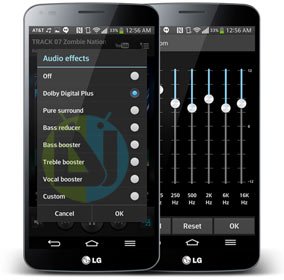
The latest phone from LG is being projected by the company as the “shape of innovation”. To some extent, the LG G Flex is indeed a device with a difference as it pleasantly deviates from the very form of the smartphone as we know it. The curved display of the phone is its greatest USP.
The highly priced G Flex features a 6.0″ Curved P-OLED display with 720 x 1280 pixels, Snapdragon 800 processor, Quad-core 2.26 GHz Krait 400 CPU, 13 MP main camera, Li-Po 3500 mAh battery. The nice hardware comes with Android 4.4.2 KitKat. Among all good things about the device, the quality of its display and camera focus issues remain as stains on its shiny aura.
Well, I do not own the LG G Flex but have had an opportunity to use the device for a couple of hours. It really feels good and draws people’s attention with its curved form-factor. The picture quality of the device might not stand up to our expectations but its audio quality is really good.
Good? Wait for a little! Our today’s post is about improving the audio quality of your LG G Flex. XDA member aznrice2k4 has come up with an amazing trick to enable Dolby Equalizer on LG G Flex. His audio mod for the device involves modifying system music configuration file to activate Dolby Digital Plus equalizer that lies hidden by default. So, it’s clear that you need to have root privileges on your LG G Flex. If you have rooted your phone yet, you can do it by following our easy tutorial:
Besides root access, you’ll also need a root file browser. We recommend the Root Browser app:
[googleplay url=”https://play.google.com/store/apps/details?id=com.jrummy.root.browserfree”]Now here’s how you can enable Dolby Equalizer in apps like music and video players on your LG G Flex:
- Open Root Browser.
- Navigate to system/etc.
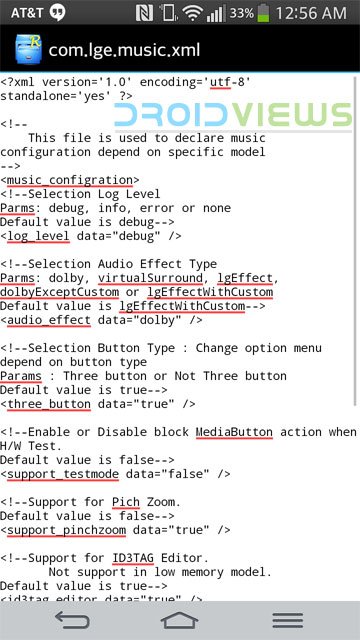
- Look for a file named com.lge.music.xml and open it.
- Now edit the strings as shown in the screenshot below:
- After editing the codes, save changes and go back.
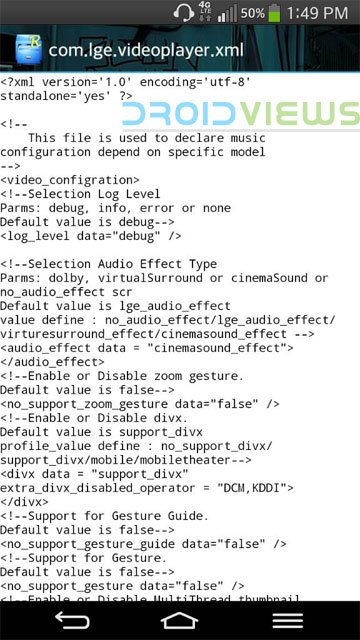
- Now look for com.lge.videoplayer.xml and open it.
- Make changes to this file as shown in the screenshot below:
- Once again, save the changes and exit the Root Browser.
- Reboot your device.
When your LG G Flex boots up, open music player app. Now you should see the Dolby Digital Plus mode enabled in the list of equalizers.
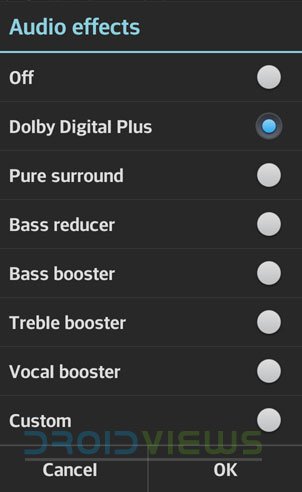
Select the Dolby equalizer preset and start enjoying amazing audio quality. While viewing videos, select Cinema Sound. Try the mod and do not forget to share your experience with us. Cheers!
Don’t Miss: How to Remove Bloats on LG G Flex + List of Safe to Remove Apps

Join The Discussion: