For the past few days, we have been writing rooting tutorials on different Galaxy Note 3 variants. There is a great number of people to whom Android tastes dull without root access on their device. Rooting is indeed one of the best things about Android as it hands over the power to you. It lets you install a plethora of useful apps that can’t be installed otherwise. If you want to improve the performance of your Android phone or tablet or add a feature that does not come with it, rooting is the only way you can get all such things. As we said above, we have covered almost all the variants of the device in the previous posts and today, we’re going to root AT&T Galaxy Note 3.
The AT&T Note 3 was only left variant and the present tutorial will complete the circle. If you own the AT&T Galaxy Note 3 with model number SM-N900A, this tutorial is just for you. By following a few simple steps, you will be able to root your device and thus you can enjoy all the advantages of having a rooted device. Since there is no way to bypass the locked bootloader on this model, we’ll add the procedure to do the same and install a custom recovery later when it is available.
Disclaimer:
Rooting your AT&T Galaxy Note 3 will trip your device custom lash binary but it will not trigger Samsung’s KNOX warranty counter. Besides, involving in any such activity might put your device at risk. We, therefore, advise you to use your discretion before proceeding. Neither the developer of this exploit nor DroidViews will be responsible for any mishap. Learn how to unbrick AT&T Galaxy Note 3 SM-N900A to fix your phone if anything bad happens.
UPDATE
The Root de la Vega method does not work anymore! To root your AT&T Galaxy Note 3 SM-N900A without unlocking the bootloader, use Geohot’s TowelRoot app.
Preparations:
The rooting method described below has been developed by XDA member designgears, and it is a little different than other exploits that we are familiar with. It demands you to install a modified firmware and then copy a rooting package to your device. The procedure is pretty simple but it sounds a little geeky. The only tiresome job for those with slow internet is the file size (2 GB) of the download package. Here are a few things to be taken care of before we proceed to root the AT&T Galaxy Note 3.
- Download Odin 3.09 and extract the zip on your computer: Odin3 v3.09.zip
- Download the rooting package for your device and extract it with 7Zip program: N900AUCUBMI9_VEGA.7z
- Inside the extracted folder, you’ll find 3 files:
- N900AUCUBMI9_OneClickBin.exe
- Root_de_la_Vega.tar
- Root_de_la_Vega.zip (extract)
- root_files (folder)
- root_de_la_vega.sh
- Install the latest Samsung USB Drivers or Kies on your PC (skip if you have any of them already).
- In case you have Kies installed on your computer, make sure to close it while you use Odin.
-
- Go to Settings> General> Developer options> USB Debugging and enable it by checking the box. Learn how to enable Developer options on Android.
-
- Rooting your Note 3 using this method will wipe all apps and data present on your device. Backup your device’s apps and data using a backup app.
- Charge your phone’s battery to at least 50% level.
- Remove the external SD card (if any) from your device.
Root AT&T Galaxy Note 3 SM-N900A:
- Turn off the device and boot it into Download mode. This is how you can do it: hold the Volume Down + Home + Power buttons at the same time for about 2-3 seconds and press the Volume Up key to enter Download mode.
- Now run the N900AUCUBMI1_OneClickBin.exe file.
- Connect the phone to your PC using USB cable and wait till Odin detects your device. It is signalled by the COM port turning Yellow and “Added!!” text at the message box on Odin.
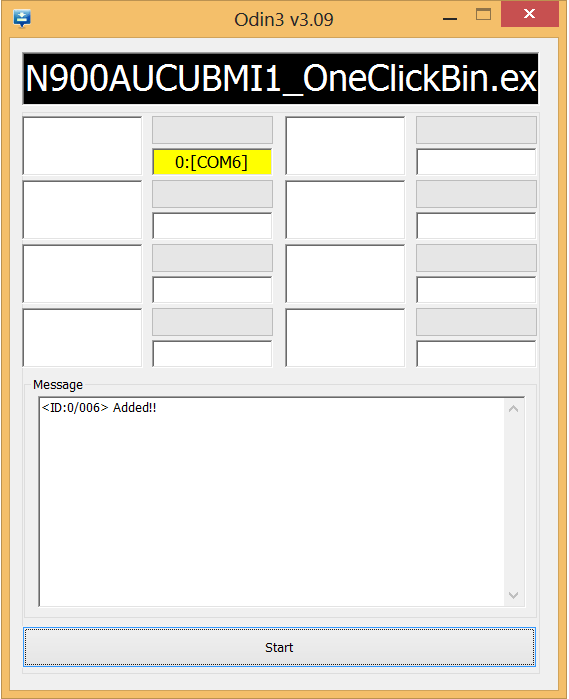
- Now click the Start button.
- When the installation is finished, disconnect the device and boot it again into Download mode. Pull out the battery and press the key combo (volume down+home+power as you did above).
- Launch Odin v3.09.exe and connect the device via USB. Once again you would see “Added!!” on Odin.
- Now click the AP button on Odin and select “Root_de_la_Vega.tar” file.
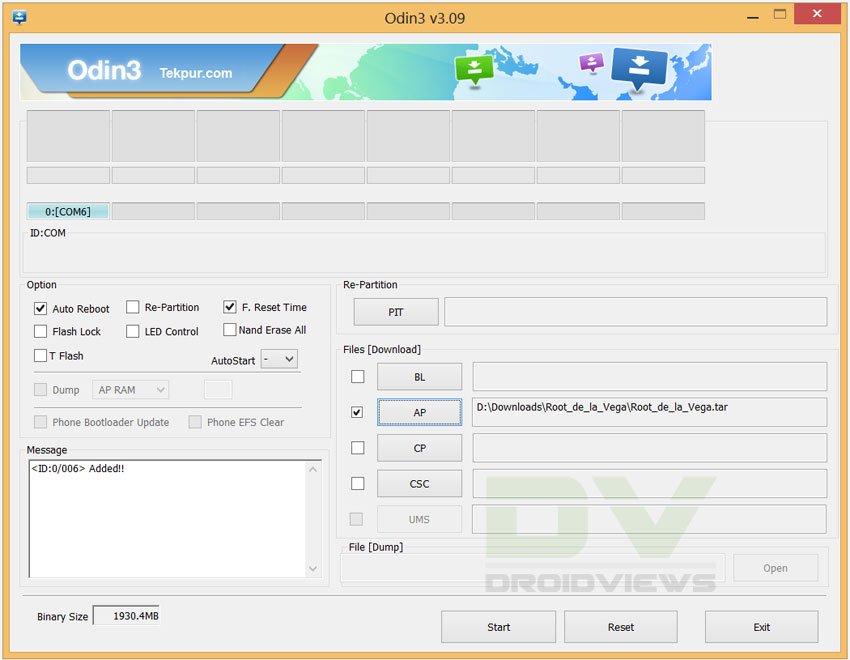
- Make sure your Odin screen looks like our screenshot shown above. Then click the Start button and wait till the installation is finished.
- Finally, you will see PASS!! message on Odin, signaling successful installation and then your device will reboot.
- Now extract the “Root_de_la_Vega.zip” file and open the extracted folder. You’ll find 2 files (a folder and a file with .sh extension) inside it:
- root_files (folder)
- root_de_la_vega.sh
- Connect device to PC and copy the above files to your device.
- Disconnect the device and then reboot it.
- When the device boots up, go to file manager and delete the 2 files (that you copied to your Note 3 in Step 11) from your device.
- Finally, reboot your phone again.
When your AT&T Galaxy Note 3 SM-N900A boots up, it would have root access. To confirm root permissions on your device, install the Root Checker app from the market and run it. Enjoy your rooted device and yes, do not forget to share your experience with us.

DroidViews gixxerguy
Great info, I wish I could had had the chance to try the above. I took my Note 3 back to AT&T and they replaced it no questions asked (I was on day 13). It’ll be a long while before I have the nerve to try Rooting again but that’s just me. Good luck to all and thank you again DroidViews.
gixxerguy DroidViews
Hi, here is the stock firmware for the AT&T Note 3. Just download and install it using Odin 3.9. If you need any help, let me know.
http://up.4share.vn/f/2b18191f1b131d12/N900AUCUBMI9.zip.file
Flash back the stock firmware to recover the device.
DroidViews
I appreciate your comment; however, the stock firmware for the AT&T SM-N900A is not released yet. I have searched forums high and low. I am still under my 14 day window with AT&T so I’m headed there right now and tell them my phone jacked itself up and see if they replace it. For others who read this, if you have information on acquiring the stock firmware it would be great to post it here. Thank you DroidViews.
gixxerguy DroidViews You’re always welcome for any kind of support on Android. :)
The above procedure soft bricked my Note 3. It will not longer boot. I’m 5 hours into this and still no light at end of tunnel. This is BS and I’m fit to be tied right now. WTF am I going to do with this, “SW Rev Check Fail: [sbl1] Fused 2 > Binary 1” fault code???
I’m ready to purposely smash my already cracked samsung galaxy note 3. All of the programs I can find to retrieve my contents require me too root it in order to do so! I cannot figure this out and I’ve literally downloaded many different programs that I now have the task of uninstalling! UGGH PLEASE HELP! even if you can refer me to someone or a company or if your services are able to help! one thing I also noticed is many programs for rooting have many different SM-N900’s but not the SM-N900A which I am assuming is licensed to AT&T. I have 3 years of family photos and many other documents and recordings on this device that I have the pleasure of sending back to them. please help me figure out how to.
I can’t get device to pass step 9, it keeps failing.
It’s a very old guide and will not work on the newer firmwares. What firmware and build version your device is on?
Hi Rakesh
Im hoping you can help me with this as i’m new to rooting and slowly pulling may hair out.
I have tried all ways to root my phone all different ways..
Root_de_la_vega (fails to load in Odmin mod at the last point about (95% complete)
Kingo (says unable to suport device)
Drakeymcmb (Safetrap dosent work)
Looking at the post below I see that have very similer issues as Danny.
When I try using N900AUCUBMI9 and Odin with and with without the BL and still don’t get anywhere.
I have found I am unable to unbrick the phone by using N900AUCECMLG but its not rooted.
Many thanks in advance for you help! 🙂
Chris
Hi all,,
Has anyone got any ideas what i am doing wrong?
Thanks all 🙂
Hi Chris, use this firmware instead: https://drive.google.com/folderview?id=0B0iu05aCEtuxc29hX29IWVk4VzA&usp=sharing
I would work hopefully. Let me know.
Hi Rakesh
Thanks for getting back to me! 🙂
Right just tired the link and the files uploaded to the phone with no error but now the phone just boots to the Samsung Note 3 then hangs!
Any idea? 🙂
Great! Now pull out the battery, wait for a few seconds, place the battery back to its place and follow Steps 10-14 from here: https://www.droidviews.com/how-to-downgrade-firmware-on-samsung-galaxy-devices/
Okay I done the Factory Reset and Wipe Cache etc but it still just hanging on the Samsung Label boot screen, any other ideas?
Flash the device again. I would try to look for a complete firmware with greater build version.
Hi Rakesh
Thanks for getting back to me.
I have tried that but with no luck, the only firmware that seems to work is the 4.4.2 leaked version that is not rooted… I even tried to flash with out the BL file but the phone just keep resetting when finish and I cant even got into the recovery mode.
I did try N900AUCUBMI9 with out the boot loader but that still fails just at the end of the upload.
Can you recommend any other firmware version or any other ideas?
Many thanks
Chris
Hi again Rakesh
Do you have any other ideas on what I can do?
Sorry for the late reply. The server was down the day you asked for help, soall my attention was on fixing the issue and I forgot to reply. 🙁
Right. Try this then: https://www.droidviews.com/firmware-upgrade-encountered-an-issue-solution/
Hi Rakesh,
I followed those instructions, but I’m still bricked. The process starts & looks like it’s going to be successful, but after about 10 minutes Kies reports this failure, “Firmware emergency recovery stopped due to GalaxyNote 3(SM-N900A) error.”
I’ve tried it 4 times, and each time same Firmware emergency recovery fails with the same response. Can you please help??????/
Hi Rakesh,
I tried again last night from a different computer, but, but I’m still bricked. The process starts & looks like it’s going to be successful, but after about 10 minutes Kies reports this failure, “Firmware emergency recovery stopped due to GalaxyNote 3(SM-N900A) error.”
I’ve tried it 4 times, and each time same Firmware emergency recovery fails with the same response. Can you please help??????
Hi Danny, I don’t think you device is bricked. It’s rather soft-bricked. You just need a firmware to install.
I’ve found the firmware file for SM-N900A. Download and install it and your Note 3 will be normal again: https://mega.co.nz/#!ul53SL4B!F749bRJI4VSUv7hnKvoX-Ri36G5Ec246r3U100RJxPY
Download firmware, put device in download mode, connect to computer and then run the firmware file with .exe extension.
Hope it helps revive your device. 🙂
Thanks Rakesh, but that’s what I did originally which lead me to this state. Same as the other commentor (SAJski1). I did try again just now, and my phone still fails with “REV CHECK FAIL [sbl1]Fused 2>binary 1”. Any help is greatly appreciated
Do you remember the firmware build version of your device?
Okay, download this firmware: https://mega.co.nz/#!PQ8CBbbK!IXUxr1__SfmdLGFwkU_AAzf5jvpUzpvr4Ep3XJdBEUE
Extract the zip, select the required components on corresponding fields in Odin 3.09. Do not forget to select PIT file, it’s crucial.
Also check Repartition in Odin.
After downloading the multi-file firmware, can you give a screenshot of Odin with all files selected?
I would also need a screen capture of the screen after you click the Start button on Odin.
I’ve attached all the screen shots.
Note that when ODIN started the NAND Write Start!!, the blue status bar on my cell phone (downloading, do not turn off target), kept progressing for about 15 minutes, and looked like it will be successful. However when it’s about 90% complete, the phone shows “Secure CHeck Fail : system”, and ODIN shows, ” FAIL! (Auth)”
Thanks in advance
I asked you to use this firmware with all files selected in Odin 3.09: https://mega.co.nz/#!PQ8CBbbK!IXUxr1__SfmdLGFwkU_AAzf5jvpUzpvr4Ep3XJdBEUE
I’m working on that firmware now. Most of the file names are self-explanatory, but in ODIN, which files do I use for the “Phone” field: AP_N900AUCUBMI9_1625098_REV03_user_low_ship_MULTI_CERT.tar or CP_N900AUCUBMI9_1625098_REV03_user_low_ship_MULTI_CERT.tar?
Use AP
I re-ran again, with the same results: it fails immediately when I click Start. ODIN shows error, “Complete(Write) operation failed”, and my cell phone shows error, “REV CHECK FAIL [sbl1]Fused 2>binary 1
Did you leave the BL field blank?
No, I put:
BootLoader: BL_N900AUCUBMI9_1625098_REV03_user_low_ship_MULTI_CERT
PDA: CP_N900AUCUBMI9_1625098_REV03_user_low_ship_MULTI_CERT
Phone: AP_N900AUCUBMI9_1625098_REV03_user_low_ship_MULTI_CERT
CSC: CSC_ATT_N900AATTBMI9_1625098_REV03_user_low_ship_MULTI_CERT
PIT: HLTE_USA_ATT_32G
Is that wrong?
I already told you above to leave BL blank. The secure bootloader will not let it replaced and therefore it fails.
Yes you did, but your posts aren’t showing up real time, so my tests are usually one post behind 🙁
Anyway, I tried again with BL Blank &:
PDA: CP_N900AUCUBMI9_1625098_REV03_user_low_ship_MULTI_CERT
Phone: AP_N900AUCUBMI9_1625098_REV03_user_low_ship_MULTI_CERT
CSC: CSC_ATT_N900AATTBMI9_1625098_REV03_user_low_ship_MULTI_CERT
PIT: HLTE_USA_ATT_32G
but still got the same error. ODIN Error, ” FAIL! (Auth)”, and cell phone error , “Secure CHeck Fail : system”
Weird! Try one more thing. Launch Odin and flash only the PIT file selected. Also, uncheck the Re-Partition option.
Hi Danny, I just noticed something. Please use this Odin and select the corresponding file: http://d-h.st/85j
OK, I’ll test that now. Regarding your previous suggestion, I wasn’t able to unselect re-partition, but I WAS able to successfully flash the PIT only. Now when I try and start the phone, I just get the Samsung Galaxy Note3 splash screen. Then about 30 seconds later, it will restart again (boot loop cycle). However, I can still get into download mode.
The Odin version you used is specially for the S4 as it shows. It appears to be a modified version. Use the standard Odin 3.09 from my link and let me know.
See this image: https://dl.dropboxusercontent.com/u/84115590/Captuggre.PNG
Thanks, I’m getting closer. I’ll spare you the details, but I tried every combination of ODIN File selection; PIT (selected/unselected), BL (selected/unselected), AP(selected/unselected), CP(selected/unselected), and CSC(selected/unselected). All failed except when I rain ODIN with ONLY CP selected. That was successful, and now I get the Samsung & ATT splash screen, and occasianlly even the main “Slide to begin” screen. However, that’s just an endless loop. I tired to run ODIN agian with Bootloader selected, but it still fails instantly with “REV CHECK FAIL [sbl1]Fused 2>binary 1” error. Without BL, I get “Secure CHeck Fail : system” after 90%. Should I keep trying ODIN file combinations, or pursue a different method?
Hmm, I’ll have to do some research about the issue.
Thanks, I’ve re-run and isolated all the file combinations again in ODIN:
AP causes phone to throw the error, “Secure CHeck Fail : system”
BL causes phone to throw the error, “sw rev check fail : [sbl]Fused 2 > Binary 1″
CSC causes phone to throw the error,”secure check fail: cache”
CP works fine.
PIT works fine
Currently, I’m still in the boot-loop-cycle.
Thanks!
Hi Rakesh,
Any advice on my next steps today. My current status is I can either boot into Download mode, or regular boot is an endless boot-loop cycle. I’ve re-run and isolated all the file combinations again in ODIN:
AP causes phone to throw the error, “Secure CHeck Fail : system”
BL causes phone to throw the error, “sw rev check fail : [sbl]Fused 2 > Binary 1″
CSC causes phone to throw the error,”secure check fail: cache”
CP works fine.
PIT works fine
Currently, I’m still in the boot-loop-cycle.
Thanks!
Hi Danny, I recommended the same files and method to one of my friend in Dallas and it worked for him. The cause of bootloop for his Note 3 was again RDLV.
I am really confused why it’s not working for you. Did you try to flash only the PIT file?
Just found a newer firmware (that might be the firmware on your Note 3).
https://drive.google.com/folderview?id=0B0iu05aCEtuxc29hX29IWVk4VzA&usp=sharing
Download and install it.
That worked. Thanks for all your help, I know your time is valuable, send me the email you use for PayPal to: thanksrakesh@trashmail.net so I can send you some beer/coffee funds…
The phone is still having some problems & several programs don’t work, but I can fix that through Kies. So do you think my phone is UNROOTABLE? Or should I pursue a different rooting method?
Ah, good to know, Danny that I could be of any help to you. Your phone is not unrootable. Actually the RDLV method a bit complicated.
Anyway, try this: https://www.droidviews.com/root-verizon-galaxy-s4-sch-i545-on-android-4-3-vruemk2/
The method is safe to use. Alternatively, you can use this too: https://www.droidviews.com/root-a-range-of-android-devices-in-just-one-click-with-this-universal-root-tool/
Just another safe method.
As for our email, it is droidviews@gmail.com
🙂
Hi Rakesh, I followed all the links you posted, but was unsuccessful in rooting. However, I was finally able to root my SM-900A Android Version 4.3, using this link: http://forum.xda-developers.com/showthread.php?t=2559715
It took 2 weeks to figure it out, but it’s well worth it!
Here are the new screenshots. This time around, it fails immediately when I click Start. ODIN shows error, “Complete(Write) operation failed”, and my cell phone shows error, “REV CHECK FAIL [sbl1]Fused 2>binary 1”
Thank you, Danny
It simply means that the secure bootchain is preventing the bootloader replacement. While installing the firmware keep the BL field blank.
Just like SAJski1, I’m softbricked (hopefully) also. I can only start the phone in downloading mode, and is says, “Firmware upgrade encountered an issue. Please select recovery mode in Kies & try again”. I opened Kies, but it says, “The connected device is not supported by Kies 3. Check which devices are supported and try again.”. Can you please help????
Follow this: https://www.droidviews.com/how-to-install-restore-stock-firmware-on-samsung-galaxy-note-3-all-models/
Hi Danny, if you still have an unrooted device, try this: https://www.droidviews.com/root-att-and-verizon-galaxy-s5-without-voiding-knox-warranty/
Step 5 is a little unclear, “When the installation is finished, disconnect the device and boot it again into Download mode. Pull out the battery and press the key combo (volume down+home+power as you did above).”. If you pull out the battery, you can’t start the phone, so not sure what that has to do with the process?
You have to put the battery back, of course.
I get that, but the steps just seem out of order. Can’t you just power it down, and then start into downloading mode? instead of removing the battery
Removing the battery is recommended because the phone does not turn off automatically.
Try this too: https://www.droidviews.com/root-verizon-galaxy-s4-sch-i545-on-android-4-3-vruemk2/
Works on most Galaxy devices. Easy to use, KNOX free!
This tripped me up for a while, “Install the latest Samsung USB Drivers or Kies on your PC (skip if you have any of them already):”. I didn’t install the Samsung USB Drivers because I installed latest Kies. With just Kies installed, my device could not be detected in Downloading mode. Once I installed the Samsung USB Drivers, only then was my computer able to detect my Note 3 in Downloading mode.
1. If I root my note 3, therefore voiding warranty, can I somehow do a factory reset & effectively restore warranty?
2. Apart from voiding warranty, is it possible to damage my note 3 by rooting it?
Hi Ken, if you only root your Note 3, you can later unroot your device.
As for the warranty void, I would recommend you rooting your Note 3 using Saferoot that won’t void the warranty and is safe to use too:
https://www.droidviews.com/root-verizon-galaxy-s4-sch-i545-on-android-4-3-vruemk2/
Tried to root using this methind and have apparently bricked phone. Can still access download mode, but all attempts to flash the stock yield:
Added!!
Enter CS for MD5..
Check MD5.. Do not unplug the cable..
Please wait..
Checking MD5 finished Sucessfully.
Leave CS..
Odin v.3 engine (ID:3)..
One Click Downloader Mode
File analysis..
SetupConnection..
Initialzation..
Set PIT file..
DO NOT TURN OFF TARGET!!
Get PIT for mapping..
Firmware update start..
SingleDownload.
sbl1.mbn
NAND Write Start!!
All threads completed. (succeed 0 / failed 1)
and a FAILED indiaction from Odin.
Phone indicates REV CHECK FAIL [sbl1]Fused 2>binary 1
Any ideas? I’m at a loss…
Did you try to install the same stock firmware version as you Note 3 was on previously?
First off, thanks for the fast reply!…I checked the version on the phone before starting, and thought I read it as correct, but to be honest, I’m not 100% sure. I do have the file for the correct device, SM-N900A…Just to add, device is “soft-bricked”?? (Yes, I’m a noob…). I can still get into download mode and ODIN recognizes the device…
Yes, your Note 3is just softbricked and can be recovered by flashing stock firmware. Since it was not rooted, it must be on the latest firmware. Just download the latest rom and install it. Here’s the guide
Here’s the link: https://www.droidviews.com/how-to-install-restore-stock-firmware-on-samsung-galaxy-note-3-all-models/
Sorry, more questions…
The KINGO app the link directed me to failed (gave a script error)…I cannot boot the device, I can only get download mode…Prior to contacting you, I did get the OneClickBin to NOT fail one time, so I proceeded with flashing the rooted stock ROM, which failed on the system load, so I’m not sure the KINGO app is seeing the official latest firmware. Can a recovery mod be flashed and recover from that? Although I still think myself a noob, I’ve flashed several other phones with custom ROMs and been able to go back to STOCK, so I’ve worked around abit with them. I just hit this roadblock on this one…
Thanks again for your support…
gixxerguy DroidViews You’re always welcome for any kind of support on Android. 🙂
DroidViews gixxerguy
Great info, I wish I could had had the chance to try the above. I took my Note 3 back to AT&T and they replaced it no questions asked (I was on day 13). It’ll be a long while before I have the nerve to try Rooting again but that’s just me. Good luck to all and thank you again DroidViews.
gixxerguy DroidViews
Hi, here is the stock firmware for the AT&T Note 3. Just download and install it using Odin 3.9. If you need any help, let me know.
http://up.4share.vn/f/2b18191f1b131d12/N900AUCUBMI9.zip.file
DroidViews
I appreciate your comment; however, the stock firmware for the AT&T SM-N900A is not released yet. I have searched forums high and low. I am still under my 14 day window with AT&T so I’m headed there right now and tell them my phone jacked itself up and see if they replace it. For others who read this, if you have information on acquiring the stock firmware it would be great to post it here. Thank you DroidViews.
Flash back the stock firmware to recover the device.
The above procedure soft bricked my Note 3. It will not longer boot. I’m 5 hours into this and still no light at end of tunnel. This is BS and I’m fit to be tied right now. WTF am I going to do with this, “SW Rev Check Fail: [sbl1] Fused 2 > Binary 1” fault code???