When we talk of an “unlocked” phone in the context of an Android device, it might have two implications: a phone with unlocked SIM capabilities, or a phone that has an unlocked bootloader. Both the things are put into a device to discourage the users from being infidel to their network carriers and OEMs respectively. Most carriers do not like their users to break with the contract by using a SIM card from another carrier. In the same way, when a device manufacturer wishes to ensure that its users must root their devices and replace the official recovery with a custom one, they ship their phones or tablets with locked bootloaders.
While some OEMs/carriers remain rigid with locking the bootloader to discourage custom development, there are still many who do not use such tricks. HTC and Sony devices generally come with locked bootloaders but these companies also provide the option to unlock it on their developer portals. Nexus devices have locked bootloaders too, but they are easy to unlock. Most Samsung Galaxy devices do not have any lock on bootloader but some of their US variants are. It is due to this that a custom recovery cannot be installed US variants of devices like S4 and Note 3.
Anyway, if you own an Android device from HTC or Sony and you wish to root your phone and install a custom recovery on it, you must be knowing that you will not be able to do any of those things without unlocking the bootloader of your phone. Both the OEMs do provide an official way to unlock their device, but the methods provided with them a little rounded and takes time too. To save your time and make the whole procedure easy, we are going to share an awesome tool with you that performs the unlocking in a matter of minutes and just in a single click.
Warning:
Though the procedure given below is safe enough, you must keep in mind that it voids the warranty of your Android device. Moreover, unlocking the bootloader will also wipe all data (except external SD card) present on your device. Proceed only if you understand its implications!
Features:
The good thing is that the bootloader unlocking tool from KingoApp, does it in an official way and is compatible with almost all phones from HTC and Sony. According to the official site, the HTC/Sony Bootloader Unlock tool has the following features:
- It is safe and easy to use.
- The tool can also re-lock the bootloader anytime.
- Performs the unlocking procedure the official way.
- Supports most HTC devices.
- Automatically retrieves unlock code and all required things.
Also See:
How to Root Any Android Device in Just One Click
Downloads:
Download the latest version of the tool for your HTC/Sony device from below:
KingoApp Bootloader Unlock Tool for HTC: Click Here
KingoApp Bootloader Unlock Tool for Sony: Click Here
(not compatible with Windows 8 or above)
How to Unlock the Bootloader:
As we mentioned above, using the KingoApp Bootloader Unlock tool is as easy to use as downloading in a single click. It does not require a tutorial, yet here are some of the steps that you have to follow to get your phone’s bootloader unlocked.
- Download and install the Bootloader Unlock tool on your Windows PC.
- Enable USB Debugging on your Sony/HTC device. If you do not know how to do it, we have a detailed tutorial for you.
- Ensure that you have a working internet connection on the computer.
- Make sure you have the latest USB Drivers for your device installed on your computer. If you do not have it, the tool will do the job automatically.
- Launch the Bootloader Unlock tool and then connect your phone to the computer the USB cable.
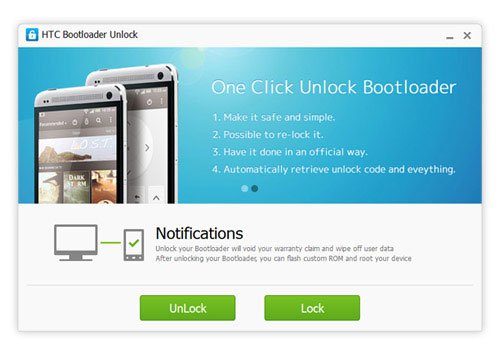
- When the Unlock button is highlighted in Green, click it.
- Just keep following the onscreen instruction till the procedure is finished and your phone’s bootloader is unlocked.
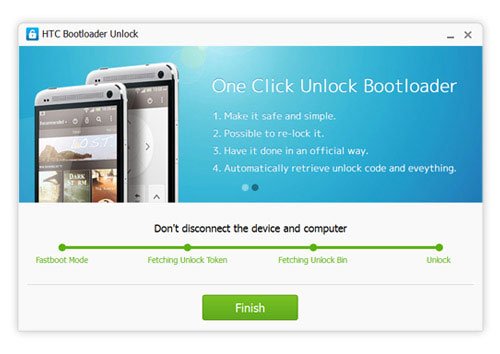
- When all is done, click the Finish button.
Mission accomplished! Wasn’t it easy? Now your HTC/Sony device is ready to be rooted and now you can also install CWM or TWRP recovery on it and start enjoying the privileges of owning a rooted Android phone. Cheers!



I have sony xperia z1 and i unlock and rooted it with search4roots rooting tool. Which perfect tool for my phone
i got stuck in fetching token
what to do ?how long it will take to unlock my device? actually i had downloaded for android device on pc did i need to download it for pc?
stuck at fetching unlock data
i have xperia ion
stuck at fetching unlock data
i have Xperia E C1504
Unlock bootloader Faild on wndows 7 64 bit.
in my xperia m
it isn’t working in my HTC desire X. Please help me. Please guys. It’s urgent. I’ve to unlock it right away.
There’s a new took available for HTC devices. Try this: https://www.droidviews.com/windroid-universal-android-toolkit-lets-unlock-bootloader-root-install-twrp-host-devices/
You should have specified that this program won’t do its job under windows 8/8.1. You need windows 7.
Added the info. Thanks!
Stuck at fetching unlock data on my Xperia Z C6603.
Please help.
i’m getting the same problem with my Xperia M.. what should I do… should I disconnect my phone
my sony xperia sp has the unlock bootloader allowed no in the service menu will this program work i have tried it but it gets stuck at fetching unlock data
logic say no! u have locked fastboot
This isn’t working for my HTC Desire 300, the buttons do not turn green and I’ve not found any way around this, I’d prefer it if you did reply instead of being ignorant like you have with others.
Well it does not support all HTC devices. It might have issues with some. Since it’s just a 3rd party tool, we can’t tell you how to make it work.
If it is not working for you, visit HTC Dev and give a try to the official method: http://www.htcdev.com/bootloader/
You must install HTC sync and android SDK on your PC and it doesnt work under WIN 8/8.1
hi i have htc wilffire s not its not working with my phone
please help i have htc desire 310 dual
the above method is not working
This works well on my HTC one!…thanks a lot!…for those having issues with “stucked on fetching”. Just be patient, wait a bit during fetching, and it will be done..:)
Thanks for sharing your experience!
how you did it? It failed in the 3rd step.
Não falo inglês. Mas minha duvida é, quanto tempo dura todo o processo?
yo Rakesh. hello, i’m trying to unlock my xperia z and i’m stuck at “fetching unlock data”, i just wanna confirm how long does this stay like this.
It stucked on fetching the data…
I have tested it on international HTC One. Why not use the procedure given at the official page: http://www.htcdev.com/bootloader
hi sir!! why my phone always shutting down when i click unlock and it always stuck at fetching unlock data…sony xperia zr with android 4.3….
hi! doesnt require any manufacturing date for sony device?
No.
Thanks a milloin Rakesh, I was trying hard to unlock my HTC Incredible s and root it, but was unsuccessful. Though, tried a lot “One Click solutions”. Your article was really helpful for me to have such a wonderful softwares. I was able to unlock my HTC and root it with ease. Thanks a Ton again.
Thanks for confirming.
Can you advise me on custom ROM?. I wish to flash a very stable and attractive custom ROM available for HTC Incredible S. Please advise.
I tried two times to unlock the bootloader on my HTC One x + using your app but it doesn’ t work. Am I doing some mistake? Is true that I am not a specialist at all in Android matters, booting, rooting and stuff like that, but I do the thing carefully, after reading about it on more sites.
Could you please tell me what shoul I do? After all, I want to unlock it just because I want to install some more language packs.
What happens when you click the unlock button?
It goes fine till the last step, when the “dot” on the steps line instead of green turn red and comes out “failed” message.
sam here
it good to root my phone