
Snapdragon 810 stumbled into rumors since it showed up in the flagships this year. The chipset has much to offer than its predecessor but when it comes to stability and endurance it was the worst SoC ever by Qualcomm. Though Tim McDonough covered up the issue on FORBES adding rumours are rubbish but it seems not true.
The high end flagships are cursed with throttling and overheating when they are pushed to certain limits. The curse fell upon HTC M9, LG G Flex 2 and Sony Xperia Z3+. The devices are reported to overheat which sounds silly given that they were the high end smartphones and flagships of 2015.
For a casual users the overheating is not a big concern but it is meaningless to afford such a high end smartphone and hinder its frontier. We already covered a post on Snapdragon 810 chipset back in June, explaining all about the second version of Snapdragon 810.
Today on DroidViews we take a little effort to calm the angry users who own these devices. On July 28, OnePlus launched their flagship killer OnePlus 2 and interestingly it has the Snapdragon 810 v 2.1 clocked at 1.8 GHz. MKBHD reviewed the pre-release hardware of OnePlus 2 and claims it has no Overheating and throttling issues. What exactly OnePlus did? I am quite sure they didn’t hire Maleficent, but they did clever math.
The magic lies in numbers here. OnePlus 2 is clocked at 1.8 GHz instead of 2.5 Ghz. The company added a thermal gel to dissipate heat across the device. Though we can’t do such pro stuff but we can clock down the speeds to prevent throttling and overheating. Yes, you are right it will bring down the device’s performance but it’s way better than a cooking processor. Desperate out there? Let’s get started
Prerequisites
- Make sure you have a rooted device and must have a kernel supporting underclocking and overclocking.
- Backup each and everything before you proceed. (Just in case)
Warning: The author will not be responsible, if you damage or brick your device. Do it at your own risk. It is highly recommended that you have basic knowledge of underclocking. You have been warned !
Solution
- Download and Install Trickster MOD Kernel Settings from Google Play[googleplay url=”https://play.google.com/store/apps/details?id=com.bigeyes0x0.trickstermod”]
- Open the App and grant Superuser permissions and Tap info >> General.
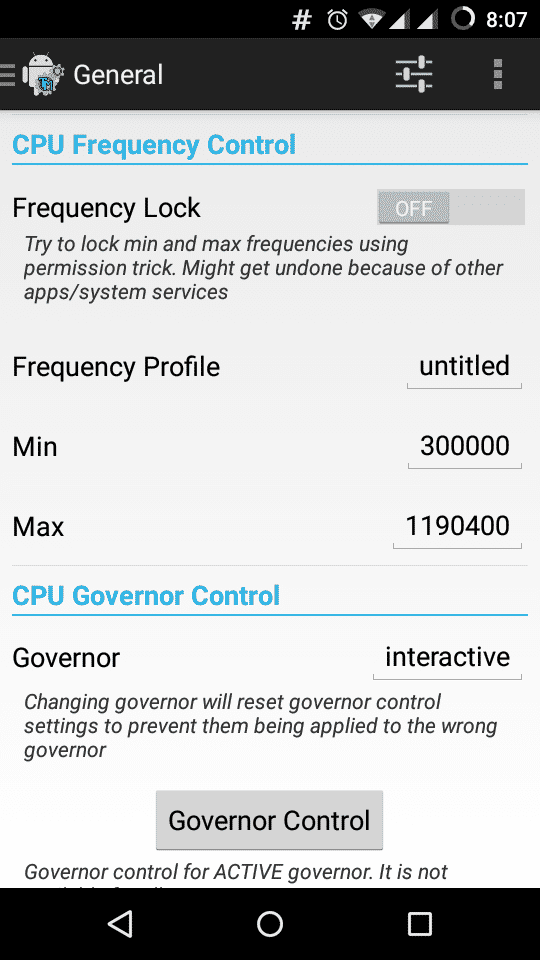
- Now under CPU frequency control section, Enter the minimum clock and maximum speeds you want. (Setting up wrong numbers can lead to unexpected results)
- You can try increasing the numbers in hundreds.
- Tap the Governor status and select ondemand.
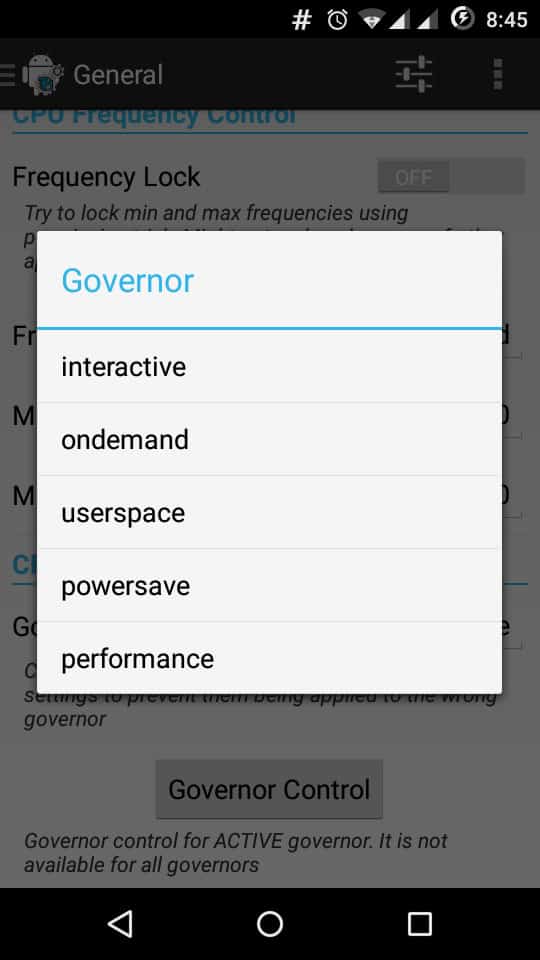
- Save the Settings and Reboot your device.
All done! Well done. Hope you have set your numbers right or else you might end up with fried chipset. If you have any doubts or queries do reach us through comments below.



Join The Discussion: