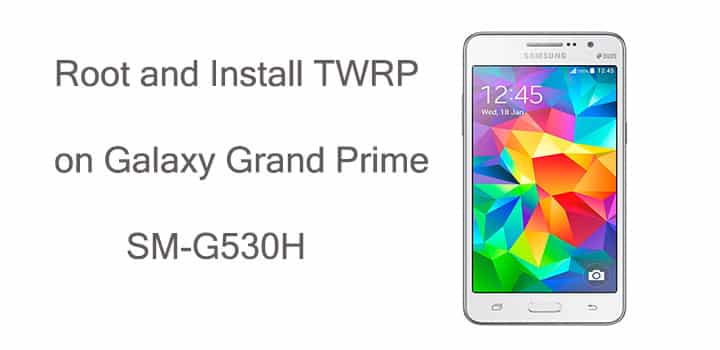
Galaxy Grand Prime is a popular phone with good enough specifications. Although it has been a year that the device has launched, its manufacturer has pushed the Lollipop update for the phone. It looks like the Grand Prime has received good support for software updates. Like the KitKat version, you can also get root access on the Lollipop firmware G530HXXU2BOH5.
However, to root your Galaxy Grand Prime, you need to install a custom recovery like TWRP using the Odin software. Odin is a Windows application specially designed for Samsung devices to perform a range of operations like install or update the stock firmware, CF-Auto-Root, install custom recovery and more. Once you install the recovery, you can then flash the SuperSU package through TWRP.
Before we begin with this tutorial, make sure you are on Android 5.0.2 Lollipop firmware. So if you are still on the KitKat firmware or have installed a custom ROM for any reason, you need to install the Lollipop firmware for your Galaxy Grand Prime SM-G530H.
Requirements
- Make sure you have the perfect device and variant. This tutorial is suitable only for Samsung Galaxy Grand Prime SM-G530H variant.
- Make sure you have fully charged your Galaxy Note 5 or at least up to 60% of the battery.
- Enable USB Debugging on your phone.
- Make sure you have Samsung drivers installed on your PC.
Download Section
- Download | TWRP for Galaxy Grand Prime SM-G530H (File: TWRP-SMG530H.tar)
- Download | SuperSU-vx.xx.zip
- Download | Odin3 v3.10.7
Backup Your Apps and Data
It is recommended that you backup your apps, contacts, messages, photos, videos and any other important data stored on the internal storage of your phone. Get some of our useful backup apps from the DroidViews archives. This will help you backup your device data easily. Once you install TWRP recovery onto your device, take a nandroid backup before you flash the SuperSU zip file.
Root Galaxy Grand Prime SM-G530H
- Download the TWRP and SuperSU files for your Galaxy Grand Prime.
- Transfer the SuperSU file to your phone’s internal storage and place the TWRP file to your desktop.
- Now turn off your phone and boot it into the Download Mode. To do this, turn off your device and then press and hold Volume UP + Home + Power buttons simultaneously for 2-3 seconds. When you see the warning screen with a yellow triangle sign, press the Volume Up key to enter Download/Odin mode
- Download the required Odin.zip file and extract the file on your PC. You will get the Odin3_v3.10.7.exe file. Open it as administrator to get to the Odin window.
- Connect your Galaxy Grand Prime to the computer using the USB cable.
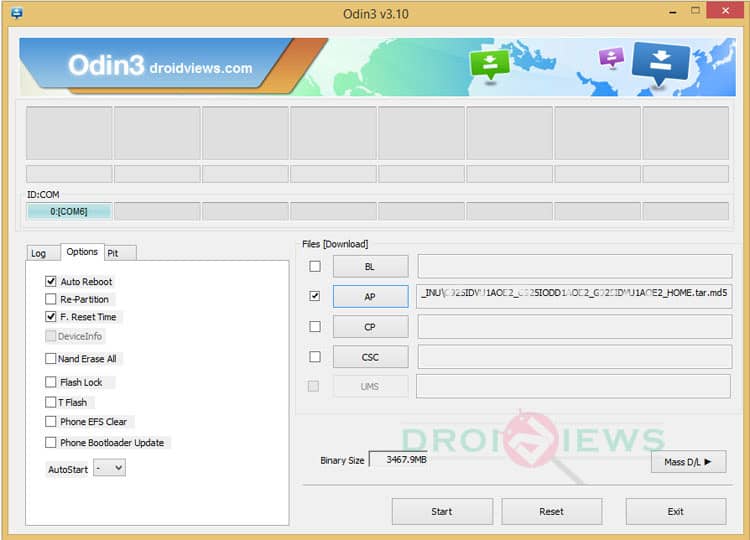
- When you connect the device, the ID:COM port on Odin will turn Blue. You’ll also see “Added!!” message to indicate successful connection.
- In case your phone is not detected by Odin, you can try the following things:
- Reboot your phone and turn off USB Debugging and turn it on again.
- Try reinstalling the Samsung USB Drivers.
- Try changing the USB cable and connecting to other ports.
- Now click AP button on Odin and add the firmware file (TWRP-SMG530H.tar).
- In the Options section, make sure that only the Auto Reboot and F. Reset Time boxes are checked, and everything else is unchecked. (Do not, in any case, check Re-Partition box)
- Now, click the Start button on Odin and the TWRP installation will begin which may take a few minutes.
- Once you get a PASS! message on Odin, your device will restart. It’s the green signal that indicates a successful installation. In case you get Fail! message, make sure you have gone through the preparations carefully.
- Now detach the USB cable from your Galaxy Grand Prime and power off the phone.
- Now boot into the custom recovery. Press and hold the Volume Up+Home+Power buttons at the same time for a few seconds to boot into the TWRP recovery, that was just installed on your device.
- Tap the Install button in TWRP and navigate to SM-G530H-SuperSU-v2.46.zip.
- Select it and swipe the confirmation slider button at the bottom to flash the SuperSU package.
- When the installation is successful, reboot to system.
Once you successfully boot into the system, you can now enjoy root access on your Galaxy Grand Prime. For any queries, comment down below.


can’t reboot to twrp. it always boot to default android recovery mode when I press vol up + home + power button. please help.
Install the recovery file again but this time uncheck the Auto-Reboot option in Odin. When it’s installed , reboot into the recovery mode directly.
facing the same problem… please explain “reboot into recovery mode directly”
hi im from the Philippines i have downloadthe twrp file and flash it with odin and it pass, when i boot into recovery im directed to download mode and it says could not to do normal boot what should i do im using sm-g530h please help..
“signature verification failed”. it appear when i install supersu. the root wont installed. can you help me? thanks
Hi There, I really need a Pit file for Samsung note 2 GT- N7105 I have try some pit file from online but doesn’t work and my phone only go to downloading mode I have the firmware but not the Pit file, please help me I would be very grateful to you.
https://uploads.disquscdn.com/images/1caee9863cff9a40a2c87ffa7741bb1db5fb4f6ab4aff62b35ccb06a0624799d.jpg
Here’s the PIT file for the Galaxy Note 2 GT-N7105: https://drive.google.com/file/d/0B-EQqpEb645uYTRpeXZ0NWZ0WXM/view?usp=sharing
Thank you for reply really appreciated that. The Pit file you give me I have already but doesn’t work. I have 2 PIT file but both not working Don’t understand why:( Any slosition please or advice? https://uploads.disquscdn.com/images/481557676fcda851bf68c14236b0e92361d618064b05eb9ed2f570a2bbe57fec.jpg
When i extract the twrp i got recovery.img so how?
Looks like you extracted the .tar file. I guide clearly says that you have to extract only if the downloaded file is a zip.
Anyway, don’t extract and add the TWRP.tar file to the AP slot in Odin.
My mobile is not detected by odin..why???
Please sir help me.
Do these:
1. Install the USB drivers
2. Enable USB debugging on phone.
3. Try a different USB cable and USB port on computer.
4. Reboot your phone and PC.
My Samsung grand prime is not the version you wrote. Mine is SM-G531H. Can i still root my phone? If yes, please how do i go about it
cf auto root works for rooting grand prime sm-g530w
CF-Auto-Root-gprimeltecan-gprimeltevl-smg530w.tar.md5
exact file
twrp how to download it. sorry I’ve tried several times but can not download the file twrp?????
Link updated!
when i extract TWRP-SMG530H.tar archive, it ask password. plz help me.
You don’t have to extract the tar file.
Thanks. I will try.
awsome work….thnx it perfectly worked
thanks
but when every time push with pc and open odin it did not know (i install all driver samsung ,samsung kies ,)please help me
Please upload the file somewhere else 4 shared sucks, instead ita downloading crappy software.
then how do i know it is original
please my samsung galaxy prime sm-g530h is slow what can i do to speed it up
It works on a grand samsung prime SM-G530T?
I have the same issue. Twrp doesnt load.
I had installed twrp but when I boot my phone by pressing v-up +home+power it boots to normal recovery mode. In device status it shows “custom”
please help me
Install an app like Boot Smart or Quick Boot, grant root access and reboot to recovery.
Thanks for responding but my device is not rooted
Try different combinations for vol down/up, power, home. Also did you get a PASS message using Odin? Try using an older version of Odin.
me too facing the same problem
I have the same problem, odin passed but no twrp mode when rebooting with both key combinations. Has anyone solved this issue?
it doesnt boot into the twrp recovery. instead it boots into that weird stock samsung recovery