Rooting is one of the best things about Android. It is a bliss that lets us satiate our appetite for customization and tweaking the device. However, sometimes our OEMs and service providers try to put a check on the very soul of Android by putting a check so that users might not be able to root their devices. That is why there is always a cold war going on between our developers and the service provider. Fortunately, in most cases, the great minds of the Android development community come out with a victorious smile. Now, you can root AT&T Galaxy S4 on the UCUAMF3 firmware.
The latest mischief has been made by AT&T who appears to be following Verizon’s path. An OTA update with baseband version UCUAMF3 for SGH-I337 rolled out the last month brought a security patch, making all existent root methods ineffectual. Moreover, the users of the AT&T Samsung Galaxy S4 with MF3 version are unable to downgrade to a lower version.
However, the users of this device can now take a sigh of relief because XDA member Jortex has released a working root exploit. So, if you have updated your phone to build number JDQ39.I337UCUAMF3, you will now be able to achieve root access. Though Jortex’s method is not so easy as the Motochopper way, it is not very difficult to perform too.
UPDATE
To root your AT&T Samsung Galaxy S4 SGH-I337 on Android 4.4.2 KitKat, use Geohot’s TowelRoot app.
Requirements:
- A microSD card and a card reader or adapter.
- In case you know how to execute commands in ADB, you need not use an external SD card or download the Terminal Emulator app from below. And yes, do not forget to enable USB Debugging on your phone and install Android SDK on your computer before you use the ADB method.
- Download and install Terminal Emulator app from the Google Play Store.
- Download the rooting package file: Root_for_ATTSG4_FM3
Root AT&T Galaxy S4 SGH-I337 on UCUAMF3 Firmware:
Now here are the simple steps to get root on AT&T Galaxy S4 SGH-I337 on UCUAMF3
- Insert your microSD card in the card reader and format it to exFAT on your Windows PC.
- Insert the microSD card into the computer using a card reader or a microSD adapter.
- Go to “My Computer”.
- Right-click on your SD card drive.
- Click Format and choose exFAT.
- Click “OK”.
- When the formatting is done, extract Root_for_ATTSG4_FM3.rar and copy all its contents (4 files) to the memory card.
- Now put the card into the phone.
- Then open the Terminal Emulator app and type the following lines:
cd /mnt/extSdCard
./pwn
./script.sh
- Issuing the above command will execute the “script.sh” file and all necessary apps like Busybox and SupeSU will be installed to your Galaxy S4.
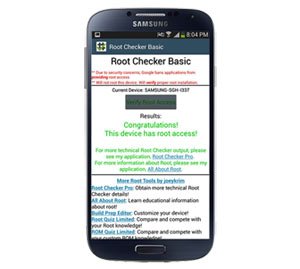
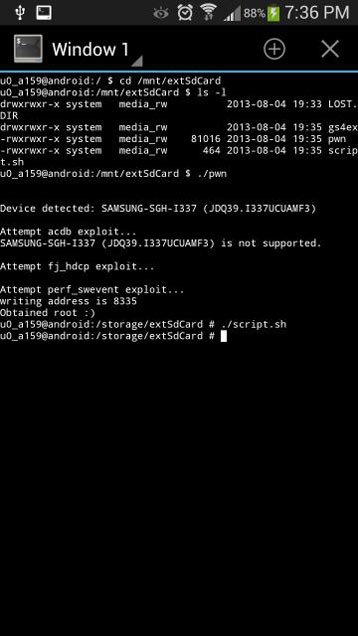 If everything goes well, you will have root privilege on your AT&T Galaxy S4 SGH-I337. Open app drawer and look for the SuperSU app there. To verify successful root, install Root Checker app from the market:
 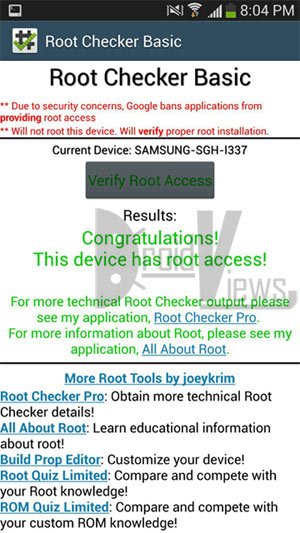 [googleplay url=”https://play.google.com/store/apps/details?id=com.joeykrim.rootcheck”]
hello sir i ahave samsung s4 sghi337 at&t it was running in android jelly bean , wen i go and tap on software update i did nt find any change on my device and it does not show any update . tell me the solution to put kit kat to my device
What about Lollipop?
See this: https://www.droidviews.com/update-att-galaxy-s4-sgh-i337-to-lollipop-and-keep-root/
WILL THIS WORK ON 4.4.2 KITKAT
Try this: https://www.droidviews.com/root-att-and-verizon-galaxy-s5-without-voiding-knox-warranty/
This method is not working as well
What error do you see? It has been confirmed by a user.
I installed the apk file, the and started the root the phone instantly rebooted.
Then I installed super su.
Then it showes error in installing binary file
Okay, try this: uninstall SuperSU and uninstall and reinstall Towelroot again. This time, do not install SuperSU from play store.
After installing towelroot , nothing happend phone just rebooted like before
checked from rootchecker its not rooted
The guide has been updated: https://www.droidviews.com/root-att-and-verizon-galaxy-s5-without-voiding-knox-warranty/
Try again!
i got a problem i make everything but when i put ./pwn said permission denied and don’t let me continue with the process, can you help me ?
Try this: https://www.droidviews.com/root-verizon-galaxy-s4-sch-i545-on-android-4-3-vruemk2/
How do I remove the root? I want to update my software. It’s unlocked and I rooted it with this method. Thanks
Go to SuperSU app and you will have unroot option under app settings.
Can someone please please find a root for the Samsung galaxy s4 sgh-i337 that works
Try saferoot: https://www.droidviews.com/root-verizon-galaxy-s4-sch-i545-on-android-4-3-vruemk2/
followed the steps right . terminal emulator displayed root obtained:) too but when i check with root checker , there ‘ s no rot access . please help 🙁
Open SuperSU app and update the binary when prompted.
If it does not work, open SuperSU settings and reinstall it.
what do i do?!
What do you mean?
after i type in ./pwn the “Error Too many open files” message pops up and my phone restarts itself
Seems you have not done ExtFat the card properly.
the sd card is ExFat, all 4 files are on the sd card and im still having the same problem. what else could be the problem?
I am not sure what to suggest you but you must be making some mistake. Do things again.
Use this: https://www.droidviews.com/root-verizon-galaxy-s4-sch-i545-on-android-4-3-vruemk2/
This didn’t work either. Every time I run the batch file, command prompt just closes on me
Reinstall USB drivers, reboot PC and phone and try again.
Still not working.
Much Thanks. This procedure worked like a charm when the motochopper method failed with UCUAMF3 firmware. 🙂
Thanks for coming back and confirmation. 🙂
cnsnts Since the method does not involve the use of computer much, all you need to do is to find a way to format your SD Card to ExFAT on Mac. Rest of the steps are done on the phone itself.
i have a mac, do i need to do anything different?
cd /mnt/extSd NOT FOUND what to do?
Format the SD Card using ExFAT option on you computer. Make sure the card has only the files of the rooting package as instructed above.
i wanted to say i waited til late november and i finally got the 4.3
jellybean pushed on my galaxy s4..with no issues from above..i made sure
i found out what was not working..and what was working..knowing samsung
they wont let a device not go long with a softwear they know doesnt run
right so..it seems very much so i have a good build..i never push
leaked updates because i know the issues will be there…with all these
devices everything is pushed out the door to fast..as far as the build
in some of these newer phones even the actual build quality was jacked
up with a few carriers..such as the sprint htc one..death grip..the
phone had gaps and the glass wasnt fit correctly..check youtube on
that..but htc fixed the issue..i give them alot of credit on this..shows
they care..now the htc one max is out and build beautiful…the
official 4.3 mk2 build update is now a wonderful experience for anyone
hesitant as i was…here ya go from the horses mouth…its stable!..i
did this on my moms s4 also..so she even said she noticed the battery is
a lil better!..i agree..just depends on the use..a small upgrade in
buying an extended life battery isnt a bad investment at maybe
$20..amazon is wonderful..i personally dont find the need..but ty for
letting me post this…hope it helps people with the sgh-i337 model mk2
build 4.3 offical users thanks for your help!
Thanks for sharing your view, Blake! 🙂
is there a root for the i337 with att on official 4.3 firmware…i would love to root..i just want to make sure im doing what is right so i dont get in any boot loop or crap like that..im using the mf3 build also…any help would be much appreciated here!! i now must have root access…with everything ive seen this isnt fair lol!
Hi Blake, the method given above works great on MF3. As for rooting the 4.3 firmware, no developer has been successful in coming with a working exploit so far. Still there is a tool that can root AT&t S4 on Android 4.3:
https://www.droidviews.com/root-a-range-of-android-devices-in-just-one-click-with-this-universal-root-tool/
SD Card Drive won’t show up in My Computer..what do I do?
Try rebooting the phone and computer.
hi i keep getting {/system/bin/sh: ./pwn: can’t execute: Permission denied} what am i doing wrong. i formatted to exFAT, put 4 files to root of sd card.
Do you have UCUAMF3 firmware version or something else?
yes i am.
model # sgh-i337
version 4.2.2
baseband i337ucuamf3
kernel 3.4.0-812098 se.infra@sep-104 #1
build # ldq39.i337ucuamf3
Hmm, in that case there is no reason why it is not working on your device. Start over again and be careful every single step. The guide works 100%.
Hello I was having some problems getting past the step entering “cd /mnt/extSdCard” but i am able to fix it via the picture. You should add that you need to type in “sl -l” to be able to continue to entering in ./pwn
The code has worked without “sl -l”. Where did you add it, by the way?
Right after the cd /mnt/extSdCard It was blanked so i assumed i did something wrong and then i saw the picture and tried adding that… and the root works.. but i’m having some problems with some rooted apps.. not sure if its because of this though.
What kind of issue are you having?
well for one example, do you know the app Font Installer Root? I tried to install a font but the font never changes. Another one is downloading a ROM, i tried to download from the available installers from google play. But the download never starts with those apps. So i tried to download the rom from my pc then transfer it to my phone. those didn’t work either. When i go into Clockwork recovery, there’s always an error when i try to install the rom.
Which ROM did you try to install?
It’s called carbon
Okay. Is your phone’s firmware version “UCUAMF3”?
Yes it is sir. And SGH I337 ATT
Hmm. We got the culprit then. This particular firmware version has a locked bootloader that does not allow a custom recovery. I have already mentioned it in the article above.
alright then. do you know about the Font Installer root problem then? Or downloads will not start?
Actually there are several font apps that do not work. I once tried some apps from the play store a couple of months ago but none of them worked.
TouchWiz has it own font app called Flipfont that can be downloaded from withing phone settings> Display> font, but for some reason they do not work too.
Alright thanks man… so will there be a custom recovery available? Thats my last question thanks 😀
After these steps, would I have to unlock my bootloader to flash a custom recovery such as ClockworkMod? I know this can be done through the ROM Manager app in the Play store, but is it required that the Bootloader be unlocked for this to work? Thanks in advance for the response 🙂
Yes, Ryan. A custom recovery requires either a method to bypass bootloader or an unlocked bootloader.
I’m fully aware that I’m being a Noob here, (new to the rooting community), but would you be able to provide a link to instructions on how to do this after the device is rooted?
This was a HUGE help. Thanks for helping out a newcomer. 🙂
It’s always a pleasure to be of any help to the community. 🙂
must you keep the files on the card in order to keep the root?
No, you can delete them when root is achieved.
Root checker said that I have root access but I dont see SuperSU anywhere in my app drawer…
Yes, that is a very important step. Copy your files to you computer for a while, then xFAT it and try again. It’ll work for sure. Let me know. 🙂
I installed SuperSU from the app store and I am good to go! Thanks!
Nice! enjoy root!
Hmm, weird! Try some of these apps and see if they work. If yes, who cares for SuperSU to crowd the app drawer! LOL
What if my SD card flex isnt working? is there any otherway to do this?
You must have a microSD card adapter or a card reader. Manage it. If you have a 64 GB card, you can format it on the device itself.
i have followed these steps and obtained root, now is my bootloader unlocked?
No, you only have root access. The bootloader has not been unlocked yet. 🙁
will OTA updates work once we root the phone with this method?
Usually, root prevents OTA from being installed. You can also do this: go to Settings> More> About> Software update and turn off auto update.
I actually want OTA updates to work 😉 as I would like to get 4.3 from ATT. If OTA update overwrites the transparent weather widget mod that I plan on installing, I can always install it again. I dont think I am ready to put in a new ROM that is not from ATT – btw when you install a new ROM, do all the game scores …etc… get reset? Thanks for your quick response Rakesh.
If you receive OTA while rooted, you will lose root. Also, 4.3 will come to S4 at the end of this or beginning of next month and AT&T users will have to wait at least for another month to get it. Till then you can enjoy it.
Like the official ROM, custom ROMs too are updated at regular basis, and so you will always be able to get the latest update even with a custom ROM.
Thx rakesh. If I move to custom rom now, will I lose game scores..etc..
Root device and use Titanium Backup to backup your Apps and Games. It creates complete backup with all data of apps and games: https://www.droidviews.com/best-apps-for-rooted-android-devices/
Cool!!! So first root the device – I assume that will keep the existing ROM and not reset anything with the apps, settings, data…etc… then install titanium backup and backup apps, data…etc… and then I can install what ever ROM I want and restore will get back all the apps with their settings and data. Does titanium backup also remember the background settings, icon layout on the screen …etc… ? btw – thank you so much for your quick responses and patience in handling these naive questions.
Rakesh – I was able to successfully root ATT/SGS4 UCUAMF3 with this method. Thank You. However, my final goal is to install transparent accuweather widget. In order to do that I need to install CWM or TWRP. I followed https://www.droidviews.com/install-your-favorite-custom-recovery-cwmtwrp-on-rooted-android-device-with-a-single-click/ and flashed TWRP using recovery tools. Once I rebooted – I had the scare of my life. It said normal boot failed and stuck on Downloading…. Do not reset target…. I rebooted multiple times and same message…. I then pressed down arrow, home button, power and it went into some other menu – I selected reboot phone there and the phone came up … phew!!!! I tried installing CWM from recovery tools .. but it wasn’t able to download the install file…. I think I need one of these recovery tools in order to be able to install transparent accuweather https://www.droidviews.com/install-transparent-accuweather-widget-on-your-samsung-galaxy-s4/ … help please!!! do you know why I got TWRM error screen – that was scary!!!!) .. btw – I installed titanium backup and backed up all the apps… 🙂
Re-partitioned using the .pit file and odin. Now the Downloading…. do not reset target doesn’t come any more when I press vol-up/home/power. However, I still see:
1. Samsung/unlock icon/Custom when the phone boots – why? is this because rooting installed busybox?
2. When I try to recovery mode (vol-up/home/power), I still get “no command” error – why?
Two more questions:
3. yesterday night when my partition was screwed up, how did the phone boot when i pressed vol-down/home/power and then picked the reset option?
4. I guess my only option now to install transparent weather widget is to go to a new ROM or wait until TWRP/CWM is made to work for UCUAMF3. Is there a particular ROM that you would recommend?
Thanks / Sobhan
I get /system/bin/sh: ./pwn: can’t execute: Permission denied
The only thing I didn’t do was the format to exFAT because I have other files on the sd card already. Was that a crucial step?
Hi Jeff, do he steps as directed. EdGAR is compulsory and you got the error because you have other files on the card.
not true… my card is formated and clean with only the 4 files on it and even tried removing the readme file and still gives me the same message….
Only formatted card is not enough. It must be formatted as exFAT (not FAT32) to have desired result.
Indeed, exFAT worked! my mistake and ignorance. Thanks Alot!
Nice to know it worked for you. 🙂
I did this yesterday and now my root checker is saying phone not proper root access. What do I need to do? Dibi keep the sd card or I can change.
Hi will rooting my galaxy S4 i337 allow me to downgrade the firmware or give me access to the umts main menu screen that is currently locked?
No rooting will not allow that, but it will allow installing a custom ROM based on a lower version than UCUAMF3 and then you can try unlocking.