The Galaxy Note 3 is the latest addition in Samsung’s popular Note series. The device has just been launched about a couple of weeks ago and it is already riding on the wheels of popularity. Whenever a new Android device comes, our developer community get a new challenge, and that is to gain root access on that device and port a custom recovery to it. The Galaxy Note 3 has now arrived to the users of Sprint in the US and if you have this new device, you must be looking for a way to root it.
Rooting indeed has many advantages. It allows you install useful tools and apps that can boost your phone’s performance and let you customize it in various ways. If you also have TWRP or ClockworkMod recovery installed over it, you’ll be able to install custom ROMs, mods and Kernels to get the most out of your Note 3. We have already posted rooting tutorials for some other variants of the device, and now here is another guide on rooting Sprint Galaxy Note 3 SM-N900P.
UPDATE
The Root de la vega method does not work any more! To root your Sprint Galaxy Note 3 SM-N900P on KitKat, use Geohot’s TowelRoot app.
Warning:
Rooting your Galaxy Note 3 will void its warranty and the procedure given below considered a bit risky. Please, do not proceed unless you are ready to face any consequences. The method described here are meant only for the Sprint variant of the Galaxy Note 3 with model number SM-N900P.
Getting Prepared:
If you have made up your mind to root your Galaxy Note 3 SM-N900P, here are a few preparatory steps to be taken before actually plunging into action.
- Download Chainfire’s CF-Root package and extract the zip: CF-Auto-Root-hltespr-hltespr-smn900p.zip
- Download the latest TWRP Recovery for Sprint Note 3 SM-N900P: openrecovery-twrp-2.6.xx-hltespr.img.tar
- Download Odin and extract the zip: Odin3_v1.85.Zip
- Install either Samsung Kies or USB Drivers on your computer. If not, download and install now. If you have Kies, make sure it is not open while your follow the rooting steps.
- Turn on USB Debugging on your Note 3: Settings> General> Developer Options. If you do not see developer options, you will have to enable it first.
- Make sure that your device is amply charged.
Root Sprint Galaxy Note 3:
- Boot your phone into Download Mode: turn it off, press and hold Volume Down + Home keys and then press the Power button. Keep all 3 keys pressed for 2-3 seconds till you see a warning screen. Now press the Volume Up key to continue to the Download Mode.
- Launch Odin3 v1.85.exe program and connect your phone to computer using USB cable.
- Wait till the device is connected to Odin and you see “Added!!” on Odin.
- Now click the PDA button, navigate to the CF-Root folder and select “CF-Auto-Root-hltespr-hltespr-smn900p.tar.md5” file.
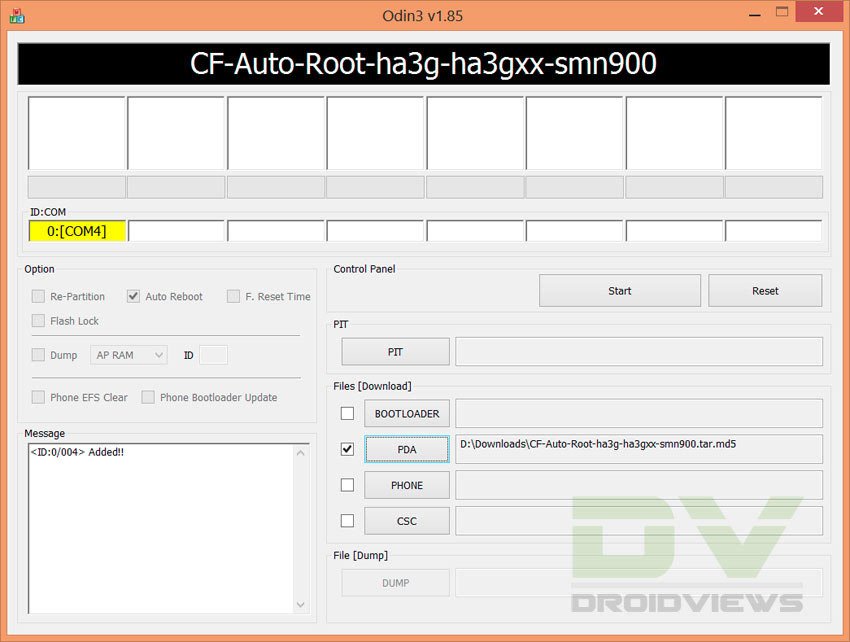
- Finally, hit the Start button.
- Wait till the rooting package is installed. It takes just a few seconds.
- At the completion of procedure, you will get a PASS!! message on Odin and you device will reboot automatically.
When your Note 3 boots up, open the app drawer and check if the SuperSU app is present there or not. If it is there, your device has root access. To further verify root, install the Root Checker app from the Play Store.
[googleplay url=”https://play.google.com/store/apps/details?id=com.joeykrim.rootcheck”]Installing TWRP Recovery on Note 3 SM-N900P:
If you also wish to install custom ROMs and mods on your device or backup your ROM, follow the following steps to install TWRP recovery on your device.
- Turn off your phone and boot it into Download Mode.
- Launch Odin and connect your phone to PC.
- Click on PDA and select the TWRP recovery file with .tar extension “openrecovery-twrp-2.6.xx-hltespr.img.tar”.
- Then click on Start button and wait till it is installed.
- Again, you will get PASS!! message on Odin followed by a device reboot.
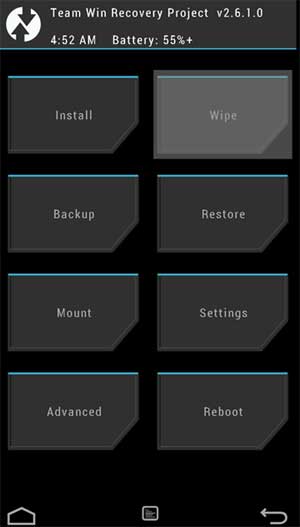
When your Note 3 boots up, it should have TWRP Recovery installed on it. Whenever you need to put your device in recovery mode, hold the Volume Up + Home + Power buttons together. Keep them pressed till you see the screen with “TeamWin” written on it. Do not forget to share how it went for you or leave a comment if you have a question or problem. Cheers!
Useful Articles:
Best Apps for Rooted Android Devices
Add Any App to Floating Pen Window on Galaxy Note 3
How to Install Official Firmware on Galaxy Note 3 (All Models)
Customize Your Note 3 in Various Ways with Xposed Module
sources: 1, 2



You didn’t mention anything about the note 3 getting stuck in a boot loop with a message stating the stock recovery is not installed, or something to that effect. When I pulled the battery, I was able to boot into the OS again. Any help on this one?
same issue was wondering if you was able to solve the problem
Yes, but I now have the note 4. Sorry, too much time passed and I don’t remember how I even solved the problem. The Note 4 is very nice though, definitely recommend it…. Happy holidays everyone. …
Were you able to root the phone?
yes I was able to root the phone ..jusy unable to add recovery to install different rom. when putting the phone in recovery mode just loops. and clock work will not open in phone after download even with twrp
Try this: http://www.techerrata.com/file/twrp2/hltespr/openrecovery-twrp-2.8.3.0-hltespr.img.tar
tried the new download …same result words to small to read .got the blue line. then a yellow then a red. .rebooted and went back as if I just turned the phone on .
In that case, you should leave trying for now. I will do a little research and let you know if I find any solution.
Will do …thx for trying.
software version N900PVPUDNK4
android version 4.4.4
hardware ver. N900P.12
BASEBAND SAME AS SOFTWARE VER.
kernel ver.3.4.0-2593013
dpi@SWDD6004 #1
Security software ver
MDF ver 1.0 release 3
vpn ver 1.4 release 2
don’t know if any helps or is just to much info.