Some time ago, we shared the multi-purpose MotoTool that could not only root but also install CWM/TWRP recovery and restore Moto G to stock firmware. While the rooting and recovery functions of the MotoTool work fine for all Moto G variants, its firmware restore feature is meant only for a specific model.
If you own Google’s Moto G and you wish to downgrade its firmware to a lesser version of Android, you will have to flash the stock firmware manually. In case you want to restore your Moto G back to stock firmware because it is stuck in a bootloop or for some other reason, you can use our tutorial and return your Moto G to working state.
Warning:
Please note that the method described below has been tested and found working, still we do not hold any responsibility. In most cases, the success and failure depend on how the users follow a tutorial. If you wish to proceed, do it at your own risk.
Note:
Please note that the firmwares with ‘_umtsds’ in their names are meant for the Dual-SIM variants of the Moto G. If you flash the dual-SIM firmware on single SIM model, you might encounter network connectivity issues. So, be careful in choosing the correct firmware to ensure that you do not get into an inconvenient situation after flashing it.
Getting Prepared
In order that we can install the stock firmware on the Moto G, we need to do some things beforehand.
- Download the official firmware, corresponding to your Moto G model from above.
- After the firmware file with .tar.gz or .xml.zip extension has been downloaded, extract/unzip it to your desktop.
- In case the firmware you downloaded has .xml.zip extension download mfastboot-v2.zip [mirror] file and extract its contents to the same folder where you have the extracted firmware files with .bin and .img extensions.
- Unlock the bootloader of your Moto G. To do so, follow the instructions given here.
- Download and install the latest MotoCast for Motorola USB Drivers on your computer: Download Here
- Download and set up ADB/Fastboot on your computer. We recommend downloading Minimal ADB and Fastboot Tool for the purpose: Download Here
- Enable USB Debugging in device Settings. Find the method here.
Restore Moto G to Stock Firmware
Having taken care of the prerequisites, follow the steps given below to restore Moto G to stock firmware.
- Reboot your Moto G to Bootloader mode. Here is how you can do it: turn off your phone and then press and hold the Volume Down + Power buttons simultaneously for a few seconds. You can also boot your Moto G in Bootloader mode using ADB command. Make sure USB Debugging is enabled on your device, connect it to computer, launch Minimal ADB and Fastboot Tool, type the following command in the cmd window and hit the Enter key:
adb reboot-bootloader
- The Moto G Bootloader screen looks like this:
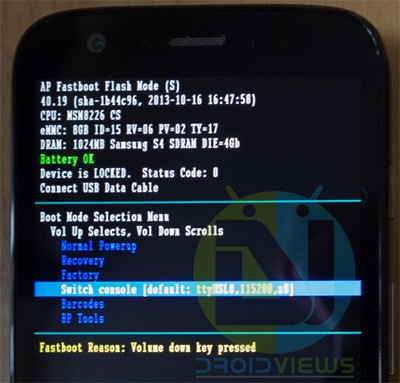
- Now open the folder that contains the extracted firmware files and launch the cmd prompt. you can do so by pressing the Shift key + Right-click on mouse and selecting “Open command window here” option.
- If the firmware you downloaded has .tar.gz extension,
- Type the following command in the cmd window (eu stands for ‘erase userdata’):
flashall.bat /eu
- If you are a Linux/Mac user, type the following command in terminal window:
chmod +x flashall.sh
./flashall.sh
- Wait till the firmware files are flashed to your Moto G. At the end of the installation procedure, your phone will reboot automatically.
- Type the following command in the cmd window (eu stands for ‘erase userdata’):
- If you downloaded a firmware with .xml.zip extension, follow these steps:
- Type the following commands in the cmd window one by one and press Enter key after each command line. Make sure that you see OKAY message on cmd after executing each command:
mfastboot flash partition gpt.bin
mfastboot flash motoboot motoboot.img
mfastboot flash logo logo.bin
mfastboot flash boot boot.img
mfastboot flash recovery recovery.img
mfastboot flash system system.img_sparsechunk1
mfastboot flash system system.img_sparsechunk2
mfastboot flash system system.img_sparsechunk3
mfastboot flash modem NON-HLOS.bin
mfastboot erase modemst1
mfastboot erase modemst2
mfastboot flash fsg fsg.mbn
mfastboot erase cache
mfastboot erase userdata
mfastboot reboot
- Your phone will reboot automatically.
- Type the following commands in the cmd window one by one and press Enter key after each command line. Make sure that you see OKAY message on cmd after executing each command:
- Wait till your device boots up. Go through the initial setup and enjoy!
By the time you read these words, you might have already restored stock firmware on your Moto G. If you have any doubts or you want to share your experience with us, do not forget to drop a comment below. Cheers!

Looks easy to do, but I couldn’t figure out what firmware to download from the list?
Hi, when i try to flash with cmd (point 5.1) the console says only .
Can someone help?
http://www.allfreeperks.in for all guides
Hi!
I’m afraid that your link to firmware doesn’t work any more… Could soomebody please link me firmware for XT1032 EU version (on KitKat 4.4.4)
Hi, I have Boost Moto-G CDMA (Reliance) XT-1031 version. Which firmware version i have to download.
Sorry, I don’t know where you can get the specific firmware for your carier.
Thank u Bro … u made my day … ur explaination i awesome.
I have a Moto G 1st Gen and it’s from the US it’s model name is Falcon us retail something and it has 4.4.4 so what firmware do i use ? and will this help me install the lollipop software because i can’t install even so i don’t have root and i have the original recovery
i tried it it flashed fully but it reboots boot animation comes and then it stops at m symbol please help me
I downloaded three different ones for tesco but some appear as failed, remote failure and when I downloaded one that was .tar.gz and when I put in flashall.bat /eu it kept saying failed unplug jtag and try again help please I need to go back to tesco uk firmwire and ive tried everything
My moto g XT1033 totely dead not load system.img i select recovery option then error are .. invalid boot image header! boot up failed i download many Motorola Firmwares d’nt work . 1st i m install cyandrmod11 before delete all catch file and system data … plese help mere moto ki jaan bacha lo plzz 🙁
Try this firmware: http://sbf.droid-developers.org/download.php?device=14&file=868
pls suggest me step by step install firmware my problem is cyandrmod11 install then recovery option then delete all catch.system file tab se ye problem aa ri h plese suggest me fastboot command install this RETAIL-DE_FALCON firmware plz
why stoped flash logo d’nt work
How to relock Bootloader of Motorola Moto E XT1022?
Use the ADB/fastboot command. See here: https://www.droidviews.com/restore-moto-g-2014-to-stock-and-lock-the-bootloader/
Its for Motorola Moto G and all the firmwares are for Moto G only. Not for my device Motorola Moto E
pls help moto g.. 18days old thought batterie was dieing, phone said shutting down, turn itself off… plug in to charge for 6hrs, phne wont turn bck on… think its locked where I bought phne wont help..
On the first command I get adbwinapi.dll missing.
Setup Android sdk again.
My device had a system image error and now I have no service on it. No contacts. Everything is gone. My backups were deleted. My moto g is unlocked. Help!
Flash the firmware again.
Hi Rakesh, After I executed all the commands, my moto G couldn’t boot up, it stays in the loop with “warning bootloader unlocked”. Any idea?
Probably a silly question, but i want to check before i get started.
One of the steps you give (for .xml.zip files) is as follows:
mfastboot flash system system.img_sparsechunk1
mfastboot flash system system.img_sparsechunk2
mfastboot flash system system.img_sparsechunk3
However, i have taken a look at the file i downloaded (UK retail 4.3) and the three files are not numbered 1 2 and 3 rather they are 0 1 and 2. Do i simply substitute the file names as they appear in my download?
Also, can you confirm that this whole process also restores the stock recovery and will allow OTA updates?
(edit: And does it re lock the bootloader. Sorry, I’m really new to this!)
Hi, I have tested it myself and it worked perfectly. As for the file names, yes, you need to substitute the file names with the ones you have in the downloaded firmware. Flashing firmware does not lock the bootloader.
Thanks 🙂
I am very happy with my phone at the moment (Rooted and custom recovery) but i want to have this knowledge ready so when the next big OTA update comes i can just restore my phone to stock and get the OTA update without any problems.
I want to use a EU version but i get an error ”adbwinapi.dll missing”
My Moto G has Kitkat 4.444, I tried to downgrade to 4.3. After I finished all commands the phone couldn’t reboot, it stays in a loop of “warning bootloader unlocked”. I checked commands, all commands prompts were OKAY except the first 2 commands flash partition gpt.bin and flash motoboot motoboot.img had: writing ‘partition’…(bootlloader) preflash validation failed FAILED (remote failure). What can I do to get out of this reboot loop?
just flash the GPE rom. follow the steps it will automatically flash and just ignore ” preflash validation failed” notice.. I got it working that way..
http://forum.xda-developers.com/showthread.php?t=2646404
What firmware do i use for the XT1028?
Here is Vzw firmware (4.3): http://sbf.droid-developers.org/download.php?device=14&file=733
and 4.4.2: http://sbf.droid-developers.org/download.php?device=14&file=823
source: http://sbf.droid-developers.org/phone.php?device=14
i did dat nd now i am stuck on ‘WARNING UNLOCK BOOTLOADER’ screen….wat to do?
At which step are you halted?
i dont get okay response….instead i get waiting for device
worked like a charm.. 😀 thanks..
Glad to know!
Thanks buddy! This worked great! I was able to downgrade my Dual SIM Moto G (Indian) Kit Kat version to Jelly Beans nice and easy.
Hi, Which version of firmware did you use? There are so many versions there. Please send me an email to m5726844@gmail.com. Thanks.
Hi, Which version of firmware did you use? There are so many versions there. Please send me an email to swetankambar@gmail.com. Thanks.
which one of these is the dual sim version?
Wouldn’t it be easier to create a flashable zip? :p
i tried it it flashed fully but it reboots boot animation comes and then it stops at m symbol please help me
Thanks, I was looking for this!
I’m not getting the OKAY response after typing in the console commands…HELP please!
same wid me..
it say waiting fr device