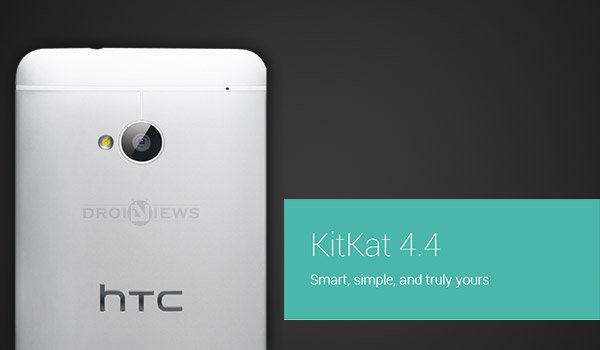
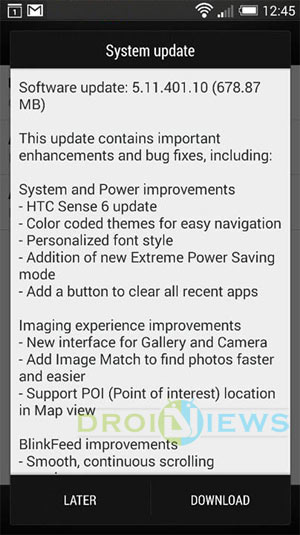
The 2014 edition of the HTC One, that is the HTC One M8 brought HTC’s latest Sense 6 innovation along with KitKat 4.4.2, making it the first HTC flagship showcasing KitKat. Due to unseen reasons HTC didn’t let the same out for its predecessor HTC One M7. But, like most others it didn’t make you wait for long, a new update for the HTC One M7 is out lately. Labeled firmware version 5.11.1540.9, the new build is based on KitKat 4.4.2 and weighs approx 667MB. Officially the HTC website has shown changes in accordance to this update. As per the OTA changelog, the major compilation is the introduction of Sense 6, apart from that Camera and Gallery UI improvements, updated BlinkFeed, new color-coded theme, Clear All Recent button and a lot more are inside the package.
We would like to present our hearty gratitude to XDA Senior Member alray for grabbing out the OTA and posting it online. We’ll help you to Install Sense 6 on HTC One M7 using the Stock Recovery.
Warning!
This update is meant to be Installed only and only on HTC One M7. You should not try this on any other variant. DroidViews or any of its community members shall not be held responsible for any damage to your device. Perform everything at your own risk.
Prerequisites
- Stock firmware and recovery Installed (This won’t work for a Custom Recovery or a Custom ROM)
- Charge your M7 above 60% battery to avoid shuts during the process.
- Backup SMS, Contacts, Messages, Calenders, Internal and External Storage.
- Enable USB Debugging: link
- Install and set up ADB: link
Install Sense 6 on HTC One M7
- First of all, download the OTA update zip file: OTA_M7_UL_K44_SENSE60_MR_BrightstarUS_WWE_5.11.1540.9-4.19.1540.9_P_release.zip
- Connect your M7 to the PC via USB cable.
- Transfer the downloaded OTA zip file on the root (Not in any folder) of the Internal storage (Preferably) or to the SD card.
- Disconnect the device and power it off completely.
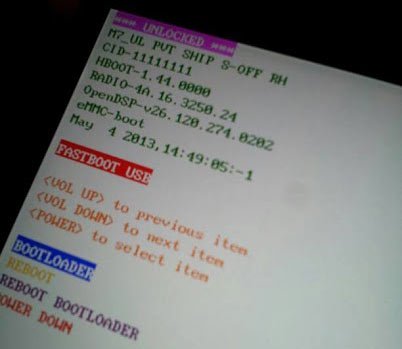
- Press the Volume Down and Power buttons together for a few seconds until you see a white screen displaying some text.
- This is the device’s bootloader mode and it looks similar to the below screenshot.
- Use the Volume keys to highlight RECOVERY and select it by pressing the Power button.
- The device will reboot into recovery mode displaying Android system recovery <3e>.
- It’s always a better option to wipe the cache. In the Recovery mode, use the Volume keys to highlight wipe cache partition and select it using the Power button.
- Select apply from phone storage if the file was placed on the Internal storage or apply from sd card if it was on the SD card.
- Navigate to the location of the file and select OTA_M7_UL_K44_SENSE60_MR_BrightstarUS_WWE_5.11.1540.9-4.19.1540.9_P_release_370042lrklkigfk5j4biku.zip.
- The updating process will take a bit of time so hold back and make sure not to disturb the process.
- Once done, select reboot system now.
Since this is an update the first boot will take time. Once booted, experience the latest Android 4.4.2 KitKat along with HTC Sense 6. If you have had any issues during this process or any related query, post below. Stay tuned until we get back with more stuff on the M7.
Updated? Root your M7 and Install Custom Recovery on it.
Root HTC One M7 and Install ClockworkMod/TWRP Recovery on It


When I choose apply from phone storage it says invalid operation and shuts the phone of anyone know why this happens?
Hi! Can I use official htc RUU instead of this OTA update which you gave into this tutorial? Will this work for me, because I also know that have different between them?
Yes.
Hi I am using Sprint HTC One M7 unlocked, currently android version is 4.3. Please advise how to update to
Kitkat.
You might want to see this: http://forum.xda-developers.com/showthread.php?t=2795856
Will this work for verizon
No.
any other option there for verizon?
The Sense 6 OTA for the Verizon model is available as a zip file. You can download the RUU file though: https://www.androidfilehost.com/?fid=23501681358539272
Thanks Rakesh,
Can I follow same procedure for this too?
No. You can follow the steps given here instead: https://www.droidviews.com/restore-verizon-htc-one-m8-to-stock-rom-with-ruu/
Any other option to update verizon?
So i am using the stock android 4.1.2 (used to be rooted but did RUU so back 🙂 ) and i wanted 4.4 but when i go into recovery i get a phone with a danger sign? any ideas?
press volume up and power button
I know this is kind of a dick thing to say, but in the first few sentences alone, there were a ton of grammatical errors. Maybe some people don’t care, but that kind of stuff genuinely bothers me, and makes me question the seriousness of this site. This is actually the first article/post I’ve read on this site, so maybe this was just a one time deal. Either way, u can only make one first impression, so in the future, I would take the one extra minute it takes to re-read your work and then edit it. Peace.
Hi, we are aware of such mistakes made by the post author. We have already dumped him. We’ve been working on checking grammatical errors and correcting them. Thanks for your concern. 🙂
Hi Neeth … I tried to perform s-off on my cell …but in vain… Tried rumrunner and firewater …but both are not comparable with the AT&T stock rom..
Rakesh ….. the instructions in firewater says that ”’
You should not be connected using any hubs which may cause connectivity issue
What it means ?
Use the stock/original USB cable, uninstall HTC Sync manager and any other pc suite. Enable USB debugging.
hi Rakesh … both Firewater and rumrunner couldnt perform S-off ,, i guss i stick with my factory version of at&t .
now i am still on my at&t after dong root …. Now i need to delete that ” teamwin ” ,, uninstall ‘” supersu v 2.02 ” cause it has that uroot option and when i do that the app deleats on its own … Now i need to remove teamwin and unlock my celll…
So how do i go abut it ???
I guess I did not get you correctly. Could you be more clear?
Earlier it showed my my htc info … but now its not going ahead of this ..
C:UsersAJITDesktopOneDrivers_FastbootFastboot>fastboot getvr all
There is some problem with USB drivers on your device. Are you using Win 8.1?
i am on window 7 and i am all stuck …..none of the softwares are turn into s-off…
Try uninstalling and reinstalling the USB drivers? You are making some mistake.
Hi Rakesh , which is better to turn S-off , firewater or Rumrunner…?
I prefer Firewater’s method.
Here’s the guide to change CID and MID: https://www.droidviews.com/change-cid-mid-htc-one-devices/
thanks Rakesh, and this OTA 4.4 sense 6 , 600 mb has a downloading mirror in chinese language … it it safe to install …
Mega link works at night. The same file is mirrored at the Chinese server. It’s safe.
Hi Rakesh ,,, It is quiet surprising that after doing unlockin and root ,, i still dont have that derverloper option on my “”about”” settings and unless i dont do that i cant proceed for s-off
Hi Rakesh, Thanks for the post. I have few questions.
I have AT&T HTC one M7 and I am no longer in US. I have knowledge on rooting and custom recovery. Could you please tell me how can I flash international version of HTC one Stock ROM as I do not want loose OTA updates from HTC. Thanks in advance.
You’ll have to restore the stock Sense firmware using RUU (ROM update utility).
Download this RUU file: https://www.androidfilehost.com/?fid=23329332407580500
Setup ADB on your computer and flash the RUU as follows:
If your s-on be sure the bootloader is locked
fastboot oem lock
Copy your downloaded file to your fastboot / adb folder
Rename the file Rom.zip
open a command prompt in the same folder (shift + right click – command prompt here )
adb reboot-bootloader
fastboot commands:
fastboot oem rebootRUU
wait for the Silver HTC logo
fastboot flash zip Rom.zip
the first time you issue a command to flash firmware/ruu in fastboot it only prepares the flash. You have to issue the exact command again:
fastboot flash zip Rom.zip
most times the green status bar does not reach the 100% mark. So when the output in the command window is complete, you can reboot:
fastboot reboot
Thanks a lot for the info Rakesh, Provided RUU is for the Cingular but I am looking for International version, Also, it would be really great if you can share some link where I can get bit more detailed steps on this process. Thanks in advance.
See the RUU guides here: https://www.droidviews.com/tag/htc-one-m8/
So.. no need to change MID and CID for this process.? Please confirm.
Yes, you do.
This will work if your s-off and your modelid: PN0712000 and CID: CWS__001
or you can EDIT the Android-info.txt to match your MID and CID
Can we do s-off on un-rooted and boot-loader locked devices… OR unlocked bootloader and rooted device is required to do s-off? Please advise…
hi @disqus_JPKNTgKrqS:disqus ,,, i have the same at&t cellphone and i have unlocked it and rooted it by using Supersu v 2.02 and i am looking forward to do same thing as u did cause the reason is that my cell is working on 4g cellular and data mode and its eating my battry and there is no way to toggle between gsm /3g /4g option …. and @DroidViews:disqus have i dont something wrong cause i dont want a “”customised rom offered by developers “”” … All i need is the orignal international version of stock android 4.4.2 sense 6 with OTA….. Please help me …..
Ajith… below is the process I followed and now I have Europe version of HTC one stock with 4.4.4 and sense 6 on it. I assume you have completed first 3 steps
1. Unlock your bootloader with HTC dev
2. Flash custom recovery
3. Root your device with SuperSU
4. S-off your device (I used RumRunner tool for this)
5. Change you CID from CWS__001 to HTC__001 and MID from PN0712000 to PN0710000
6. download and run the RUU (available for 4.4.X with sense 5.5) … boom …. that’s it …. you have fully stock, un-rooted Euope HTC one , which allows you to toggle between network modes
7. Finally, download OTA from mobile for sense 6….
Hi Neeth .. man i am a noobe and .i am from chennai and would like to have chat with you as to know more abut this whole process… Man please help me for god sake … u can find me on facebook as ” Ajit Salopal “””
this ruu is of 1.4gb ,, which i quiet big … after installing it on my cell i can download ota for sense 6 … right … and after s-off , how to change cid and mid ?
Hi Neeth ,,
which exact rom did you use … i know ur time is precious and i appreciate that … but is that the same rom that Rakesh gave you ?
Neeth … would it be comfortable for you to join professional chat with me on fb …. u can search me as ” Ajit Salopal ” .. reason is that ,i dont want to mess up my htc one m7 taking precautionary measures… This way i would get to know how to change CID AND MID… and this 600mb OTA update has a downloading mirror in chenese . Can that be trusted ..??
Does this work on Htc one sprint version
No.
I have HTC J ONE. it’s the japanese version by AU. i am on sense 5.5 atm, and i want to know if i can use this OTA method.
hy.i have htc one m7 from i india .my mobile is from uk.i don’t know very well about it.
mu os is android 4.1.2 and sense 5.0 . in update section i dont got any update and now what i do??
please heelp me.
Do you have OTA file with 4.19.401.9 ?
I tried the provided OTA file but in vain.
Is it compatible with HTC One M7 Singapore Unlocked?
is it compatible with CID: orang001 ?? ??
No.
I got error that this file is no longer available… what should i do now ?
Try the mirror link please.
Hi DJ, the article was very helpful, as i have switched from IOS to Andriod i’m a complete noob, i have a HTC ONE M7, it does not show me any update regarding the software update, the next thing is my software version is 3.04.651.2. how can i update it? links on how to update it i just did a Hard reset. and i want the sense 6 and Kitkat 4.4.2?
Change your CID and MID and then download RUU according to your CID then you will be able to download OTA
I prefer to change your to HTC__001
Hi Asad, can you please share some link on this process. Thanks in advance
I am on CID: ORANGE_UK so i change my cid and mid and after that i am able to update my phone.
Now i am on kitkat 4.4.3 and sense 6
how do i change the CID MID? any guide, can you give a link mate?
Hi, i got another question becouse I read that we have to make sure we are on 4.19.1540.9 to install this update it’s that right ? Sorry I’m new on HTC
Yes.
Hi, i got the HTC one m7 unlocked UL with android 4.3 sense 5 versión 3.22.1540.1 work on this?
Yes.
ok thank’s 😀
hi, i have this device! htc M7 at&t, Can I install this OTA on my device??
No.
Sorry if this a dumb question, but why not?
Because it is only for the international LTE model and requires a corresponding base firmware for the same model to be installed and function properly. If you try to install it, the installation might fail.
You can try it but we do not recommend any dubious thing to users.
Thanks for your answer. I bough an HTC ONE M7 on Amazon that was supposed to be an international version but I got one with the At&T logo. It’s working fine (I live outside the US) but it came with Sense 5 (Not even 5.5) and Android 4.3. At&t Software Update keeps saying there are no updates for my phone. I’m guessin my phone is also not a good candidate for this install? Would appreciate any recommendations.
The best way to enjoy the latest best of Android on your M7 will be to root, install a custom recovery and then flash a sense-based custom ROM.
okay then, i have same question like john sanabria, thanks for your explanations Mr. Rakesh 🙂
sorry for my bad language
Replied above!
Rakesh, would you be please point me to some tutorials to do these steps? I’m fairly new to this and don’t want to screw up my phone. I really appreciate your help. Thanks in advance.
Browse this link to find all required tutorials: https://www.droidviews.com/tag/htc-one-m7/
Sorry for the previous link. Follow these:
Unlock your phone’s bootloader first.
https://www.droidviews.com/root-htc-one-m7-and-install-clockworkmod-recovery-on-it/
https://www.droidviews.com/best-custom-roms-for-htc-one-m7/
More tips for M7 here: https://www.droidviews.com/tag/htc-one/
Hi Rakesh, i have an ATT M7 UL LTE version, sim unlocked using it in Latam. So can i use this process here to update my phone? you mentioned is not for ATT phones, only for UL versions, but mine is both from ATT and UL version.
No, it won’t work for you. Look for the OTA package for your phone model.
hi.. i have htc one m7 unlocked, when i enter in recovery it say MOUNT SDCARD FAILED, can you help me please… thanks..
Try formatting your card: https://www.sdcard.org/downloads/formatter_4/eula_windows/
how can i use this tool, it does’n detect my device
any way, i used otg, and now not showing MOUNT SDCARD FAILED, but it write
DEVICE_CW_INSTALL : NO CW FILE. SKIP CW INSTALATION
WRITE HOT_MODE:0 DONE
and when i select apply from sd card, it will reboot and restart my phone.
what can i do?
Hi, I have Verizon HTC one m7 just want to update to sense 6. I’m not in us so not getting it directly. I have updatepackage.zip for my version. But I am unable to get into recovery. It just reboot after showing black screen for few seconds when selected by power button in bootloader.
Can someone tell me why I am not able to get in recovery? I just bought it.
Select RECOVERY and then press the Power key.
hey rakesh can you please help me….i have htc one m7 t mobile network unlocked i got this phone from usa now i am in dubai….i updated ma phone to sense 6….after update signals are not coming….can u please tell how can i fix this…
The reason is different network frequencies. Root your device, install a custom recovery and try AndroidRevolution HD ROM. It should be fixed!
Hi,
I was previously on a custom ROM (4.4.2 with Sense 6 HTC One M7) and just yesterday got back to Stock succefully. However, do I need to lock the bootloader and get the S-OFF to S-ON to recieve OTA (I am in India and the phone was purchased here)? I got the updates after switching to stock till 4.2.2 and it stopped there.
Really appreciate your help! Thanks 🙂
You can relock the bootloader using the instructions at HTCDev site.
I know, but do I have to? is it necessary to lock the bootloader to get the OTA updates? also, what about S-OFF? should I leave it like that?
Thanks!
No, you can get the OTA with an unlocked bootloader.
hi i htc one m7 unlocked and my phone number is 3.62.401.1 and running jellybean 4.3 and sense 5 will it work
If it is M7 UL, it would work.
hi Rakesh.. my HTC ONE is bought from the US. its an AT&T unlocked phone, international version.. i already have the kitkat 4.4 installed on this device. just need an upgrade to Sense 6.. will this link help me get there, without bricking my phone.. ! I am new to all this.. your feedback will really help..
Thanks
No Anshul, it is only for HTC One M7 UL (LTE) version. The AT&T model already received the Sense 6 update back in June. Why not not try getting the software update on the phone itself?
I just entered into the devices’ bootloader (following your instructions from above), and saw, that it is “locked”.. while.. i had purchased the factory unlocked version..
any ideas on that..
i have tried checking on my phone already … (bought it end-june), but it says no updates..
shall i keep my patience.. hoping that it will someday.. share the OTA update to SENSE 6.. !
Thanks for your help.. and immediate response..
I think .. i’ve figured out why it mentioned “Locked” on the bootloader.. the sim is unlocked on my phone, and not the software..
I will take your advice.. going forward to get updated to the latest.. sense 6 !!! 🙂
thanks
There are usually two types of locks on some devices: carrier lock and bootloader lock. You phone would have network unlock that means you can use any SIM card. The locked status you are talking about points to the bootloader lock which needs to be unlocked if you want to root your phone and install a custom recovery.
Since you are using the phone in India, you won’t receive OTA updates here. To keep the phone updated, unlock bootloader root the device, install TWRP recovery and install a custom Sense-based ROM.
Since you are new to such things, I’d advise you to use the phone for some days, read about custom development and then give it a try.
https://www.droidviews.com/tag/htc-one/
Oh.. really no OTA updates in India.. ???
I know i am new.. but im really dis-appointed on receiving the sense 5.5..
Could you help me with the steps I should follow.. to upgrade to sense 6.. ! it would be a great help..
Also, I have read.. that unlocking the bootloader.. renders the device open to a lot of risks.. is that something that one must keep in mind.. before unlocking … ??
PLEASE .. help.. !
cheers 🙂
to do this ota update, htc one (m7) has to be rooted or no??
You need not a rooted phone to install official OTA.
Both mirror links navigate to main site I.e. pan.baidu.com where link is down and not working please guide.
provided download link is not working….
There are 2 mirror links too.
It can install a m7 htc one at&t that was s-on?
It’s not for the AT&T model.
Se le puede instalar a un htc one m7 at&t que esta en s-on??
Does the bootloader need to be unlocked in order to do this ?
No.
Thanks, and also how do i place the OTA file on the root ?
By root we mean the main location of your SD storage, not in a folder or subfolder.
Okay well the OTAs in the right place and every time I boot into recovery and apply from phone storage or SD card it says invalid CID and boots into the regular OS
same problem with me
Why wont another recoveries work (Clockwork or TWRP)? And is this for the international or unlocked version?
Also, How can I get back to the original recovery …? Thanks 🙂
Stock OTAs are installed only through stock recoveries. The package given here is for HTC One M7 (UL).
will it erase everything on the phone like a Factory reset?
No.
whenever I click on apply from phone storage it just switches the phone back on normally? what should i do…?
whenever I click on apply from phone storage it just switches the phone back on normally? do i have to be rooted?
No, you need not need to root the device. Which model of HTC One do you have?
I have a HTC One M7_ul lte, it was a phone sent from HTC
It will work then.
my system recovery not work! Bootloader must be unlocked?
download link is down 🙁
Download here: http://pan.baidu.com/s/1i3FqtcL
My HTC One is SIM unlocked but its from AT&T. Can i use this update anyway?
I have a ROOTED HTC One M7 UL version with stock ROM and stock recovery…. i have installed TWRP also… can i flash this update to my phone.. will that work.
Root is OK but you need system recovery to flash the OTA zip.
HI Rakesh, I am new to this…. what do you mean by system recovery….
System recovery is one that comes with your phone. Since you have replaces that with a custom recovery (TWRP) you will not not be able to install the OTA.
In your bootloader screenshot, we can see “M7_U” which is not the name of the LTE variant.
I have also M7_U in my bootloader but no possibility to see a LTE feature in the settings or somewhere else.
Your ROM file name contains “M7_UL”.
What is the explanation ?
Please, I need a serious information because no thread in many forum give an efficient method to check the variant of my HTC One M7 …
Thanks in advance.
The screenshot was mistakenly used from our archives. I have corrected it now. As for the OTA package, it’s meant for HTC One M7 UL (LTE) version. While a ROM meant for M7 UL can be flashed on M7 U, the same cannot be done with OTA packages.
Hi Rakesh .I have flashed via fastboot M7 5.0.1 gpe version for Unlocked cell.
Now i want to install this version but i dont know if this is possible to all unlocked cell or only for country US because my RADIO is different