
Booking a cab for you might be easy. Just unlock your smartphone, open the app, turn on the location and feed the address. It simply requires you to read, write and remember a few things. But unfortunately, that is not the case with over 630 million people with cognitive disabilities. Forget booking a cab, just using a smartphone seems to be a far-fetched reality for them. Keeping this in mind, the Silicon Valley giants have introduced the Action Block feature in the Google Assistant App. Everything, from the initiation process to its availability, is covered in depth below.
Action Block Feature in Google Assistant
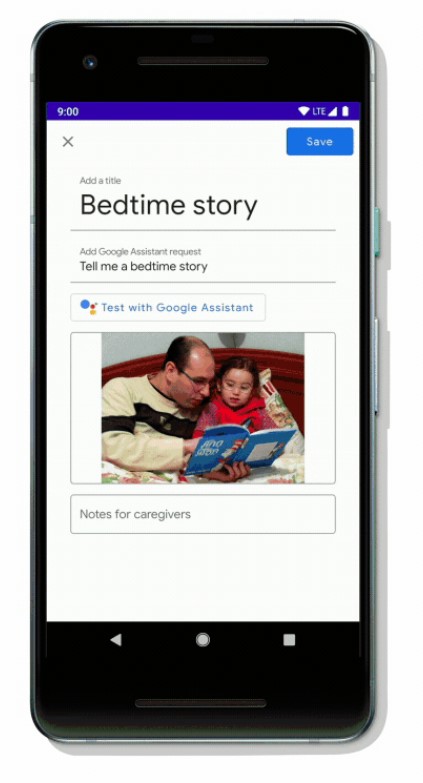 The action block feature of Google Assistant will let you add specific Google Assistant commands directly onto your home screen. That is, it will create a shortcut on your home. You just have to tap once on it and the associated command will be executed. To further make it easy for people with special needs, Google also has provided the option of adding an image to the shortcut. This way, they could easily identify the corresponding shortcut, without having to read about the same. If you have ever used the famous automation app, Tasker, then you might very well be aware of this feature.
Features that it Provides
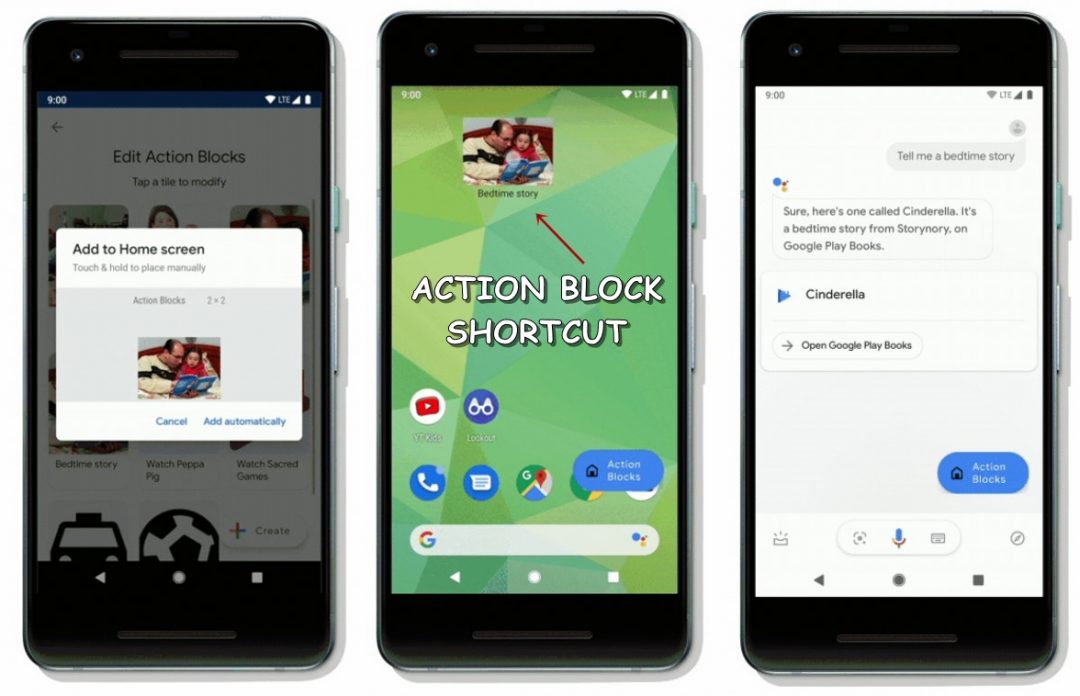 There are tons of functionalities that the Action Blocks in the Google Assistant app may be used for. Apart from booking a cab, you may even book your favorite foods online, call your loved ones, share your locations, control the lights, watch your favorite TV shows, etc. For example, if you wish to make Google Assistant read you a bedtime story, you will just have to enter the title of the command followed by the command itself. Once you have created the desired command, you may further create it’s shortcut as well. The next time you won’t have to do it all over again. Simply tap on the shortcut and the fed command will get executed (as evident from the screenshots above).
Availability
As far as the availability of the Action Block feature in the Google Assistant app is concerned, it is currently in the testing phase, so don’t expect a rollout anytime soon. However, if you are among the care-givers or one of your family members have some kind of cognitive disability, then you may join the app’s trusted tester program.
So first Google launched the Live Transcribe app, which helped the hearing impaired by transcribing the speech of others in real-time. Then it launched the Sound Amplifier feature as part of Android’s Accessibility menu. This effectively reduces background noise and provides a more even frequency during conversations. This was followed by the live captions feature of Android 10. And finally, by adding the Action Block feature in the Assistant app, it is surely making the Android system easily accessible for one and all.
Read next: How to Use Google Lens on Android Devices

Join The Discussion: