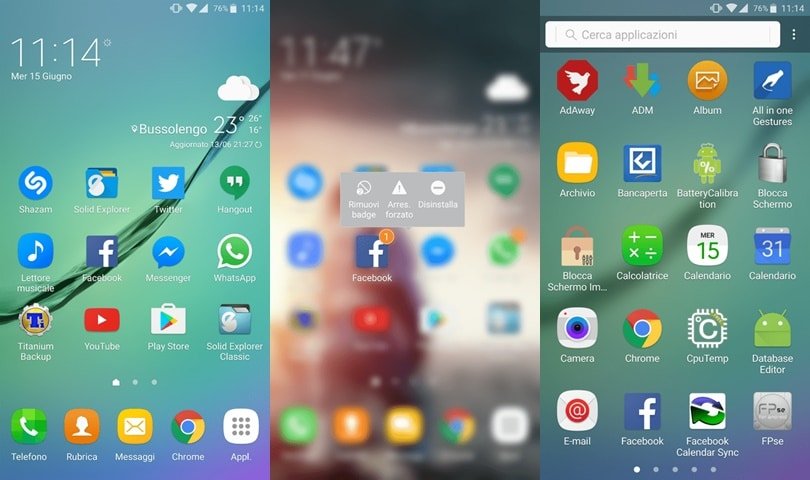
Once you turn on the screen on the brand new Galaxy Note 7, the first thing you’ll notice that it has a brand new launcher which is quite different from Galaxy S7. Samsung calls it the GraceUX, the new TouchWiz UI for Samsung devices, which is a lot smoother than the earlier versions of TouchWiz UI. GraceUX is a bit new to the Android world but it already managed to get the attention of many users and developers. One of the noticeable things is the latest Note 7 launcher app on the Galaxy Note 7.
Luckily, one of the developers has extracted the GraceUX Note 7 Launcher from the official firmware and ported it to all the Samsung devices running on Android 6.0.1 Marshmallow TouchWiz ROMs. So, any Galaxy S5, S6, S7, Note 4, Note 5 users who are on Android Marshmallow can install the Note 7 Launcher. Your device must be rooted in order to install the Note 7 launcher.
Many users have confirmed it working on Galaxy S6, S7, and Note 5 devices and it is highly likely that it will work on Galaxy S5 and Note 4 as well provided you have TouchWiz firmware based on Marshmallow. So, without any further ado, let’s see how to download and install Note 7 launcher on your Samsung device.
Download Galaxy Note 7 Launcher for Samsung Devices (Galaxy S5, S6, S7, Note 4 and Note 5)
Make sure you have a rooted device and also take backup of all your files to make sure we’re on the safe side if things go sideways. Download the ported Note 7 launcher from the download link below.
Download (Mirror) | TouchWizHome_NoteUX_Albe95_V2.zip
- Download the zip file and extract it on your phone. You’ll get a file named “TouchWizHome_2017.apk”
- Move the extracted file to /system/priv-app/ folder on your phone. You can use any root file manager to do this.
- Long press on the ‘TouchWizHome_2017.apk’ and change the permissions of the file to rw-r-r and press OK. You might be asked for granting root permissions for the file manager, grant it (Detailed guide).
- Reboot the device once you’re done with the above steps.
Once the device is rebooted, you’ll have the beautiful GraceUX note 7 launcher on your Galaxy device.



Join The Discussion: