Verizon is the most popular and largest network operator in the US but for some unknown reasons, it’s also the laziest carriers to roll out software updates for its devices. The Verizon S7/S7 Edge was one of the last to receive the Nougat update but things are not the same in the case of the Verizon S6/S6 Edge. AT&T, T-Mobile, and Sprint users are still waiting for the latest update to knock their doors. However, if you own the Verizon model of the phone, you don’t need to wait anymore. By following the steps in our tutorial, you can install the stock Android 7.0 Nougat firmware on Verizon Galaxy S6 (SM-G920V) or S6 Edge (SM-G925V) right now. The build version of the available Nougat firmware is VRS4DQD1 and you can download it from below.
If you don’t want to download and install the full Nougat firmware on your Verizon S6/S6 Edge, you can simply request the OTA from Settings> About device> Software update. Please note that if you have disabled some system apps or have rooted your S6, or have been using this phone out of the US territory, you won’t be able to get the automatic update. Therefore, installing the firmware manually using Odin is the only way to get Android 7.0 Nougat on your Verizon Galaxy S6 or S6 Edge.
In case you are curious about the new features introduced in Android Nougat update for the Galaxy S6, please take a look at the full list of features on the official Verizon Wireless portal.
Download Verizon Galaxy S6 (SM-G920V) Nougat Firmware
G920V_G920VVRS4DQD1_VZW_USA_v7.0.zip | Mirror 1 | Mirror 2
Older firmwares for VZW S6:
- G920VVRU4CPK2 (6.0.1): G920V_G920VVRU4CPK2_VZW_USA_v6.0.1.zip
- G920VVRU4CPH1 (6.0.1): G920V_G920VVRU4CPH1_VZW_USA_v6.0.1.zip
- G920VVRU4BOG7 (5.1.1): G920V_G920VVRU4BOG7_VZW_USA_v5.1.1.zip
Download Verizon Galaxy S6 Edge (SM-G925V) Nougat Firmware
G925V_G925VVRS4DQD1_VZW_USA_v7.0.zip | Mirror 1 | Mirror 2 | Mirror 3
Older firmwares VZW S6 Edge:
- G925VVRS4CPL3 (6.0.1): G925VVRS4CPL3_VZW4CPL3_VZW_USA_Verizon.zip
- G925VVRU4CPK2 (6.0.1): G925VVRU4CPK2_VZW4CPK2_VZW_USA_Verizon.zip
- G925VVRU4CPD2 (6.0.1): G925VVRU4CPD2_VZW4CPD2_VZW_USA_Verizon.zip
- G925VVRU4BOK7 (5.1.1): G925VVRU4BOK7_G925VVZW4BOK7_VZW.zip
- G925VVRU4BOG9 (5.1.1): G925VVRU4BOG9_VZW4BOG9_VZW_USA_Verizon.zip
Getting Prepared
- Download the Android Nougat firmware from one of our links above and unzip the downloaded file on your desktop.
- Download Odin3_v3.12.3 and extract the zip on your desktop.
- Make sure you have installed the latest Samsung USB Drivers on your PC.
- Enable USB Debugging on your phone.
- Backup your apps and data as a precaution.
- Charge your Verizon Galaxy S6 to ensure 60-70% battery level.
Install Android 7.0 Nougat Firmware on Verizon Galaxy S6/S6 Edge (SM-G920V/G925V)
- You will get 4 files inside the extracted firmware folder. In case you find just one file (with .tar.md5 extension) inside the firmware zip, just click the AP button in Odin and add the firmware file and click the Start button. You can find the installation instructions given here.
AP_G925VVRS4DQD1_CL10981169_QB13133503_meta.tar.md5
BL_G925VVRS4DQD1_CL10981169_QB13133503_low_ship.tar.md5
CP_G925VVRS4DQD1_CP6172916_QB13133503_low_ship.tar.md5
CSC_VZW_G925VVZW4DQD1_CL10981169_QB13133503_low_ship.tar.md5 - Open the Odin folder and launch the program as an administrator.
- Now to reboot your Verizon Galaxy S6/S6 Edge into Download mode, turn it off, press and hold Home + Volume Down + Power buttons until you see a blue screen with the exclamation sign. Press the Volume Up key to enter the Download Mode.
- Connect your phone to the PC with a USB cable.
- The ID:COM port on Odin will be highlighted in blue when your device is detected. You will also see “Added” in the message box.
- Now click the BL button in Odin, navigate to the folder in which you extracted the firmware files. Select the file that has a name starting with BL.
- Then click the AP button and add the file with the name starting with AP. Do the same with CP and CSC fields.
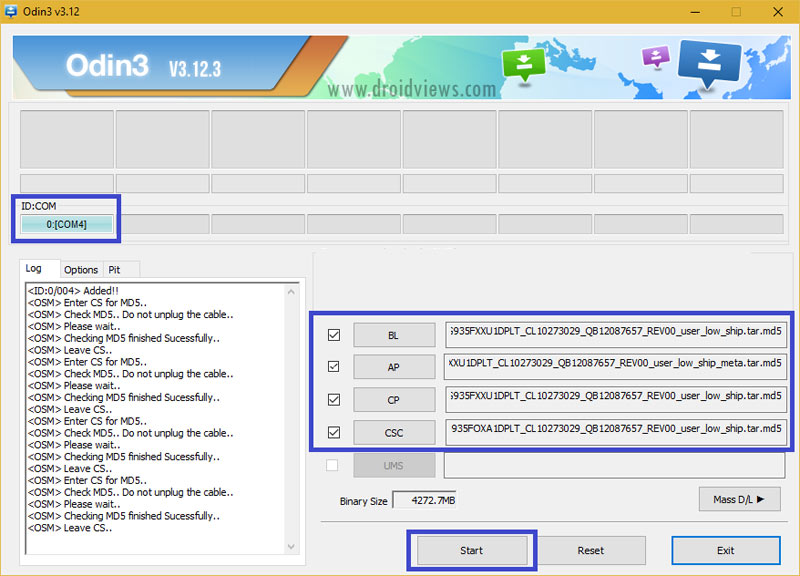
- When done with that, click the Start button and have some popcorn while the installation process completes. Or just wait like a normal person.
- When the installation completes successfully, you will get a PASS! message on Odin and your Galaxy S6 will reboot automatically.
Please don’t panic if the first boot takes a while. The first boot after installing a new firmware takes about 5-8 minutes. Just wait patiently until your phone boots up and you will have the profit. Enjoy!
Hi. My phone: Samsung S6 Verizon SM-G920VVRU4BOK7. I live and use the phone in Russia. The phone began to lose network, work slowly. Help me reflash it?
Thank u! it works great Samsung Galaxy S6(SM-G920V)
Thank you! My phone cel its work with Android 7.0. (y)
THANK YOU, its work
Using odin 3.12.3
Hi. There is a now update for Galaxy S6 Verizon ithink it’s a november update. I was hoping that you will post update as well. Hopefully there is a google drive link. Thanks
Hi, we’ll try to upload it.
Thanks Rakesh.. Looking forward to it.. You guys are the best..
i got the message fail please help
Show me the Odin screenshot please.
Hey Hi Rakesh. I sincerely thank you for the guide you solved my problem. I couldn’t get my VerizonGalaxy S6 to auto upgrade and I found out in your guide it won’t be possible if I’m not in us. but Now my only concern is, If I upgrade it, will it lose it’s capability to use Pakistani local cellular. I’m using Pakistani network and I know these phones are tempered so will I be able to still use it’s cellular? Your answer will be greatly appreciated I’d do it rather more If email me your answer.
ahmedkof01@gmail.com
Hi, installing the stock firmware won’t affect the SIM unlocked status of your phone.
Hello Rakesh, after installing the update on my S6edge Verizon the sim unlocked status did chage (the phone will no longer let me use cellular data). Will a flash back to 5.1.1 from the new 7.0 fix the issue?
Try performing a data factory reset: https://www.droidviews.com/how-to-perform-data-factory-reset-and-wipe-cache-on-samsung-galaxy-devices/
Hola quiero decir que a mi ha funcionado..! Al principio solamente instalaba la AP.. Pero luego intente me fije que son todas que tienes que agregar… porque cuando la primera vez hice que agregaba solamente una no me funcionaba la seña ni los datos mobiles..! Pero luego Hice Agregando todas..! y ahora si me funciona a la perfección..! Saludos desde El Salvador..
Lo hice en mi S6 Verizon
English please!
my phone runs os 5.1.1. Do i need to upgrade to 6.0.1 before going to 7.0 because mine gets stuck during installation.
lost all my personal data including photos, music, videos, THANK YOU. you did say i dont need save my data in PC.
I did suggest to backup everything.
Hello guys. Can u give me the sequencey of code number to update new android version??
Ex: G925VVRU4CPD2 -> G925VVRS4CPL3 -> G925VVRS4DQD1. Can i update from G925VVRU4CPD2 to Android 7.0 in one step???
I had a S6 edge (SM-G925V) from verizon. its very nice if u give me the tutor.
P/s: Im so sorry. My English is not good.
I hope u guys can help me.
Thanks.
I did it, I have a Samsung Galaxy S6 flat (SM-G920V) from verizon and all works fine thanks to much.
I have install Android 7 with this method and don’t have any problems with 4g or LTE bands, using telcel chip everything work perfect thanks
Thanks for sharing your experience!
I do not take the 4g network, how did you configure the APN telcel?
me too, you complete? help me plzzz
What do I do if Odin isn’t registering my phone?
Reinstall the drivers.
Try a different USB cable and port.
Restart the computer and your phone.
And if that doesn’t work?
Which model do you have?
s6 verizon 920v
Download and install this firmware: https://www.androidfilehost.com/?fid=529152257862722308
These are custom ROMs?
No, they are official firmwares.
Thank u soo much…
thank you
You’re welcome!
Estoy en el mismo caso,,no me conecta a las redes 4g, ya elimine y configure APN y no agarra =(,,,Esperemos que alguien nos pueda ayudar. Saludos.
Realice todo el proceso pero no me conecta a redes 4G, que debo hacer?
Hola, yo actualize mediante lo OTA y tampoco me agarran las redes 4G, por cierto, desde que compre el celular mi pc no lo reconce ya no se que hacer he intentado de todo
A mi tambien me paso lo mismo; No agarra las redes 4G, ni con movistar ni con Telcel.
regresa a la version anterior me paso igual
Hola, cual es la version anterior, yo acabo de comprar un S& (este modelo) ya traia nugat y no agarran las redes 4 G con movistar
no me salen los 4 archivos solo 1, que hago?
Then click the AP button, add the firmware file to it and then click the Start button.
Do you have the S6 (flat)? I used the S6 Edge firmware.