Released back in June 2014, Samsung Galaxy Tab S with stunning 8-inch display is an elegant device. This device managed to load up Android KitKat with ease. The TouchWiz experience on this device is buttery smooth and one feels blessed owning this device. Galaxy Tab S will be a dream tablet with Android 5.0.2 Lollipop installed as Lollipop experience on this device is snow soft and quirky.
The update in this post is only for Australian users. The official ROM was compiled on Tue, 23 Jun 2015, indicating the miscellaneous bug issue is solved. Make sure that device product code is XSA. You can refer 4627885 to know the changelogs. Now let’s get into the easy guide.
Getting Prepared
This Android 5.0.2 Lollipop firmware only works on Samsung Galaxy Tab S 8.4 Wifi SM-T700 model only.
- Users make sure you have installed USB drivers on the PC, We have made it easy for you. Download them here.
- Make sure your device has more than 80% battery, to be able to troubleshoot your device in case of bricked Tab.
- Installing official ROM will void your warranty.
Warning: The author will not be responsible, if you damage or brick your device. Do it at your own risk. You have been warned !
Update Galaxy Tab S: The Steps
- Download official lollipop ROM released by Sammobile from here and copy it to your microSD card.
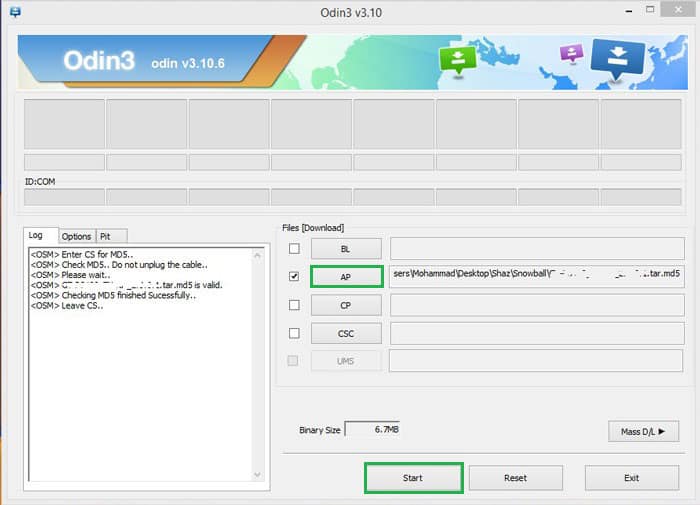
- Download Odin v3.10.6 from here and set it up on your computer.
- Get into the Download mode. (Hold Home + volume down along with the power button)
- Run Odin with administrator rights on your computer.
- Power off and connect your device to a computer using the USB cable. (Confirm the connection with Blue box, if it doesn’t show up configure your USB drivers)
- Click on ‘AP’ in Odin 3.10.6 (Select ‘PDA’ on Odin 3.0.7 ).
- Choose “xxxx.tar.md5″ file from the dialog box.
- If on Odin 3.0.7, check Auto-reboot and F-reset time. ( Don’t alter anything or you may end up with bricked device).
- Click on Start.
- Now wait until the process is done. After a few seconds, the Tab will reboot.
The initial boot will take 5-10 min. Once you have booted you can enjoy Android 5.0.2. If you are facing difficulty during the installation do let us know in the comments below. Don’t forget to share your experiences.


Join The Discussion: