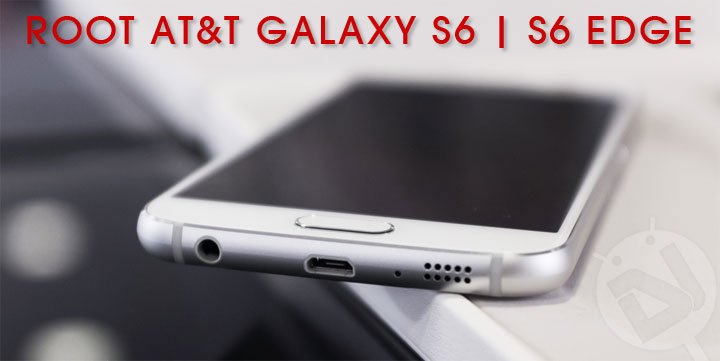
The latest Samsung Galaxy series devices – S6 and S6 Edge have bought a revolution to the smartphone market with its new design, AMOLED curved display, faster UFS flash memory with up to 128 GB support, blazing fast Quad-core 1.5 GHz Exynos chipset, 3 GB RAM, a 16 MP camera for more balanced photographs, Lollipop 5.0.2 out-of-the-box, new Edge clock and much more to explore. As usual, it didn’t take long to have root available for this device, thanks to Chainfire for his work. We’ve already covered a guide to root Samsung Galaxy S6 and S6 Edge without tripping KNOX counter.
To achieve root on your Samsung Galaxy S6 without changing the KNOX counter you need to use PingPong Root tool, which is developed and being maintained by idler1984. The tool has recently added support for the AT&T variants of the S6 and S6 Edge, and the corresponding G920AUCU1AOCE and G925AUCU1AOCE builds are supported. The method is pretty easy and requires you to install an app, which will do the complete job for you. Again, if you want to Root AT&T Galaxy S6 and S6 Edge without changing the KNOX counter, you should follow this guide.
Warning!
Rooting is considered a risky procedure and may soft-brick your device, which could be recovered by simply installing the stock firmware using Odin. Droidviews or any of its community members shall not be held liable for any damage to your device.
Prepare Yourself
- Charge your phone to sufficient battery level so that it doesn’t shut down during the process.
- Backup everything, so in case anything goes wrong, you can restore back your data.
- Download the PingPong Root tool: pingpongroot_beta6.apk
Steps To Root AT&T Galaxy S6 And S6 Edge
- If you have already downloaded the apk onto your device, its good. If not, connect your S6 to the PC and transfer the apk file.
- Now, open a file manager and browse to the location of pingpongroot_beta5.1.apk, and install it.
- While installing, the app will itself prompt for SuperSU installation. Once SuperSU is installed, tap on Open.
- The app will open, show an error message and exit back to PingPong Root.
- On the first run, if you’re prompted for any permissions, allow them.
- Optional: Tap on Download Data to update your device information.
- The final step will be to press on the Get root! button.
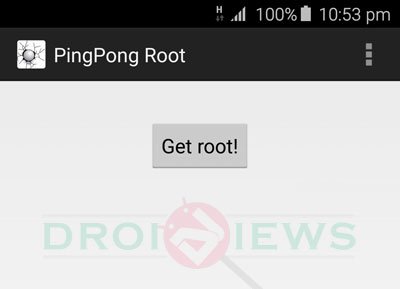
- It will take a few moments, so wait patiently.
- If the device reboots by itself, try the process again.
- Once done and you have successfully rooted, you can uninstall the PingPong Root app.
- You can verify your root by running the Root Checker app.
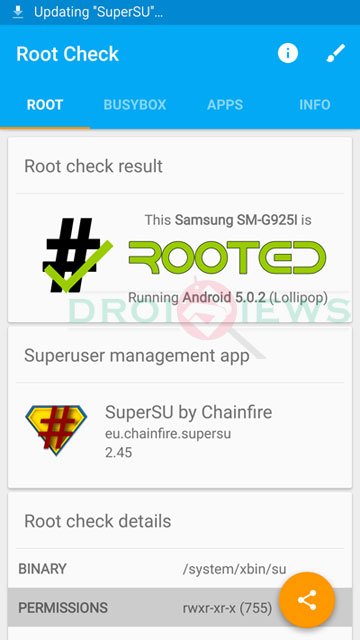
Now that you have rooted your AT&T Samsung Galaxy S6, you can go ahead and use apps or tweaks that require root. Have you successfully rooted? Post your comments below and provide us with your valuable feedback. If you got any trouble while installation, share with us.
Source: XDA

I have AT&T galaxy 6 sm-g920a. I factory reset my phone and lost all contacts. I am only trying t root my phone because I found a program that may find my contacts only if rooted. I am doing the pingpong root and am getting error message from SupeSU “There is no SU binary installed and SuperSU cannot install it.” Anyone know how to fix and what this means? I really just want to try an get my contacts back so if there is a non root way, anyone know? Thank you!
Sad day for me, my phone is still not supported. At least I can’t find anything anywhere 🙁
I have a Galaxy S6 Edge: G925AUCU3BOJ9 (AT&T). Is there anyway I can use the other G925A variants?
Hello friends , the problem that I have is that I try to update my phone with a custom rom, but at the time I CHOOSE the option ” update from external storage” tells me that disable, as active this option , apologies if not clear but I speak Spanish and I am using the translator
You can’t install a custom ROM via the stock recovery.
I see some youtube videos to the same model G920A they put rooting custom rom then
For some reason my AT&T Galaxy s6 Edge isn’t supported 🙁 any reason you know of?
Try the latest version of PingPong: http://www.mediafire.com/download/8wnlnqp6b7ev991/pingpongroot_beta5.2.apk
@DroidViews:disqus, so, I have the beat 6 downloaded and my device was not supported either. Should I go download the beat 5.2?
You can try them too. Also try this: https://www.droidviews.com/root-almost-all-android-devices-with-the-kingroot-tool/
@DroidViews:disqus, I tried using KingRoot. That is the tool I used to root my wife’s Tab 4 that she has. It worked incredibly well for her device, but I tried using it for my Samsung S6 and I got a message saying, “Root strategy unavailable, no strategy now.” It also states, “12180 request received. Research is accelerating for you.”
I do not know what all of that information means, I am just curious to see how this goes. I would prefer not to root my via a PC because I am worried about it Bricking.
Well, looks like Samsung has patched the older root exploits. You should wait. What error do you get while using PingPong? I recently rooted my S6 Edge using it.
PingPong Root simply says, “Your device data is still not supported. Stay tuned…”
It is alright, lol. I will simply live vicariously through my wife for now until an update is made. Any idea on how long until that update is processed?
Okay. Try the steps given here: https://www.droidviews.com/root-samsung-galaxy-s6-without-tripping-knox-with-pingpong-root/
Also make sure that the firmware build version of your phone has been listed on the page.
The firmware build is not listed on the page. My build number is OF3. I will still give it a second attempt once I get back home tonight via my computer, but I think I might be waiting a little bit longer before I get to root my device.
Thank you for your help with this.
Still trying to decide if it’s worth it. I’ve read some mixed results on getting back to stock. I’ve never had issues flashing stock firmware in Odin so I’m leaning towards rooting.
PingPong is a very easy and safe root exploit. It will either work or not work at all and will certainly not send you phone into a boot loop.
I never expressed any concerns or worries with the rooting process. I never mentioned anything about a possible boot loop.
Nothing is guaranteed in the world of modding your phone. So I’m still thinking it over. I have other phones that are rooted with recovery. Not every phone I own needs root.
Yeah I am poindering it also, only reason I want to is to get rid of the TONS of stupid background apps almost 400 apks running on this thing!
Root it, even if it is to just “freeze” all the bloat as I did. I get 2 1/2 days from a single charge by disabling apps running that I do not use..
If I root my G925A can I put the G925T firmware on it?
No.