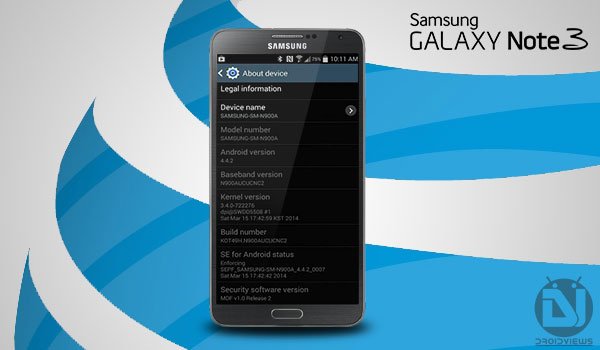
The legacy continues of the Galaxy Note devices and so the Galaxy Note 3 was released during September 2013. And It didn’t even took months for the carrier branded Note 3 to reach out the market having a Full-HD 5.7 inches display, Snapdragon 800 chipset and a Quad-core 2.3 GHz Krait 400 processor, all of which are par excellence. . One such variant is the Galaxy Note 3 SM-N900A which is bound to the AT&T network. While all other carriers like T-Mobile, Sprint and U.S Cellular have got their updates pushed, its time for the AT&T to line up.
The new update is labelled as build N900AAUCUCNC2 which is based on KitKat 4.4.2 KOT49H. The OTA update size is around 554 MB. So in case if you have not yet received the update notification and are curious enough, you can install it easily using this guide. Make sure to have Installed a stock firmware which is not rooted and does not have any custom recovery installed, to do so click the link below and return back to stock firmware completely. This guide will help you easily install Android 4.4.2 KitKat OTA on AT&T Galaxy Note 3 SM-900A.

How to Install Stock Firmware on Galaxy Note 3 (All Models)
Warning!
- We shall not be responsible for any damage to your device. Perform everything at your own risk.
- The Guide is meant only and only for the AT&T Galaxy Note 3 SM-N900A. Do not attempt to use it on any other variant or device.
After downloading the file, do not forget to rename it as update.zip.
Install KitKat OTA on AT&T Galaxy Note 3
- Connect your device to the PC via USB cable
- Copy the update.zip to the root of the internal or external storage and not in any folder.
- Disconnect your device and switch it off.
- Hold down the Volume up + Home + Power buttons until you see the Galaxy Note 3 logo screen and then release the keys. Your device will boot into stock recovery mode.
- If you have transferred the zip to internal storage then using the volume keys highlight Apply update zip and select it using the Power button.
- If you have transferred the zip to external storage then using the volume keys highlight Apply update from external storage and select it using the Power button.
- The process will take some time, so kindly be patient. Once done, select Reboot from the main menu of the recovery.
The first boot might take a bit longer than usual, don’t worry. Enjoy the latest Android version on your AT&T Galaxy Note 3 SM-N900A and don’t forget to tell us about your experience on the new update.

THIS DOES NOT WORK, IT JUST WIPES OFF ALL YOUR DATA!!!
You’re better of doing the ota update, this was total crap.
N900A 4.3 Kingo Root doesn’t allow you to do OTA
I did what was mentioned in the steps but I dont see an option” Apply update.zip” in recovery mode at all
What options do you see?
1. Reboot the device
2. Update via ADB command something
3. Update via external storage – tried this as well but got SD card mount error
Dont remember the other options
does it work?
it doesnt work it doesn’t work… it only shows ERROR IN tmp/sideload… n then just wipes my phone but no upgrading why?
Rename the file as “update.zip” and try again.
i do it and its not work
pleas help
So can anyone confirm this has worked for them???
should i unzip the file or just put it as it is?
Just copy it to the device without unzipping.
I downloaded it directly to file 0 in the device. And did the steps but it stayed for more than 3 hours on the “downloading” page. And when I restarted the device, nothing happened!
Thank you for you support any way bro.
can i use this on kingo rooted phone
yes.
I hope so despite the statement above, “Make sure to have Installed a stock firmware which is not rooted and does not have any custom recovery installed”.
I got a N900A 4.3 kingo root
Just tried it. It doesn’t work. It just wipes my phone and does a factory reset
will this work on N900AUCUBMI9?
Yes, it should.
so lets say if unfortunately i brick it… then will i be able to unbick using the stock firmware link that u provided?
Using this guide instead: https://www.droidviews.com/how-to-unbrick-att-galaxy-note-3-sm-n900a/
it doesn’t work… it only shows ERROR IN tmp/sideload… n then just wipes my phone but no upgrading
Im having the same problem
DO NOT DO IT. IT WILL WIPE OUT YOU PHONE AND WILL NOT INSTALL ANYTHING.
Will this work on a stock rom when system status says custom?
Yes.
Also,I’m missing google play services,was rooted,unrooted with superuser and don’t have root access but google services remains gone.will this hard/softbrick as a result.and coming from mj5 will be ok?
sorry, but I did not get you. can you be clearer?
ERROR IN tmp/sideload………….. won’t work for me.
It means you need a greater version of base firmware to flash the OTA. What is your current version?
NB4
Also try redownloading the zip package. Bad zip file might also lead to that error.
Has anyone tested this?
It has been tested by many, Jeremy!
I just tried it, and I can’t get it to work. . Let me try it again just in case i missed something. Will report in a few minutes.
Where have you copied the file, Jeremy?
tried copying it to the root of my sd card and the root of phone. . same problem. I called AT&T. their gonna ship me a new phone.