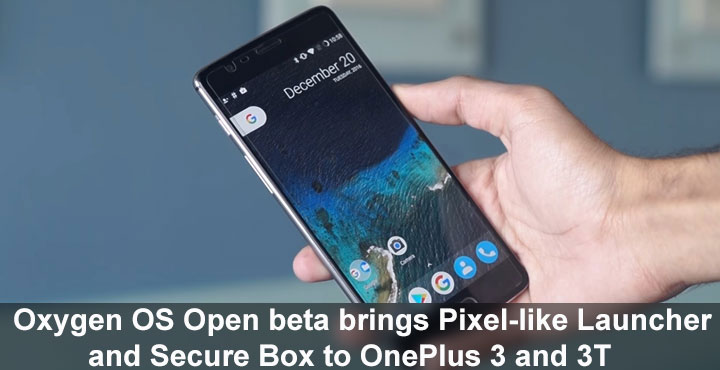
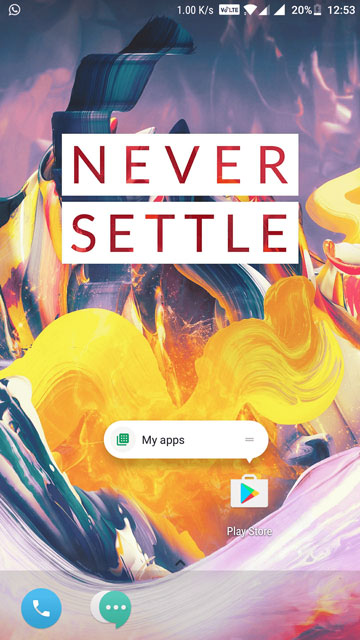
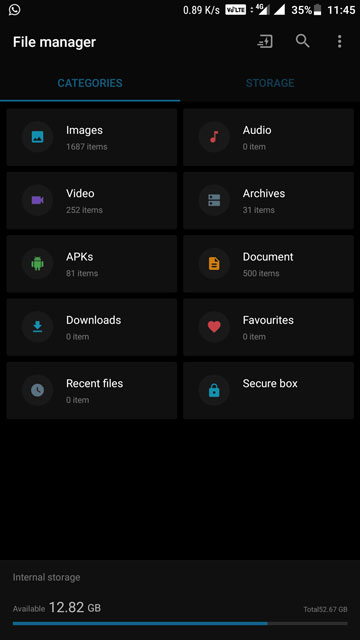
Both OnePlus 3 and OnePlus 3T received new beta updates today that are packed with new features including a new OnePlus stock launcher. The new launcher is OnePlus’ take on the Google Pixel launcher, complete with swipe-up gesture for the app drawer and launcher shortcuts. The launcher settings also have a fresh look and can now be accessed via a pinch gesture on the home screen as well. The App drawer too has been redesigned, and there’s a new file safe called Secure Box built into the file manager. Secure Box only supports a PIN lock for now, but fingerprint support probably isn’t too far behind.
Both the new launcher and File manager with the secure box can be downloaded from the bottom of this article. The apps work perfectly fine on OnePlus devices running Oxygen OS 4.1.1.
Screenshots
Other updates
The update version for the OnePlus 3 is Open Beta 13 while for the OnePlus 3T it is Open beta 4. Apart from the launcher, there are some more improvements here and there. For instance, network speeds are now displayed in the notification bar. Many people don’t care but an inbuilt network speed indicator, that doesn’t look odd in the status bar, is the very first reason that I root my Android for.
OnePlus’ version of Android already has a dark mode but now Oxygen OS is also getting an automatic night mode. There is also a new Notification denoising feature which is basically just priority settings, meaning you can assign various levels of importance to app notifications. For instance, if an app is bugging you with notifications, but you find some of them useful, you could assign it a priority such that its notifications will sit at the bottom of the list, will be grayed out, etc.
Furthermore, touch latency issues have also been fixed in the new update and EIS has been improved upon as well. Contacts have received the link and merge features after all. Keeping in mind India’s push for a more cash-less economy, OnePlus has introduced a QR-based quick pay feature wherein you can set the long press of the home button as a payment shortcut.
Changelog
- All new launcher added support for shortcuts on 7.1.1
- Redesigned app drawer
- Redesigned UI for launcher settings
- Status bar icon option to display real time network speed
- Notification Denoising
- New Gaming Do Not Disturb mode
- Automatic Night Mode
- Added Secure Box for file encryption
- Optimized touch latency
- Optimized camera EIS for videos
- Improved contacts management with linking and merge functions
- Added quick pay option for India
- Bug fixes and general improvements
If you are already enrolled in the Open Beta, you’ll receive the update via OTA. In case you don’t want to wait, we have the links right here.



Join The Discussion: