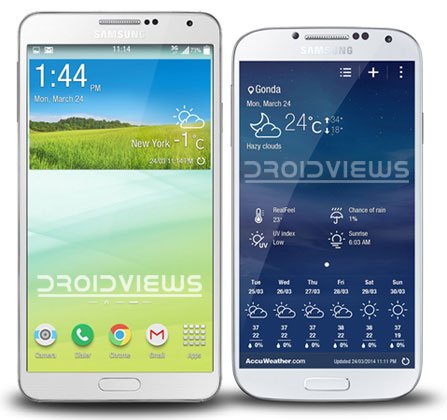
It has been more than a month since the Samsung Galaxy S5 was unveiled. The device can hit the stores near you any moment. However, before you hold the Galaxy S5 in you hands, you can enjoy its wallpapers, ringtones and apps on your current device. The Galaxy S5 will be featuring a new version of its TouchWiz with many improvements and features.
Alongside many new apps, UI changes and features, the Galaxy S5 also brings a new version of the AccuWeather Clock widget. Well there is nothing special about new apps and widgets on a new smartphone, but if those goodies are ported to work on other devices, it becomes a thing of wider interest.
Albe95 from the XDA forums has successfully ported the Galaxy S5 AccuWeather widget to work on older Galaxy devices like the Galaxy S4 and Galaxy Note 3. The new weather widget has a flat background and a plain look. While the options available under AccuWeather Widget settings are pretty much the same, there is one good option that most of us always longed for. Yes, the new weather app lets you set the lever of transparency for the weather widget.
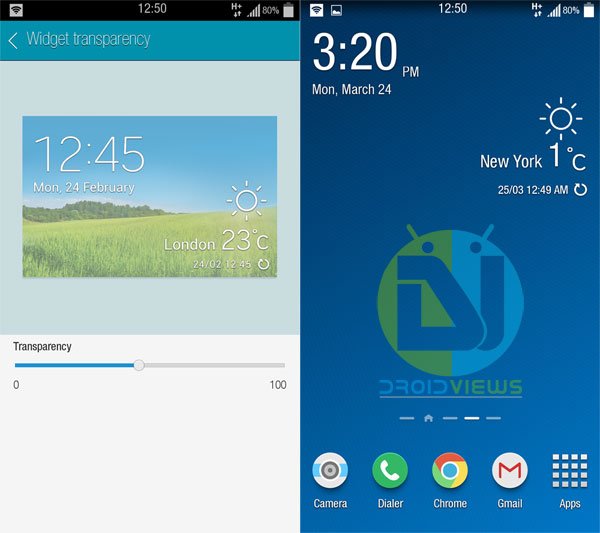
If you own a Galaxy phone or tablet device and have root privileges on it, you can install the Galaxy S5 AccuWeather Widget on your device. We have tested the ported weather widget on the Note 3 and Galaxy S4 successfully. If your phone had HD or Full HD display, try it and it might work too.
Requirements
- A rooted Galaxy device.
- TouchWiz based Odexed or Deodexed ROM
Galaxy S5 AccuWeather Widget 2014
Install S5 AccuWeather on All Devices
Flashing the S5 Weather Mod on Samsung Phones
- Download the AccuWeather Widget and and Weatherdaemon app from above and copy it your device.
- Install a root file explorer app on your device. We used Root Browser: [googleplay url=”https://play.google.com/store/apps/details?id=com.jrummy.root.browserfree”]
- Open Root Browser and go to system/app folder.
- Look for these 2 files:
- AccuweatherPhone2013.apk
- AccuweatherPhone2013.odex
- Now press and hold both the files one by one and select Rename option.
- Now rename them as shown below by adding .bak extension to them. Then select OK.
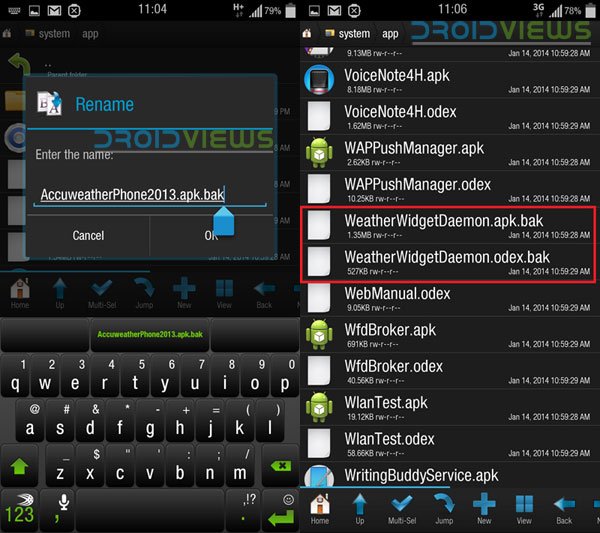
- Then look for the following files:
- WeatherWidgetDaemon.apk
- WeatherWidgetDaemon.odex
- And rename them by adding .bak at the end as shown on the screenshot above.
- Now reboot your device.
- Open My Files app and install the new APK files.
- Reboot your device again.
- You can now add the Galaxy S5 AccuWeather Widget on your home screen.
- Tap and hold the home screen, select Apps and widgets, tap the Widgets tab and select Weather 4 x 2.
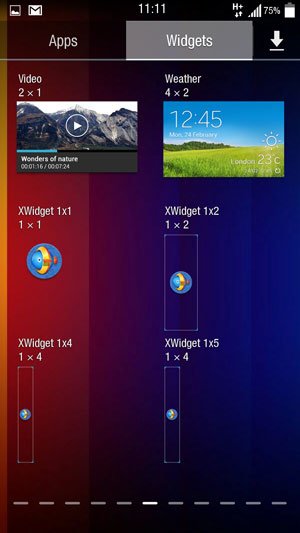
- Apply the widget and enjoy!
In case the Galaxy S5 AccuWeather Widget does not work on your device, go to system/app and delete the new APKs that you copied and delete them. Then remove the .bak extension from the old apps. Reboot your device and you’ll be back to the original AccuWeather widget.
Galaxy S5 AccuWeather Widget for All Devices
If the Galaxy S5 weather widget from above does not work for you, or if you have a non-Samsung Android device download XWidget app from the Play Store and then download the Galaxy S5 Weather HD widget from the app’s online store.
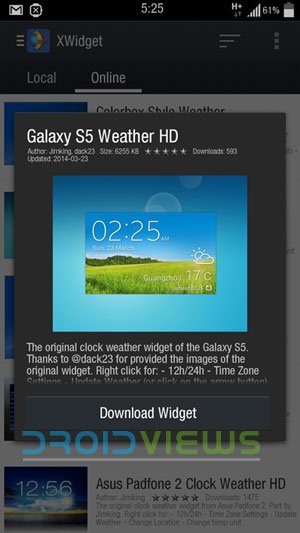
Enjoy the Galaxy S5 AccuWeather Widget on your Android device and do not forget to share your experience through your comments!



I did run into an issue with getting it working. I finally got it working though. There is another file that may need to be removed also. The com.sec……accuweather file. I uninstalled that then did as was said in here and it worked. Picked up on it when after removing/moving files out of system/app that the widget still showed up in the app (widget tab) drawer. Hope this helps some. I’m running 4.4.4 Note 3 stock ROM which I rooted after. (Not totally comfortable yet with the progress made on ROMs based on Sprint 4.4.4 NH7 just yet. So I went stock. I’ll just place the mods that I use in later. Some mods actually just affected the performance in a bad way anyways so it works out for me.
i have samsung galaxy grand 2 its runing androind 4.4.2 kitkat its working well
why didn’t you uninstall the old ones and install the new app instead of rename the old ones ?
I’ve done the steps and it works well except the size can’t be changed .. it’s standard 4×3 and i want it 4×2 ^_^
why didn’t you uninstall the old ones and install the new app instead of rename the old ones ?
I’ve done the steps and it works well except the size can’t be changed .. it’s standard 4×3 and i want it 4×2 ^_^
why didn’t you uninstall the old ones and install the new app instead of rename the old ones ?
I’ve done the steps and works well except the size can’t be changed .. it’s standard 4×3 and i want it 4×2 ^_^
How to change the font of the widget? It is very important =) Thanks!
Or maybe at least just font of temperature and clock?
App not installed error in nexus 7 kitkat 4.4.4 rooted. Any idea about fix?
Well it’s not for other devices. Try Xwidget instead: https://www.droidviews.com/install-galaxy-s5-accuweather-widget-galaxy-s4-galaxy-note-3/2/
App not installed error in nexus 7 kitkat 4.4.4 rooted.
This works on galaxy s2 i9100 jelly bean?
No, but you can use Xwidget app: https://www.droidviews.com/install-galaxy-s5-accuweather-widget-galaxy-s4-galaxy-note-3/2/
Oh thanks 🙂
It only gives me a 5×3 widget… No 5×2.
i got issue
when i install unified daemon result App not installed – Done
when select the widget to home it Unfortunately, Weather has stoped.
i have select files
AccuweatherWidget.odex
AccuweatherWidget_main.odex
AccuweatherDaemon.apk.bak
AccuweatherDaemon.odex.bak
Please help
You might have made some mistake. Have you fixed the permissions?
Which phone do you have?
N7100 note 2
Has it KitKat?
Yes 4.4.2
Then it should work. I am not sure why it is not! Try XWidget then.
yes Xwidget great!
Please what ROM are you using on screenshots ? I really like the rounded icons.
Thanks
It is Samsung stock TW ROM. You can use third-party icons on any ROM if you have root access. See this: https://www.droidviews.com/revamp-your-android-devices-screen-with-third-party-icon-packs-using-icon-themer/
I have a Samsung galaxy grand 2 100%
Warking my device
100% working on my rooted galaxy grand 2
i am using note 2..and i only have this files..can’t find those files you mentioned above… and i am using stock kitkat rom and rooted..do you think this will work?
here
I have tested it on S4 and Note 3. AS for older devices, I am not sure because they have different apk files. Better try Xwidget on the next page.
ok..is there an S5 Accuweather?
https://www.droidviews.com/install-galaxy-s5-accuweather-widget-galaxy-s4-galaxy-note-3/2/
here it goes..now downloading the Galaxy S5 Weather HD … hope it work. 😀
it worked …thanks a lot…but haven’t see a 5 x 2 widget..
this is awesome..
It only gives 4 x 2 widget but you can resize it. Just press and hold the widget and drag the pointer to make it larger or smaller.
ok..i got it..and one more thing. Its opacity, it will totally make everything invisible. I thought just the background..but still it really look cool.
You can edit every aspect of the widget.
What if my note 2 doesnt have those files?what if my phone have different file names?wht should i do?
Try renaming the old files and they copy the new files and fix permission, or just install XWidget app.
Been looking all over for this. Worked just as advertised. Thank you so much!
You’re welcome!
when i choose 4×2 widget it only show clock, but not weather
You probably forgot to install the companion WeatherDaemon apk. I noticed the direct link is s copy of the AccuWeather apk. You need to use the mirror.
Thanks for bringing this to notice. I have fixed the link.
Indeed! Thanks for the apk files!
Do you download both files or just one?
Both. And install both as well. Reboot and done.
how to make it 5×2
The stock S5 widget is available only in 4×2. If you want 5×2 version, use XWidget given at the next page.
Since it is an imitation of the M8 clock, we would not be able to cover this UCCW widget in a post here. Thanks for the tip though!