I had preordered the Galaxy S6 Edge SM-G925I about a week ago and received it just a few days ago. It’s a really damn good phone, probably the best of all that I own or have owned so far. Apart from its shiny smooth body that makes it slip-friendly and battery drain (a common issue on new devices), I don’t have anything negative to say after 4 days of use. What do you think?
Since I was aware that Chainfire has only released his Auto-Root packages for just a few variants and my S6 Edge was not one of them, I sat quietly for a couple of days. Later, I read a Google+ post claiming to gain root on SM-G925I using the CF-Auto-Root file meant for the T-Mobile S6 Edge variant, that is SM-G925T. I gave it a shot but got “FAILED!” message in Odin. A little research disclosed that the CF-Root for the TMO S6 Edge worked only on the devices with OC1 firmware. I remembered taking updating to OC5 firmware after purchasing the device, so I tried Chainfire’s root package for SM-G925F and it worked!
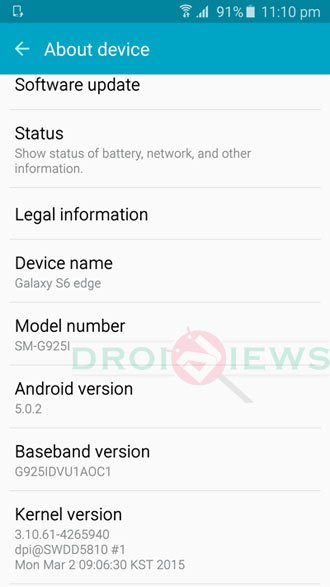
Below, we’ll see how to root the Samsung Galaxy S6 Edge SM-G925I by flashing CF-Root using Odin. If you have bought the unlocked 32 or 64GB version of the model from India, Australia, Singapore, Latin America, United States, and North America and its model number is SM-G925I, the following method should work for you as it did for me! Please check your phone’s model number by going to Settings> About before you proceed.
Preparations
- Download Chainfire’s Auto-Root package depending on the build number of the firmware of your Galaxy S6 Edge:
- For OCI firmware: CF-Auto-Root-zeroltetmo-zeroltetmo-smg925t.zip
- For OC5 firmware: CF-Auto-Root-zerolte-zeroltexx-smg925f.zip .
- For OD1 or greater: S6-Edge-Root-G925I.zip
- For all firmware versions: PingPong Root Tool
- Download and install the latest Samsung USB Drivers on your computer.
- Enable USB Debugging on your Galaxy S6 Edge. You can do so under Settings> Developer options. You can find detailed steps here.
- Disable Verify App via USB option in Developer options.
- Make sure that Reactivation Lock is disabled in Settings> Lockscreen and Security> Find My Mobile, or you won’t be able to flash CF-Root or TWRP and get this error: “Custom Binary (Recovery) Blocked by R/L”.
Root Samsung Galaxy Edge SM-G925I
- Unzip the CF-Auto-Root package file and open it.
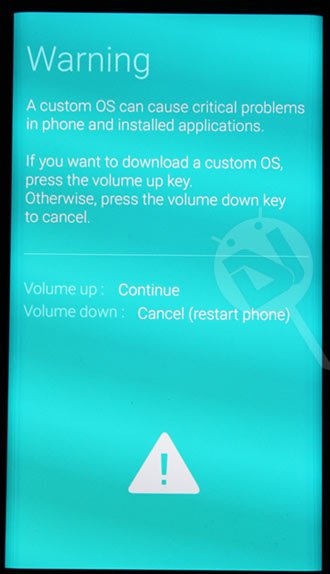
- Turn off your device and reboot t into the Download or Odin Mode. You can do so by pressing the Volume Down+Home+Power buttons simultaneously for 3-5 seconds. When you see the warning screen, press the Volume Up key.
- Now connect your S6 Edge to PC using the USB cable that came with it.
- Launch Odin3-v3.10.6.exe as administrator.
- Make sure that the ID:COM port in Odin is highlighted and you see “Added!!” text in the Log box.
- Now click the AP field and add the CF-Auto-Root-zerolte-zeroltexx-smg925x.tar.md5 file to it.
- Click the Start button and wait until the installation finishes.
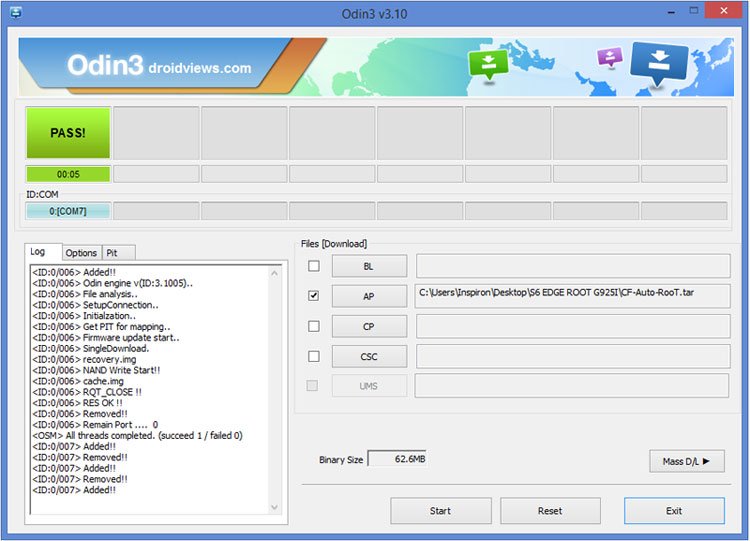
- You’ll see PASS! message on Odin and your device will reboot automatically.
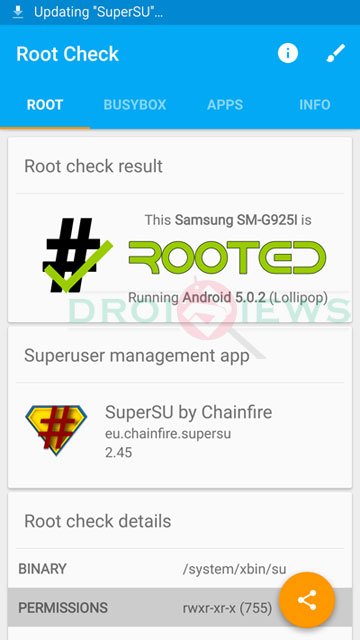
Done! When your Galaxy S6 Edge boots up, it will have root access. To very root privilege, you can use the Root Checker app.
Must Read: Download Latest Magisk Zip and Magisk Manager APK
OMFG thank you so much!
How come that the root package for Samsung S6 Edge for OD1 firmware is .img? Is it going to work? Or I need to change the file extension of it into .tar.md5? Please help me.
hello.. Im going to root my Samsung Galaxy S6 Edge G925I v.5.0.2 where i can download the compatible firmware of it? Please help me in my problem.
my phone is sm-g925i from india. 1st i did wid cf auto root , it show me recovery seandriod is not enforcing , now i tried it wid ur metthod od1 s6 edge. still it is shwng recovery seandriod is not enforcing.. plz help me. my id is abadankitji@gmail.com.
hello
Hi Rakesh, Need an urgent help. I followed these steps. But now while restarting, it is stuck in the first screen and on the top the following error comes – RECOVERY IS NOT SEANDROID ENFORCING.
Now its not booting up and connecting with smartswitch also to recover.
Appreciate your help.
i just tried to root my phone with the file CF-Auto-Root-m0-m0xx-gti9300.tar.md5 and CF-Auto-Root-jflte-jfltexx-gti9505.tar.md5 but it failed i am stuck in a blue screen saying use the mergency recovery funtion in the s,art switch pc software wat to do?
wtf bootloop. OD1. Pingpong root not working for me either.
Can confirm OE3 Can be rooted with http://www.mediafire.com/download/q3aao869hsrie5r/S6-Edge-Root-G925I.zip . reboots 2x then will boot to “Android Upgrading Apps”. Then successful root. Any chance anyone knows how to install Philz Touch recovery?
Is your firmware BOE3? because i cant find any ping pong root tool that supports my variant?
i been uploaded firmware oc1 server mega.oz,,but when i try root this firmware , apper error invalid file
Jainik chauhan?
This is awesome dude !! I first followed the method on highonandroid but was unable to do it as i had activated the “finad my phone” thing and i was getting the error you have mentioned and after going through this post rooted my phone in minutes !! Thanks a lot !! 🙂 Now tell me something is that KNOX thing valid in india too? And is there a way i can restore the KNOX if i have to take it for warranty?
Hi Rakesh, Can you explain me what is OC1 and OC5 , please tell me can i root my phone without any error .. 😀
OC5 is a firmware version and yours is on OE3 which is the indian firmware version. You can go ahead and root your phone. I just did it now 🙂
Oh thank you Mr. Shrikanth, could you please give me the link to the proper download. 🙂
For OD1 or greater SM-G925I, When i add CF-Auto-RooT.tar.md5 its showing “md5 error! Binary is invalid”
Remove the .md5 extension and try again. It worked for me and will work for you too.
Ok thanks its done now , but phone is continuously blinking on boot screen
Weird! I rooted my phone with OD1 using the same file. Is it still in a state of boot loop?
yes still in loop. 🙁
Don’t worry. You can fix it by installing the firmware.
Download this: http://samsung-updates.com/details/43913//SM-G925I/INU/G925IDVU1AOD1.html
and install it using Odin. The guide is here: https://www.droidviews.com/install-stock-firmware-on-samsung-galaxy-devices-using-odin/
yes i had already done it with Kies but now can u advise me the proper rooting method for my varient. Thanks
Details
Was your phone on OD1 when you tried to root the devices earlier?
Nop its on the same as above.
That’s why it resulted in a bootloop for you.
Try this: https://www.droidviews.com/root-samsung-galaxy-s6-without-tripping-knox-with-pingpong-root/
Couple of days before i try PingPong Root , My Varient is NOT supported.
It has been updated today. Just download the latest version from above and give it another shot. It might not work but there’s no harm in giving it a try.
Yes right, Finally Done. Thanks
Rooted?
Yes
Great!
Thanks.
Try this took. It’s safe to try: https://www.droidviews.com/root-samsung-galaxy-s6-without-tripping-knox-with-pingpong-root/
I uploaded the root package without removing the .md5 extension from the file. I’ll reupload it.
Thanks. Please, can somebody explain me step by step how can I install or enable Spanish Language on a SM-G925I (Singapore – SingTel) which comes with PDA = G925IDVU1AOD1 and CSC = G925IOLC1AOD1
Hi, there’re two way to get the language of your choice on your S6 Edge. On my Edge (G925I), I had just a handful of languages but just to help you I tried a few things an looks like finally I got success. T
If your phone is not rooted, download and install one of following firmwares:
http://samsung-updates.com/details/44802//SM-G925I/COL/G925IDVU1AOD1.html
http://samsung-updates.com/details/43655//SM-G925I/TPA/G925IDVU1AOC1.html
If you have a rooted phone, download this app: https://play.google.com/store/apps/details?id=com.wanam
Open the app, grant root access, tap “Select Default Language” and select “espanol” and reboot the phone.
Then open Settings> Language and input> Language and set the language. Done.
Let me know if it helped you and I will do a tutorial to help others. It worked for me.
Just enabled Spanish on my Indian S6 Edge. See the screenshot.
Hello, please, with this changes, can I get Spanish Language from the Languages Menu?
Rooting does not enable languages but having gained root privilege, you should be abe use mods that can enable language packs and other features on your phone.
See this:
https://www.droidviews.com/unleash-your-galaxy-s6-g920fg920i-with-wanamlite-mod/
Does not work with OC5. Auto Root bootloops at boot animation. Flashing SuperSU via recovery causes bootloader to hang.
You can’t flash the SuperSU zip package via stock recovery. You need to have either CWM or TWRP installed for that.
As for OC5, CF-Root doesn’t work on that. You should try downgrading to OC1 and then root the device.
What works with OC4?
Try this : CF-Auto-Root-zerolte-zeroltexx-smg925f.zip
Worked with 925T, F the phone stopped booting this is Telstra Australia SM-G925I.
You mean the phone is in a state of bootloop?
Just hangs on boot screen.
Hey Jason, sorry for the late reply. I was out of network reach.
Anyway, if are still stuck at the boot logo, download the stock firmware from here: http://samsung-updates.com/device/?id=SM-G925I
and install it using this guide: https://www.droidviews.com/install-stock-firmware-on-samsung-galaxy-devices-using-odin/
Hi, just updated the guide. Now it works perfect! Give it a try.
Namaste Rakesh. Thanks for this! It is bookmarked! lol
Ha ha ha! You plan to get this device?
Yes, I received it 2 days ago. Samsung Galaxy S6 Edge 128GB White, it’s the SM-925F version (european one). LOVE it!
Congrats bro! Mine is 64GB black one.