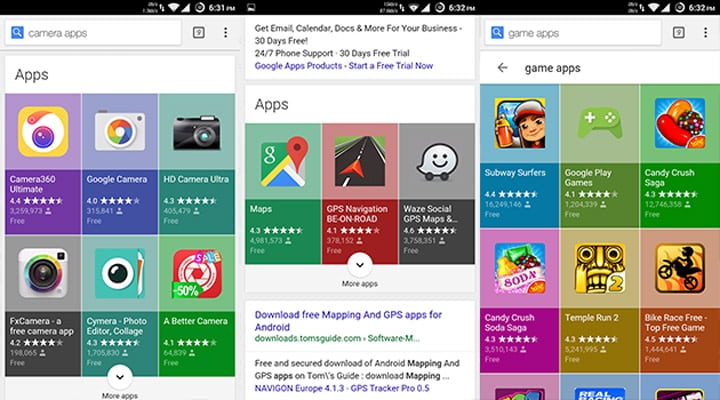
If you have Google searched for an app recently, then you most likely may have come across some changes in Google’s search results. If you search for a category of the app and place a query into the Google Search Bar followed by the keyword “apps” using your Android device, then you will see a new section displayed just above the normal results.
This new section consists of a gorgeous new grid of relevant apps from the Play Store and will show up just under the ads section on the Google results page.
This new update seems pretty handy when you are searching for an app. When you expand the section, it will show you all the relevant apps for your search query. You can get this search result when you type a category name like maps, camera, game, etc followed by the keyword “apps”.
The results display useful information about the category apps like the icons, ratings and the number of downloads. To see all the apps you can click the expand button to get an endless list of apps related to your search without entering the Play Store. However, to install an app you need to click over the app tile and you will be directed to its Play Store listing.
Google seems to be popularizing Android Applications through search results and most importantly, this will let you access apps quickly and thus make your search experience productive. This update can only be seen on Android devices for now. The web search from a PC or iPhone shows the usual results.
This update is slowly rolling out for everyone. So if you don’t see the additional layout, then it will soon pop up in your Android search results. Tell us about your experience from this update. We would be happy to hear from you.
Editor’s Pick: Fix Google Play Store Errors on Android Devices
Join The Discussion: