At a time when most Galaxy S3 users have been enjoying the Premium Suite Upgrade (Android 4.1.2) for the Galaxy S3 for quite a while, U.S. Cellular, as it promised early this week, has started to roll out the Android 4.1.1 Jelly Bean update for the Samsung Galaxy S3 SCH-R530. The firmware update is available to its users in U.S. since yesterday.
If you have bought your Galaxy S3 from the carrier, get ready for some action. The new update will bump the build number of your phone to JR003L.R530UVXALK5. Head into Settings > About Device > Software update to check for the update manually.
Features of Android 4.1.1 Update:
Android 4.1.1 Jelly Bean update for the Samsung Galaxy S3 SCH-R530 will bring a host of new features and enhancements to your phone. Here are some major changes:
- Google Now information cards
- Expandable notifications
- Project Butter
- Widgets that can automatically resizable on home screen
- Enhanced TouchWiz features
- New improvements for the camera with an optimized mode for low light and indoor photos
- Browser improvements, calendar improvements
- Pop-Up-Play update, Easy Mode for first-time smartphone users
- Blocking mode to disable incoming calls, notifications, alarms and LED indicators
- Improved usability
- City ID app update 1.25.1
- Amazon Shopping update 2.1.0
- Mobi TV update v5.1.1.14-219790
Download & Instructions:
Well, there are two ways you can upgrade your Samsung Galaxy S3 SCH-R530 to official Android 4.1.1 Jelly Bean firmware.
Simple Upgrade Tool Method:
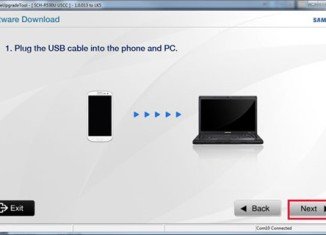
The first method relates to the Simple Upgrade Tool recommended by U.S. Cellular itself. You will have to download this tool and install it on your computer and launch it. Then boot your device into Download Mode, connect it to the computer via USB Cable and follow the onscreen prompts. Follow this link to head over to the official page that guides you through the whole procedure.
Odin Method:
The other method used Odin3 to perform the firmware installation. Download the firmware in zip, extract it and flash it by connecting the device to the PC. Download the firmware file from below and follow this tutorial.

Join The Discussion: