Samsung Galaxy S5 is the current flagship device of Samsung company which is packed with an armada of premium hardware components. The Galaxy S5 offers a butter smooth experience to the user and would easily satisfy the user without any doubt. However, as an Android enthusiast and advanced user, I always intend to get the best out of the device and the Galaxy S5 is no exception. The device is no good if it’s not rooted. Let’s see how to update Verizon Galaxy S5 to Android KitKat (4.4.4) and root it on the NI2 firmware.
The Verizon Samsung Galaxy S5 is one tough device to get it rooted. It created problems while rooting in the initial days of release when it was on 4.4.2 KitKat. The situation is so tense that the XDA developers community had announced a lump sum $18000 dollars bounty to whoever successfully gets it rooted. Finally, the Towelroot developer geohot from XDA developers is the one to successfully root the device.
However, things got out of hand once again with the release of Android 4.4.4 KitKat by Google as the Verizon Galaxy S5 again failed to root on the new version of KitKat. So developers and enthusiasts tried many workarounds to get the device rooted again. They successfully rooted the device on NHA firmware based on 4.4.4 KitKat but surprisingly Samsung released NI2 build for the device which messed up the things again.
In this guide, we will show you how to retain the Root on Verizon Galaxy S5 on Android 4.4.4 KitKat (NI2 build). Follow the guidelines carefully and root your device with as minimum hassle as possible.
Warning
This Guide is intended only for the Verizon Galaxy S5, not for any other variant or device of Samsung. Be extra cautious when you choose the firmware builds as flashing wrong firmware might result in a bricked device.
Rooting and flashing firmware will void your device warranty either temporarily or permanently. You alone are responsible for any consequences that might occur during the process. DroidViews or any of its community members shall not be held responsible for any damage to your device.
Prepare Your Device
- Charge your Galaxy S5 above 60% battery level to avoid shutdowns during the process.
- Enable USB Debugging.
- Install Samsung USB Drivers on your computer.
- Backup your device storage, Contacts, SMS, etc. using Google Sync service or any third-party app.
- Download the Odin flashing tool and extract the downloaded zip to your PC, so now you have Odin3.09 folder: Odin3 v3.09.zip
This guide involves a lot of flashing process that involves flashing firmware and kernels using Odin Flash tool. It is recommended that you should be well acquainted with the Odin flashing process. If you’re not sure on how to flash firmware using Odin, then first go through the Odin Flash process before you start with the guide.
Update Verizon Galaxy S5 to Android 4.4.4
- Extract the Odin zip file provided above on your PC.
- The Odin firmware files will come either in .tar or .tar.md5 extensions. So, if the Odin flash-able file compressed using any archiving software, then extract the firmware file from the Zip file.
- Move the downloaded .tar/.tar.md5 file from the download location to the Odin3.09 folder on the desktop.
- Double-click on Odin3 v3.09.exe to start the flashing tool.
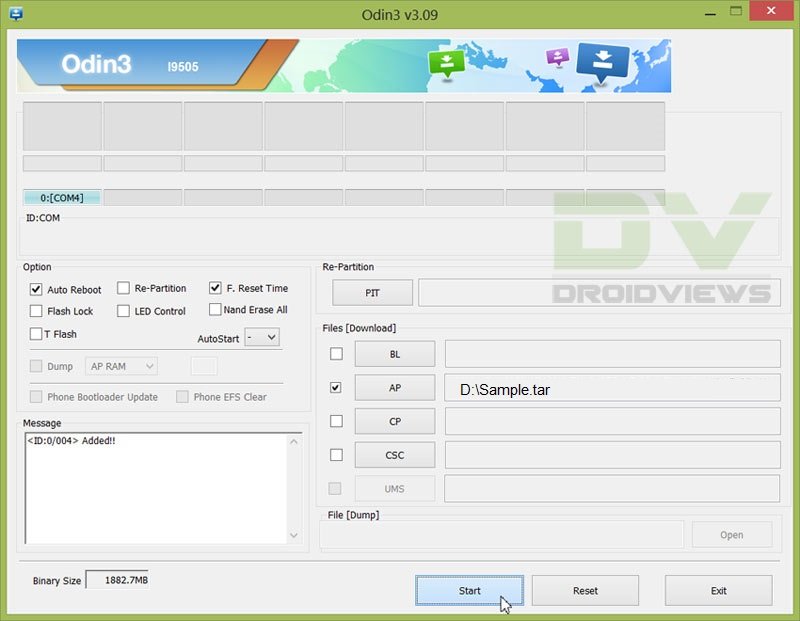
- In the Odin window, make sure Auto Reboot and F. Reset Time are checked and everything else is unchecked.
- Make sure that Re-Partition is not checked as this might corrupt your partitions.
- Power off your phone. Now press the Volume Down, Home and Power buttons altogether until you see the warning screen, then use the power button to confirm and enter Download Mode.
- Connect the device to the PC.
- As soon as you connect, the Odin window will display the acquired ID:COM port on the top-left and message box shall display Added!! message.
- Click on AP and select the firmware file.
- Click on Start and the process will begin.
- It will take a few seconds to complete the flashing process and upon completion will display a PASS!! message.
- Your device will reboot automatically after the process is finished.
Update and Root Vzw Galaxy S5 on NI2 Firmware
- As we already discussed, you should be on the rooted NHA build before proceeding with the guide.
- So If you’re not on NHA build or made changes beyond rooting, re-flash the NHA firmwares G900VVRU1ANHA_G900VVZW1ANHA_VZW.zip (unzip the downloaded file first) by following the above Odin flash procedure (Don’t do OTA to NHA). Then root the Galaxy S5 using Towelroot by following the procedure.
- Once you’re on rooted NHA build, you’re all set to go.
- Now, turn on your WiFi and take the OTA update to NI2 firmware. This might take some time, so be patient.
- After the update put it back into download mode, and flash the G900V_NCG_Stock_Kernel.tar.md5 file using Odin.
- Restart your device after it’s completed and doesn’t get fainted seeing some apps force closing, it is expected. Now click Ok until you are able to start Towel root app on your device.
- Now select the Make it Ra1n button in the Towel root app to root your device.
- Once again boot your device into the Download mode, flash NI2_stock_kernel.tar.md5 using Odin and restart your device once completed.
- Now you should find everything normal on your device with root working flawlessly.
That’s it. It’s a bit long process, but a simple one. Let us know if you’ve any further doubts regarding the guide in the comments section below.

Maybe I missed it in reading through all the comments, but is it still possible to get OTA update to 4.4.4? What’s different about the OTA kernel from the downloaded, Odin installed version?
im using G900VVRU1ANCG_G900VVZW1ANCG_G900VVRU1ANCG_HOME.tar.md5 on auto reboot f. reset then press start and it says fail.
I have a brand new S5, does this mean that i dont need to do step 2?
What Android and build version it has?
I think that saying “The device is no good if it’s not ROOTED.” is beside the point. Developers of new apps need to be able to view the entire filesystem, including protected areas. If Android doesn’t support a mechanism to navigate one’s own device while protecting other devices at large, then shame on them. Google.
Hello, I’ve noticed that 0A8 Lollipop is out now. Can I upgrade directly from NHA to 0A8 using your method and still retain root?
I have the same question. Anyone able to upgrade to Android 5.0 using this method and still retain root?
Well written guide! Just a quick question though, will this method work with a new VZW S5 that shipped with 4.4.4? The phone has never been rooted before, and I’ve screwed up enough phones being experimental in the past. Info would be:
Model Number: SM-G900V (obvious, but just in case)
Android Version: 4.4.4
Baseband Version: G900VVRU1ANI2
Kernel Version: 3.4.0 dpi@SWDD5816 #1
Build Number: KTU84P.G900VVRU1ANI2
here is the info
Model:SM-G900V
Android Version: 4.4.4
Baseband version: G900VVRU1ANK2
Kernel version: 3.4.0 dpi@SWDD5609#1
Build number:KTU84P.G900VVRU1ANK2
Please help
What do you mean by saying
Don’t do OTA to NHA
Means that you must not take the NHA OTA update if prompted and proceed with other steps.
This worked great no flaws what so ever.. Thanks a million
I am having an issue. I used Odin to get the NHA build, but when I try to use TR, it says my phone isn’t supported. I’ve tried all three downloads on the TR link provided above.
Here is the info…
Model: SM0G900V
Android Version: 4.4.4
Baseband version: G900VVRU1ANHA
Kernal version: 3.4.0 dpi@swdd5518 #1
Build number KTU84P.G900VVRU1ANHA
Any ideas?
Looks like you are making mistake. Flash the NHA kernel, install Towelroot, then flash NCG kernel, then launch TR.
OK. Step two (above) said to root it per that guide.. That’s why I tried to do it before flashing the NCG.
So, just to be clear… these are the steps I need to do, right?
1. flash to NHA (which I did)
2. Download TR
3. Flash NCG
4. Launch TR
5. Flash NI2
How do I get the OTA update to NI2?
A litle edit-
1. flash to NHA
2. Download and install TR
3. Get NI2 OTA on WiFi
3. Flash NCG
4. Launch TR
5. Tap MakeitRain button to root.
Thank you for the quick and helpful responses! When I connect to wifi, does it automatically prompt me to update to NI2? Or will I need to do something?
On WiFi connection it should prompt you within a few minutes. If you got get any OTA notification, go to Settings> About> Software update and tap check for updates.
Awesome. I will try it when I’m back around a wifi connection. Thank you for the help. I’ll keep you posted.
I’ve been on wifi for about 30 minutes, with no prompt. I went to settings>about> about there wasn’t an option for software update. So, I went to settings>system updates>check for updates and it tells me that I am up to date at this time…
I’ve been on wifi for about 30 minutes, with no prompt. I went to settings>about> about there wasn’t an option for software update. So, I went to settings>system updates>check for updates and it tells me that I am up to date at this time…
Since I am not getting the OTA update, can I just use Odin to update to NI2, then flash NCG, then launch TR, then flash NI2?
That will not work as it’s all about kernel. Better download and install the NCG firmware and root using TR.
Ok I got a little confused so somehow I thought I had to do NCG first… but here’s the irony… I did do it first and towelroot v3 works is this good enough or should I start all over? How do I know when I get to NI2?
I am officially rooted I think; that’s all I wanted really but now I am getting a security warning telling me unauthorized actions have been taken, how do I stop that?
Hmm I followed the entire step… nada still isn’t rooted… c’mon rooting is stupid Google should give us full control!
Ok so here is my situition, if any one can help with any actions to take please feel free to comment. Thanks in advance.
OK so to get right into it I have just bought a new galaxy s5 kernel 3.4.0 running 4.4.4 android NEVER rooted before, hence being new, and I have tried towel root and it says device not supported. I have followed all of the steps acordlingly and I still can’t seem to get this running. Any advice?
You must downgrade the kernel as described in the guide and then use Towelroot to gain root access.
Ok so after looking at the instructions for the 400 and 85th time (ha) i do see that i missed a step -_- but thank you Rakesh for finding it, my next situation is trying to install the Game Killer APK. I have rooted the phone and gained root aces, but can not find a successful link to install the AKP. again i ask if any suggested actions. Thank you Rakesh for you prompt responsive help in the process.
UPDATE : Ok I have downloaded the AKP on my PC but where do I place the AKP file on my S5 to download it onto the device?
What Apk do you mean? Towelroot?
I did the whole process but I have root access
Sorry mate, but I couldn’t get your point. Is your device not rooted on NI2 after following this process?
Do not know of any way to root the s5 Verizon! Help me Please!!
Do not know of any way to root the s5 Verizon
I’m trying to root following the steps above but towelroot says my device is not supported. I’m on NHA build. Kernel version is 3.4.0. Are the directions not accurate or what am I missing? The directions say to do NHA/towelroot/kernal/
New problem. Now I can’t get OTA update. It keeps saying service unavailable.
Update. I got everything working perfect. The instructions should be updated to reflect once you downgrade to NHA, you then need to accept the OTA upgrade to NI2, then flash the NCG kernal, then run towelroot. Then flash the NI2 kernal.
Hi, the OTA thing is already mentioned in Step 4.
I have rooted 4.4.4 kitkat using this method. Verizon has pushed the lollipop update to my phone. Can I accept the update or will it brick my phone?
You can take the update but you won’t be able to root it back.
The first NHA kernel is 3.4.0 dated Aug 28… I am having trouble rooting since towel root works on kernels before June 13. Can any of y’all help?
I have a galaxy s5 with verizon.
4.4.4
G900VVRU1ANI2
Kernel Version: 3.4.0
Build Number: KTU84P.G900VVRU1ANI2
Hardware Version: G900V.05
I have tried towelroot and when I tap on the sign, all I get is directed to a page with coding. I’ve tried Odin. I put my phone in download mode, plugged my phone to my computer and it does not show up in Odin. I have been on droidnews, xda-developers and have followed all instructions. Also when I downloaded Odin and unzipped it, I did not see a .tar file. What am I doing wrong?
Really Really new to the whole Rooting thing and I’m going to give it a go! I’ll keep you guys updated!
Sure!
Alright so I JUST finished downloading the NCG stock kernel and the other really long one! So which one do I flash first?! I’m getting confused reading the instructions haha
So Everything was going super well until I got to step number 7 it says my device isn’t supported 🙁 I tried to make it rain but to no avail! please help and thank you in advance!
Did you flash the NHA firmware and then the NCG kernel before trying Towelroot?
Yes I did I wonder if it’s because it’s towelroot V3? but would restart the whole process mess anything up?
No.
Alright I’m going to give it a go and I’ll update in 10! Thanks Again Sir!
After obtaining root are you able to install a custom recovery like safestrap for example?
I think you can install Safestrap on S5.
Safestrap installed! Can you recommend a custom rom?
Excellent post. I had a few hiccups along the way but in the end everything worked. Thank you for centralizing all of the needed information, files and utilities. My phone is once again rooted!!
Hi first time android user I’m looking to root my verizon galaxy s5. It’s running on 4.4.4. To make sure I’m understanding this right… I should use the link to the nha firmware which reverts the phone to the version that can be rooted, then follow the steps to use towelroot and then follow the steps to upgrade to ni12? Thanks for your help sorry if this is a dumb question just never done this before.
Hi Patrick, what firmware version your S5 currently has?
Hi Rakesh I’m not sure. I’m trying to attach the screen shot of my “about phone”
It’s not working but I think maybe you mean the build number? It’s ktu84p.g900vvru1ani2
Okay, do this: either downgrade to NHA firmware as instructed above and then install TR and root the device. You can then take the NI2 OTA and install the NCG Kernel and root the device again on NCG. Then flash the NI2 kernel.
If you still have any doubts, let me know.
Thanks. I will do that. I will let you know how it goes 🙂
I just want to double-check — backing up is just a precaution in this situation, correct? Updating & using new firmware won’t force me to re-install any apps, will it?
Yes, it’s just a precaution. Installing the new firmware won’t wipe any data or apps.
I’m having a bear of a time: SM-G900V was rooted with Towelroot, but an OTA update wiped out root. I installed the NHA firmwares linked to earlier in the article. Neither NGC nor NHA kernels work with Towelroot. While using NGC, Towelroot detects a root and does not install. With NHA, the device is not supported.
What is your current firmware version (build)?
Here is a screenshot: http://i.imgur.com/FQXNJLu.jpg
It’s NI2. The above method should work for you, Brandon. It’s been tested.
Try again and if it doesn’t work, downgrade to NHA and root the phone using Towelroot.
Since I want to be certain since I’m not financially capable of replacement should I goof – if I’m already on the NI2, these procedures still working, right? Sorry if it’s a goofy question, but I figure better safe 🙂
I have the developers edition. What steps do I need to change since I am rooted without Towel root?
The model number of the Vzw S5 dev. edition is ET-G900V, right? The only difference between the regular and de. model is the unlocked bootloader. You can install custom ROMs developed for SM-G900V but I have now idea if the above method will work on your device. Will have to do some research. 🙁
I’ve flashed back to the NHA build of 4.4.4 on my Verizon S5 (US version) and when i try to root from that build before proceeding Towel Root tells me phone is not currently supported. Do I have to update to NI2, then revert to NHA before I can root? what gives? thanks in advance for your help
Download NCG and NHA Kernels. Flash the NCG kernel in Odin. Then install Towelroot and run it. When the phone is rooted, flash the NHA kernel back using Odin. Leave the NI2 part. It should work! Let me know.
P.S.- Link to NHA kernel: https://www.androidfilehost.com/?fid=23622183712469066
This worked for me. THANKS! Under step 2 when I followed the link on how to root using Towelroot I forgot to do all steps after “make it rain” and this did not effect the outcome of the above guide.
Thanks Rakesh and anyone else who deserves credit.
Thanks for sharing your experience and the appreciation. 🙂
Your welcome. Following this successful root I have been researching how to make an image/custom backup. I keep getting the warning, in CWM and TWRP, that only supported phones or builds are supported, do not proceed otherwise. Since your wonderful guide is so new do I have to wait for CWM, TWRP or something similar to support the g900v, etc? I apologize if this is off topic but the logical step after using your above method would be to back it up…Is there a guide that I am missing?
Thanks
Frank, I don’t think that a custom recovery for the Verizon S5 is coming anytime soon. Still, there are a lot of things you can do with a rooted phone. https://www.droidviews.com/best-apps-for-rooted-android-devices/
Thank you, that saves me lots of time researching solutions.
I’m a bit confused now and would like some guidance before I start
I have a Verizon G900V which I want to root.
Before finding this particular guide, I already used https://www.droidviews.com/root-att-and-verizon-galaxy-s5-without-voiding-knox-warranty/
Basically enabled dev mode, installed towelroot and made it rain, then install SU which failed to properly root the device and triggered KNOX.
I then uninstalled SU and found this updated guide for Verizon phones.
If I understand correctly based on your reply to Casey, the steps from where I am at are:
Flash NCG Kernel in Odin
Make it rain in towelroot (which is already installed and has been activated)
Flash NHA kernel (not NHA firmware).
Device should be rooted
No need for SU based on what Frankff posted?
Or did I miss something?
The Verizon S5 has been rooted on NCG Kernel by open1your1eyes0 of XDA. But he retained that on the NHA as well, this process follows the same method where you will take an OTA to NI2 and then flash the NCG Kernel for rooting. Once rooted you have to restore the NI2 kernel again.
So the key point is you need to be on the NCG kernel before rooting. So if you want to root the NHA in step 2, it would be better to be on NCG Kernel but it won’t be necessary as the main aim to root it on NI2. The reason for starting the guide with NHA is that we need the towel root working when all your apps force close when you flash the NCG kernel after taking the NI2 OTA.
So the process would be:
Root NHA Build Verizon S5
Take NI2 OTA
Flash NCG Kernel in Odin
Make it rain in towelroot
Flash NI2 kernel (not NHA firmware).
Device should be rooted
Thanks for the guide – so from where I am right now (with towelroot already run), flash NHA firmware, get NI2 OTA and then follow the remainder of the steps?
Just want to clarify because I’m very new to this and bought my 900V in the States to use in Europe (and while it lets me make calls and use my local provider, it won’t let me use the mobile data, hence I want to root it and get rid of the Verizon locks)
What is the version of your current firmware build. You can see that under Settings> About device.
4.4.2
G900VVRU1ANCG
Kernel 3.4.0 Mar31 13:30:24
In that case, you need not do the stuff described above. Just install and try Towelroot itself: https://www.droidviews.com/root-att-and-verizon-galaxy-s5-without-voiding-knox-warranty/
It should work on NCG. Let me know.
I did that and it said success, but when I followed through to SU, it tripped Knox and then failed, so I’m not sure whether its working or not.
Sorry I’m really new to Androids
KNOX might be interfering with SU. Try the solution given here: https://www.droidviews.com/disable-knox-security-service-on-samsung-galaxy-devices/
Thanks got everything working now and got rid of a lot of bloatware and managed to set apn and the like!
One more thing I was wondering about is whether my device will ever patch automatically (I haven’t changed any settings, but its a US phone I’m using in Europe with a European provider now) and whether I should try to get a patch at any stage in case it is beneficial. And what to keep in mind if I do.
Glad to know that we could help you, Igor! If by “patch” you mean software update, you should be careful as not all firmware versions might be rootable.
Hi Rakesh. I successfully flashed to nha using Odin, but now am getting that device is not supported. Should I do the same with the ncg?
Yes.
Followed directions, but TR says device is not supported. It was before I flashed anha, any ideas?
Thanks for sharing your experience!
i had the same issue rooting 3 phones but all of them worked using the method in your update, probably should just make that a step in the guide since it doesn’t really effect anything buy flashing the stock ncg an extra time.
I followed this procedure and it worked flawlessly. The only minor issue I have is now the phone reports a status of Custom which is seen during boot up as well as in the Settings | about phone | Status | “Device status Custom”. Prior to this I was running NE9 rooted via the same process and the status was “Official”. Is there anyway to get back to an official status?
You might have used TowelRoot that bypasses bootloader and KNOX security.
The “custom” text you see is due to the secured bootloader. Flashing anything custom with Odin will generate it. Take it as a little price that you have to pay to get a gem like root. 🙂
To get back to official, you will have to flash the official firmware back and wait till Towelroot or a similar exploit supports the new 4.4.4 build.
Thanks Rakesh,
This did not happen when I rooted with TowelRoot when I had the original NCG build or when I rooted the NE9 build with the same process as above. In all cases (including NI2) the Knox counter has NOT been tripped. Again it’s not a big deal just my preference to have it report as official. For what it’s worth when I originally updated to NE9 using OTA from Verizon it also reported custom. Ironically it was only after I used Odin to go back to NCG, rooted again with TowelRoot and then installed NE9 with Odin did my phone report as “Official”. Anyway thanks for the response.
Hey Bob, all I can say now is “just enjoy root”! ☺
Thanks for this information, My newly purchased Verizon S5 is still on 4.4.2 NCG build out of the box, and I rooted with towelroot, installed SuperSU, renamed the file that causes the OTA update notification, then installed the NextApp SDFix” app (to regain the ability for apps to write to the SD card) and happened to notice this “custom” device status myself. I then installed the Phone Info Samsung app, which shows me as okay with Knox 0 X 0 but like you, I’d still prefer it to read “official” in case I have to take it in to warranty.