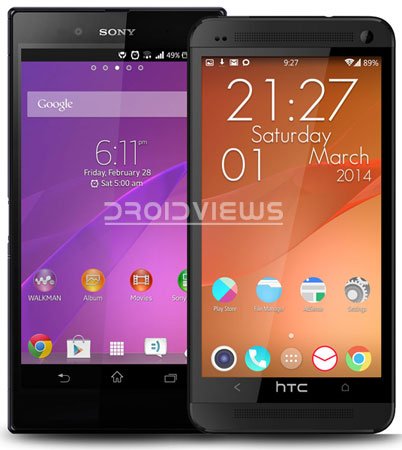
With the MWC 2014 approaching to its end, we already have a bunch of upcoming Android smartphones already launched. The event had been very lucky for Sony last year because the Xperia Z succeeded to bring its maker back to competition. The company has again launched some of its new devices at MWC and the Xperia Z2 is one of them. Sony’s new flagship will take some time before it is available to customers but if you want to play with some goodies from the new smartphone, you can at least enjoy the Xperia Z2 live wallpaper on your Android device right now.
The live wallpaper from the Sony Xperia Z2 has leaked and can be downloaded from our link below. The Z2 live wallpaper is very simple yet elegant. It displays the same old illustrative abstract pattern on your device in different colors. Usually, live wallpapers show animation by default but this one remains static until you slide your fingers on the screen or scroll the homescreen.
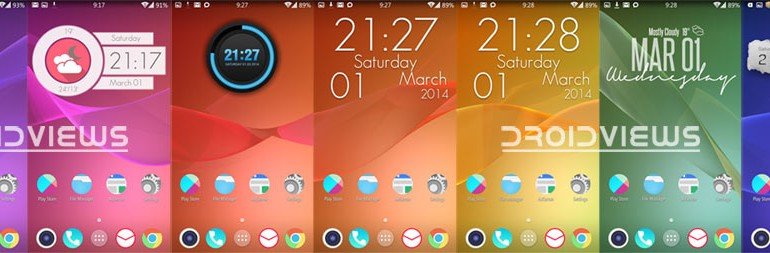
The live wallpaper keeps changing its color, but again not automatically. The color change has seven variations that appear in the following sequence: Purple> Pink> Red> Orange> Yellow> Green>Blue. To change the colors, you will have to swipe around the home screens. The faster you swipe the screens, the faster is the transition.
Requirements:
The Sony Xperia Z2 live wallpaper app requires root access but it can also be installed on devices without root. Also, your device must be running Android 4.1 Jelly Bean or above. I tested it on Nexus 5 (stock rooted), HTC One (CM11), Xperia Z1 (stock rooted), and Galaxy Note 3. The live wallpaper worked fine on all devices, but on Note 3, it showed only the colorful background without patterns.
Download:
How to Install:
On Non-Rooted Devices:
- Download and copy the APK file to your device.
- Go to Settings> Security> and check Unknown Sources option.
- Go to file manager, tap the app and install it.
On Rooted Devices:
- Download and copy the app to your device.
- Install a root file manager app, if you do not have it already.
- Open Root Browser and go to Xperia_Z2_Live_Wallpaper.apk.
- Tap and hold the app and select Copy.
- Then navigate to system/app directory and paste the APK there.
- Scroll down to the app and tap and hold it again.
- Select Permissions.
- Now set the file permissions to rw-r–r– (0644) as shown below).
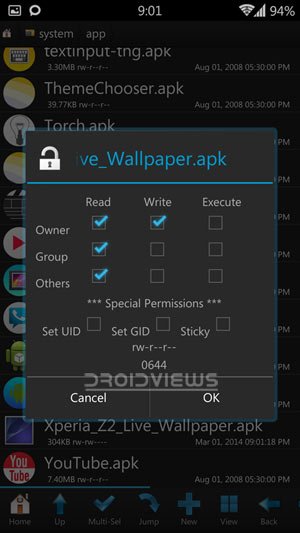
- Having set the permissions, select OK.
- Finally, exit the root file explorer and reboot your phone.
When you phone boots up, tap and hold the home screen and select Live wallpapers. Select Xperia™ and set it. Done! Enjoy the Xperia Z2 live wallpaper!



non root version is Not working on my xperia z ultra
Doesn’t work on non rooted Xperia. Using Z1.
What error do you see?
App crashing.